
1. المقدمة
This manual provides detailed instructions for the safe and efficient operation of your Blackweb Portable Blu-ray/DVD Player, model SDVD1183-BW. Please read this manual thoroughly before using the device and retain it for future reference. This portable player features an 11.4-inch HD screen, USB and SD card slots for media playback, and supports both Blu-ray and DVD discs.
2. معلومات السلامة
- مصدر الطاقة: استخدم محول التيار المتردد المرفق فقط. تأكد من مستوى الصوتtagيتوافق مع المتطلبات المحددة في المحول.
- سلامة البطارية: The device contains a Lithium-Ion battery. Do not expose to extreme temperatures, puncture, or disassemble. Dispose of batteries according to local regulations.
- تهوية: Do not block ventilation openings. Ensure adequate airflow around the device during operation.
- الماء والرطوبة: Keep the device away from water, rain, and high humidity. Do not operate with wet hands.
- تنظيف: افصل التيار الكهربائي قبل التنظيف. استخدم قطعة قماش ناعمة وجافة. تجنب استخدام المنظفات السائلة أو البخاخات.
- معالجة القرص: Handle discs by their edges. Avoid touching the playback surface. Keep discs clean and free from scratches.
- درجة حرارة: قم بتشغيل الجهاز ضمن نطاق درجة حرارة يتراوح بين 5 درجة مئوية إلى 35 درجة مئوية (41 درجة فهرنهايت إلى 95 درجة فهرنهايت).
- أطفال: This device is not a toy. Keep out of reach of small children.
3. انتهى المنتجview
Familiarize yourself with the components and controls of your portable Blu-ray/DVD player.

الشكل 3.1: أمام view من السودweb Portable Blu-ray/DVD Player (SDVD1183-BW) with the screen open. The 11.4-inch display is visible at the top, and the control panel with navigation buttons, volume controls, and disc tray area is at the bottom.
3.1 Front Panel Controls (Open View)
- شاشة: 11.4-inch HD display.
- علبة القرص: Area for inserting Blu-ray or DVD discs.
- زر الطاقة: يقوم بتشغيل الجهاز أو إيقاف تشغيله.
- MODE/SOURCE Button: Switches between input sources (Disc, USB, SD).
- Navigation Buttons (Left/Right/Up/Down/Enter): للتنقل في القائمة والاختيار.
- زر التشغيل/الإيقاف المؤقت: يبدأ التشغيل أو يوقفه مؤقتًا.
- زر التوقف: يوقف التشغيل.
- أزرار التقديم / الترجيع السريع: Skips chapters or fast forwards/rewinds playback.
- زر الإعداد: الوصول إلى قائمة إعدادات النظام.
- أزرار VOL +/-: ضبط مستوى الصوت.
- المتحدثون: مكبرات صوت ستيريو مدمجة.
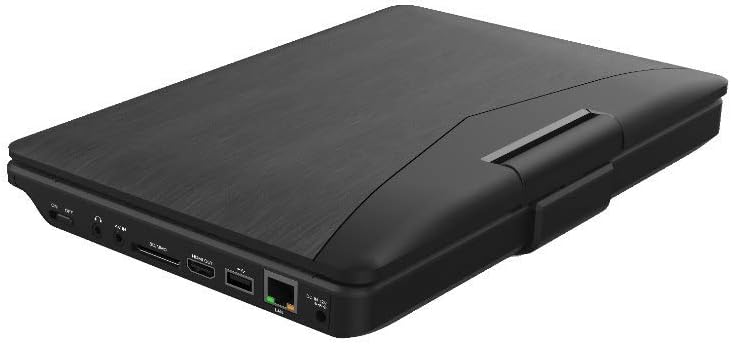
الشكل 3.2: جانب view من السودweb Portable Blu-ray/DVD Player (SDVD1183-BW) when closed, highlighting the various input/output ports. These include the DC IN port, USB port, SD card slot, HDMI OUT port, and LAN (RJ45) port.
3.2 منافذ اللوحة الجانبية
- التيار المباشر الداخل: مدخل الطاقة لمحول التيار المتردد.
- منفذ USB: قم بتوصيل محركات أقراص فلاش USB لتشغيل الوسائط.
- فتحة بطاقة SD: Insert SD memory cards for media playback.
- مخرج HDMI: Connect to an external display (TV, monitor) for larger viewعمل.
- منفذ الشبكة المحلية (RJ45): For wired network connection (if applicable for online features, though not explicitly stated for this model).
- مقبس سماعة الرأس: 3.5mm audio output for private listening.
4. الإعداد
4.1 شحن البطارية
- Connect the supplied AC power adapter to the DC IN port on the player.
- قم بتوصيل الطرف الآخر من محول التيار المتردد بمنفذ حائط قياسي.
- The charging indicator light will illuminate, typically red, during charging. It will change color (e.g., green or off) when fully charged.
- اترك البطارية تشحن بالكامل لمدة ساعتين إلى ثلاث ساعات تقريبًا قبل الاستخدام الأول.
4.2 تشغيل/إيقاف التشغيل
- لتشغيل: Open the screen and press the قوة button. The screen will light up.
- لإيقاف التشغيل: اضغط مع الاستمرار على قوة اضغط على الزر حتى يتم إيقاف تشغيل الشاشة.
5. تعليمات التشغيل
5.1 Playing Blu-ray/DVD Discs
- تأكد من تشغيل المشغل.
- افتح غطاء درج القرص برفق.
- Place a Blu-ray or DVD disc onto the spindle with the label side facing up. Press down gently until it clicks into place.
- Close the disc tray cover. The player will automatically detect the disc and begin playback or display the disc menu.
- استخدم أزرار التنقل و يدخل to select options from the disc menu.
- استخدم تشغيل/إيقاف مؤقت, قف, FF، و ريو أزرار للتحكم في التشغيل.
5.2 Playing Media from USB/SD Card
- أدخل ذاكرة فلاش USB في منفذ USB أو بطاقة SD في فتحة بطاقة SD.
- اضغط على الوضع/المصدر button to select "USB" or "SD" as the input source.
- The player will display the file browser. Use the navigation buttons to browse your media file(مقاطع فيديو، صور، موسيقى).
- يضعط يدخل لاختيار وتشغيل file.
5.3 ضبط الإعدادات
- اضغط على يثبت button to access the system settings menu.
- Use the navigation buttons to select categories such as "Video Setup," "Audio Setup," "Language Setup," etc.
- يضعط يدخل to enter a sub-menu and adjust settings like screen brightness, contrast, aspect ratio, audio output, and subtitle preferences.
- يضعط يثبت مرة أخرى للخروج من القائمة.
5.4 توصيل شاشة خارجية (HDMI)
- Ensure both the portable player and the external display (TV/monitor) are powered off.
- قم بتوصيل أحد طرفي كبل HDMI (غير مضمن) بالجهاز مخرج HDMI port on the portable player.
- Connect the other end of the HDMI cable to an HDMI input port on your external display.
- Power on both devices. Select the corresponding HDMI input on your external display.
- The portable player's output will now be displayed on the external screen. The portable player's screen may turn off or mirror the content, depending on settings.
5.5 استخدام سماعات الرأس
- Plug standard 3.5mm headphones into the headphone jack on the side of the player.
- The internal speakers will automatically mute when headphones are connected.
- اضبط مستوى الصوت باستخدام ملف المجلد +/- أزرار.
6. الصيانة
6.1 تنظيف الجهاز
- قم دائمًا بفصل محول الطاقة قبل التنظيف.
- استخدم قطعة قماش ناعمة وجافة وخالية من الوبر لمسح الأسطح الخارجية.
- For the screen, use a screen-specific cleaning cloth or solution, applying it to the cloth first, not directly to the screen.
- لا تستخدم المنظفات الكاشطة أو الشمع أو المذيبات.
6.2 العناية بالقرص
- Handle discs by their edges to avoid fingerprints and scratches on the playing surface.
- تخزين الأقراص في علبها عندما لا تكون قيد الاستعمال.
- If a disc is dirty, wipe it gently from the center outwards with a soft, lint-free cloth. Do not use harsh chemicals.
7. استكشاف الأخطاء وإصلاحها
| مشكلة | السبب المحتمل | حل |
|---|---|---|
| المشغل لا يعمل. | نفدت طاقة البطارية. محول الطاقة غير متصل أو معيب. | Connect the AC adapter and charge the battery. Ensure the AC adapter is securely connected to both the player and a working power outlet. |
| لا توجد صورة على الشاشة. | Screen brightness too low. HDMI cable connected to external display. | Adjust screen brightness in the SETUP menu. Disconnect HDMI cable or ensure external display is correctly configured. |
| لا يوجد صوت. | مستوى الصوت منخفض جدًا أو مكتوم. سماعات الرأس متصلة. Audio settings incorrect. | قم بزيادة مستوى الصوت باستخدام المجلد + زر. افصل سماعات الرأس إذا كنت تريد سماع الصوت من مكبرات الصوت. Check audio settings in the SETUP menu. |
| القرص لا يلعب. | القرص متسخ أو مخدوش أو تم إدخاله بشكل غير صحيح. تنسيق القرص غير مدعوم. Region code mismatch. | Clean the disc and reinsert it correctly. Ensure the disc is a supported Blu-ray or DVD format. This player supports region-free or compatible region discs. |
| USB/SD media not recognized. | تم اختيار مصدر إدخال غير صحيح. File التنسيق غير مدعوم. USB drive/SD card corrupted or incompatible. | يضعط الوضع/المصدر to select "USB" or "SD". Refer to specifications for supported file التنسيقات. Try a different USB drive or SD card. Ensure it is formatted correctly (e.g., FAT32). |
8. المواصفات
- نموذج: SDVD1183-BW
- حجم الشاشة: 11.4 بوصة
- دقة الشاشة: 1280×720
- نوع الوسائط: Blu-Ray, DVD
- الاتصال: USB, SD Card Slot, HDMI Out, LAN (RJ45), 3.5mm Headphone Jack
- مصدر الطاقة: AC Adapter, Built-in Lithium Ion Battery
- وزن السلعة: حوالي 4.15 رطل (1.88 كجم)
- أبعاد المنتج (الطول × العرض × الارتفاع): 16 × 14.5 × 3.5 بوصة (40.64 × 36.83 × 8.89 سم)
- الشركة المصنعة: أسودweb
9. الضمان والدعم
For warranty information and technical support, please refer to the documentation provided at the time of purchase or contact the retailer. As this product is often sold as "Renewed," specific warranty terms may vary. Please consult the Amazon Renewed Guarantee for details regarding refurbished products purchased through Amazon.
For further assistance, you may also visit the official Blackweb يدعم webأو اتصل بخدمة العملاء الخاصة بهم إن وجدت.