
مقدمة
The Scosche LUSWC Link+ Universal Steering Wheel Control Interface is designed to seamlessly integrate an aftermarket car stereo with your vehicle's factory steering wheel controls. This interface allows you to retain essential functions such as volume control, track changes, and phone buttons, enhancing your driving experience with modern audio features while preserving original vehicle aesthetics.
The LUSWC supports a wide range of vehicle applications, including Analogue, CAN-Bus, iBus, Class II, and Matrix platforms, making it compatible with over 900 vehicle models. It provides a reliable connection and simplifies the installation process for various car stereo setups, including single DIN and double DIN units.
معلومات السلامة
تحذير: This product can expose you to chemicals including DEHP, which is known to the State of California to cause cancer and birth defects or other reproductive harm. For more information, go to www.P65Warnings.ca.gov.
Always ensure your vehicle's battery is disconnected before beginning any electrical installation. Professional installation is recommended for optimal safety and performance. Refer to your vehicle's service manual for specific wiring diagrams and safety precautions.
محتويات الحزمة
The Scosche LUSWC package typically includes:
- LUSWC Interface Module
- تسخير الأسلاك الخاص بالمركبة
- Instruction Manual (User Guide)
Additional accessories such as dash kits, antenna adapters, and specific wiring harnesses may be required for a complete installation and are sold separately.
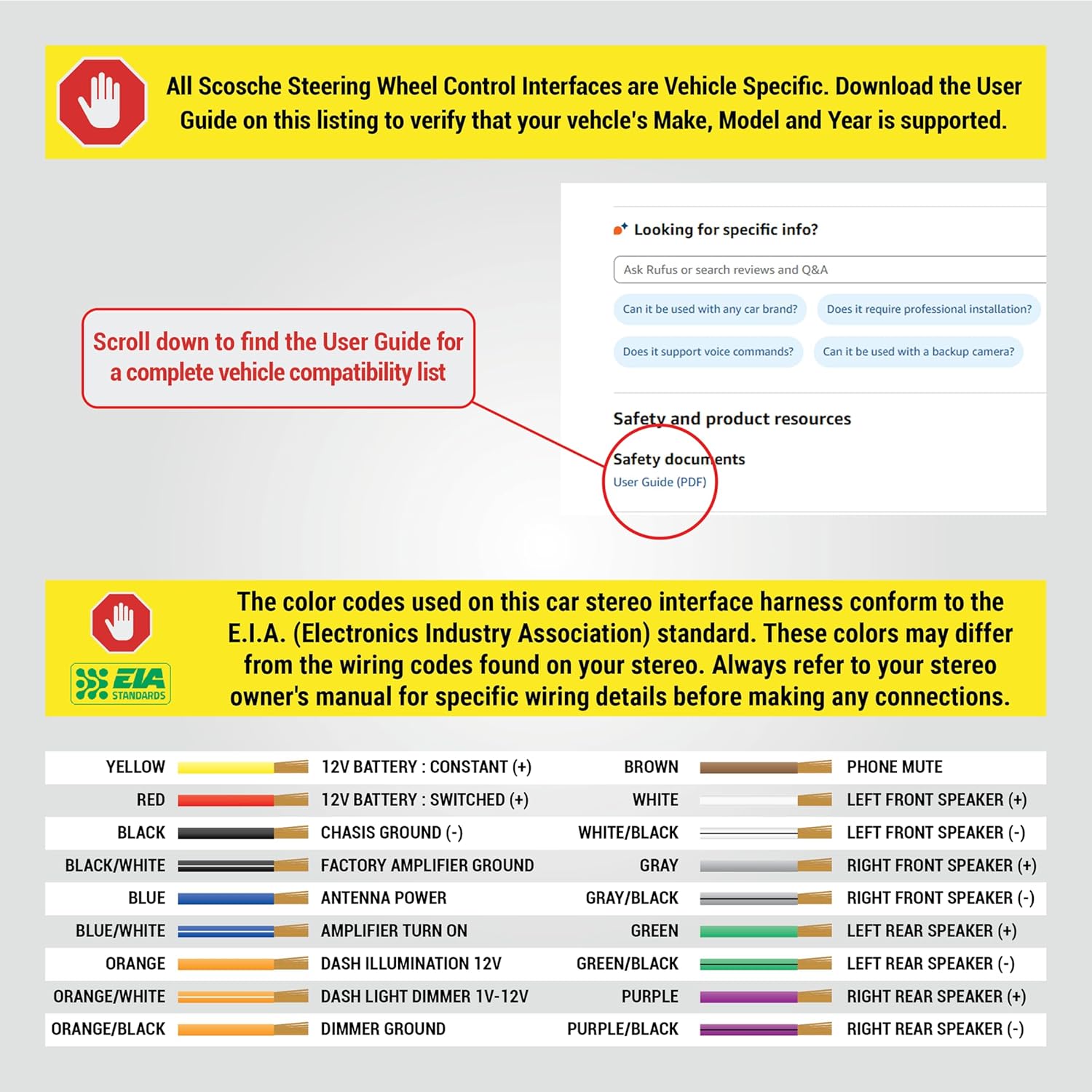
Image: Scosche LUSWC Interface Module and included wiring harness.

الصورة: اخرى view of the Scosche LUSWC Interface Module and wiring harness.
الإعداد والتثبيت
Installation of the Scosche LUSWC interface requires careful attention to wiring connections. Always refer to the detailed user guide for your specific vehicle's make, model, and year to ensure compatibility and correct wiring procedures.
1. التحقق من توافق السيارة
Before starting, confirm that your vehicle is supported by the LUSWC interface. The user guide contains a comprehensive vehicle compatibility list.

Image: Instructions to locate and download the User Guide PDF for a complete vehicle compatibility list.
2. توصيلات الأسلاك
The LUSWC utilizes standard wire color codes conforming to the E.I.A. (Electronics Industry Association) standard. However, these colors may differ from the wiring codes found on your specific stereo. Always cross-reference with your stereo's owner's manual for precise wiring details before making any connections.
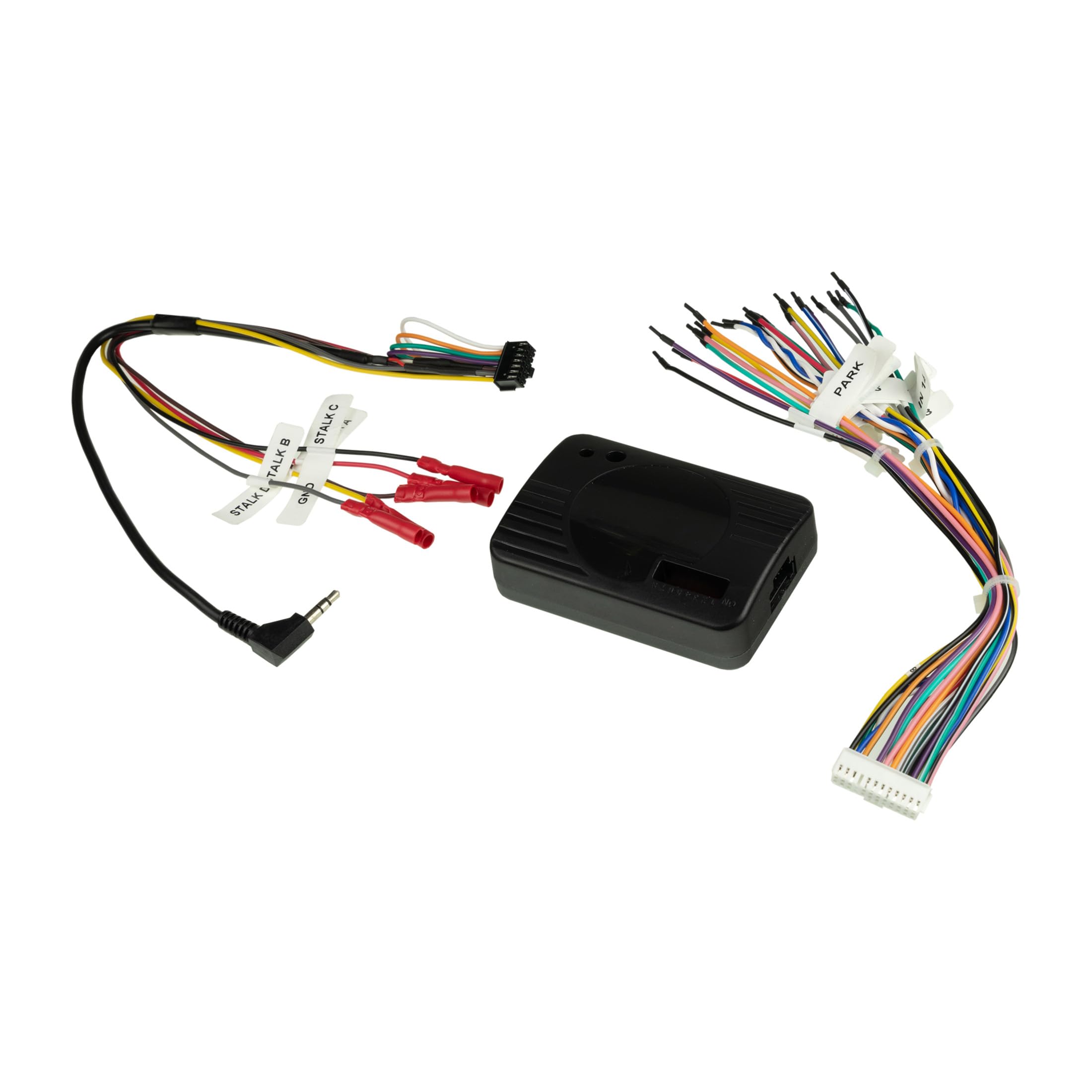
Image: EIA standard wiring color codes for car stereo interface connections.
قد لا تتصل بعض الأسلاك مباشرةً بضفيرة أسلاك السيارة، مثل... amplifier turn-on wire, parking sense wire, and Steering Wheel Control connections. Ensure all connections are secure and properly insulated.
3. إتمام التثبيت
For a complete installation, you may need additional accessories like a dash kit, a specific wire harness, or an antenna adapter. These components ensure a proper fit and connection between your new stereo and the vehicle's existing systems.

الصورة: أكثر منview of accessories (dash kit, wire harness/interface, antenna adapter) needed for a complete car stereo installation.
دليل التثبيت بالفيديو
Video: A detailed guide on installing the Scosche Interface. This video demonstrates the process of connecting the interface to your vehicle's wiring harness and aftermarket radio.
تعليمات التشغيل
Once installed, the LUSWC interface allows your factory steering wheel controls to operate your aftermarket stereo. The functionality typically includes:
- التحكم في مستوى الصوت: اضبط مستوى الصوت بالزيادة أو النقصان.
- التحكم في المسار/المحطة: Skip tracks forward/backward or change radio stations.
- اختيار الوضع/المصدر: Switch between audio sources (e.g., radio, Bluetooth, USB).
- أزرار الهاتف: Answer/end calls if your aftermarket stereo supports this feature.
- مساعد صوت: Retain the use of your car's steering wheel voice assistant.
The interface also supports an analog learning system with a button remapping feature on select models, allowing customization of control functions.
صيانة
The Scosche LUSWC interface is designed for long-term reliability and typically requires no routine maintenance. Ensure all connections remain secure and free from moisture or extreme temperatures. If you experience any issues, refer to the troubleshooting section or contact customer support.
استكشاف الأخطاء وإصلاحها
If you encounter problems with your LUSWC interface, consider the following common issues and solutions:
- عناصر التحكم في عجلة القيادة لا تستجيب:
- Verify all wiring connections are correct and secure, especially the SWC wires.
- Ensure the LUSWC interface is properly programmed for your specific vehicle and aftermarket stereo. Refer to the user guide for programming steps.
- Check your aftermarket stereo's settings to ensure steering wheel control input is enabled.
- Incorrect Button Functionality:
- If your model supports button remapping, ensure it has been configured correctly.
- Re-program the interface according to the user guide.
- No Power to Stereo/Interface:
- Check the 12V constant and switched power connections.
- Inspect vehicle fuses related to the stereo and accessory power.
For persistent issues, consult the full user guide or contact Scosche technical support.
تحديد
| ميزة | التفاصيل |
|---|---|
| نموذج | LUSWC |
| التوافق | 900+ Vehicle Applications (Analogue, CAN-Bus, iBus, Class II, Matrix Platforms) |
| مادة | النحاس، كلوريد البولي فينيل (PVC) |
| الاتصال | Analog pulse output for vehicle speed, Analog +12V output for variable dash illumination, Reverse trigger, Ground output for parking brake engagement |
| الاحتفاظ بالسيطرة | Steering wheel controls, phone buttons, voice assistant, time/date change (from steering wheel) |
| المميزات الخاصة | Analog learning system, button remapping (select models only) |
الضمان والدعم
The Scosche LUSWC Link+ Universal Steering Wheel Control Interface is backed by Scosche's Limited Lifetime Warranty. This warranty covers defects in materials and workmanship under normal use. For specific terms and conditions, please refer to the official warranty documentation included with your product or visit the Scosche webموقع.
For technical assistance, troubleshooting, or warranty claims, please contact Scosche customer support. Lifetime technical support is available to assist you with any questions or issues you may encounter during installation or operation.
Scosche Industries Contact Information:
Please visit the official Scosche website for the most current contact details, including phone numbers and online support options.