
1. المقدمة
Thank you for choosing the Greadio Retro Bluetooth Speaker and Vintage FM Radio. This manual provides essential information for the safe and efficient operation of your device. Please read it thoroughly before use and retain it for future reference.
2. معلومات السلامة
- لا تعرض الجهاز للماء أو الرطوبة أو درجات الحرارة العالية.
- تجنب إسقاط الجهاز أو تعريضه لصدمات قوية.
- لا تحاول تفكيك الجهاز أو إصلاحه بنفسك. اتصل بفني صيانة مؤهل.
- يحفظ بعيدًا عن متناول الأطفال.
- استخدم فقط كابل الشحن المرفق.
3. محتويات العبوة
تأكد من وجود جميع العناصر في العبوة:
- Greadio Retro Bluetooth Speaker (Model GR919P)
- كابل شحن USB
- كابل AUX
- دليل المستخدم

Image: Greadio Retro Bluetooth Speaker (Pink) with its charging cable, AUX cable, and user manual.
4. انتهى المنتجview
Familiarize yourself with the main components and controls of your Greadio Retro Bluetooth Speaker.

Image: Front panel of the speaker, showing the speaker, frequency scale, tuning knob, volume knob, and ON/OFF & Function knob.

Image: Rear panel of the speaker, showing the Micro USB port, TF card socket, Play/Pause button, and Previous/Next buttons.
المميزات الرئيسية:
- الحجم الصغير: Measures 4.4 x 2.7 x 2 inches, making it highly portable.
- حجم الصوت العالي: Equipped with a five-watt amplifier for rich and clear audio.
- بلوتوث شنومكس: Advanced wireless connectivity for quick pairing.
- التشغيل متعدد الأوضاع: Supports FM Radio, Bluetooth, TF Card, and AUX input.
- بطارية قابلة لإعادة الشحن مدمجة: Provides up to 9 hours of playtime.
5. الإعداد
5.1 الشحن الأولي
Before first use, fully charge the speaker. Connect the provided USB charging cable to the Micro USB port on the back of the speaker and plug the other end into a USB power adapter (not included) or a computer's USB port. The charging indicator light will illuminate during charging and turn off when fully charged.
5.2 تشغيل/إيقاف التشغيل
To power on the speaker, rotate the ON/OFF & Function knob clockwise until you hear a click and the display lights up. To power off, rotate the knob counter-clockwise until it clicks off.
6. أوضاع التشغيل
The Greadio Retro Bluetooth Speaker supports multiple playback modes. Rotate the ON/OFF & Function knob to switch between modes.
6.1 وضع Bluetooth
In Bluetooth mode, the speaker can connect wirelessly to your smartphone, tablet, or other Bluetooth-enabled devices.
- Turn on the speaker and switch to Bluetooth mode. The display will show a blue light, indicating it's ready for pairing.
- On your device, enable Bluetooth and search for "Greadio" or "R919".
- اختر السماعة من القائمة لإقرانها. سيصدر صوت تأكيد عند نجاح عملية الإقران.
- يمكنك الآن تشغيل الصوت من جهازك عبر مكبر الصوت.

Image: The speaker's dial illuminated in blue, signifying Bluetooth mode is active.
Video: Demonstrates how to connect the Greadio Bluetooth Speaker to a smartphone via Bluetooth, showing the pairing process and audio playback.
6.2 وضع راديو FM
Enjoy your favorite FM radio stations with the vintage-style tuner.
- Turn on the speaker and switch to FM Radio mode. The display will show an orange light.
- Rotate the Tuning Knob (large central knob) to scan for available FM stations.
- Adjust the Volume Knob (smaller knob) to your desired listening level.

Image: The speaker's dial illuminated in orange, signifying FM radio mode is active.
6.3 وضع بطاقة TF
تشغيل الموسيقى مباشرة من بطاقة TF (MicroSD).
- Insert a TF card (up to 32GB, not included) with MP3 audio files into the TF card socket on the back of the speaker.
- The speaker will automatically switch to TF Card mode and begin playback.
- Use the Play/Pause button and Previous/Next buttons on the back to control playback.

Image: The TF card slot located on the rear of the speaker for direct music playback.
6.4 وضع AUX
Connect external audio devices using the AUX cable.
- Connect one end of the provided AUX cable to the AUX port on the back of the speaker.
- قم بتوصيل الطرف الآخر بمخرج الصوت الخاص بجهازك الخارجي (مثل مشغل MP3 أو الكمبيوتر).
- The speaker will automatically switch to AUX mode. Play audio from your external device.

Image: The AUX port on the rear of the speaker for wired audio connections.
7. الشحن
The speaker features a built-in 1100mAh rechargeable Lithium Ion battery. When the battery is low, the speaker will indicate this (e.g., voice prompt). Connect the Micro USB charging cable to a 5V/1A USB power source to recharge. A full charge typically takes 3-4 hours and provides up to 9 hours of playback time, depending on volume and mode.
8. الصيانة
- نظّف السماعة بقطعة قماش ناعمة وجافة. لا تستخدم منظفات أو مذيبات كاشطة.
- قم بتخزين مكبر الصوت في مكان بارد وجاف بعيدًا عن أشعة الشمس المباشرة ودرجات الحرارة القصوى.
- في حالة عدم الاستخدام لفترات طويلة، اشحن البطارية مرة واحدة على الأقل كل ثلاثة أشهر لإطالة عمرها الافتراضي.
9. استكشاف الأخطاء وإصلاحها
| مشكلة | السبب المحتمل | حل |
|---|---|---|
| لا يتم تشغيل مكبر الصوت. | بطارية منخفضة. | اشحن السماعة بالكامل. |
| لا يوجد صوت في وضع البلوتوث. | Not paired or volume too low. | Ensure device is paired and volume is up on both speaker and source device. |
| استقبال راديو FM ضعيف. | إشارة ضعيفة أو تداخل. | Adjust the speaker's position or rotate for better reception. The charging cable can act as an antenna. |
| بطاقة الذاكرة لا تعمل. | Card not inserted correctly or unsupported file شكل. | أعد إدخال بطاقة الذاكرة. تأكد من files بتنسيق MP3. |
10. المواصفات
- رقم الموديل: جي آر 919 بي
- أبعاد المنتج: 4.4 × 2.7 × 2 بوصة
- وزن السلعة: 7.7 أونصات
- تقنية الاتصال: بلوتوث 5.0
- تقنية الموالف: FM
- مصدر الطاقة: تعمل بالبطارية (بطارية ليثيوم أيون واحدة متضمنة)
- ميزة خاصة: قابلة لإعادة الشحن
- الشركة المصنعة: جراديو
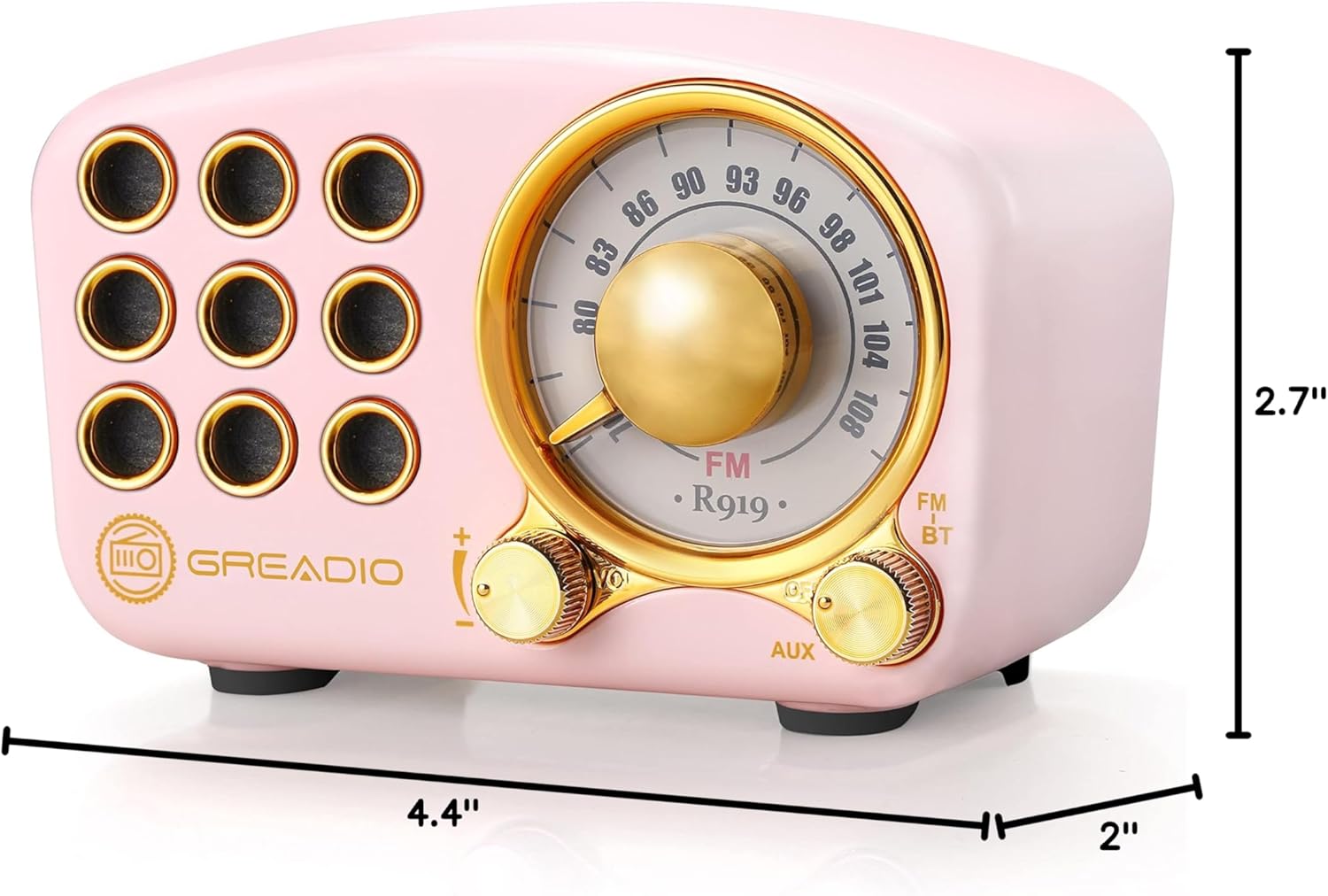
Image: Dimensions of the Greadio Retro Bluetooth Speaker.
11. الضمان والدعم
Greadio products are designed for reliability and performance. For warranty information or technical support, please refer to the contact details provided on the product packaging or visit the official Greadio webالموقع. احتفظ بإيصال الشراء كإثبات للشراء.