
معلومات هامة حول السلامة
Please read these instructions carefully before assembly and use. Failure to follow these instructions may result in property damage, serious injury, or death. If you do not understand these instructions or have doubts about the safety of the installation, please contact customer service.
- قدرة الوزن: Do not exceed the maximum weight capacity of 100 lbs (45.3 kg) for the TV and 20 lbs (9 kg) for the AV shelf.
- حجم التلفزيون: تم تصميم هذا الحامل لأجهزة التلفزيون التي يتراوح حجمها بين 32 و 85 بوصة.
- التوافق مع VESA: Ensure your TV's VESA mounting pattern is between 100x100mm and 600x400mm.
- استقرار: Always ensure all bolts are securely tightened before moving the stand. Lock the casters when the stand is in a stationary position.
- أطفال: Keep children away from the TV stand during assembly. Do not allow children to climb on or play with the stand or TV.
- موقع: Place the TV stand on a flat, stable surface. Avoid placing it in areas with high winds or uneven terrain.
محتويات الحزمة
تأكد من وجود جميع المكونات وسلامتها قبل بدء التجميع. في حال وجود أي أجزاء مفقودة أو تالفة، يُرجى التواصل مع خدمة عملاء بيرل سميث.

Image: All components of the PERLESMITH PSTVMC05 Rolling TV Stand, including the base, vertical poles, TV mounting bracket, AV shelf, camera shelf, casters, and various hardware.
- TV Cart Base
- Vertical Support Poles (2)
- حامل تثبيت التلفزيون
- رف الأجهزة السمعية والبصرية
- رف الكاميرا
- Lockable Caster Wheels (4)
- مجموعة أدوات التثبيت (مسامير متنوعة، وغسالات، وفواصل)
- دليل التعليمات
الإعداد والتجميع
Assembly of the PERLESMITH PSTVMC05 TV stand is designed to be straightforward and does not require drilling into walls. It is recommended to have a second person assist with lifting the TV.
Video Guide: How to Install PSTVMC05 Mobile TV Stand
Video: A detailed step-by-step guide on how to assemble the PERLESMITH PSTVMC05 mobile TV stand. This video covers attaching the TV bracket, assembling the base and vertical poles, and mounting the TV.
- ربط العجلات بالقاعدة: Securely screw the four lockable caster wheels into the designated holes on the TV cart base. Ensure they are tightened to prevent wobbling.
- تجميع الأعمدة الرأسية: Connect the two vertical support poles to the base. Follow the instructions in the manual for proper alignment and secure fastening.
- تركيب حامل التلفزيون: Attach the TV mounting bracket to the vertical poles at your desired initial height. This bracket will hold your television.
- تجهيز التلفزيون للتركيب: Attach the TV adapter plates (if necessary) and the TV mounting arms to the back of your television using the appropriate screws and spacers from the hardware kit. Ensure the VESA pattern matches the stand's compatibility.
- جبل التلفزيون: With assistance, carefully lift your TV and hook the mounting arms onto the TV mounting bracket on the stand. Secure the TV to the bracket using the safety screws or locking mechanisms provided.
- تثبيت AV Shelf: Attach the AV shelf to the vertical poles at a comfortable height for your devices.
- Install Camera Shelf: Attach the camera shelf to the top of the vertical poles, if desired, for webcams or other small accessories.
- إدارة الكابلات: Utilize the hollow design of the vertical tubes to route and organize cables, maintaining a neat appearance.

Image: The PERLESMITH PSTVMC05 TV stand with a television mounted, illustrating its wide TV compatibility (32-85 inches) and VESA patterns up to 600x400mm.
تعليمات التشغيل
The PERLESMITH PSTVMC05 TV stand offers flexibility for optimal viewing and placement.
ضبط الارتفاع
The TV plate height can be adjusted to 11 different levels, ranging from 39.37 inches (100 cm) to 59.06 inches (150 cm) from the floor. To adjust the height, loosen the securing bolts on the vertical poles, slide the TV mounting bracket to the desired height, and re-tighten the bolts securely.

Image: A visual representation of the 11 height adjustment levels available on the PERLESMITH PSTVMC05 TV stand, indicating minimum and maximum heights.
ضبط الإمالة
يُتيح حامل التلفزيون إمكانية إمالة الشاشة من -10° إلى +5°. تُساعد هذه الميزة على تقليل الوهج وتحسين جودة الصورة. viewing angles. To adjust the tilt, loosen the tilt adjustment knobs on the side of the TV mounting bracket, set the desired angle, and re-tighten the knobs.
عجلات متحركة وقابلة للقفل
The stand is equipped with four lockable caster wheels for easy movement. To move the stand, unlock all four casters. To secure the stand in place, press down on the locking levers on each caster until they click into position. Ensure all casters are locked when the stand is stationary to prevent accidental movement.

Image: The PERLESMITH PSTVMC05 TV stand demonstrating its 360-degree rotating casters for easy mobility, with examples of moving the TV between rooms.
AV and Camera Shelves
The adjustable AV shelf provides space for devices such as laptops, DVD players, or gaming consoles. The top camera shelf is suitable for webcams or other small peripherals. Both shelves can be adjusted vertically along the main poles.
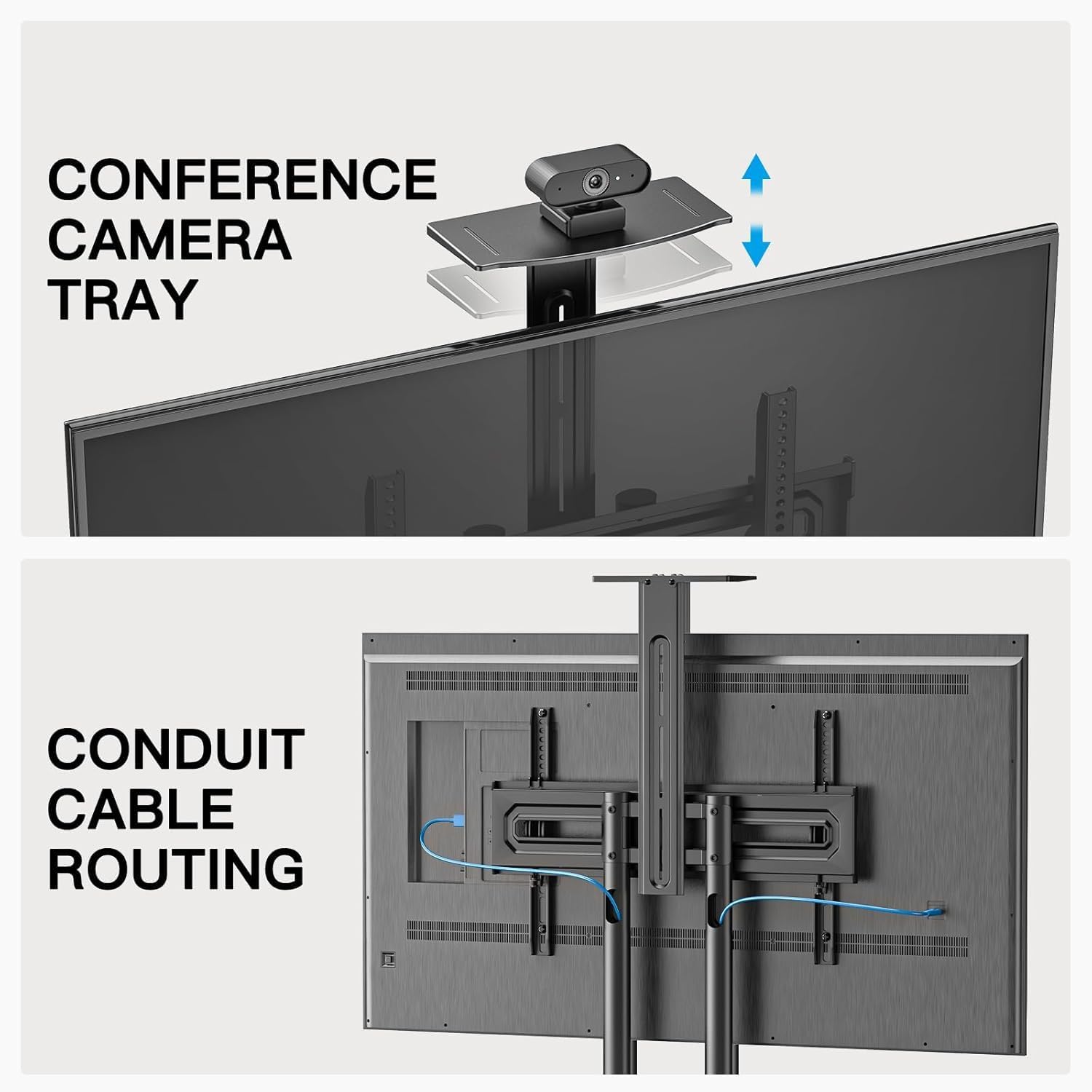
الصورة: لقطة مقربة view highlighting the adjustable camera tray and the integrated conduit cable routing system within the vertical poles of the PERLESMITH PSTVMC05 TV stand.
صيانة
Regular maintenance ensures the longevity and safe operation of your TV stand.
- تنظيف: Wipe the stand with a soft, dry cloth. Avoid abrasive cleaners or solvents that could damage the finish.
- المثبتات: افحص جميع البراغي والصواميل بشكل دوري للتأكد من إحكام ربطها. أعد ربطها إذا لزم الأمر.
- عجلات: حافظ على عجلات الكاستر خالية من الحطام لضمان حركة سلسة.
- توزيع الوزن: Ensure the weight of the TV and any devices on the shelves is evenly distributed and within the specified limits.
استكشاف الأخطاء وإصلاحها
If you encounter issues with your PERLESMITH PSTVMC05 TV stand, refer to the following common problems and solutions:
| مشكلة | السبب المحتمل | حل |
|---|---|---|
| الحامل غير مستقر أو يتأرجح. | مثبتات مفكوكة؛ أرضية غير مستوية؛ وزن التلفزيون يتجاوز السعة المسموح بها. | Check and tighten all screws and bolts. Ensure the stand is on a level surface. Verify TV weight is within 100 lbs (45.3 kg). |
| لا تتحرك العجلات بسلاسة ولا تثبت بشكل صحيح. | Debris in casters; casters not fully engaged/disengaged. | Clean any debris from the caster wheels. Ensure the locking levers are fully pushed down to lock or fully pulled up to unlock. |
| TV appears to lean or is not level. | Mounting arms not level; vertical poles not securely fastened. | Use a level to ensure the TV mounting arms are horizontal before attaching the TV. Re-check the tightness of the vertical pole connections to the base and the TV mounting bracket. |
| Difficulty adjusting TV height or tilt. | Adjustment knobs/bolts are too tight. | Loosen the relevant knobs or bolts sufficiently before attempting to adjust. Re-tighten firmly after adjustment. |
تحديد
| ميزة | التفاصيل |
|---|---|
| رقم الموديل | PSTVMC05 |
| أحجام التلفزيون المتوافقة | 32 - 85 بوصة |
| أقصى وزن مسموح به للتلفزيون | 100 رطل (45.3 كجم) |
| التوافق مع VESA | 100x100mm إلى 600x400mm |
| نطاق تعديل الارتفاع | 39.37 بوصة - 59.06 بوصة (100 سم - 150 سم) |
| زاوية الميل | -10 درجة إلى +5 درجة |
| سعة وزن رفوف الأجهزة السمعية والبصرية | 20 رطل (9 كجم) |
| مادة | سبائك الفولاذ |
| نوع الحركة | Mobile (with lockable casters) |
| وزن العنصر | 16.9 كيلوغرام |

Image: A comparison highlighting the superior weight capacity of the PERLESMITH PSTVMC05 TV stand (100 lbs for TV, 20 lbs for shelf) compared to other models.
الضمان والدعم
The PERLESMITH PSTVMC05 Rolling TV Stand comes with a ضمان لمدة سنة واحدة.
For technical assistance, missing parts, or warranty claims, please contact PERLESMITH customer service. You can typically find contact information on the manufacturer's webالموقع أو من خلال منصة الشراء الخاصة بك.
Additional resources, including a PDF user manual, may be available online. For example, a PDF manual is available at: دليل المستخدم (PDF).