
مقدمة
The Jasco 45852 Smart Dimmer is a Zigbee-certified plug-in device designed for wireless control of your home's plug-in lights. It allows for remote dimming and on/off functionality, integrating with various Zigbee-compatible gateways and smart home systems. This manual provides instructions for setup, operation, and maintenance of your smart dimmer.
مميزات المنتج
- التوافق مع تقنية زيجبي: Works with Zigbee-certified gateways, including Amazon Echo Plus, Echo Show (2nd gen), SmartThings, Wink, PEQ, and Logitech Harmony Home Hub Extender.
- Dual Outlet Design: Features one Zigbee-controlled, polarized outlet for dimming and one always-on, grounded outlet.
- تشغيل عن بعد: Control ON/OFF and brightness functions of indoor plug-in dimmable LED, CFL, incandescent, and halogen lighting from mobile devices.
- مراقبة الطاقة: Provides energy reporting to help reduce electrical costs.
- تصميم موفر للمساحة: Side-access outlets and compact construction allow for discreet placement without blocking the second outlet of a duplex receptacle.
- التحكم اليدوي: Includes a manual On/Off and program button on the device.
- النطاق اللاسلكي: Up to 150ft from the controller or closest Zigbee device.

صورة: The Jasco 45852 Smart Dimmer showing its polarized wirelessly controlled outlet, grounded always-on outlet, and the manual On/Off & Program button. Its design ensures the second wall outlet remains free for use.
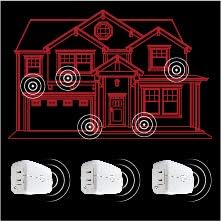
صورة: A diagram illustrating how multiple Jasco Smart Dimmers can extend the Zigbee wireless range throughout a home, creating a mesh network for reliable control.
الإعداد والتثبيت
- الموقع: Plug the Jasco 45852 Smart Dimmer into a standard 120V AC wall outlet. Ensure it is placed within range of your Zigbee gateway or another Zigbee device to ensure proper network connectivity. The compact design allows it to fit behind furniture and leave the second outlet free.
- توصيل الجهاز: Plug the dimmable light fixture you wish to control into the polarized smart outlet of the dimmer. The other grounded outlet provides continuous power and is not dimmable.
- Pairing with a Zigbee Gateway:
- Follow the instructions provided by your specific Zigbee gateway (e.g., Amazon Echo Plus, SmartThings, Wink) to add a new device.
- Typically, this involves putting your gateway into "discovery" or "pairing" mode.
- Once your gateway is in pairing mode, press the manual On/Off & Program button on the Jasco Smart Dimmer. The LED indicator on the dimmer will flash to indicate pairing mode and then turn solid when successfully paired.
- ملحوظة: When pairing with SmartThings, it may be recognized as a "GE" device.
- الاختبار: After successful pairing, test the dimmer by using your gateway's app or voice commands (if applicable) to turn the connected light on/off and adjust its brightness.
The Jasco 45852 Smart Dimmer is compatible with Amazon Alexa devices when connected through a certified hub, or directly with Echo Plus and Echo Show (2nd gen). It is not compatible with Philips Hue (Zigbee Light Link – ZLL).
تعليمات التشغيل
التحكم اليدوي
The manual On/Off & Program button on the front of the dimmer allows for direct control of the connected light.
- Press the button once to turn the connected light ON or OFF.
- To adjust brightness manually, press and hold the button. Release when the desired brightness level is reached.
Remote Control via Zigbee Gateway
Once paired with your Zigbee gateway, you can control the dimmer wirelessly using your gateway's mobile application, computer interface, or voice commands (if supported by your gateway and voice assistant).
- التحكم في التشغيل/الإيقاف: Use the app or voice command to toggle the light connected to the smart outlet.
- يعتم: Adjust the brightness level from 0-100% through your smart home app. Dimming lights can help reduce energy costs and extend bulb life.
- الجدولة: Create custom schedules for your lights to turn on/off or dim at specific times.
- مشاهد: Integrate the dimmer into custom scenes with other smart devices for automated lighting scenarios.

صورة: The Jasco Smart Dimmer being controlled wirelessly by various devices such as a smartphone, tablet, and PC, demonstrating its integration into a smart home ecosystem for customized scenes and scheduled events.

صورة: A graphic illustrating energy monitoring capabilities, showing a graph of energy usage over time, highlighting how dimming can reduce energy consumption and save money.
صيانة
The Jasco 45852 Smart Dimmer requires minimal maintenance.
- تنظيف: Disconnect the dimmer from the power outlet before cleaning. Wipe the device with a soft, dry cloth. Do not use liquid cleaners or sprays.
- تحديثات البرامج الثابتة: Periodically check your Zigbee gateway's application for any available firmware updates for connected devices. Follow the gateway's instructions for applying updates.
استكشاف الأخطاء وإصلاحها
| مشكلة | السبب المحتمل / الحل |
|---|---|
| Light does not turn on or dim. |
|
| LED lights blink or glow dimly when off. |
|
| Dimmer cannot pair with gateway. |
|
| جهاز التحكم عن بعد لا يستجيب. |
|
تحديد
| ميزة | التفاصيل |
|---|---|
| رقم الموديل | 45852 |
| مصدر الطاقة | 120 VAC، 60 Hz |
| Maximum Load (Dimmable Outlet) | 300W Incandescent, 100W Dimmable LED/CFL |
| Maximum Load (Always-On Outlet) | 15 Amps, 1800W Resistive |
| بروتوكول الاتصال | زيجبي |
| لاسلكي المدى | Up to 150 ft. from controller or closest Zigbee device |
| درجة حرارة التشغيل | 32-104 درجة فهرنهايت (0-40 درجة مئوية) |
| الأبعاد (الطول × العرض × الارتفاع) | 4 × 1.4 × 2.4 بوصة (101.6 × 35.6 × 60.9 مم) |
| وزن العنصر | 7.2 أونصات |
| لون | أبيض |
| الاستخدام | للاستخدام الداخلي فقط |

صورة: A diagram showing the physical dimensions of the Jasco 45852 Smart Dimmer, measuring 4 inches in length, 1.4 inches in width, and 2.4 inches in height.

صورة: The product packaging for the Jasco Plug-In Smart Dimmer, displaying key specifications such as maximum load for incandescent and dimmable LED/CFL bulbs, ampإراج ، المجلدtage, wireless range, and operating temperature.
معلومات الضمان
The Jasco 45852 Smart Dimmer comes with a ضمان محدود لمدة سنة واحدة. For detailed terms and conditions, please refer to the warranty documentation included with your product or visit the official Jasco webموقع.
دعم العملاء
For further assistance, technical support, or to inquire about warranty claims, please contact Jasco customer support.
- Webموقع: Visit the official Jasco Products webالموقع الخاص بالأسئلة الشائعة وموارد الدعم ومعلومات الاتصال.
- الهاتف/البريد الإلكتروني: Refer to the product packaging or Jasco's webالموقع للحصول على تفاصيل الاتصال الحالية.