
Wavel GF-07
Wavel Ultra Mini GF-07 GPS Tracker User Manual
الموديل: GF-07
1. انتهى المنتجview
The Wavel Ultra Mini GF-07 is a compact and lightweight GPS tracking device designed for tracking vehicles, individuals, or assets. It features a magnetic back for easy attachment and operates by inserting a working SIM card (not included) to enable real-time tracking and voice monitoring capabilities. Please note that this device primarily supports 2G GSM networks.
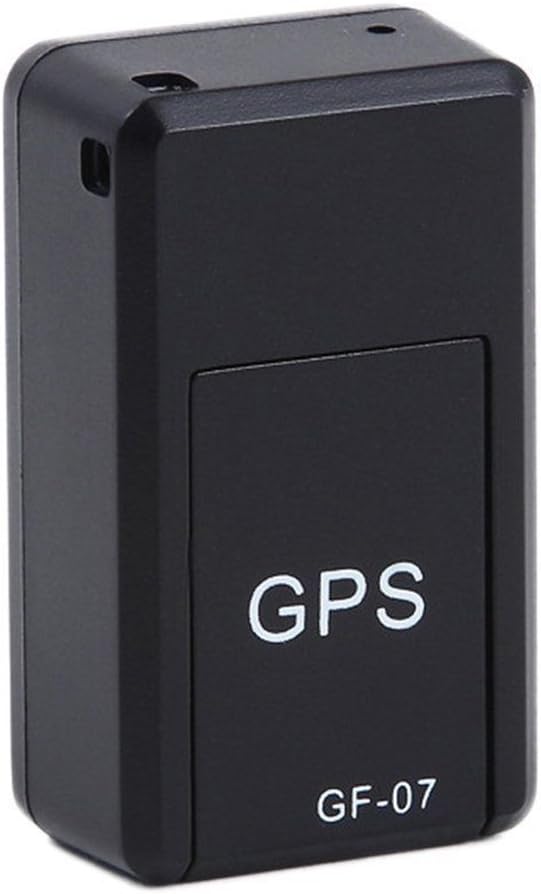
الشكل 1: أمام view of the Wavel GF-07 GPS tracker, showing the 'GPS' and 'GF-07' labels.
المميزات الرئيسية:
- تصميم مضغوط: Small size (approximately 42x25x20mm) and lightweight for discreet placement.
- ملحق مغناطيسي: Equipped with powerful magnets for secure installation on metallic surfaces.
- التتبع في الوقت الحقيقي: Utilizes a SIM card (not included) for location tracking via Google Maps over the internet.
- مراقبة الصوت: Dialing the SIM card number allows for silent audio monitoring around the device.
- التسجيل الصوتي: Supports voice recording by sending a specific SMS command. Requires a TF card (not included).
- وضع الاستعداد الطويل: Features a 3.7V 300mA lithium battery with approximately 100 hours of standby time.
2. محتويات العبوة
تأكد من وجود جميع العناصر في العبوة:
- 1 x Wavel Ultra Mini GF-07 GPS Tracker
- 1 × كابل شحن USB
- 1 × دليل المستخدم (هذه الوثيقة)
Note: A working 2G GSM SIM card and a TF (microSD) card are required for full functionality and are NOT included.
3. دليل الإعداد
3.1. إدخال بطاقة SIM وبطاقة TF
- Locate the SIM card slot and TF card slot on the device. These are typically found by sliding open a cover or removing a small panel.
- Insert a working 2G GSM SIM card into the SIM card slot. Ensure the SIM card is active and has sufficient balance for calls and SMS. (Important: This device primarily supports 2G GSM networks. Compatibility with 3G/4G/5G networks for data transmission may vary or be limited, and 2G networks are being phased out in some regions.)
- Insert a TF (microSD) card into the TF card slot for voice recording functionality.
- أغلق الغطاء بإحكام.

الشكل 2: View of the GF-07 tracker with the cover removed, showing the SIM card and TF card slots.
3.2. شحن الجهاز
قبل الاستخدام الأول، قم بشحن الجهاز بالكامل.
- Connect the provided USB cable to the charging port on the GF-07 tracker.
- Connect the other end of the USB cable to a standard USB power adapter (e.g., phone charger, computer USB port).
- The device will indicate charging status (e.g., an indicator light). Charge until the light indicates full charge or turns off.

الشكل 3: جانب view of the GF-07 tracker, highlighting the micro USB charging port.
4. تعليمات التشغيل
4.1. تشغيل / إيقاف التشغيل
The device typically powers on automatically when a SIM card is inserted and it has power. There is no explicit power button.
- تشغيل الطاقة: Insert a charged battery and a SIM card. The device should power on automatically.
- إيقاف التشغيل: Remove the SIM card and/or disconnect the battery.
4.2. Real-time Tracking (Google Maps)
To track the device's location:
- Ensure the SIM card in the device has an active data plan.
- From your mobile phone, send a specific SMS command to the SIM card number in the GF-07 tracker. The manual states "track and map (with Google Maps) in real-time over the Internet" but doesn't specify the SMS command for this. (Common commands for similar devices might be "URL" or "GPS", but refer to the original small manual for exact command if available. If not, this functionality might be app-based or require a specific platform.)
- The device should reply with a Google Maps link showing its current location. Click the link to view the location on Google Maps.
4.3. مراقبة الصوت
To listen to the surroundings of the device:
- Dial the phone number of the SIM card inserted into the GF-07 tracker from your mobile phone.
- The device will automatically answer the call silently, allowing you to hear sounds around it. There will be no light or noise from the tracker during this process.
4.4. Voice Recording Function
To initiate voice recording:
- Ensure a TF (microSD) card is properly inserted into the device.
- Send the text message "555" to the SIM card number in the GF-07 tracker.
- The device will reply with a message "Snd" to confirm that recording has started.
- Recordings will be saved to the TF card. To stop recording, send "666" (common for similar devices, not specified in input, but logical). To retrieve recordings, you would typically need to remove the TF card and access it via a computer.
5. الصيانة والعناية
- تنظيف: امسح الجهاز بقطعة قماش ناعمة وجافة. لا تستخدم المنظفات السائلة أو البخاخات.
- درجة حرارة: تجنب تعريض الجهاز لدرجات حرارة عالية (ساخنة أو باردة).
- التعرض للماء: الجهاز غير مقاوم للماء. احفظه بعيداً عن الماء والرطوبة العالية.
- تخزين: في حالة التخزين لفترة طويلة، تأكد من أن البطارية مشحونة جزئيًا (حوالي 50٪) وقم بتخزينها في مكان بارد وجاف.
- عمر البطارية: Battery working time is approximately 100 hours on standby. Actual usage time will vary based on tracking frequency and network conditions.
6. استكشاف الأخطاء وإصلاحها
| مشكلة | السبب المحتمل | حل |
|---|---|---|
| الجهاز لا يعمل. | Low battery; SIM card not inserted correctly; faulty device. | Charge the device fully. Re-insert the SIM card. If problem persists, contact support. |
| Cannot get location reply. | No network signal; SIM card has no data/balance; incorrect SMS command; device not powered on. | Check network coverage. Ensure SIM card is active and has data. Verify SMS command. Confirm device is powered on. |
| Voice monitoring not working. | SIM card has no call balance; device out of range; SIM card not inserted correctly. | Check SIM card balance. Ensure device is in an area with network coverage. Re-insert SIM card. |
| تسجيل الصوت لا يعمل. | TF card not inserted; TF card full; incorrect SMS command. | Insert a TF card. Check TF card storage. Verify SMS command "555". |
| الجهاز لا يشحن. | Faulty cable/adapter; charging port damage. | Try a different USB cable and adapter. Inspect charging port for damage. |
| Inaccurate GPS location. | Weak GPS signal (indoors, dense areas); environmental interference. | انقل الجهاز إلى منطقة مفتوحة ذات سماء صافية view. GPS accuracy is approximately 100m. |
7. المواصفات
| ميزة | التفاصيل |
|---|---|
| نموذج | GF-07 |
| لون | أسود |
| الأبعاد (الطول × العرض × الارتفاع) | تقريبًا 42 مم × 25 مم × 20 مم |
| مادة | ABS (أكريلونيتريل بوتادين ستايرين) |
| نوع الهوائي | جي إس إم |
| غس لتحديد المواقع الدقة | ما يقرب من 100 متر |
| بطارية | بطارية ليثيوم 3.7 فولت 300 مللي أمبير |
| Battery Working Time (Standby) | حوالي 100 ساعات |
| البطاقات المدعومة | SIM Card (2G GSM), TF (microSD) Card |
| تكنولوجيا الاتصال | خلوي |
| ميزة خاصة | مرفق مغناطيسي |

الشكل 4: Dimensions of the GF-07 tracker: 42mm length, 25mm width, 20mm height.
Ask a question about this manual
Ask about setup, troubleshooting, compatibility, parts, safety, or missing instructions. Manuals+ will review the question and use this page’s manual context to help answer it.