
1. المقدمة وما فوقview
This manual provides essential information for the safe and effective use of your Walfront 10-60V to 12-97V 1500W 30A DC-DC Step-Up Converter Module. This non-isolated DC power converter is designed for high-power applications, offering stable and efficient voltage conversion with advanced protection features.
المميزات الرئيسية:
- انتاج طاقة عالية: Converts 10-60VDC input to a stable 12-97VDC output, supporting up to 1500W.
- كفاءة تحويل عالية: Achieves 92%-97% efficiency, minimizing energy loss.
- وظائف حماية متعددة: Includes overcurrent protection, short circuit protection, and reverse input protection for enhanced safety.
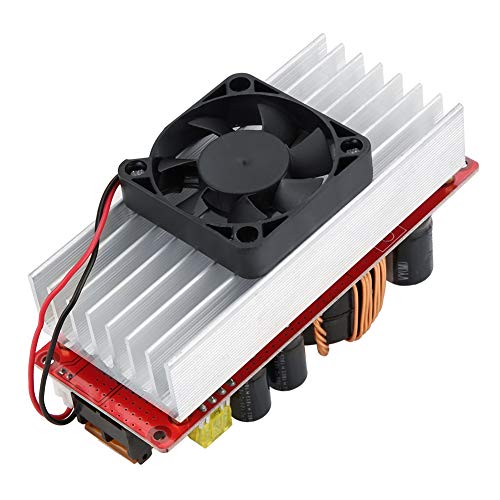
- التحكم الذكي في درجة الحرارة: Features a fan that automatically activates at approximately 60°C and stops below 60°C to maintain optimal operating temperature and extend lifespan.
- نطاق واسع للتطبيق: Suitable for solar street light drivers, LED lighting, vehicle power supplies, DIY adjustable power supplies, and battery charging.
2. معلومات السلامة
Please read and understand all safety warnings before operating this device. Failure to follow these instructions may result in electric shock, fire, or serious injury.
- المخاطر الكهربائية: This module operates with high voltage and current. Always disconnect power before making any connections or adjustments.
- التهوية المناسبة: Ensure adequate airflow around the module, especially the heatsink and fan, to prevent overheating.
- القطبية الصحيحة: Always connect input and output with correct polarity. Reverse polarity can damage the module and connected devices.
- العزل: Ensure all connections are properly insulated to prevent short circuits.
- التثبيت الاحترافي: If you are not familiar with electrical wiring, seek assistance from a qualified professional.
- الظروف البيئية: لا تعرض الوحدة للرطوبة أو درجات الحرارة القصوى أو البيئات المسببة للتآكل.
3. محتويات العبوة
تأكد من وجود جميع العناصر وأنها في حالة جيدة عند فتح العبوة.
- 1 x Walfront 10-60V to 12-97V 1500W 30A DC-DC Step-Up Converter Module
- دليل المستخدم (هذا المستند)
4. تعليمات الإعداد
Follow these steps to set up your DC-DC converter module.
- تحديد المكونات: Familiarize yourself with the input/output terminals, voltage/current adjustment potentiometers, and protection features.

- اتصال الإدخال: Connect your DC power source (10-60V) to the input terminals labeled 'Input +' and 'Input -' (or 'Input GND'). Ensure correct polarity. Use appropriate gauge wires for the expected current.
- اتصال الإخراج: Connect your load or device to the output terminals labeled 'Output +' and 'Output -' (or 'Output GND'). Ensure correct polarity.
- Initial Adjustment (Voltagهـ): Before applying power to the load, turn the CV (Constant Voltage) potentiometer (labeled 'CV電圧調整' or 'w204') counter-clockwise to its minimum setting.
- Initial Adjustment (Current): Turn the CC (Constant Current) potentiometer (labeled 'cc定電流制御') counter-clockwise to its minimum setting.
- تشغيل الطاقة: Apply power to the input of the module.
- تعيين حجم الإخراجtage: Using a multimeter, measure the output voltage. Slowly turn the CV potentiometer clockwise until the desired output voltage (12-97V) is reached.
- Set Output Current (Optional, for constant current applications): If using constant current mode (e.g., for battery charging), connect your load. Then, slowly turn the CC potentiometer clockwise until the desired output current is reached. If not using constant current, this step may be skipped, or the CC can be set to maximum to allow the voltage to regulate freely.
- اتصال المروحة: The module includes a temperature-controlled fan. Connect the fan to the designated fan connector (labeled 'ファン接続'). The fan will operate automatically when the module temperature reaches approximately 60°C.
5. تعليمات التشغيل
Once set up, the module operates automatically. Observe the following guidelines for optimal performance:
- مراقبة درجة الحرارة: The intelligent fan will manage the module's temperature. Ensure the fan is not obstructed.
- إدارة الأحمال: Do not exceed the maximum output power (1500W) or current (30A) to prevent damage.
- المجلدtage and Current Stability: The module is designed to provide stable output. If fluctuations occur, check input power stability and load conditions.
6. الصيانة
Regular maintenance helps ensure the longevity and reliable operation of your module.
- تنظيف: Periodically clean the module, especially the heatsink and fan blades, to remove dust and debris. Use a soft brush or compressed air. Ensure power is disconnected before cleaning.
- فحص الاتصال: قم بفحص جميع توصيلات الأسلاك بانتظام للتأكد من أنها آمنة وخالية من التآكل.
- الفحص البيئي: تأكد من أن بيئة التشغيل تظل ضمن نطاقات درجة الحرارة والرطوبة المحددة.
7. استكشاف الأخطاء وإصلاحها
If you encounter issues with your module, refer to the following common problems and solutions:
| مشكلة | السبب المحتمل | حل |
|---|---|---|
| لا يوجد مجلد إخراجtage | No input power; Incorrect input polarity; Blown fuse; Output short circuit; Undervoltagتفعيل الحماية الإلكترونية. | Check input power supply; Verify input wiring polarity; Replace fuse if necessary; Check output for short circuits; Ensure input voltage هو فوق الحد السفليtagعتبة الحماية. |
| إخراج المجلدtagمنخفض/مرتفع جدًا | CV potentiometer incorrectly set; Input voltagمنخفض جدًا/مرتفع جدًا. | Adjust CV potentiometer; Ensure input voltagيقع ضمن نطاق 10-60 فولت. |
| No output current (in CC mode) | CC potentiometer incorrectly set; Load resistance too high; Overcurrent protection activated. | Adjust CC potentiometer; Check load for open circuit; Reduce load or ensure it's within current limits. |
| وحدة الانهاك | Insufficient ventilation; Excessive load; Fan malfunction. | Ensure proper airflow; Reduce load; Check fan operation and clear obstructions. |
8. المواصفات الفنية
Detailed specifications for the Walfront DC-DC Step-Up Converter Module:
| المعلمة | قيمة |
|---|---|
| ماركة | والفرونت |
| رقم الموديل | Wal front9sbfz08351 |
| حجم الإدخالtage | العاصمة 10-60V |
| حجم الإخراجtage | تيار مستمر 12-97 فولت (قابل للتعديل) |
| طاقة الإخراج | 1500 وات (الحد الأقصى) |
| تيار الخرج | 30A (الحد الأقصى) |
| كفاءة التحويل | 92% - 97% |
| درجة حرارة التشغيل | -40 درجة مئوية إلى 85 درجة مئوية |
| تبديل التردد | 150 كيلو هرتز |
| Module Size (with copper pillars and fan) | 130 مم × 52 مم × 84 مم |
| Module Size (without copper pillars and fan) | 130 مم × 52 مم × 67 مم |
| وزن المنتج | 0.37 كجم |
| رمز المنتج الموحد | 750086417451 |
| ASIN | B07RMT9W7D |
| بلد المنشأ | الصين |

9. معلومات الضمان
Walfront products are manufactured to high-quality standards. This product is covered by a standard manufacturer's warranty against defects in materials and workmanship. The warranty period typically begins from the date of purchase. Please retain your proof of purchase for warranty claims.
لا يغطي الضمان الأضرار الناجمة عن:
- التثبيت أو الاستخدام غير السليم.
- تعديلات أو إصلاحات غير مصرح بها.
- الحوادث، أو سوء المعاملة، أو الإهمال.
- Operating outside the specified environmental or electrical parameters.
For specific warranty terms and conditions, please refer to the product packaging or contact Walfront customer support.
10. دعم العملاء
If you have any questions, require technical assistance, or need to make a warranty claim, please contact Walfront customer support through the following channels:
- الدعم عبر الإنترنت: Visit the official Walfront webموقع للأسئلة الشائعة، وموارد الدعم، ونماذج الاتصال.
- بريد إلكتروني: Refer to your product packaging or the Walfront webابحث عن عنوان البريد الإلكتروني المناسب للدعم على الموقع.
- دعم التاجر: If purchased from a retailer, you may also contact their customer service for assistance.
When contacting support, please have your product model number (Wal front9sbfz08351) and proof of purchase readily available.