
1. المقدمة
This manual provides instructions for the proper setup, operation, and maintenance of your Ohaus CR5200 Compass Series Portable Balance. Please read this manual thoroughly before using the balance to ensure correct operation and to prevent damage.
The Ohaus CR5200 is a portable digital balance designed for accurate weighing with a capacity of 5200 grams and a readability of 1 gram. It supports multiple weighing units including grams (g), ounces (oz), pounds:ounces (lb:oz), troy ounces (ozt), and pennyweights (dwt).

الصورة 1.1: الأعلى view of the Ohaus CR5200 Compass Series Portable Balance, showing the display and control buttons.
2. معلومات السلامة
- Operate the balance on a stable, level surface free from vibrations and drafts.
- تجنب تعريض الجهاز لدرجات حرارة قصوى أو رطوبة عالية أو لأشعة الشمس المباشرة.
- Do not overload the balance beyond its maximum capacity of 5200 grams.
- Keep the balance clean and free from dust and debris.
- Use only the specified power source (3 AA batteries or compatible AC adapter).
3. الإعداد
3.1 فك التعبئة
Carefully remove the balance from its packaging. Inspect the balance for any signs of damage. Retain the packaging for future transport or storage.
3.2 Powering the Balance
The Ohaus CR5200 can be powered by three AA alkaline batteries or an external AC adapter (not included, but compatible with the side power port).
تركيب البطارية:
- Locate the battery compartment on the underside of the balance.
- افتح غطاء حجرة البطارية.
- Insert three AA alkaline batteries, ensuring correct polarity (+/-).
- أغلق غطاء حجرة البطارية جيدًا.

الصورة 3.1: الجانب السفلي view of the balance with the battery compartment open, showing three AA batteries installed.
اتصال الطاقة الخارجية:
If using an AC adapter, connect it to the power input port located on the side of the balance. Ensure the adapter meets the specified voltage and current requirements (e.g., 12V 0.5A).

الصورة 3.2: الجانب view of the balance, highlighting the external power input port.
3.3 التنسيب
Place the balance on a firm, level, and stable surface. Avoid locations near air vents, windows, or equipment that generates vibrations or electromagnetic interference.
4. تعليمات التشغيل
4.1 تشغيل/إيقاف التشغيل
- لتشغيل الجهاز: اضغط على [تشغيل/إيقاف] button. The display will show a self-test sequence and then settle at 0.0 g.
- لإيقاف التشغيل: اضغط مع الاستمرار على [تشغيل/إيقاف] الزر حتى تنطفئ الشاشة.
4.2 Selecting Weighing Units
The balance supports multiple weighing units: grams (g), ounces (oz), pounds:ounces (lb:oz), troy ounces (ozt), and pennyweights (dwt).
- To change the weighing unit: Press the [وحدة] button (often labeled with 'g' and an arrow). Each press cycles through the available units.
4.3 الوظيفة الفارغة
The tare function allows you to zero out the weight of a container, so only the weight of the contents is measured.
- ضع العبوة الفارغة على وعاء الوزن. ستظهر على الشاشة وزنها.
- اضغط على [الفارغ/صفر] button (often labeled with '→0←'). The display will reset to 0.0.
- أضف المادة المراد وزنها إلى الحاوية. ستظهر الشاشة الوزن الصافي للمادة.
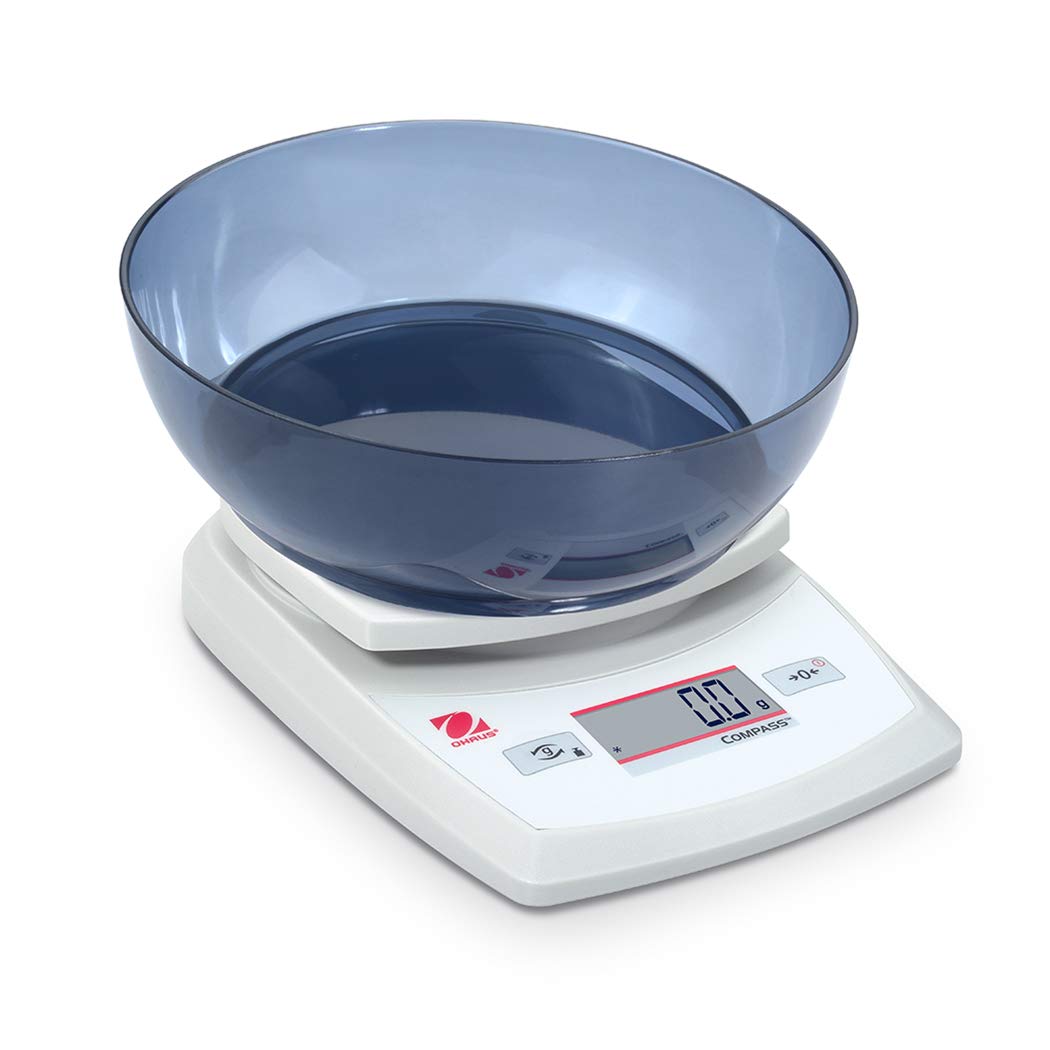
Image 4.1: The balance with an empty bowl on the weighing pan, ready for the tare function.
4.4 الوزن الأساسي
- Ensure the balance is powered on and the display shows 0.0 in the desired weighing unit.
- ضع العنصر المراد وزنه بعناية في منتصف صينية الوزن.
- Wait for the display to stabilize. The stable weight will be shown.
- Remove the item from the pan.
4.5 المعايرة الخارجية
The Ohaus CR5200 features external calibration. This process requires a known calibration weight (not included) to ensure accuracy. Refer to the full Ohaus CR Series manual for detailed calibration procedures specific to your model.

Image 4.2: The balance with a cylindrical calibration weight placed on the weighing pan.
5. الصيانة
5.1 التنظيف
- امسح السطح الخارجي المتوازن بقطعة قماش ناعمة.amp القماش. لا تستخدم المنظفات أو المذيبات الكاشطة.
- تأكد من عدم دخول أي سوائل إلى هيكل الميزان أو شاشته.
- Keep the weighing pan clean to ensure accurate readings.
5.2 استبدال البطارية
When the battery indicator appears on the display, replace the three AA alkaline batteries as described in Section 3.2.
5.3 التخزين
When not in use for extended periods, remove the batteries to prevent leakage. Store the balance in a dry, dust-free environment. The Ohaus CR5200 is designed for portability and can be stored in a protective case (if available).

Image 5.1: The Ohaus CR5200 balance shown alongside its protective carrying case.
6. استكشاف الأخطاء وإصلاحها
| مشكلة | السبب المحتمل | حل |
|---|---|---|
| Balance does not turn on. | Dead or incorrectly installed batteries; no AC power. | Replace batteries or check AC adapter connection. Ensure correct battery polarity. |
| قراءات غير دقيقة أو غير مستقرة. | Unstable surface; drafts; electromagnetic interference; balance needs calibration. | Move balance to a stable, level surface. Shield from drafts. Recalibrate the balance (refer to Section 4.5). |
| تعرض الشاشة كلمة "Err" أو رمز الخطأ. | تحميل زائد؛ خطأ داخلي. | Remove excess weight if overloaded. Power cycle the balance. If error persists, contact Ohaus support. |
| وظيفة التصفير لا تعمل. | Balance not stable; button not pressed correctly. | Ensure balance is stable and display is settled. Press the TARE/ZERO button firmly. |
7. المواصفات
| ميزة | مواصفة |
|---|---|
| رقم الموديل | سي آر 5200 |
| سعة | 5200 جرام (5.2 كجم) |
| قابلية القراءة | 1 جرام |
| وحدات الوزن | g, oz, lb:oz, ozt, dwt |
| نوع المعايرة | خارجي |
| مصدر الطاقة | 3 AA alkaline batteries (included) or AC adapter (not included) |
| نوع العرض | رقمي |
| مادة | بلاستيك |
| أبعاد المنتج (الطول × العرض × الارتفاع) | 23.62 × 17.02 × 5.59 سم |
| وزن العنصر | 408.23 جرامًا (حوالي 14.4 أونصة) |
| المميزات الخاصة | محمول |
8. الضمان والدعم
For warranty information, technical support, or service inquiries, please contact Ohaus customer service or visit the official Ohaus webالموقع. احتفظ بإيصال الشراء كإثبات للشراء.