
1. المقدمة وما فوقview
This manual provides comprehensive instructions for the setup, operation, maintenance, and troubleshooting of your SHARP 4T-C55BJ3EF2NB 55-inch 4K UHD Smart LED TV. Please read this manual thoroughly before using your television to ensure proper functionality and safety.
The SHARP 4T-C55BJ3EF2NB is a 55-inch 4K Ultra HD Smart LED TV, offering a resolution of 3840 x 2160 pixels. It features Active Motion 400, HDR10, HLG, Aquos UltraClear, and Aquos Motion technologies for smooth and clear image movements. The integrated Harman/Kardon speaker system, with 2 x 10W output, Dolby Digital, Dolby Digital Plus, DTS-HD, DTS Studio Sound, and Sound Equalizer, delivers an immersive audio experience. This TV also includes a Triple Tuner for satellite, cable, and antenna reception, along with a range of pre-installed smart applications.

الشكل 1.1: الجبهة view of the Sharp 4T-C55BJ3EF2NB 55-inch 4K UHD Smart LED TV, displaying colorful content and smart app logos.
2. معلومات السلامة
اتبع دائمًا احتياطات السلامة الأساسية عند استخدام هذا التلفزيون لتقليل خطر الحريق والصدمة الكهربائية والإصابة.
- لا تعرض التلفزيون للمطر أو الرطوبة.
- لا تسد فتحات التهوية.
- تأكد من عدم دوس سلك الطاقة أو ثنيه.
- افصل التلفاز أثناء العواصف الرعدية أو عند عدم استخدامه لفترات طويلة.
- قم بإحالة جميع أعمال الصيانة إلى موظفي الخدمة المؤهلين.
3. محتويات العبوة
قم بفك تغليف جهاز التلفزيون بعناية وتأكد من وجود جميع العناصر التالية:
- 1 x SHARP 4T-C55BJ3EF2NB 55-inch 4K UHD Smart LED TV
- 1 x Remote Control (including 2 x AAA batteries)
- 1 x TV Stand with Installation Package (screws, etc.)
- 1 × دليل البدء السريع
- 1 × دليل المستخدم (هذه الوثيقة)
4. الإعداد
4.1 الإعداد المادي (حامل أو تثبيت على الحائط)
You can either install the TV on its included stand or mount it on a wall. Ensure the TV is placed on a stable, level surface if using the stand.
تركيب الحامل:
- ضع شاشة التلفزيون لأسفل على سطح ناعم ومستوٍ لمنع التلف.
- Attach the stand components to the bottom of the TV using the provided screws from the installation package.
- تأكد من إحكام ربط جميع البراغي.
التثبيت على الحائط:
The TV supports VESA standard mounting 400 x 200 mm. Use a compatible wall mount bracket (not included) and follow the instructions provided with the wall mount. Ensure the wall can support the TV's weight (approximately 21.4 kg).
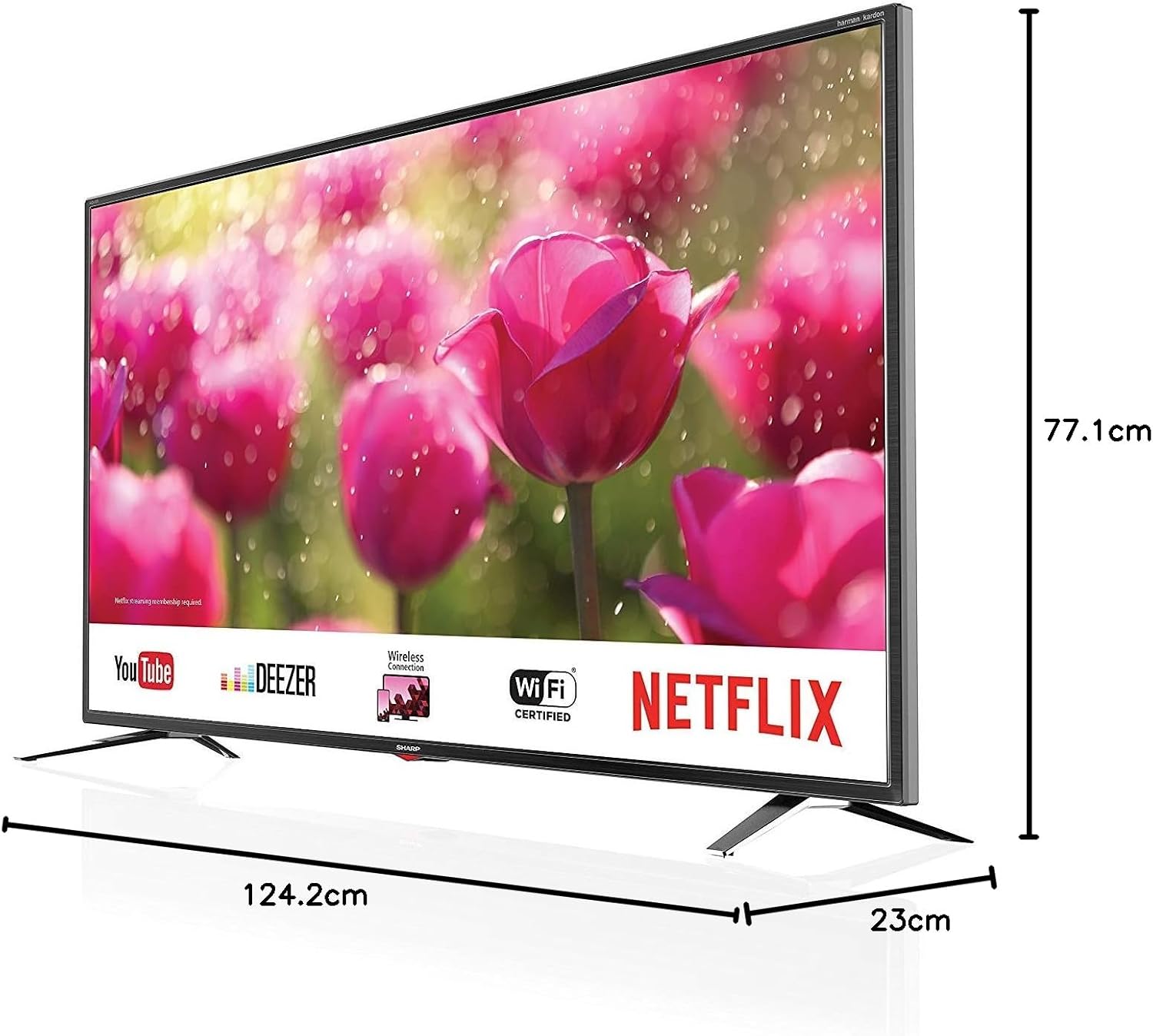
Figure 4.1: Product dimensions of the Sharp 4T-C55BJ3EF2NB 55-inch 4K UHD Smart LED TV.
4.2 الاتصالات
Connect your external devices to the TV using the appropriate ports located on the rear panel.

الشكل 4.2: خلفي view عرض منافذ الاتصال.
- HDMI: Connect up to 3 HDMI devices (e.g., Blu-ray player, game console).
- USB: Connect USB storage devices for media playback (3 ports available).
- الهوائي/الكابل/القمر الصناعي: Connect your antenna, cable, or satellite feed to the Triple Tuner input.
- شبكة محلية (RJ-45): للاتصال بالإنترنت السلكي.
- إخراج الصوت البصري الرقمي: للاتصال بنظام صوتي خارجي.
- Audio/Headphone (3.5 mm jack): لسماعات الرأس أو مكبرات الصوت الخارجية.
- فتحة CI+: For Conditional Access Modules (CAM) for encrypted channels.
- فتحة بطاقة SD: For media playback from SD cards.
4.3 الإعداد لأول مرة
After connecting all necessary cables and plugging in the power cord, press the power button on the remote control or TV. The TV will guide you through the initial setup process, including language selection, network connection (Wi-Fi or LAN), channel scanning, and time zone settings.
5. التشغيل
5.1 التشغيل الأساسي
- تشغيل/إيقاف التشغيل: اضغط على زر الطاقة في جهاز التحكم عن بعد.
- التحكم في مستوى الصوت: استخدم أزرار VOL +/-.
- اختيار القناة: استخدم أزرار CH +/- أو أزرار الأرقام.
- مصدر الإدخال: Press the SOURCE button to select between HDMI, TV (Tuner), USB, etc.
- التنقل في القائمة: Use the arrow keys and OK button to navigate menus.
5.2 ميزات التلفزيون الذكي
Your SHARP TV is equipped with smart functionalities, allowing access to various online content and applications via the Sharp Aquos Net+ App Store.
- التطبيقات المثبتة مسبقًا: Access popular services like YouTube, Deezer, Rakuten TV, Chili, Netflix, Eurosport Player, Joyn, and Prime Video directly from the home screen.
- Web المتصفح: تصفح الإنترنت مباشرة على التلفزيون الخاص بك.
- Wireless Connection (WLAN): Connect to your home Wi-Fi network for internet access.
5.3 إعدادات الصورة والصوت
قم بتخصيص viewاستمتع بتجربة مشاهدة واستماع مميزة عبر قائمة إعدادات التلفزيون.
- أوضاع الصورة: Select from various preset picture modes (e.g., Standard, Movie, Game) or customize brightness, contrast, color, and sharpness.
- دعم HDR: The TV supports HDR10 and HLG for enhanced contrast and color with compatible content.
- أوضاع الصوت: Choose from preset sound modes or adjust bass, treble, and balance. The Harman/Kardon speaker system provides high-quality audio.
- معادل الصوت: Fine-tune audio frequencies for a personalized sound profile.
5.4 تشغيل الموالف الثلاثي
The integrated Triple Tuner supports DVB-T/T2 (terrestrial), DVB-C (cable), and DVB-S/S2 (satellite) signals. After initial channel scanning, you can access digital channels directly.
- فقط بضعة أسئلة سريعة: View and manage your scanned channels.
- دليل البرامج الإلكتروني (EPG): Access program information and schedules.
6. الصيانة
6.1 التنظيف
- شاشة: امسح الشاشة برفق بقطعة قماش ناعمة وخالية من الوبر. وللبقع الصعبة، استخدم محلول تنظيف شاشات مصمم خصيصًا لأجهزة التلفاز، وضعه على قطعة القماش وليس مباشرة على الشاشة.
- خزانة: امسح خزانة التلفزيون بقطعة قماش ناعمة وجافة. لا تستخدم المنظفات الكاشطة أو المذيبات.
6.2 تحديثات البرامج
Periodically check for software updates to ensure optimal performance and access to the latest features. Updates can typically be performed via the TV's settings menu when connected to the internet.
7. استكشاف الأخطاء وإصلاحها
إذا واجهت مشكلات مع التلفزيون الخاص بك، فراجع المشكلات والحلول الشائعة التالية:
| مشكلة | الحل المحتمل |
|---|---|
| لا يوجد طاقة | تأكد من توصيل سلك الطاقة بإحكام بالتلفزيون ومقبس الكهرباء. جرّب مقبسًا آخر. |
| لا توجد صورة، ولكن الصوت موجود | تأكد من اختيار مصدر الإدخال الصحيح. تحقق من توصيلات الكابلات بالأجهزة الخارجية. |
| لا يوجد صوت ولكن الصورة موجودة | تحقق من مستوى الصوت وحالة كتم الصوت. تأكد من توصيلات كابل الصوت. تحقق من إعدادات إخراج الصوت في التلفزيون. |
| جهاز التحكم عن بعد لا يعمل | استبدل البطاريات. تأكد من عدم وجود عوائق بين جهاز التحكم عن بُعد ومستشعر الأشعة تحت الحمراء الخاص بالتلفزيون. |
| لا يمكن الاتصال بشبكة Wi-Fi | Check Wi-Fi password. Restart your router. Ensure the TV is within range of the Wi-Fi signal. |
For more complex issues, consult the full user manual (if available in print) or contact Sharp customer support.
8. المواصفات
| ميزة | وصف |
|---|---|
| رقم الموديل | 4T-C55BJ3EF2NB |
| ماركة | حاد |
| حجم الشاشة | 55 بوصة (139 سم) |
| تكنولوجيا العرض | قاد |
| دقة | 4K Ultra HD (3840 × 2160 بكسل) |
| معدل التحديث | 60 هرتز |
| دعم HDR | HDR10، HLG |
| تكنولوجيا الحركة | Active Motion 400, Aquos UltraClear, Aquos Motion |
| نظام الصوت | Harman/Kardon, 2 x 10W (8 Ohm), Dolby Digital, Dolby Digital Plus, DTS-HD, DTS Studio Sound, Sound Equalizer |
| الموالفات | Triple Tuner (DVB-T/T2/C/S/S2) with HEVC/H.265 (10-bit), MPEG4/H.264, VP9 support |
| الاتصال | 3x HDMI 4K, 3x USB, Audio/Headphone (3.5 mm jack), Digital Optical Audio Output, LAN (RJ-45), WLAN (2.412 GHz – 2.472 GHz), 1x SD Card Slot, CI+ Slot |
| الميزات الذكية | Web Browser, Sharp Aquos Net+ App Store, Pre-installed apps (YouTube, Netflix, Deezer, Prime Video, etc.) |
| أبعاد المنتج (مع الحامل) | 124.2 × 77.1 × 23 سم (العرض × الارتفاع × العمق) |
| وزن المنتج (مع الحامل) | 21.4 كجم |
| معيار التثبيت VESA | 400 × 200 ملم |
| الشركة المصنعة | حاد |
| أول تاريخ متاح | 15 يناير 2020 |
9. الضمان والدعم
للحصول على معلومات الضمان، يرجى الرجوع إلى بطاقة الضمان المرفقة مع المنتج أو زيارة موقع Sharp الرسمي website. For technical support, troubleshooting assistance beyond this manual, or service requests, please contact Sharp customer service.
الدعم عبر الإنترنت: www.sharp.eu