
1. المقدمة
Thank you for choosing the Dacom Athlete G05 Bluetooth Headset. This manual provides comprehensive instructions to help you set up, operate, and maintain your new wireless headphones. Please read this manual carefully before use to ensure optimal performance and longevity of your device.
2. محتويات العبوة
تأكد من تضمين جميع العناصر المدرجة أدناه في الحزمة الخاصة بك:
- 1 x Dacom Athlete G05 Bluetooth Headset
- 1 × كابل شحن USB
- 1 × دليل المستخدم (هذه الوثيقة)
3. انتهى المنتجview
The Dacom Athlete G05 is a wireless stereo earphone designed for sports and running, featuring a comfortable in-ear design with ear hooks for secure fit. It connects via Bluetooth V4.1.
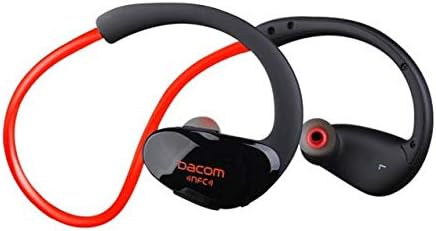
الشكل 3.1: أمام view of the Dacom Athlete G05 Bluetooth Headset, showing the earbud and ear hook design.
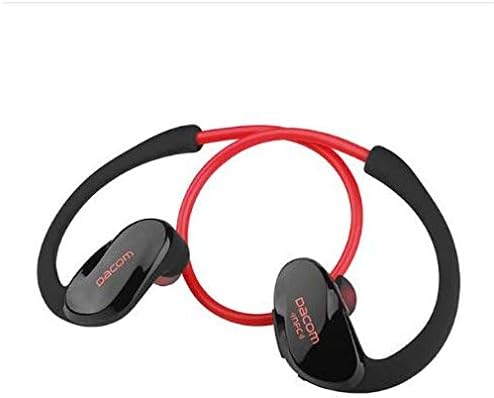
الشكل 3.2: مؤخرة view of the Dacom Athlete G05 Bluetooth Headset, illustrating the connecting cable between the two earbuds.
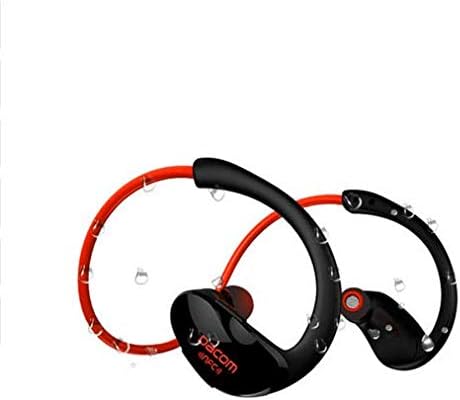
الشكل 3.3: Dacom Athlete G05 Bluetooth Headset demonstrating water resistance, suitable for sports activities.
4. الإعداد
4.1 شحن سماعة الرأس
Before first use, fully charge your Dacom Athlete G05 headset. A full charge typically takes approximately 1.5 to 2 hours.
- Connect the provided USB charging cable to the charging port on the headset.
- Connect the other end of the USB cable to a power adapter (DC5V 150mAh output recommended) or a computer's USB port.
- The battery indicator light will illuminate during charging and change color or turn off once fully charged.
A fully charged headset provides approximately 8 hours of talk time or music playback, and up to 180 hours of standby time.
4.2 اقتران بلوتوث
لتوصيل سماعة الرأس بجهاز يدعم تقنية البلوتوث (مثل الهاتف الذكي أو الجهاز اللوحي):
- تأكد من شحن سماعة الرأس بالكامل وإيقاف تشغيلها.
- Press and hold the multi-function button on the headset until the Bluetooth indicator light flashes red and blue alternately, indicating it is in pairing mode.
- على جهازك، قم بتمكين البلوتوث وابحث عن الأجهزة المتاحة.
- Select "Dacom Athlete G05" (or similar name) from the list of found devices.
- إذا طُلب منك إدخال كلمة مرور، فأدخل "0000" (أربعة أصفار).
- Once paired, the Bluetooth indicator light will flash blue slowly or turn solid blue, and you will hear a confirmation tone.
The headset supports Bluetooth V4.1 and profiles such as Headset, Handsfree, A2DP, AVRC, and APT-X.
5. تعليمات التشغيل
5.1 تشغيل/إيقاف التشغيل
- تشغيل الطاقة: اضغط مع الاستمرار على الزر متعدد الوظائف لمدة 3 ثوانٍ تقريبًا حتى يومض ضوء المؤشر باللون الأزرق وتسمع نغمة تشغيل الطاقة.
- إيقاف التشغيل: اضغط مع الاستمرار على الزر متعدد الوظائف لمدة 5 ثوانٍ تقريبًا حتى يومض ضوء المؤشر باللون الأحمر وتسمع نغمة إيقاف التشغيل.
5.2 إدارة المكالمات
- الرد على المكالمة: Short press the multi-function button when a call comes in.
- إنهاء المكالمة: Short press the multi-function button during a call.
- رفض المكالمة: اضغط مع الاستمرار على الزر متعدد الوظائف لمدة ثانيتين عند ورود مكالمة.
- إعادة الاتصال بالرقم الأخير: اضغط مرتين على الزر متعدد الوظائف عندما لا تكون في مكالمة.
5.3 تشغيل الموسيقى
- تشغيل/إيقاف مؤقت: اضغط قصيرًا على الزر متعدد الوظائف.
- المسار التالي: اضغط لفترة طويلة على زر رفع الصوت +.
- المسار السابق: اضغط لفترة طويلة على زر التحكم في الصوت.
- رفع الصوت: اضغط لفترة قصيرة على زر رفع الصوت +.
- اخفض الصوت: اضغط لفترة قصيرة على زر التحكم في الصوت.
Note: The headset features touch control for various functions.
6. الصيانة والعناية
- حافظ على جفاف سماعة الرأس. لا تعرضها لدرجات حرارة أو رطوبة شديدة.
- Clean the earbuds and charging contacts regularly with a soft, dry cloth.
- تجنب إسقاط سماعة الرأس أو تعريضها لصدمات قوية.
- قم بتخزين سماعة الرأس في مكان بارد وجاف عندما لا تكون قيد الاستخدام.
- لا تحاول تفكيك سماعة الرأس أو تعديلها، لأن ذلك سيؤدي إلى إبطال الضمان.
7. استكشاف الأخطاء وإصلاحها
| مشكلة | الحل المحتمل |
|---|---|
| سماعة الرأس لا تعمل. | Ensure the headset is fully charged. Connect to a power source and try again. |
| لا يمكن الاقتران بالجهاز. |
|
| لا يوجد صوت أو مستوى الصوت منخفض. |
|
| اتصال متقطع. |
|
8. المواصفات
| ميزة | التفاصيل |
|---|---|
| اسم المنتج | Athlete sports Bluetooth headset |
| رقم الموديل | جي05 |
| نسخة البلوتوث | رقم V4.1 |
| فئة بلوتوث | الصف الثاني |
| دعم Profiles | Headset, Handsfree, A2DP, AVRC, APT-X |
| مدخل الشحن | DC5V 150mAh (Power adapter output) |
| نوع البطارية | High-performance lithium polymer battery |
| وقت التحدث | حوالي 8 ساعات |
| وقت اللعب | حوالي 8 ساعات |
| وقت الاستعداد | حوالي 180 ساعات |
| نطاق التردد الصوتي | 20 هرتز - 20 كيلو هرتز |
| BT Radio Frequency | 2.400-2.481 جيجاهرتز |
| معاوقة الخرج | 16Ω 3mW |
| حساسية | 100-105 ديسيبل |
| عامل شكل سماعات الرأس | في الأذن |
| تكنولوجيا الاتصال | لاسلكي |
| طريقة التحكم | يلمس |
| مادة | بلاستيك |
| لون | أحمر |
9. الضمان والدعم
Dacom products are manufactured to the highest quality standards. For warranty information or technical support, please refer to the warranty card included with your purchase or visit the official Dacom webيرجى الاحتفاظ بإثبات الشراء الخاص بك للمطالبة بالضمان.