
مقدمة
This manual provides instructions for the proper setup, operation, and maintenance of your Calvas 2020B0-B1 remote control. This remote is designed to be compatible with Shaw LCD LED televisions, offering a convenient replacement or secondary control unit. Please read this manual thoroughly before using the device.

الصورة: الجبهة view of the Calvas 2020B0-B1 remote control.
يثبت
1. تركيب البطارية
- حدد موقع حجرة البطارية في الجزء الخلفي من جهاز التحكم عن بعد.
- اضغط لأسفل على المزلاج واسحب غطاء البطارية لإزالته.
- أدخل بطاريتين AAA (غير مرفقتين)، مع التأكد من محاذاة الأطراف الموجبة (+) والسالبة (-) بشكل صحيح مع العلامات الموجودة داخل الحجرة.
- قم بتحريك غطاء البطارية مرة أخرى إلى مكانه حتى يستقر بشكل آمن.

الصورة: الخلف view من جهاز التحكم عن بعد مع فتح حجرة البطارية.
2. Quick Setup for TV Control
The remote features a quick setup function for initial pairing with your television. Follow these steps:
- اضغط مع الاستمرار على يثبت button until the LED light blinks twice.
- اضغط على قوة التلفزيون زر.
- اضغط مع الاستمرار على OK زر.
- أطلق سراح OK key when your TV turns off. This indicates successful pairing.
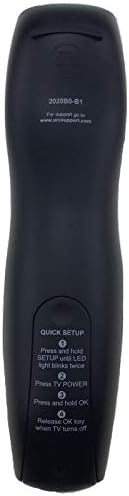
Image: Back of the remote control displaying quick setup instructions.
Note: If the TV does not turn off, repeat the steps or consult the TV's manual for specific remote programming codes if available.
تعليمات التشغيل
The Calvas 2020B0-B1 remote control utilizes infrared (IR) technology. Ensure a clear line of sight between the remote's IR emitter and your TV's IR receiver for optimal performance.
وظائف الأزرار:
- قوة: تشغيل التلفزيون أو إيقاف تشغيله.
- المجلد +/-: يزيد أو يخفض مستوى الصوت.
- CH +/-: يغير القناة لأعلى أو لأسفل.
- كتم الصوت: كتم صوت التلفزيون أو إلغاء كتمه.
- NUMBER PAD (0-9): يدخل أرقام القنوات مباشرة.
- مرشد: يعرض دليل البرنامج.
- MENU: الوصول إلى القائمة الرئيسية للتلفزيون.
- معلومات: يعرض معلومات حول البرنامج الحالي.
- موافق / أسهم التنقل: يؤكد الاختيارات ويتنقل بين القوائم.
- EXIT: للخروج من القائمة أو الشاشة الحالية.
- الاخير: يعود إلى السابق viewقناة إد.
- DAY +/-: Navigates through days in the program guide.
- MUSIC / FAV: Accesses music channels or favorite channels (functionality may vary by TV model).
صيانة
تنظيف:
- امسح جهاز التحكم عن بعد بقطعة قماش ناعمة وجافة.
- بالنسبة للأوساخ العنيدة، قم بإزالة الأوساخ برفق.ampاغمر قطعة القماش بالماء أو بمنظف معتدل غير كاشط.
- Do not use harsh chemicals, solvents, or abrasive cleaning pads, as these can damage the remote's surface or internal components.
استبدال البطارية:
- Replace batteries when the remote's response becomes sluggish or the LED indicator fails to light up.
- Always replace both batteries at the same time with new AAA batteries.
- لا تخلط بين البطاريات القديمة والجديدة أو أنواع مختلفة من البطاريات.
- قم بإزالة البطاريات إذا لم يتم استخدام جهاز التحكم عن بعد لفترة طويلة لمنع التسرب.
تخزين:
- قم بتخزين جهاز التحكم عن بعد في مكان بارد وجاف بعيدًا عن أشعة الشمس المباشرة ودرجات الحرارة القصوى.
- تجنب إسقاط جهاز التحكم عن بعد أو تعريضه للرطوبة الزائدة.
استكشاف الأخطاء وإصلاحها
- جهاز التحكم عن بعد لا يستجيب:
- تأكد من تركيب البطاريات بشكل صحيح وعدم نفاذ شحنها. استبدلها إذا لزم الأمر.
- Ensure there is a clear line of sight between the remote and the TV's IR receiver. Remove any obstructions.
- Try re-pairing the remote with the TV using the "Quick Setup" steps.
- بعض الأزرار فقط تعمل:
- This might indicate a partial pairing issue or a specific button malfunction. Try re-pairing the remote.
- Clean the remote's surface, especially around the unresponsive buttons, to ensure no debris is interfering.
- نطاق التشغيل القصير:
- استبدل البطاريات بأخرى جديدة.
- تأكد من عدم وجود مصادر ضوء قوية (مثل ضوء الشمس المباشر أو أضواء الفلورسنت الساطعة) تتداخل مع إشارة الأشعة تحت الحمراء.
تحديد
| ماركة | البقع الصلعاء |
| رقم الموديل | 2020B0-B1 (Mfr Part Number: CLS-D41D8CD98F00B204E9800998ECF8427E) |
| الأجهزة المتوافقة | Television (Shaw LCD LED TVs) |
| تكنولوجيا الاتصال | الأشعة تحت الحمراء (IR) |
| نوع وحدة التحكم | التحكم بالأزرار |
| الحد الأقصى لعدد الأجهزة المدعومة | 1 |
| الحد الأقصى للمدى | 10 مترا |
| ميزة خاصة | تصميم مريح |
معلومات الضمان
This product is typically covered by a limited warranty provided by the seller or manufacturer. Please refer to your purchase documentation or contact the retailer directly for specific warranty terms and conditions. Keep your proof of purchase for any warranty claims.
يدعم
For further assistance, technical support, or inquiries regarding your Calvas 2020B0-B1 remote control, please contact the seller or manufacturer through the platform where the product was purchased. Provide your model number (2020B0-B1) and any relevant purchase details when seeking support.