
1. المقدمة
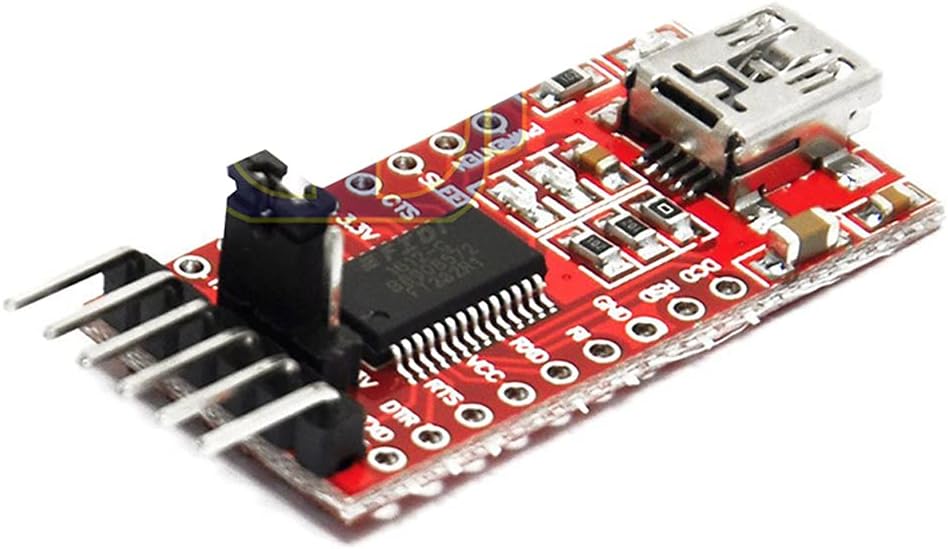
This manual provides detailed instructions for the DEVMO FT232RL USB to TTL Serial Converter Adapter Module. This module facilitates communication between a computer's USB port and devices requiring TTL-level serial communication, such as microcontrollers like the Arduino Pro Mini. It supports both 3.3V and 5.5V operation, making it versatile for various electronic projects.
2. مواصفات المنتج
- الشريحة: FT232RL (Note: This is not a genuine FTDI chip, but is compatible.)
- العمل المجلدtage: Selectable 3.3V or 5.5V via jumper.
- المؤشرات: RXD/TXD transceiver communication LEDs.
- حماية: Equipped with a 500mA self-restore fuse for overcurrent protection.
- تعريف الدبوس: DTR, RXD, TX, VCC, CTS, GND.
- Pin Pitch: 2.54 ملم.
- أبعاد: Approximately 36 x 18mm (L x W).
- الواجهة: Mini USB.
3. محتويات العبوة
- 1 x DEVMO FT232RL USB to TTL Serial Converter Adapter Module
4. دليل الإعداد
4.1. تثبيت برنامج التشغيل
Before connecting the module to your computer, it is recommended to install the necessary drivers. While this module uses an FT232RL compatible chip, it typically utilizes FTDI drivers. You can usually find the latest drivers on the official FTDI website or by performing a web search for "FTDI drivers".
- أنظمة التشغيل المدعومة: Windows 95/98/98se/ME/2000/XP/Win7 (32-bit and 64-bit), and partial Vista support.
- ملحوظة: Windows 8 is generally not supported. However, some users have reported success with Windows 10 and 11 after manual driver installation.
- Installation Steps (Windows Exampلو): Download the appropriate driver package. Extract the files. Right-click on the .inf files (usually two of them) and select 'Install' before plugging in the adapter.
4.2. المجلدtagهـ الاختيار
The module supports both 3.3V and 5.5V (5V) operation. A jumper on the module allows you to select the desired voltage for the VCC pin. Ensure the jumper is correctly placed to match the operating voltage of your target device to prevent damage.
4.3. الاتصال الجسدي
- الاتصال بجهاز الكمبيوتر: Use a Mini USB cable to connect the module to an available USB port on your computer.
- Connect to Target Device: Wire the module to your target device (e.g., Arduino Pro Mini) using the appropriate pins. Pay close attention to the pinout.
5. تعليمات التشغيل
5.1. وصف التوصيلات الكهربائية
The module features the following pins:
- DTR: Data Terminal Ready. Often used for automatic reset on microcontrollers like Arduino.
- آر إكس دي: Receive Data. Connects to the TX (Transmit) pin of your target device.
- تكساس: Transmit Data. Connects to the RX (Receive) pin of your target device.
- بطاقة الائتمان: Power Supply Output. Provides either 3.3V or 5.5V, depending on jumper setting. Connect to the power input of your target device.
- سي تي اس: Clear To Send. Used for hardware flow control (less common for simple serial communication).
- أرض الواقع: Ground. Connects to the ground of your target device.
5.2. Using with Arduino Pro Mini
To upload sketches to an Arduino Pro Mini, connect the module as follows:
- Module DTR to Pro Mini DTR
- Module RXD to Pro Mini TXD
- Module TX to Pro Mini RXD
- Module VCC to Pro Mini VCC (ensure correct voltagالاختيار الإلكتروني)
- Module GND to Pro Mini GND
Once connected and drivers are installed, your computer should recognize the module as a virtual COM port. You can then select this COM port in your Arduino IDE and upload sketches.
5.3. Communication Indicators
The RXD and TXD LEDs on the module will flash during data transmission and reception, indicating active serial communication.
6. صور المنتج

7. فيديو المنتج الرسمي
فيديو 1: انتهىview of the DEVMO FT232RL 3.3V 5.5V FTDI USB to TTL Serial Converter Module. This video provides a visual demonstration of the module's physical appearance and key components.
8. المواصفات
| ميزة | التفاصيل |
|---|---|
| ماركة | DEVMO |
| رقم الموديل | 741722788738 |
| واجهة الأجهزة | USB |
| مجموعة الشرائح | FT232RL (compatible) |
| حجم التشغيلtage | 3.3V / 5.5V (selectable) |
| الأجهزة المتوافقة | Arduino Mini, Arduino Pro Mini |
| أنظمة التشغيل المدعومة | Windows 95, 98, 98SE, ME, 2000, XP, Win7 (32bit/64bit), partial Vista support |
| وزن العنصر | 0.634 أونصة (حوالي 0.02 كيلوغرام) |
| أبعاد الحزمة | 5.31 × 3.5 × 1.14 بوصة |
9. استكشاف الأخطاء وإصلاحها
- الوحدة غير معترف بها: Ensure drivers are correctly installed. Try a different USB port or cable.
- أخطاء الاتصال:
- Verify RXD and TX pins are correctly cross-connected (RXD to TX, TX to RX).
- Check that the baud rates on both the computer and the target device match.
- Confirm the correct COM port is selected in your software.
- Target Device Not Powering On/Damaged: تحقق مرة أخرى من المجلدtage selection jumper (3.3V/5.5V) to ensure it matches your target device's requirements. Incorrect voltage can damage components.
- لا يوجد نشاط لمؤشر LED: Ensure the module is properly connected to the computer and receiving power. Check for any physical damage.
- Windows 8/10/11 Issues: While officially not supporting Windows 8, and not explicitly listing Windows 10/11, some users have found success by manually installing older FTDI drivers in compatibility mode or by using specific driver versions. Search online forums for solutions specific to your operating system.
10. معلومات السلامة
- تأكد دائمًا من المجلد الصحيحtage is selected for your target device to prevent damage.
- Avoid short-circuiting pins.
- Handle the module with care to prevent electrostatic discharge (ESD) damage.
- لا تعرض الوحدة للرطوبة أو درجات الحرارة القصوى.
11. الضمان والدعم
For any technical support, warranty inquiries, or further assistance, please contact the seller or manufacturer directly through your purchase platform. Keep your proof of purchase for warranty claims.