
Awei A780BL
Awei A780BL Bluetooth 5.0 Over-Ear Headphones User Manual
Model: A780BL | Brand: Awei
مقدمة
This manual provides comprehensive instructions for the Awei A780BL Bluetooth 5.0 Over-Ear Headphones. Please read this manual carefully before using the product to ensure proper operation and to maximize your listening experience. These headphones offer high-quality audio, a built-in microphone, and a comfortable over-ear design, suitable for various uses including gaming, music, and calls.
محتويات الحزمة
تأكد من وجود جميع العناصر في العبوة:
- 1 x Awei A780BL Bluetooth Headset
- 1 × كابل شحن USB
- 1 × دليل المستخدم (هذه الوثيقة)

Image: The Awei A780BL headphones shown alongside their retail packaging, highlighting the included components.
المنتج انتهىview

الصورة: الجبهة view of the Awei A780BL Over-Ear Headphones in black, showcasinز تصميمهم.
The Awei A780BL headphones are designed for comfort and superior sound quality. They feature a foldable design for portability and intuitive controls for ease of use.
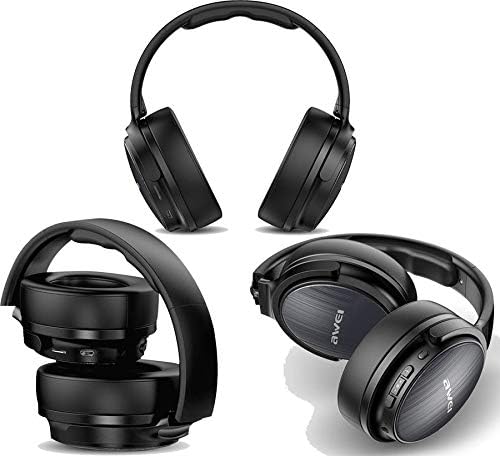
الصورة: متعددة views of the Awei A780BL headphones, demonstrating their foldable earcups and compact storage capability.
المميزات الرئيسية:
- تقنية بلوتوث الإصدار 5.0 لاتصال لاسلكي مستقر وفعال.
- Dynamic 40mm drivers for powerful and clear audio.
- Built-in microphone for hands-free calls and gaming communication.
- IPX5 water and sweat resistance, suitable for sports and outdoor activities.
- Supports both wireless (Bluetooth) and wired (3.5mm AUX) connectivity.
- Long battery life: Up to 15 hours of music/talk time.
- Comfortable over-ear design with soft earcups.

Image: A graphic highlighting the "All-Around Stereo Sound" feature of the Awei A780BL headphones, noting the 40mm driver, 32 Ohm impedance, and 122dB sensitivity.
يثبت
شحن سماعات الرأس:
- Locate the USB charging port on the headphones.
- Connect one end of the provided USB charging cable to the headphone's charging port.
- قم بتوصيل الطرف الآخر من كابل USB بمصدر طاقة USB متوافق (مثل منفذ USB في الكمبيوتر، أو محول USB الجداري).
- سيضيء مؤشر الضوء أثناء الشحن، وسينطفئ أو يتغير لونه بمجرد اكتمال الشحن.
- تستغرق الشحنة الكاملة حوالي 2 ساعات.
التشغيل/الإيقاف:
- لتشغيل: Press and hold the Power button (usually the Multi-function button) for a few seconds until the indicator light flashes and you hear a power-on prompt.
- لإيقاف التشغيل: اضغط مع الاستمرار على زر الطاقة لبضع ثوانٍ حتى ينطفئ ضوء المؤشر وتسمع صوت تنبيه لإيقاف التشغيل.
تعليمات التشغيل
الاقتران بلوتوث:
- تأكد من شحن سماعات الرأس بالكامل وإيقاف تشغيلها.
- اضغط مع الاستمرار على زر الطاقة لمدة 5-7 ثوانٍ تقريبًا حتى يومض ضوء المؤشر باللونين الأحمر والأزرق بالتناوب، مما يشير إلى وضع الاقتران.
- على جهازك (الهاتف الذكي، الجهاز اللوحي، الكمبيوتر)، قم بتمكين البلوتوث وابحث عن الأجهزة المتاحة.
- Select "AWEI A780BL" from the list of found devices.
- Once paired, the indicator light will typically turn solid blue or flash slowly, and you will hear a connection confirmation.
- إذا طُلب منك إدخال كلمة المرور، أدخل "0000".
Wired Connection (AUX Mode):
The headphones can also be used with a 3.5mm audio cable (not included) when the battery is low or for devices without Bluetooth.
- Connect one end of a 3.5mm audio cable to the AUX port on the headphones.
- قم بتوصيل الطرف الآخر بمقبس الصوت 3.5 ملم الخاص بجهازك.
- In wired mode, the headphone's battery is not consumed, and the power button is not required for operation.
الضوابط الأساسية:
| وظيفة | فعل |
|---|---|
| تشغيل/إيقاف الموسيقى مؤقتًا | اضغط على الزر متعدد الوظائف مرة واحدة. |
| المسار التالي | اضغط لفترة طويلة على زر رفع الصوت (+). |
| المسار السابق | اضغط لفترة طويلة على زر خفض الصوت (-). |
| رفع الصوت | اضغط لفترة قصيرة على زر رفع الصوت (+). |
| خفض الصوت | اضغط لفترة قصيرة على زر خفض الصوت (-). |
| الرد على المكالمة/إنهائها | اضغط على زر الوظائف المتعددة مرة واحدة أثناء المكالمة الواردة. |
| رفض المكالمة | Long press the Multi-function button during an incoming call. |
| إعادة الاتصال بالرقم الأخير | اضغط مرتين على الزر متعدد الوظائف. |
| تفعيل المساعد الصوتي | Triple-press the Multi-function button (if supported by your device). |
صيانة
- تنظيف: استخدم قطعة قماش ناعمة وجافة لتنظيف سماعات الرأس. لا تستخدم منظفات أو مذيبات كاشطة.
- تخزين: عند عدم الاستخدام، احفظ سماعات الرأس في مكان بارد وجاف، بعيدًا عن أشعة الشمس المباشرة ودرجات الحرارة القصوى. يتيح تصميمها القابل للطي تخزينها بشكل مضغوط.
- العناية بالبطارية: لإطالة عمر البطارية، تجنب تفريغ سماعات الرأس بالكامل بشكل متكرر. اشحنها بانتظام، حتى لو لم تكن قيد الاستخدام المستمر.
- مقاومة الماء: The headphones are IPX5 water resistant, meaning they can withstand splashes and sweat. Do not submerge them in water or expose them to heavy rain.
استكشاف الأخطاء وإصلاحها
| مشكلة | الحل المحتمل |
|---|---|
| لا يتم تشغيل سماعات الرأس. | Ensure the headphones are fully charged. Press and hold the Power button for a longer duration. |
| لا يمكن الاقتران بالجهاز. |
|
| لا يوجد صوت أو مستوى الصوت منخفض. |
|
| الميكروفون لا يعمل. |
|
| عمر البطارية قصير. |
|
تحديد
| ميزة | التفاصيل |
|---|---|
| اسم الموديل | طائرة A780BL |
| ماركة | أوي |
| تكنولوجيا الاتصال | Wireless (Bluetooth V5.0), Wired (3.5mm AUX) |
| بروتوكول البلوتوث | HSP/A2DP/HFP/AVRCP |
| مسافة التشغيل | Up to 10 meters (barrier-free space) |
| عامل شكل سماعة الرأس | فوق الأذن |
| حجم السائق | 40 ملم |
| مقاومة | 32 أوم |
| حساسية | 122 ديسيبل |
| نطاق التردد | 2.402 جيجاهرتز - 2.480 جيجاهرتز |
| ميكروفون | نعم |
| التحكم في الضوضاء | None (No Active Noise Cancellation) |
| تصنيف مقاومة الماء | IPX5 (مقاوم للماء والعرق) |
| نوع البطارية | بوليمر الليثيوم |
| سعة البطارية | 250 مللي أمبير |
| وقت الشحن | حوالي 2 ساعات |
| وقت تشغيل الموسيقى | تصل إلى 15 ساعة |
| وقت التحدث | تصل إلى 12 ساعة |
| وقت الاستعداد | تصل إلى 300 ساعة |
| الوزن الصافي | 270 جرام |
| لون | أسود |
| أبعاد المنتج | 4 × 10 × 16.5 سم |
الضمان والدعم
Specific warranty information for the Awei A780BL headphones is not provided in this manual. Please refer to the product packaging or the retailer's webللحصول على تفاصيل حول تغطية الضمان وخيارات الدعم، يرجى زيارة الموقع الإلكتروني.
For technical assistance or customer service, please contact the vendor or manufacturer directly through their official channels.
Ask a question about this manual
Ask about setup, troubleshooting, compatibility, parts, safety, or missing instructions. Manuals+ will review the question and use this page’s manual context to help answer it.