
1. المقدمة
The Eizo ColorEdge CS2731 is a 27-inch IPS LCD monitor designed for creative professionals who demand exceptional color accuracy and image quality. This manual provides detailed instructions for setting up, operating, and maintaining your monitor to ensure optimal performance.

الشكل 1.1: الجبهة view of the Eizo ColorEdge CS2731 Monitor, showcasinبفضل تصميمه الأنيق وقدرات العرض المميزة.
2. الميزات الرئيسية
- 27-inch Wide Gamut LCD: Features a 2560x1440 resolution IPS panel for fine detail and wide viewزوايا متعددة.
- 99% Adobe RGB Color Space: Ensures accurate reproduction of a wide range of colors, crucial for professional photo and video editing.
- Hardware Calibration Support: Compatible with free calibration software (ColorNavigator 7) for precise color management.
- مدخلات متعددة الاستخدامات: Includes USB Type-C, DisplayPort, HDMI, and DVI-D for broad connectivity.
- ضمان الشركة المصنعة لمدة عام واحد: يوفر ضمانًا طويل الأمد لجودة المنتج وموثوقيته.
3. الإعداد
3.1 التفريغ والتجميع
Carefully remove the monitor and its components from the packaging. Assemble the stand according to the included quick setup guide, ensuring all connections are secure before placing the monitor on a stable surface.
3.2 توصيل الشاشة
Connect the monitor to your computer using one of the available input ports. The ColorEdge CS2731 supports USB Type-C, DisplayPort, HDMI, and DVI-D connections. For optimal performance and color depth, DisplayPort or USB Type-C are recommended.

Figure 3.1: USB Type-C connection allows for video, USB signal, and power delivery (up to 60W) with a single cable.
Ensure the power cable is securely connected to the monitor and a power outlet. The monitor supports 240 Volts input.
3.3 التعديلات الجسدية
The monitor stand allows for various adjustments to enhance your viewing comfort and efficiency:
- ضبط الارتفاع: Adjust the monitor's height to your eye level.
- تعديل الميل: Tilt the screen forward or backward to reduce glare and improve viewزاوية جي.
- Pivot Function: قم بتدوير الشاشة 90 درجة للوضع الرأسي viewing, ideal for editing long documents or images.

Figure 3.2: Adjusting the monitor height for ergonomic viewعمل.


Figure 3.3: Monitor tilt adjustments (+5° to -35°).
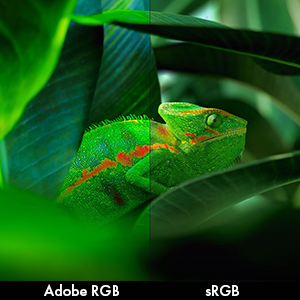
Figure 3.4: Monitor pivot function for portrait orientation.
4. تشغيل الشاشة
4.1 تشغيل/إيقاف التشغيل
Press the power button located on the front bezel to turn the monitor on or off. The power indicator light will illuminate when the monitor is active.
4.2 Color Management and Calibration
The Eizo ColorEdge CS2731 is designed for precise color reproduction. It features a wide color gamut covering 99% of the Adobe RGB color space, ensuring accurate and vibrant colors.

Figure 4.1: Illustration of the monitor's 99% Adobe RGB color gamut coverage, ideal for creative work.
The monitor also includes a Digital Uniformity Equalizer (DUE) to ensure consistent brightness and chromaticity across the entire screen, minimizing variations that can affect color accuracy.

Figure 4.2: The Digital Uniformity Equalizer corrects tone deviations for consistent display across the screen.
For hardware calibration, use Eizo's ColorNavigator 7 software. This software, combined with an optional calibration sensor, simplifies the calibration process and ensures predictable, accurate results across all units.

Figure 4.3: ColorNavigator 7 software facilitates precise hardware calibration for various creative workflows.
فيديو 4.1: أكثر منview of the ColorEdge CS Series Monitors, highlighting their features for creative professionals, including color reproduction, image quality, and ease of use. This video demonstrates the wide color gamut, digital uniformity equalizer, and hardware calibration capabilities.
5. الصيانة
5.1 تنظيف الشاشة
لتنظيف شاشة الكمبيوتر، امسحها برفق بقطعة قماش ناعمة وخالية من الوبر. أما بالنسبة للبقع العنيدة، فامسحها برفق.ampبللي قطعة القماش بالماء أو بمحلول تنظيف الشاشات. تجنبي استخدام المواد الكيميائية القاسية أو المواد الكاشطة.
5.2 العناية العامة
Keep the monitor in a well-ventilated area, away from direct sunlight and excessive heat or moisture. Avoid placing heavy objects on the monitor or its cables. When moving the monitor, ensure it is powered off and disconnected from all cables.
6. استكشاف الأخطاء وإصلاحها
6.1 لا يوجد طاقة
- تحقق مما إذا كان كابل الطاقة متصلاً بشكل آمن بكل من الشاشة ومأخذ الطاقة.
- Ensure the power outlet is functional by plugging in another device.
6.2 لا توجد صورة على الشاشة
- Verify that the video cable (USB-C, DisplayPort, HDMI, or DVI-D) is securely connected to both the monitor and your computer.
- Ensure the correct input source is selected on the monitor's OSD (On-Screen Display) menu.
- Check your computer's display settings to ensure it is configured to output to the monitor.
6.3 عدم دقة الألوان
- Perform a hardware calibration using Eizo ColorNavigator 7 software and a compatible sensor.
- تأكد من أن برامج تشغيل بطاقة الرسومات لديك محدثة.
- Check the monitor's color mode settings in the OSD menu.
For further assistance, please refer to the comprehensive troubleshooting guide available on the Eizo support webموقع.
7. المواصفات

Figure 7.1: Key dimensions of the Eizo ColorEdge CS2731 Monitor.
| يصف | قيمة |
|---|---|
| حجم الشاشة | 27 بوصة |
| دقة | 2560 × 1440 (QHD Wide 1440p) |
| نسبة العرض إلى الارتفاع | 1.78:1 |
| سطوع الصورة | 350 شمعة/م2 |
| وصف سطح الشاشة | مطفي |
| المدخلات | USB Type-C, DisplayPort, HDMI, DVI-D |
| إجمالي منافذ USB | 3 |
| المجلدtage | 240 فولت |
| وزن العنصر | 22.2 رطل |
| رقم موديل العنصر | CS2731-BK |
| تاريخ أول توفر | 8 أبريل 2019 |
Note: Some regional models may have specific voltage requirements or warranty limitations. Refer to your product's specific documentation.

Figure 7.2: Specific warranty and input voltage information for models intended for the Japanese market.
8. الضمان والدعم
The Eizo ColorEdge CS2731 monitor comes with a ضمان الشركة المصنعة لمدة سنة واحدةيغطي هذا الضمان عيوب المواد والصناعة في ظل الاستخدام العادي.
For warranty claims, technical support, or additional product information, please visit the official Eizo support webالموقع أو تواصل مع خدمة العملاء. يمكنك العثور على مزيد من المعلومات والموارد على Eizo Store on Amazon.
Please note that the warranty may be region-specific. For example, some models may have a warranty valid only in Japan, as indicated in certain product images.


