
Raymarine E70534-05
Raymarine Element 9HV HV100 Transom Transducer Instruction Manual
الموديل: E70534-05
مقدمة
This manual provides essential information for the proper installation, operation, and maintenance of your Raymarine Element 9HV with HV-100 Transom Transducer. The Element series is designed to enhance your on-water experience with advanced sonar and navigation capabilities. Please read this manual thoroughly before using the product to ensure optimal performance and safety.
المنتج انتهىview
The Raymarine Element 9HV is a CHIRP sonar/GPS display featuring HyperVision 1.2 megahertz super high-resolution sonar technology. It integrates DownVision, SideVision, and RealVision 3D sonar for detailed underwater imaging. The unit includes a 9-inch high-visibility display and a quad-core processor for fast chart redraw and smooth 3D rendering. Key features include:
- High-visibility sunlight viewable 9-inch display.
- Superior HyperVision CHIRP sonar technology for enhanced clarity.
- Built-in RealVision 3D sonar for accurate identification of underwater structures.
- Fast quad-core processor for responsive performance.
- 1.2 megahertz HyperVision sonar for outstanding resolution up to 100 feet.
- 350kHz Down and SideVision for photo-like imaging up to 600 feet.
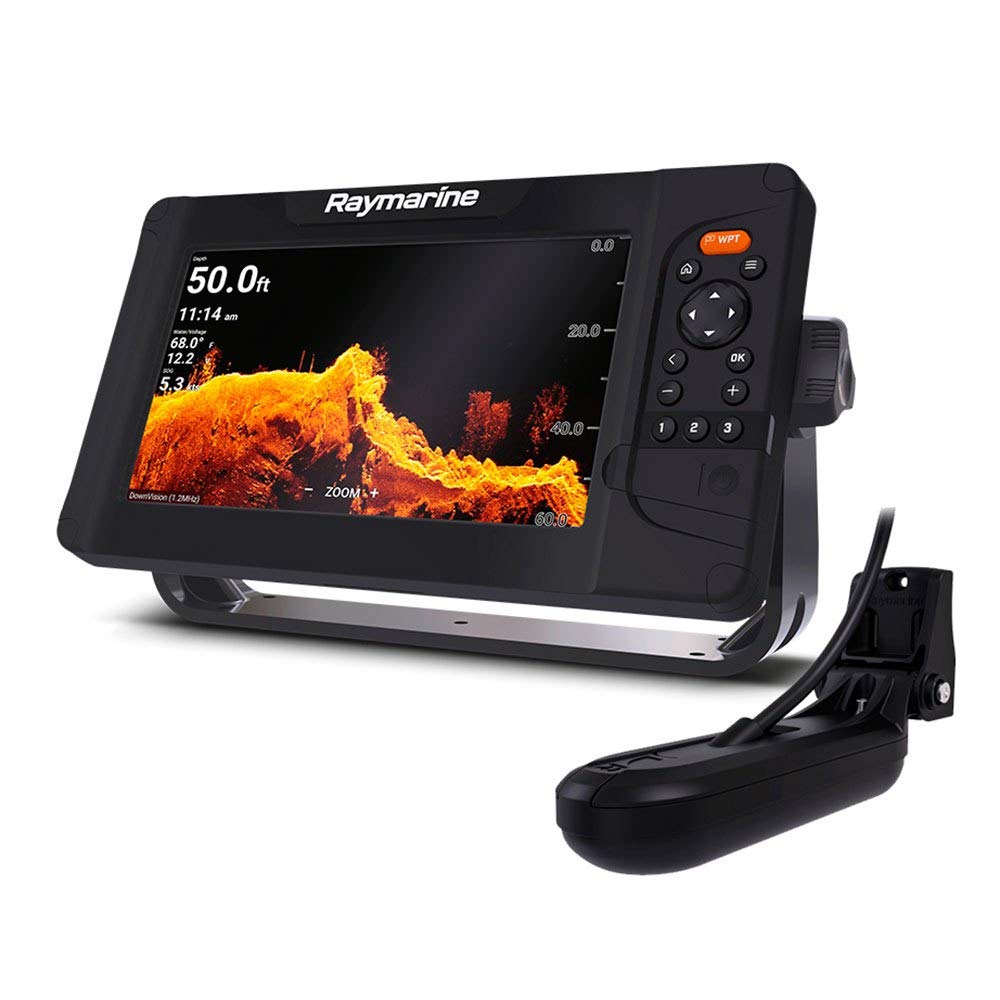
The image displays the Raymarine Element 9HV unit, featuring a detailed chart on its 9-inch screen. The screen shows current depth at 24.3 ft, time 11:16 am, water temperature 67.8°F, voltage 12.1V, and speed over ground (SOG) 5.1 kts. The chart illustrates underwater contours and a boat icon navigating towards a marked waypoint. Control buttons for navigation, menu, and waypoints are visible on the right side of the unit.
يثبت
فك التعبئة
Carefully unpack all components from the box. Verify that all items listed in the packing list are present and undamaged. If any items are missing or damaged, contact your dealer immediately.
تثبيت
The Element 9HV is designed for transom mount installation of the HV-100 transducer. Ensure the mounting location on the transom is clear of obstructions and provides a clean water flow for optimal sonar performance. The display unit should be mounted in a location that is easily viewable and accessible from the helm, away from direct sunlight if possible, to prevent glare. Refer to the detailed installation guide included with your product for specific instructions on mounting the display and transducer, wiring, and power connections. Proper grounding is essential for safe operation.
تعليمات التشغيل
تشغيل/إيقاف التشغيل
To power on the unit, press and hold the Power button until the Raymarine logo appears. To power off, press and hold the Power button until the shutdown options appear, then select 'Power Off'. A quick press of the Power button will bring up the backlight and screen lock options.
الملاحة الأساسية
Use the directional keypad to navigate through menus and pan charts. The 'OK' button confirms selections, and the 'Back' button returns to the previous screen or menu. The 'Home' button (house icon) returns to the main application page.
Sonar Operation (HyperVision, RealVision 3D)
The Element 9HV automatically selects the appropriate sonar mode based on depth and transducer input. Access sonar views from the main application page. Adjust gain, range, and frequency settings as needed for optimal target separation and clarity. HyperVision provides ultra-high-resolution imaging for detailed views of structure and fish up to 100 feet, while RealVision 3D offers a three-dimensional representation of the underwater environment.
Waypoint Management
Press the dedicated 'WPT' button to quickly mark your current location as a waypoint. Waypoints can be edited, named, and organized through the Waypoint Management menu. Use waypoints to mark fishing spots, hazards, or points of interest.
صيانة
تنظيف
نظف شاشة العرض بقطعة قماش ناعمة و...amp cloth. Avoid abrasive cleaners or solvents that could damage the screen coating. For the unit casing, use a mild detergent solution if necessary. Regularly inspect the transducer for marine growth or damage and clean as required to maintain sonar performance.
تخزين
When not in use for extended periods, store the unit in a dry, cool environment, protected from direct sunlight and extreme temperatures. Disconnect power to prevent battery drain.
استكشاف الأخطاء وإصلاحها
| مشكلة | السبب المحتمل | حل |
|---|---|---|
| الوحدة لا تعمل | لا يوجد مصدر طاقة؛ فيوز محترق؛ وصلة غير محكمة | Check power cable connections; Inspect fuse; Verify battery voltage. |
| No sonar readings | Transducer not connected; Air bubbles on transducer; Damaged transducer | Ensure transducer is securely connected; Clean transducer face; Inspect transducer for damage. |
| GPS not acquiring position | Poor satellite signal; Unit obstructed | انتقل إلى منطقة مفتوحة ذات سماء صافية view; Check for obstructions near the unit. |
| Screen freezes or is unresponsive | Software issue; Temporary glitch | Perform a soft reset (power cycle); Update software to the latest version. |
تحديد
| ميزة | مواصفة |
|---|---|
| ماركة | راي مارين |
| اسم الموديل | إي70534-05 |
| مصدر الطاقة | DC امدادات الطاقة |
| حجم الشاشة | 9 بوصة |
| نوع العرض | شاشة الكريستال السائل |
| أقصى عمق للقياس | 100 Feet (HyperVision) |
| نوع التركيب | Transom Mount or Similar |
| وزن العنصر | 2.35 كيلوغرام |
| أبعاد العنصر (الطول × العرض × الارتفاع) | 11.3 بوصة طول × 6.34 بوصة عرض × 2.4 بوصة ارتفاع |
| رمز المنتج الموحد | 723193828052، 723193831632 |
| رقم قطعة الشركة المصنعة | RAY.E70534-05 |
الضمان والدعم
Raymarine products are designed for reliability and performance. This product comes with a standard manufacturer's warranty. For specific warranty terms and conditions, please refer to the warranty card included with your product or visit the official Raymarine website. For technical support, service, or to find an authorized dealer, please contact Raymarine customer service through their official channels. Keep your proof of purchase for warranty claims.
Ask a question about this manual
Ask about setup, troubleshooting, compatibility, parts, safety, or missing instructions. Manuals+ will review the question and use this page’s manual context to help answer it.