
1. المقدمة
Thank you for choosing the HOTT CD511 Portable CD Player. This manual provides detailed instructions for the proper setup, operation, and maintenance of your device. Please read this manual thoroughly before use to ensure optimal performance and longevity of your CD player.
2. انتهى المنتجview
2.1 الميزات الرئيسية
- CD/MP3 Compatibility: Supports CD, CD-R, CD-RW, and MP3 discs.
- Electronic Anti-Skip/Anti-Shock Protection (ESP/ASP): يضمن تشغيلًا سلسًا حتى أثناء الحركة.
- خيارات مصدر الطاقة: Can be powered by batteries or via USB charging.
- وظيفة قفل الزر: Prevents accidental button presses during use.
- تأثيرات صوتية متعددة: Includes BBS, Classic, Jazz, Pop, and Rock EQ modes.
- Various Play Modes: Offers play in order, repeat a track, repeat all, intro (first 10 seconds), and shuffle.
- استئناف الوظيفة: Remembers the last played position even after power off.
2.2 المكونات والضوابط
تعرّف على الأجزاء المختلفة وأدوات التحكم في مشغل الأقراص المدمجة HOTT CD511.
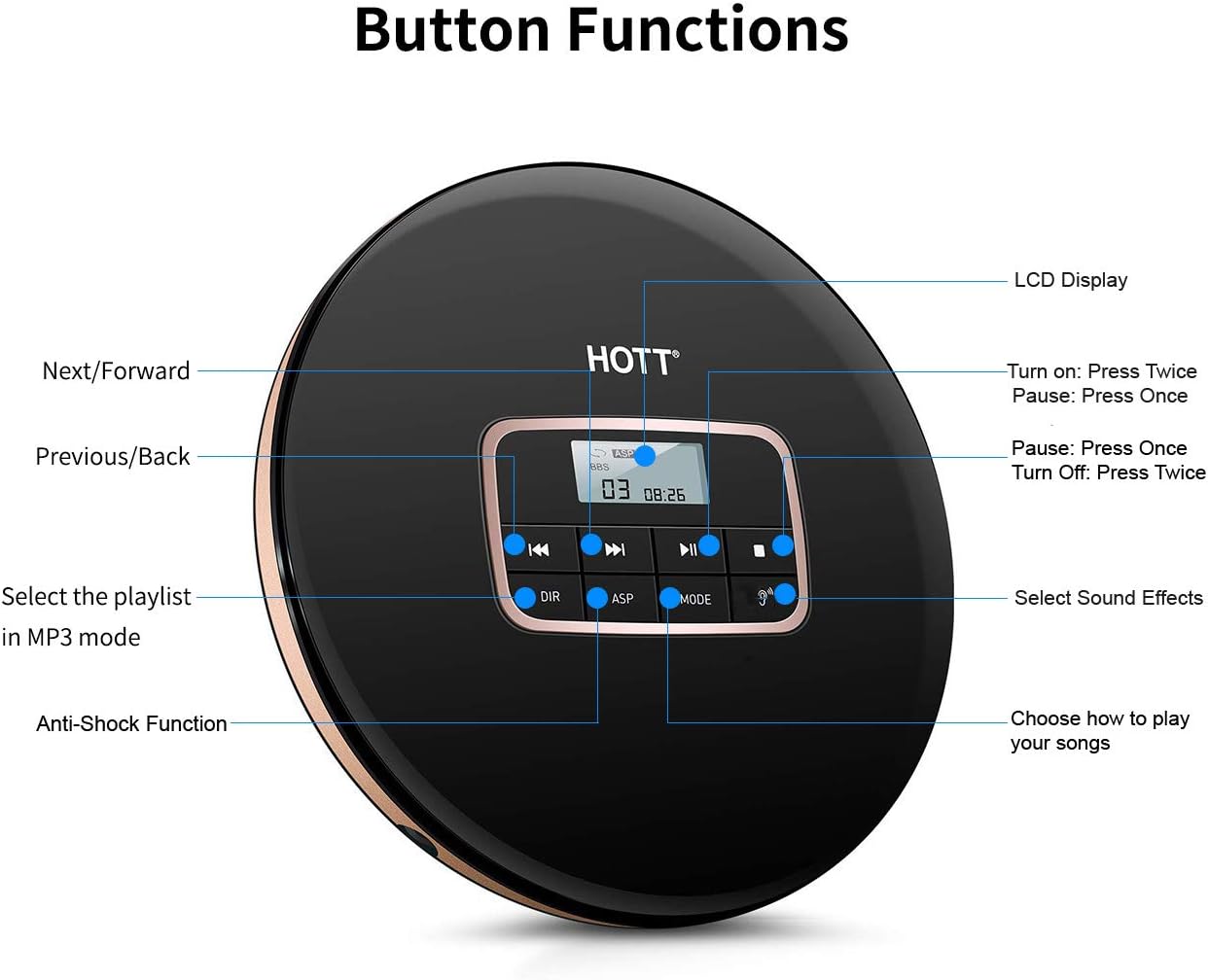
الصورة 1: قمة view of the HOTT CD511 Portable CD Player, highlighting the LCD display and various control buttons for navigation, sound effects, and play modes.
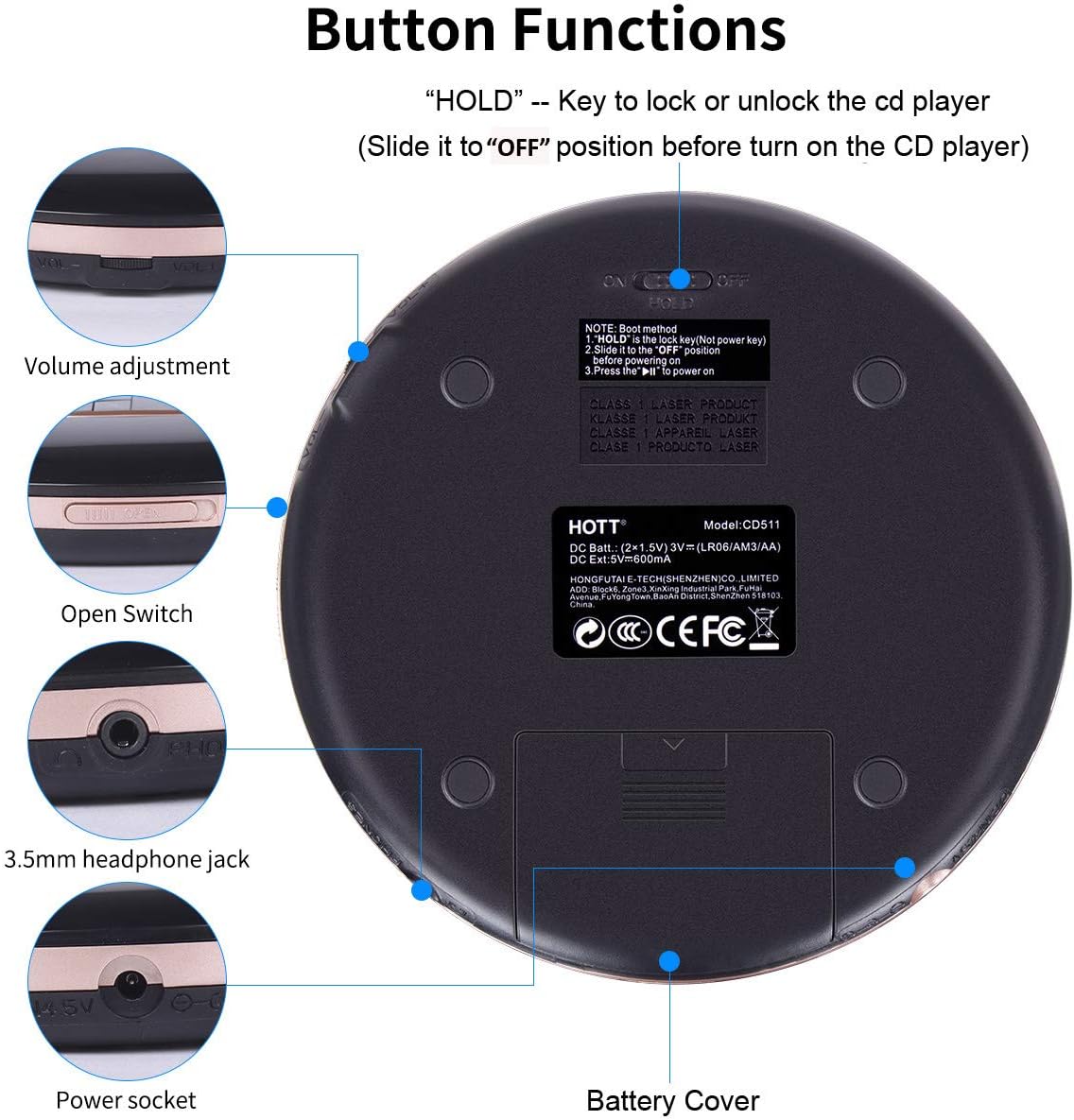
الصورة 2: Bottom and side view of the HOTT CD511 Portable CD Player, showing the HOLD switch, volume control, disc compartment open switch, headphone jack, power socket, and battery cover.
2.3 التوافق

الصورة 3: The HOTT CD511 CD player supports various disc formats including standard CD, CD-R, CD-RW, and MP3 discs.
3. الإعداد
3.1 تشغيل الجهاز
The HOTT CD511 can be powered in two ways:
- البطاريات: Open the battery cover on the bottom of the player. Insert two (2) 1.5V AA batteries, ensuring correct polarity. Close the battery cover securely.
- طاقة USB: Connect the provided USB cable to the power socket on the side of the player and to a USB power adapter (not included) or a computer's USB port.
Note: Ensure the "HOLD" switch is in the "OFF" position before turning on the CD player.
3.2 إدخال قرص مضغوط
- Slide the "OPEN" switch to open the disc compartment lid.
- Carefully place the CD onto the center spindle with the label side facing up.
- اضغط برفق على القرص المضغوط حتى يستقر في مكانه.
- أغلق غطاء حجرة القرص بإحكام حتى يُغلق.
3.3 توصيل سماعات الرأس
Insert your 3.5mm headphones into the headphone jack located on the side of the player.
4. تعليمات التشغيل
4.1 التشغيل الأساسي
- تشغيل الطاقة: اضغط على تشغيل/إيقاف مؤقت اضغط على الزر مرتين.
- تشغيل/إيقاف مؤقت: اضغط على تشغيل/إيقاف مؤقت button once to play or pause.
- توقف: اضغط على قف زر.
- إيقاف التشغيل: اضغط على قف اضغط على الزر مرتين.
4.2 الملاحة
- المسار التالي: اضغط على التالي/إلى الأمام زر.
- المسار السابق: اضغط على PREVIOUS/BACK زر.
- تقديم سريع / ترجيع: اضغط مع الاستمرار على التالي/إلى الأمام or PREVIOUS/BACK زر أثناء التشغيل.
4.3 التحكم في مستوى الصوت
اضبط مستوى الصوت باستخدام ملف الحجم +/- buttons located on the side of the player.
4.4 Play Modes and Sound Effects

الصورة 4: The HOTT CD511 offers various play modes and sound effects for a customized listening experience.
- زر الوضع: Press to cycle through play modes: Single Repeat, All Repeat, Intro, Shuffle.
- زر EQ: Press to cycle through sound effects: BBS, Pop, Jazz, Rock, Classic.
- DIR Button (MP3 mode only): Selects the playlist or folder when playing MP3 discs.
4.5 وظيفة HOLD
حرك يمسك switch on the side of the player to the "ON" position to lock all buttons. This prevents accidental operation during transport. Slide it to "OFF" to unlock the buttons.
4.6 Anti-Skip/Anti-Shock Protection (ASP)
The ASP feature is automatically activated to prevent interruptions during playback caused by minor shocks or vibrations. The duration of anti-shock protection varies depending on the disc type (e.g., CD: 40 seconds, MP3 CD: 120 seconds).
4.7 Car Connectivity

الصورة 5: The HOTT CD511 can be connected to a car's auxiliary input using a 3.5mm audio cable for playback through the car's sound system.
The CD player supports connection to car audio systems via a 3.5mm auxiliary cable. Connect one end of the cable to the player's headphone jack and the other end to your car's AUX input. This feature is compatible with most car models including Toyota, Honda, and Hyundai.
4.8 سيناريوهات الاستخدام

الصورة 6: The HOTT CD511 is suitable for various activities such as relaxation, learning, prenatal education, and travel.
5. الصيانة
- تنظيف: استخدم قطعة قماش ناعمة وجافة لتنظيف الجزء الخارجي من مشغل الأقراص. أما بالنسبة للعدسة، فاستخدم طقم تنظيف عدسات الأقراص المدمجة المخصص. تجنب استخدام المنظفات الكاشطة أو المذيبات.
- العناية بالقرص: Handle CDs by their edges. Keep them clean and free from scratches. Store discs in their cases when not in use.
- استبدال البطارية: Replace batteries when the low battery indicator appears on the LCD screen or when playback becomes inconsistent. Remove batteries if the player will not be used for an extended period.
- تخزين: قم بتخزين الجهاز في مكان بارد وجاف بعيدًا عن أشعة الشمس المباشرة ودرجات الحرارة العالية والرطوبة.
6. استكشاف الأخطاء وإصلاحها
| مشكلة | السبب المحتمل | حل |
|---|---|---|
| المشغل لا يعمل. | Batteries are dead or incorrectly inserted. USB cable is not connected or faulty. HOLD switch is ON. | Replace batteries, check polarity. Ensure USB cable is securely connected. Turn HOLD switch OFF. |
| القرص لا يلعب. | القرص متسخ أو مخدوش أو تم إدخاله بشكل خاطئ. تنسيق القرص غير مدعوم. | Clean the disc, check for damage. Reinsert the disc correctly. Ensure disc is CD, CD-R, CD-RW, or MP3. |
| Sound skipping or interruption. | Disc is dirty or scratched. Player is subjected to excessive shock. | Clean the disc. Avoid strong vibrations. ASP function is active but has limits. |
| لا يوجد صوت من سماعات الرأس. | سماعات الرأس غير موصولة بشكل صحيح. مستوى الصوت منخفض جداً. سماعات الرأس معيبة. | تأكد من توصيل سماعات الرأس بشكل كامل. ارفع مستوى الصوت. جرب استخدام سماعات رأس مختلفة. |
7. المواصفات
- نموذج: سي دي 511
- أبعاد المنتج: 5.6 × 5.6 × 0.6 بوصة
- وزن السلعة: 15.5 أونصات
- ماركة: حار
- لون: أسود
- تقنية الاتصال: مساعد ، USB
- ميزة خاصة: محمول
- عدد الأقراص: 1
- الشركة المصنعة: حار
- أول متاح: 10 مارس 2019
8. فيديو المنتج الرسمي
فيديو 1: An official product video demonstrating the features and usage of the HOTT CD Player.
9. الضمان والدعم
For warranty information or technical support, please refer to the contact details provided with your product packaging or visit the official HOTT webالموقع. احتفظ بإيصال الشراء الخاص بك كإثبات للشراء في حالة مطالبات الضمان.