
تعليمات السلامة الهامة
To ensure safe operation and prolong the life of your monitor, please read and follow these instructions carefully:
- افصل سلك الطاقة دائمًا من مأخذ الكهرباء قبل تنظيف الشاشة.
- لا تعرض الشاشة للمطر أو الرطوبة لتجنب الصدمات الكهربائية.
- تأكد من وجود تهوية مناسبة حول الشاشة لمنع ارتفاع درجة حرارتها. لا تسد فتحات التهوية.
- استخدم فقط محول الطاقة والكابلات التي يوفرها المصنع.
- تجنب وضع أشياء ثقيلة على سلك الطاقة أو الشاشة.
- If the monitor is damaged or malfunctions, do not attempt to repair it yourself. Contact qualified service personnel.
محتويات الحزمة
Before proceeding with the setup, please check the contents of your package to ensure all items are present:
- Acer CB272U smiiprx LED Monitor
- حامل شاشة (قاعدة وذراع)
- سلك الطاقة
- كابل HDMI
- دليل البدء السريع / بطاقة الضمان
يثبت
1. تجميع حامل الشاشة
- Carefully remove the monitor from its packaging. Place the monitor face down on a soft, clean cloth or surface to prevent scratches to the screen.
- Attach the stand arm to the back of the monitor panel. Ensure it is securely fastened, typically by sliding it into place until it clicks or by tightening screws.
- Connect the stand base to the bottom of the stand arm. Secure the base by tightening the captive screw located underneath the base.

الشكل 1: خلفي view of the Acer CB272U smiiprx monitor with the stand attached, illustrating the assembly points.
2. Connecting the Monitor to Your Computer
- Connect one end of the provided HDMI cable to the HDMI port on the monitor.
- Connect the other end of the HDMI cable to the HDMI output port on your computer or graphics card.
- قم بتوصيل سلك الطاقة بمدخل الطاقة الخاص بالشاشة، ثم قم بتوصيل الطرف الآخر بمأخذ كهربائي مؤرض.

الشكل 2: الزاوية الخلفية view showing the input ports of the monitor, including HDMI and power connections.
تشغيل الشاشة
التشغيل وإيقاف التشغيل
Locate the power button on the monitor's bezel. Press it once to turn the monitor on. The power indicator light will illuminate. Press it again to turn the monitor off.
Adjusting Display Settings (OSD Menu)
The On-Screen Display (OSD) menu allows you to customize various monitor settings. Use the control buttons (usually located on the back or bottom right of the monitor) to navigate the OSD menu. Common adjustments include:
- السطوع / التباين: اضبط مستوى الإضاءة الكلي والفرق بين المناطق المضيئة والمظلمة.
- إعدادات الألوان: تعديل درجة حرارة اللون، وجاما، ومستويات RGB الفردية.
- مصدر الإدخال: Manually select the video input (e.g., HDMI).
- صوتي: التحكم في مستوى صوت مكبرات الصوت المدمجة.
تعديلات مريحة
The Acer CB272U smiiprx monitor stand offers multiple ergonomic adjustments to optimize your viewالراحة:
- ضبط الارتفاع: ارفع أو اخفض الشاشة إلى مستوى العين.
- الإمالة: Adjust the screen angle forward or backward to reduce glare.
- قطب: Rotate the monitor horizontally to share your screen or adjust viewزاوية جي.
- المحور: Rotate the screen to a portrait orientation for document viewing or coding.
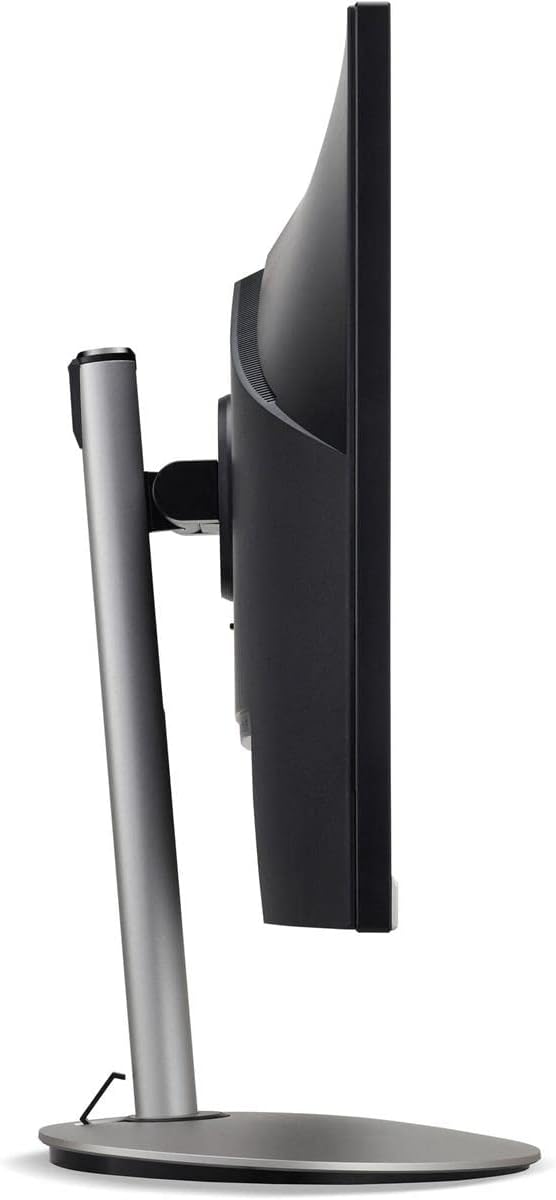
الشكل 3: الجانب الإيجابيfile of the monitor, illustrating its adjustable stand for ergonomic positioning.
صيانة
Cleaning the Monitor Screen and Casing
To clean your monitor, first ensure it is turned off and unplugged from the power outlet. Use a soft, lint-free cloth. For stubborn marks, lightly dampen the cloth with water or a specialized non-abrasive screen cleaner. لا ترش السائل مباشرة على الشاشة أوasing. تجنب استخدام المواد الكيميائية القاسية، أو المنظفات الكاشطة، أو المذيبات.
إرشادات التخزين
If you need to store the monitor for an extended period, it is recommended to use its original packaging to protect it from dust, moisture, and physical damage. Store in a cool, dry environment away from direct sunlight and extreme temperatures.
استكشاف الأخطاء وإصلاحها
راجع الجدول أدناه للتعرف على المشكلات الشائعة وحلولها:
| مشكلة | السبب المحتمل | حل |
|---|---|---|
| لا توجد صورة على الشاشة | تم فصل كابل الطاقة؛ تم فصل كابل الفيديو؛ تم تحديد مصدر إدخال غير صحيح. | تحقق من توصيلات كابلات الطاقة والفيديو؛ تأكد من تشغيل الشاشة؛ حدد مصدر الإدخال الصحيح عبر قائمة العرض على الشاشة (OSD). |
| الصورة ضبابية أو مشوهة | Incorrect resolution setting; Faulty video cable. | Set the display resolution to 2560 x 1440 at 75 Hz; Try a different HDMI cable. |
| لا يوجد صوت من مكبرات الصوت | Monitor volume too low or muted; Incorrect audio output selected on computer. | Adjust monitor volume via OSD; Unmute audio; Select the monitor as the audio output device in your computer's sound settings. |
| وميض الشاشة | Refresh rate mismatch; Interference; Faulty cable. | Ensure refresh rate is set to 75 Hz; Check for nearby electronic devices causing interference; Replace video cable. |
تحديد
Key technical specifications for the Acer CB272U smiiprx LED Monitor:
| ميزة | التفاصيل |
|---|---|
| اسم الموديل | CB272U smiiprx |
| حجم الشاشة | 24.1 بوصة |
| الدقة الأصلية | 2560 × 1440 (WQHD) |
| معدل التحديث | 75 هرتز |
| وقت الاستجابة | 1 Millisecond (VRB) |
| نسبة العرض إلى الارتفاع | 16:9 |
| نوع العرض | LED-backlit LCD / TFT active matrix (IPS) |
| سطوع | 350 شمعة/م² |
| نسبة التباين | 1000:1 (ثابت) |
| الاتصال | منفذ HDMI |
| المزامنة التكيفية | فري سينك |
| مكبرات صوت مدمجة | نعم |
| Dimensions (WxDxH with stand) | 24.1 بوصة × 9.2 بوصة × 20.5 بوصة |
| الوزن (مع الحامل) | 18.1 رطل |

Figure 4: Monitor dimensions with stand, indicating width, depth, and height.
معلومات الضمان
The Acer CB272U smiiprx LED Monitor comes with a ضمان محدود من الشركة المصنعة لمدة عام واحد. This warranty covers defects in materials and workmanship under normal use. For complete details regarding warranty coverage, limitations, and how to make a claim, please refer to the warranty documentation included with your product or visit the official Acer support webموقع.
Please retain your proof of purchase (receipt or invoice) as it will be required for any warranty service.
دعم العملاء
Should you require further assistance, technical support, or wish to download the latest drivers and firmware updates for your monitor, please visit the official Acer support webموقع:
You can also find contact information for Acer customer service in your region on the support webموقع للحصول على مساعدة شخصية.