
1. المقدمة
شكرا لك على الشراءasing the Myra TouYinGer X20 LED Projector. This manual provides essential information for setting up, operating, and maintaining your projector. Please read it thoroughly before use to ensure proper operation and to extend the lifespan of your device.
2. معلومات السلامة
- Use the projector in a dark and cool environment for optimal performance and extended product life.
- Avoid using the projector in dusty or humid conditions.
- ال تسد فتحات التهوية الخاصة بجهاز العرض.
- لا تنظر مباشرة إلى عدسة جهاز العرض عندما يكون الضوءamp هو على.
- This projector is not recommended for office presentations or educational use.
- Ensure the power supply matches the projector's requirements (AC110V~240V 50Hz/60Hz).
3. محتويات العبوة
قم بفتح الصندوق بعناية وتأكد من وجود جميع العناصر المذكورة أدناه وأنها بحالة جيدة. في حال وجود أي عناصر مفقودة أو تالفة، يرجى التواصل مع خدمة العملاء.
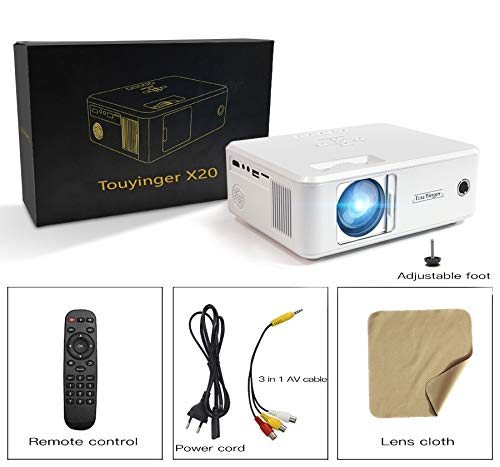
Image: The Myra TouYinGer X20 Projector shown with its packaging box and included accessories: remote control, power cord, 3-in-1 AV cable, and a lens cleaning cloth.
- Myra TouYinGer X20 LED Projector
- جهاز التحكم عن بعد
- سلك الطاقة
- 3 في 1 كابل صوت وصورة
- عدسة تنظيف القماش
- دليل المستخدم (هذا المستند)
4. انتهى المنتجview
4.1 الأبعاد والمكونات
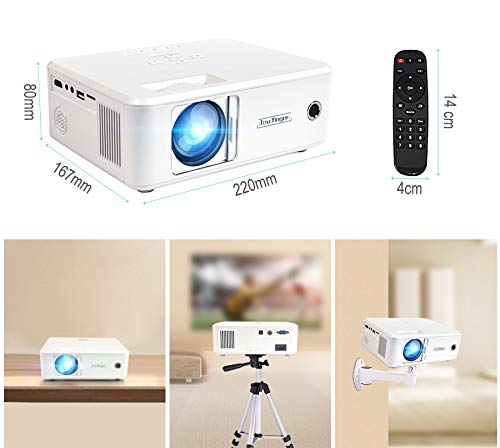
الصورة: أعلى view of the Myra TouYinGer X20 Projector showing its dimensions (220mm length, 167mm width, 80mm height). Also shown are the remote control dimensions (14cm length, 4cm width) and examples of projector placement: tabletop, tripod mount, and wall mount.
The projector features a compact design with various ports for connectivity. Key components include the lens, focus ring, keystone correction, input ports (HDMI, USB, VGA, AV, SD card slot), and power input.
4.2 واجهات
- HDMI: For connecting to devices like laptops, gaming consoles, and Blu-ray players.
- USB: لتوصيل محركات أقراص USB المحمولة لتشغيل الوسائط files. (Note: Supports Pendrive only, not hard disks or phones).
- VGA: للاتصال بأجهزة الكمبيوتر.
- من: For connecting to older devices using the included 3-in-1 AV cable.
- فتحة بطاقة SD: لتشغيل الوسائط fileمباشرة من بطاقة SD.
- منفذ صوت 3.5 ملم: لتوصيل مكبرات الصوت الخارجية أو سماعات الرأس.
5. الإعداد
5.1 التنسيب
Position the projector on a stable, flat surface or mount it using a compatible tripod or ceiling mount. Ensure there is adequate ventilation around the projector. The projection distance ranges from 1.2 to 3.8 meters, yielding a screen size of 37 to 130 inches. For best results, use in a dark environment.
5.2 توصيل الطاقة
- قم بتوصيل سلك الطاقة بمدخل الطاقة الخاص بالجهاز العرض.
- Plug the other end of the power cord into a suitable electrical outlet (AC110V~240V, 50Hz/60Hz).
- سوف يضيء مؤشر الطاقة الموجود على جهاز العرض.
5.3 توصيل مصادر الإدخال
Connect your desired media source (e.g., laptop, USB drive, DVD player) to the corresponding port on the projector.
- HDMI: Connect an HDMI cable from your device to the projector's HDMI port.
- يو إس بي/إس دي: Insert a USB flash drive or SD card into the respective slot.
- VGA: Connect a VGA cable from your computer to the projector's VGA port.
- من: Use the provided 3-in-1 AV cable to connect to devices with RCA outputs.
5.4 ضبط التركيز والانحراف
- ركز: قم بتدوير حلقة التركيز الموجودة على عدسة جهاز العرض حتى تصبح الصورة المعروضة واضحة وحادة.
- تصحيح الانحراف: Use the keystone adjustment dial (±12 vertical) to correct trapezoidal distortion if the projector is not perfectly perpendicular to the screen.
6. تعليمات التشغيل
6.1 تشغيل/إيقاف التشغيل
- تشغيل الطاقة: Press the power button on the projector or the remote control. The LED lamp سيتم تشغيله.
- إيقاف التشغيل: Press the power button again. Allow the projector to cool down before unplugging it.
6.2 اختيار المصدر
Use the 'Source' button on the remote control or projector to cycle through available input sources (HDMI, USB, VGA, AV, SD).
6.3 تشغيل الوسائط (USB/SD)
When a USB drive or SD card is inserted, navigate the on-screen menu using the remote control to select the desired media type (Video, Music, Photo, Text) and then browse for your files.
- تنسيقات الصوت المدعومة: MP3 ، WMA ، AAC
- تنسيقات الفيديو المدعومة: MPEG1, MPEG2, MPEG4, H264, RM, RMVB, MOV, MJPEG, VC1, DIVX, FLV (Note: AC3 audio is not supported).
- تنسيقات الصور المدعومة: JPEG، BMP، PNG
6.4 وظائف ثلاثية الأبعاد
The projector supports Red & Blue 3D format. To view 3D content, you will need compatible Red & Blue 3D glasses (not included).
7. الصيانة
7.1 تنظيف العدسات
Use the provided lens cleaning cloth or a soft, lint-free cloth to gently wipe the projector lens. Avoid using abrasive cleaners or excessive force.
7.2 الحماية من الغبار
The projector features an embedded lens cover for better lens and dust protection. Always replace the lens cover when the projector is not in use. Regularly clean the projector's exterior with a soft, dry cloth.
7.3 لترamp حياة
الصمام لamp has an estimated lifespan of 20,000 hours. Proper ventilation and operating conditions will help maximize lamp حياة.
8. استكشاف الأخطاء وإصلاحها
إذا واجهت مشكلات مع جهاز العرض الخاص بك، فيرجى الرجوع إلى المشكلات والحلول الشائعة التالية:
| مشكلة | السبب المحتمل | حل |
|---|---|---|
| لا توجد صورة على الشاشة | Incorrect input source selected; Loose cable connection; Power issue | Select the correct input source; Check all cable connections; Ensure projector is powered on. |
| الصورة ضبابية | لم يتم ضبط التركيز؛ جهاز العرض بعيد جدًا/قريب جدًا من الشاشة | اضبط حلقة التركيز؛ اضبط مسافة الإسقاط. |
| الصورة شبه منحرفة | جهاز العرض غير عمودي على الشاشة | اضبط قرص تصحيح الانحراف. |
| لا يوجد صوت | Volume too low; Audio format not supported; External speakers not connected | Increase volume; Check if audio format is supported (AC3 not supported); Connect external speakers if needed. |
| لم يتم التعرف على محرك أقراص USB | Unsupported device; Corrupted files | Ensure it's a USB Pendrive (hard disks/phones not supported); Check file system and integrity. |
9. المواصفات
| ميزة | مواصفة |
|---|---|
| نموذج | إكس 20 |
| تكنولوجيا العرض | لوحة LCD أحادية TFT + تقنية LED |
| الدقة الأصلية | 800 x 600 dpi (Supports 720p, 1080p) |
| سطوع | 2200 لومن |
| نسبة التباين | 1500:1 |
| Lamp يكتب | الصمام Lamp |
| Lamp حياة | 20,000 ساعات |
| الألوان القابلة للعرض | 16.7 كيلو |
| عدسة | F=126 mm (Manual focusing) |
| تصحيح الانحراف | ±12° Vertical (Manual) |
| حجم شاشة العرض | 37-130 بوصة |
| مسافة الإسقاط | 1.2-3.8 متر |
| نسبة العرض إلى الارتفاع | نسبة العرض الأصلية 16:9، متوافقة مع نسبة العرض 4:3 |
| واجهة الوسائط المتعددة | 1*VGA, 1*USB, 1*SD, 1*HDMI, 1*3.5mm Audio port, 1*AV, 1*TV |
| مزود الطاقة | AC110V~240V 50Hz/60Hz |
| أبعاد | 212 مم × 150 مم × 78 مم |
| وزن | 1.5 كجم |
| المميزات الخاصة | Portable, Red & Blue 3D Support |
10. الضمان والدعم
The Myra TouYinGer X20 LED Projector comes with a ضمان لمدة سنة واحدة من تاريخ الشراء.
For warranty claims, technical support, or any inquiries, please contact Myra customer service:
- هاتف: 8955589977
- بريد إلكتروني: myrakhmshop@gmail.com
يرجى تجهيز طراز المنتج (X20) وتفاصيل الشراء عند الاتصال بالدعم.