
مقدمة
This manual provides instructions for the Calvas USARMT LTV-914 Universal Remote Control, designed for use with various LG TV models, including AKB73715634, AKB73715679, and 3D Smart TV LN577S. This remote operates via infrared (IR) technology and is intended as a direct replacement, requiring no programming for most compatible LG televisions.
محتويات الحزمة
- 1 x USARMT LTV-914 Universal Remote Control
تحديد
- رقم الموديل: ال تي في-914
- ماركة: البقع الصلعاء
- يكتب: جهاز التحكم عن بعد للتلفزيون
- تواصل: الأشعة تحت الحمراء (IR)
- تكرار: 433 ميجا هرتز
- القنوات: 1
- مصدر الطاقة: 2 بطاريات قلوية AAA (غير متضمنة)
- مادة: نظام ABS
- الأجهزة المتوافقة: LG Televisions (e.g., AKB73715634, AKB73715679, 3D Smart TV LN577S)
- ميزة خاصة: التوافق العالمي
يثبت
تركيب البطاريات
- حدد موقع حجرة البطارية في الجزء الخلفي من جهاز التحكم عن بعد.
- قم بتحريك غطاء حجرة البطارية للأسفل أو اضغط على المزلاج وارفع لفتحه.
- أدخل بطاريتين قلويتين من نوع AAA، مع التأكد من محاذاة الأطراف الموجبة (+) والسالبة (-) بشكل صحيح مع العلامات الموجودة داخل الحجرة.
- قم باستبدال غطاء حجرة البطارية عن طريق تحريكه مرة أخرى إلى مكانه حتى يصدر صوت نقرة آمنة.

Image: Back of the remote control with the battery compartment open, illustrating battery insertion.
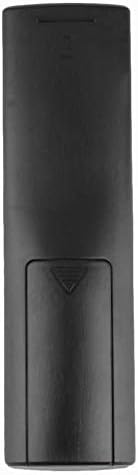
الصورة: الخلفية view of the remote control with the battery cover closed.
تعليمات التشغيل
الاستخدام الأولي
The Calvas USARMT LTV-914 remote control is designed to work directly with most compatible LG TV models without requiring any programming. Simply insert the batteries and point the remote towards your television.
Direct Use and Basic Functions
Most functions, such as power on/off, volume control, channel selection, and navigation, should operate immediately upon pointing the remote at your LG TV.

الصورة: الجبهة view of the remote control, displaying the button layout.
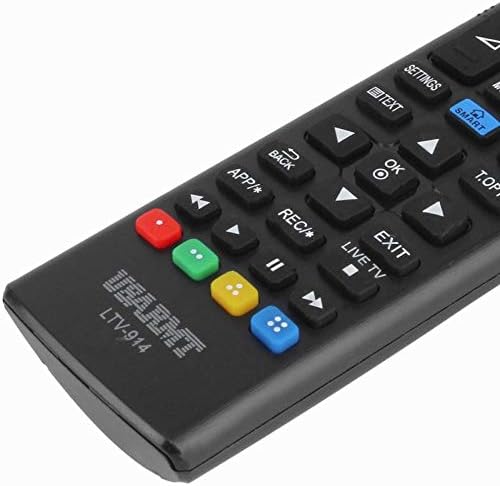
Image: Close-up of the remote's buttons, showing details of the control interface.
Factory Reset / Reconfiguration (If direct use fails)
In rare cases, if the remote does not operate your TV directly, you may need to perform a factory reset or attempt a reconfiguration.
- To reset to factory settings: Press and hold the قوة button and the number 0 اضغط على الزر في نفس الوقت لعدة ثواني.
- To attempt re-pairing (if applicable, though typically not required for this universal remote): Press and hold the قوة button and the number 1 اضغط على الزر في نفس الوقت لعدة ثواني.
After performing either of these steps, release the buttons and test the remote's functionality with your TV.
استكشاف الأخطاء وإصلاحها
- جهاز التحكم عن بعد لا يستجيب:
- تأكد من إدخال البطاريات بشكل صحيح مع القطبية الصحيحة.
- Replace old or depleted batteries with new AAA alkaline batteries.
- تأكد من عدم وجود أي عوائق بين جهاز التحكم عن بعد وجهاز استقبال الأشعة تحت الحمراء الخاص بالتلفزيون.
- تأكد من أنك ضمن النطاق الفعال لجهاز استقبال الأشعة تحت الحمراء الخاص بالتلفزيون.
- بعض الوظائف لا تعمل:
- While this is a universal remote, some advanced or specific smart TV functions might not be fully supported on all LG models.
- Try the factory reset/reconfiguration steps mentioned in the "Operating Instructions" section.
- Remote LED indicator not lighting up:
- This usually indicates dead batteries or incorrect battery insertion. Replace batteries.
صيانة
- حافظ على جهاز التحكم جافًا. تجنب تعرضه للسوائل.
- لا تقم بإسقاط الجهاز أو تعريضه لصدمات قوية.
- نظّف جهاز التحكم عن بُعد بقطعة قماش ناعمة وجافة. لا تستخدم المنظفات الكاشطة أو المذيبات.
- إذا لم يتم استخدام جهاز التحكم عن بعد لفترة طويلة، قم بإزالة البطاريات لمنع التسرب.
الضمان والدعم
Specific warranty information for this product is not provided in the available data. For support or warranty inquiries, please contact your retailer or the manufacturer, Calvas.