
1. المقدمة
This manual provides detailed instructions for the setup, operation, and maintenance of your Zerone Digital Alarm Clock, Model Zeronek1gfg26oth-02. Please read this manual thoroughly before using the product to ensure proper function and longevity.
2. معلومات السلامة والاحتياطات
- Use the clock in a dry environment. Avoid prolonged exposure to wet conditions, high temperatures, or areas with rapid temperature changes.
- Handle the clock with care to prevent damage.
- When using batteries, ensure they are high-quality AAA alkaline batteries. If the display dims or blinks, replace the batteries promptly. Prevent battery leakage by replacing old batteries.
- If the clock is not powered, verify that batteries are correctly inserted or the USB power source is connected.
- When using a USB power adapter, ensure it is a compatible DC 5V/500mA adapter.
3. محتويات العبوة
Upon opening the package, please verify that all accessories are present:
- Digital Wooden Clock (1 pc)
- User's Manual (1 pc)
- USB Charging Cable (1 pc)
4. انتهى المنتجview
The Zerone Digital Alarm Clock features a modern cube design with an LED display that shows time and temperature. It includes multiple alarm settings and adjustable brightness.

الشكل 4.1: أمام view of the Zerone Digital Alarm Clock displaying the time.

الشكل 4.2: Key features indicated by icons: Clock, Alarm, Thermometer, and Sound Control.
4.1. المكونات والأزرار
The clock features a minimalist design with control buttons located on the back panel.
- زر SET: تُستخدم لإدخال الإعدادات وتأكيدها.
- زر لأعلى: Used to increase values or navigate settings.
- زر لأسفل: Used to decrease values or navigate settings. Also controls sound control mode.
- زر إعادة الضبط: A small recessed button to reset the clock to factory defaults.
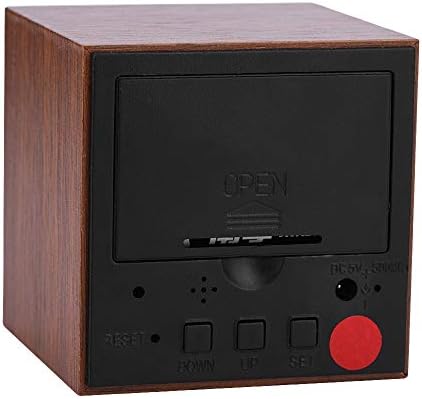
الشكل 4.3: مؤخرة view of the clock with the battery cover closed, showing the USB power input and control buttons.
5. الإعداد
5.1. تشغيل الساعة
The clock can be powered by either 3 AAA batteries or a DC 5V/500mA USB power supply.
- طاقة البطارية: Open the battery compartment cover on the back of the clock. Insert 3 AAA alkaline batteries, ensuring correct polarity (+/-). Close the cover securely.
- طاقة USB: Connect the provided USB charging cable to the DC 5V/500mA port on the back of the clock and plug the other end into a compatible USB power adapter (not included) or a USB port.
Note: When powered by batteries, the sound control mode is recommended to conserve power. The display will not show continuously in this mode.
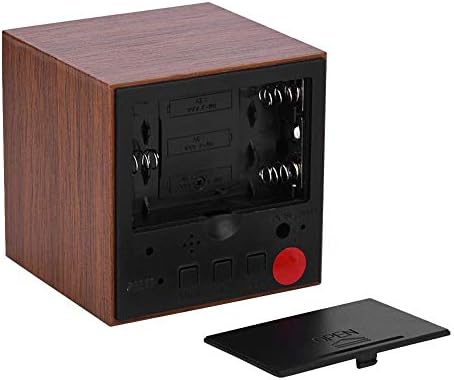
الشكل 5.1: مؤخرة view with the battery compartment open, showing slots for 3 AAA batteries.
6. تعليمات التشغيل
6.1. أوضاع العرض
The clock has two main display modes:
- DP-1: Displays Time, Temperature, Year, Month, and Date in a rotating sequence.
- DP-2: Displays Time continuously.
To switch between DP-1 and DP-2, press the تعيين الزر لفترة وجيزة.
6.2. ضبط الوقت والتاريخ
للدخول إلى وضع الإعداد، اضغط مع الاستمرار على تعيين button for 3 seconds. The display will show the first setting item (YEAR) flashing.
- While an item is flashing, use the UP or تحت أزرار لضبط القيمة.
- اضغط على تعيين button briefly to move to the next setting item.
- The setting sequence is: YEAR → MONTH → DATE → 12/24H Format → HOUR → MINUTE → ALARM 1 (AL1) → ALARM 2 (AL2) → ALARM 3 (AL3).
- After setting the last item (AL3), the clock will exit the setting mode automatically.
6.3. ضبط الإنذارات
The clock supports three independent alarms (AL1, AL2, AL3). Each alarm sounds for 1 minute.
- Enter the setting mode by pressing and holding the تعيين اضغط على الزر لمدة 3 ثوان.
- يضعط تعيين repeatedly until you reach the AL1, AL2, or AL3 setting.
- When the alarm hour or minute is flashing, use the UP or تحت أزرار لضبط وقت التنبيه المطلوب.
- يضعط تعيين للتأكيد والانتقال إلى إعداد الإنذار التالي أو الخروج.
6.4. ضبط السطوع
The clock offers three levels of brightness (L1, L2, L3), with L3 being the brightest and L1 the dimmest. Additionally, the display automatically reduces brightness by half between 18:00 (6 PM) and 07:00 (7 AM).
- اضغط مع الاستمرار على UP button for 3 seconds to enter brightness adjustment mode. The current brightness level (e.g., "L3") will be displayed.
- استخدم UP or تحت buttons to cycle through the brightness levels (L1, L2, L3).
- Once the desired brightness is set, press and hold the UP button for 3 seconds again to exit brightness adjustment mode.
6.5. Activating Sound Control Mode
Sound control mode (power-saving mode) is recommended when the clock is powered by batteries. In this mode, the display turns off and activates when a sound is detected (e.g., a clap or tap).
To toggle sound control mode:
- اضغط على تحت الزر لفترة وجيزة.
- "ON:SD" indicates sound control is active.
- "--:SD" indicates sound control is off, and the display will remain continuously on (if in DP-2 mode).
6.6. Switching Temperature Unit (Celsius/Fahrenheit)
The clock supports both Celsius (C) and Fahrenheit (F) temperature displays.
To switch the temperature unit:
- اضغط على UP button briefly. The display will toggle between "--:C" (Celsius) and "--:F" (Fahrenheit).
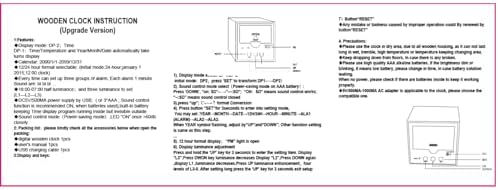
الشكل 6.1: Reference image of the original instruction sheet.
7. الصيانة
- نظّف الساعة بقطعة قماش ناعمة وجافة. لا تستخدم المنظفات الكاشطة أو المذيبات.
- Avoid exposing the clock to water or excessive moisture, as this can damage the internal circuitry.
- إذا لم يتم استخدام الساعة لفترة طويلة، فقم بإزالة البطاريات لمنع التسرب.
8. استكشاف الأخطاء وإصلاحها
| مشكلة | السبب المحتمل | حل |
|---|---|---|
| Display is dim or blinking. | انخفاض طاقة البطارية. | Replace AAA batteries or connect to USB power. |
| Display is off, no time shown. | Sound control mode is active and no sound detected; no power. | Tap the clock or make a sound to activate display. Check battery installation or USB power connection. Disable sound control mode by pressing تحت button until "--:SD" is shown. |
| الساعة لا تستجيب لضغطات الأزرار. | Temporary software glitch or improper operation. | Use a thin object (like a paperclip) to press the recessed إعادة ضبط button on the back of the clock. This will restore default settings. |
| Time or date is incorrect after power loss. | Batteries removed or depleted while USB power was disconnected. | أعد ضبط الوقت والتاريخ باتباع التعليمات الواردة في القسم 6.2. |
9. المواصفات
| ميزة | مواصفة |
|---|---|
| ماركة | زيرون |
| رقم الموديل | Zeronek1gfg26oth-02 |
| مادة | MDF, PVC |
| لون | بني |
| نوع العرض | الصمام الرقمي |
| أبعاد المنتج | 6 x 6 x 6 cm (2.36"W x 2.36"H) |
| وزن العنصر | 3.87 أونصات |
| مصدر الطاقة | 3 x AAA Batteries (not included) OR DC 5V/500mA USB |
| مستويات السطوع | 3 (L1، L2، L3) |
| وظيفة التنبيه | Yes, 3 groups of alarms |
| عرض درجة الحرارة | Yes (Celsius/Fahrenheit) |
| تنسيق الوقت | 12-hour or 24-hour mode |
| المميزات الخاصة | Voice Control Mode, Automatic Half Luminance (18:00-07:00) |

الشكل 9.1: Dimensions of the Zerone Digital Alarm Clock.
10. الضمان والدعم
For warranty information or technical support, please refer to the product packaging or contact the retailer where the product was purchased. Keep your purchase receipt as proof of purchase.