
1. المقدمة
The MOXA MGate MB3660-16-2DC is a high-performance 16-port Modbus gateway designed for converting between Modbus TCP and Modbus RTU/ASCII protocols. This device facilitates seamless communication between Modbus TCP hosts and Modbus RTU/ASCII serial devices. It features dual DC power inputs for enhanced reliability and redundancy, making it suitable for critical industrial automation applications.
This manual provides essential information for the proper installation, configuration, operation, and maintenance of your MGate MB3660-16-2DC gateway.
2. معلومات السلامة
Please read and understand all safety instructions before operating the device. Failure to do so may result in injury or damage to the equipment.
- تأكد من حجم امدادات الطاقةtage matches the device's requirements (dual DC input).
- Disconnect power before performing any installation or maintenance procedures.
- قم بتركيب الجهاز في منطقة جيدة التهوية لمنع ارتفاع درجة حرارته.
- تجنب تعريض الجهاز للرطوبة أو درجات الحرارة القصوى أو البيئات المسببة للتآكل.
- يجب أن يقوم بالتركيب والصيانة فقط الأفراد المؤهلون.
3. محتويات العبوة
تأكد من أن الحزمة الخاصة بك تحتوي على العناصر التالية:
- MOXA MGate MB3660-16-2DC Modbus Gateway
- دليل التثبيت السريع
- بطاقة الضمان
- كتلة طرفية لإدخال الطاقة
- DIN-rail mounting kit (if applicable)
If any of these items are missing or damaged, please contact your sales representative immediately.
4. وصف الأجهزة
The MGate MB3660-16-2DC features multiple ports and indicators for easy setup and monitoring.
4.1 اللوحة الأمامية
The front panel typically includes LED indicators for power, network activity, and serial port status.
- PWR1/PWR2 LED: Indicates status of primary/secondary DC power input.
- خطأ الصمام: Indicates system errors or warnings.
- LAN1/LAN2 LEDs: Indicate Ethernet link and activity.
- Serial Port LEDs (1-16): Indicate data transmission/reception on each serial port.
4.2 Rear/Side Panels
These panels house the connection ports:
- مدخلات الطاقة: Dual DC power input terminal blocks for redundant power.
- منافذ إيثرنت: RJ45 ports for Modbus TCP network connection.
- المنافذ التسلسلية: 16 DB9 or terminal block connectors for Modbus RTU/ASCII devices.
- زر إعادة الضبط: لاستعادة إعدادات المصنع الافتراضية.
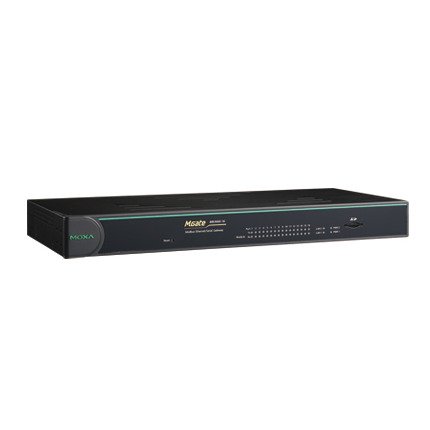
الشكل 1: الجبهة view of the MOXA MGate MB3660-16-2DC Modbus Gateway, showing LED indicators and general form factor.
5. الإعداد
5.1 التركيب
The MGate MB3660-16-2DC can be mounted on a DIN-rail or wall-mounted using the provided kit.
- تركيب السكك الحديدية DIN: Attach the DIN-rail clip to the back of the device and snap it onto a standard DIN-rail.
- التثبيت على الحائط: Secure the wall-mount plates to the device, then use screws to fix the device to a wall or panel.
5.2 توصيل الطاقة
Connect two independent DC power sources to the dual power input terminal blocks for redundancy. Ensure correct polarity.
- Connect the positive (+) wire to the V+ terminal.
- Connect the negative (-) wire to the V- terminal.
- Connect the ground wire to the ⊗ terminal.
5.3 اتصال الشبكة
Connect the Ethernet ports to your Modbus TCP network using standard RJ45 Ethernet cables.
5.4 توصيل الجهاز التسلسلي
Connect your Modbus RTU/ASCII serial devices to the 16 serial ports. Configure the serial port settings (baud rate, data bits, parity, stop bits, mode) via the device's web console or utility to match your serial devices.
5.5 التكوين الأولي
الوصول إلى الجهاز web-based management interface by connecting a computer to the same network segment and entering the default IP address (refer to the Quick Installation Guide for the default IP). Configure network settings, Modbus mapping, and serial port parameters as required for your application.
6. تشغيل البوابة
Once configured, the MGate MB3660-16-2DC operates as a transparent Modbus gateway, converting requests between Modbus TCP masters and Modbus RTU/ASCII slaves.
6.1 Modbus Communication Flow
- Modbus TCP master sends a request to the gateway's IP address and configured TCP port.
- The gateway translates the Modbus TCP request into a Modbus RTU/ASCII request.
- The gateway sends the serial request to the designated Modbus RTU/ASCII slave device via the appropriate serial port.
- The slave device responds to the gateway.
- The gateway translates the serial response back to Modbus TCP and forwards it to the Modbus TCP master.
6.2 حالة المراقبة
Regularly check the LED indicators on the front panel to monitor the device's operational status:
- PWR1/PWR2: Should be solid green when power is supplied.
- خطأ: Should be off during normal operation. A red light indicates an error.
- المصابيح LAN: Solid green for link, blinking for activity.
- Serial Port LEDs: Blink when data is being transmitted or received on that port.
7. الصيانة
To ensure optimal performance and longevity of your MGate MB3660-16-2DC, follow these maintenance guidelines:
- تنظيف: Periodically clean the device's exterior with a soft, dry cloth. Do not use liquid or aerosol cleaners.
- تحديثات البرامج الثابتة: تحقق من الموكسا website for the latest firmware versions. Apply updates as recommended to enhance features and security.
- الفحص البيئي: تأكد من أن بيئة التشغيل تظل ضمن نطاقات درجة الحرارة والرطوبة المحددة.
- فحص الكابلات: افحص جميع الكابلات المتصلة بانتظام بحثًا عن أي تلف أو وصلات مفكوكة.
8. استكشاف الأخطاء وإصلاحها
يوفر هذا القسم حلولاً للمشكلات الشائعة التي قد تواجهها.
| مشكلة | السبب المحتمل | حل |
|---|---|---|
| Device not powering on (PWR LEDs off) | No power supply; faulty power adapter; incorrect wiring. | Check power connections and source; verify power adapter functionality. |
| No network connectivity (LAN LEDs off) | Faulty Ethernet cable; incorrect network settings; switch/router issue. | Check Ethernet cable; verify IP settings; test with another network port. |
| فشل الاتصال التسلسلي | Incorrect serial port settings (baud rate, parity); wrong wiring; slave device issue. | Verify serial port settings match slave device; check serial cable wiring; test slave device independently. |
| مؤشر العطل أحمر | System error; hardware malfunction. | Consult the product manual for specific FAULT codes or contact technical support. Try power cycling the device. |
8.1 إعادة ضبط المصنع
If issues persist, you may need to perform a factory reset. Locate the reset button (usually a small pinhole) and press it for 5-10 seconds while the device is powered on. This will restore all settings to their default values.
9. المواصفات
| ميزة | مواصفة |
|---|---|
| نموذج | إمجيت MB3660-16-2DC |
| المنافذ التسلسلية | 16 (RS-232/422/485, software selectable) |
| منافذ إيثرنت | 2 x 10/100BaseT(X) auto-sensing RJ45 (typically for redundancy) |
| البروتوكولات المدعومة | Modbus TCP, Modbus RTU, Modbus ASCII |
| مدخلات الطاقة | Dual DC Power Input (e.g., 12-48 VDC, specific range may vary by model revision) |
| التكرار | Dual power inputs |
| درجة حرارة التشغيل | Typically -40 to 75°C (Industrial Grade) |
| درجة حرارة التخزين | Typically -40 to 85°C |
| رطوبة | 5 إلى 95% رطوبة نسبية (بدون تكاثف) |
| الأبعاد (العرض × العمق × الارتفاع) | Specific dimensions vary, refer to product datasheet for exact measurements. |
| وزن | حوالي 22 رطل (10 كجم) |
| الشركة المصنعة | موكسا |
10. الضمان والدعم
10.1 ضمان المنتج
MOXA products typically come with a standard manufacturer's warranty. Please refer to the warranty card included in your package or visit the official MOXA website for detailed warranty terms and conditions specific to the MGate MB3660-16-2DC.
10.2 الدعم الفني
For technical assistance, troubleshooting, or further inquiries, please contact MOXA's technical support team. Support resources, including FAQs, drivers, and documentation, are available on the official MOXA webموقع.
- موكسا Webموقع: www.moxa.com
- جهة الاتصال للدعم: Refer to the 'Support' section on the MOXA webموقع للحصول على معلومات الاتصال الإقليمية.