
1. المقدمة
This manual provides essential information for the safe and efficient operation of your Strong SRT 32HB3003 32-inch HD LED TV. Please read these instructions carefully before using the television and retain them for future reference.
2. معلومات السلامة
اتبع دائمًا احتياطات السلامة التالية لمنع حدوث صدمة كهربائية أو حريق أو تلف للتلفزيون:
- لا تعرض التلفزيون للمطر أو الرطوبة.
- لا تفتح التلفازasinج؛ إحالة جميع الخدمات إلى الموظفين المؤهلين.
- تأكد من التهوية المناسبة حول التلفزيون.
- افصل التلفاز أثناء العواصف الرعدية أو عند عدم استخدامه لفترات طويلة.
- احتفظ بالتلفاز بعيدًا عن مصادر الحرارة وأشعة الشمس المباشرة.
3. محتويات العبوة
تأكد من وجود جميع العناصر في العبوة:
- Strong SRT 32HB3003 LED TV
- جهاز التحكم عن بعد
- 2 × بطاريات AAA
- حامل تلفاز
- دليل المستخدم

Image: The Strong SRT 32HB3003 TV packaging, highlighting key features such as DVB-T2/C/S2 tuner, HDMI, USB, and Dolby Audio.
4. الإعداد
4.1 تركيب الحامل
لتثبيت حامل التلفزيون:
- ضع التلفزيون بعناية على سطح ناعم ونظيف بحيث يكون وجهه لأسفل لمنع تلف الشاشة.
- قم بمحاذاة قواعد الحامل مع الفتحات المقابلة في الجزء السفلي من التلفزيون.
- قم بتأمين الحوامل باستخدام البراغي المتوفرة.
4.2 الاتصالات
قم بتوصيل أجهزتك الخارجية بالتلفزيون باستخدام المنافذ المناسبة.
- هوائي / كابل: Connect your DVB-T2 or DVB-C antenna/cable to the 'ANT IN' port.
- القمر الصناعي: Connect your satellite dish to the 'SATELLITE IN' port for DVB-S2 reception.
- أجهزة HDMI: Use HDMI ports for high-definition devices like Blu-ray players, game consoles, or set-top boxes. HDMI 1 supports ARC (Audio Return Channel).
- جهاز USB:٪ s: Insert USB drives into the USB 2.0 ports for media playback.
- CI+ Module: Insert a CI+ module (Common Interface) into the CI+ slot for encrypted channels.
- مخرج الصوت: Use the Headphone jack for private listening or the Digital Optical Output (TOS-Link) for external audio systems.
- مدخل AV: For older devices, use the AV IN port.

الصورة: الخلفية view of the Strong SRT 32HB3003 TV, illustrating the placement of connection ports including HDMI, USB, and antenna inputs.

Image: A diagram detailing the Common Interface (CI) slot and other connectivity options such as USB, headphone jack, AV IN, HDMI 1, HDMI 2, Satellite IN, and S/PDIF (digital optical audio out).
4.3 First Time Installation
After connecting the power cable and turning on the TV, the First Time Installation wizard will guide you through initial setup steps, including language selection, country, and channel scanning for DVB-T2, DVB-C, or DVB-S2.
5. التشغيل
5.1 التحكم عن بعد أكثرview
يُتيح لك جهاز التحكم عن بُعد الوصول إلى جميع وظائف التلفزيون. أدخل بطاريتي AAA في جهاز التحكم عن بُعد، مع التأكد من صحة القطبية.

Image: The remote control for the Strong SRT 32HB3003 TV, featuring buttons for power, numerical input, volume control, channel selection, menu access, source input, and media playback functions.
5.2 الوظائف الأساسية
- قوة: اضغط على زر الطاقة الأحمر to turn the TV on or off.
- مقدار: استخدم المجلد +/- الأزرار لضبط مستوى الصوت.
- قناة: استخدم CH +/- أزرار لتغيير القنوات.
- صامت: اضغط على كتم الصوت زر لإيقاف الصوت مؤقتًا.
5.3 اختيار المصدر
اضغط على مصدر button on the remote control to select the desired input source (e.g., HDMI 1, HDMI 2, DVB-T2, DVB-C, DVB-S2, AV).
5.4 تصفح القائمة
اضغط على قائمة طعام اضغط على الزر للوصول إلى القائمة الرئيسية. استخدم أزرار الأسهم للتنقل. OK to confirm selections. The خلف button returns to the previous menu or exits the current menu.
5.5 تشغيل الوسائط (USB)
Insert a USB storage device into one of the USB ports. The TV supports playback of photos, videos, and music files. Access the media player through the main menu or by selecting the USB source.
5.6 دليل البرامج الإلكتروني (EPG)
اضغط على دليل البرامج الإلكتروني زر ل view the Electronic Program Guide, which displays program schedules for digital channels.
5.7 وضع الفندق
The TV features a Hotel Mode, which allows for restricted access to certain settings and functions, ideal for hospitality environments. Consult the advanced settings menu for Hotel Mode configuration.
6. الصيانة
6.1 التنظيف
- افصل دائمًا التلفاز عن الكهرباء قبل التنظيف.
- استخدم قطعة قماش ناعمة وجافة لمسح الشاشة والخزانة.
- بالنسبة للعلامات العنيدة، قم بالتدليك برفقampاغسل قطعة القماش بالماء أو بمنظف خفيف غير كاشط مصمم خصيصًا للإلكترونيات.
- Never spray cleaning liquids directly onto the TV.
6.2 التخزين
If storing the TV for an extended period, ensure it is kept in a cool, dry place, protected from dust and extreme temperatures. It is recommended to use the original packaging for storage.
7. استكشاف الأخطاء وإصلاحها
إذا واجهت مشكلات مع التلفزيون الخاص بك، فراجع الحلول الشائعة التالية:
| مشكلة | السبب المحتمل / الحل |
|---|---|
| لا يوجد طاقة | Check if the power cable is securely connected. Ensure the power outlet is functional. |
| لا توجد صورة، ولكن الصوت موجود | تحقق من اختيار مصدر الإدخال. تأكد من تشغيل الأجهزة الخارجية وتوصيلها بشكل صحيح. |
| لا يوجد صوت ولكن الصورة موجودة | Check volume level and mute status. Verify audio settings in the menu. |
| جهاز التحكم عن بعد لا يعمل | Check and replace batteries. Ensure no obstructions between remote and TV sensor. |
| جودة الصورة رديئة | Check antenna/cable connection. Adjust picture settings in the menu. |
8. المواصفات
Detailed technical specifications for the Strong SRT 32HB3003 HD LED TV:
| ميزة | مواصفة |
|---|---|
| رقم الموديل | إس آر تي 32HB3003 |
| حجم الشاشة | 32 بوصة (80 سم) |
| دقة | 1366 x 768 pixels (HD-Ready) |
| تكنولوجيا العرض | قاد |
| معدل التحديث | 60 هرتز |
| تقنية الموالف | DVB-C، DVB-S2، DVB-T2 |
| منافذ HDMI | 2 (1x HDMI ARC) |
| منافذ USB 2.0 | 2 |
| واجهات أخرى | Headphone, Digital Optical Out (TOS-Link), CI+ interface, AV IN |
| المميزات الخاصة | Electronic Program Guide (EPG), USB Media Playback, Parental Control, Hotel Mode |
| استهلاك الطاقة | 50 واط |
| فئة كفاءة الطاقة | A+ |
| الاستهلاك السنوي للطاقة | 45 كيلو واط ساعة / السنة |
| أبعاد المنتج (العرض × الارتفاع × العمق) | 73.2 × 43.5 × 7.78 سم |
| وزن | 4.15 كجم |

Image: The energy efficiency label for the Strong SRT 32HB3003, indicating an A+ rating and an annual energy consumption of 45 kWh.
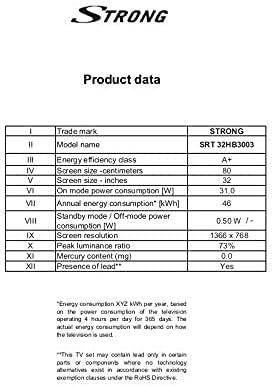
Image: A product data table providing detailed specifications for the Strong SRT 32HB3003, including screen size, resolution, and power consumption.
9. الضمان والدعم
Your Strong SRT 32HB3003 TV comes with a limited warranty. For specific warranty terms and conditions, please refer to the warranty card included in your product packaging or visit the official Strong website. For technical support, troubleshooting assistance, or service inquiries, please contact Strong customer service through their official channels.
لمزيد من المساعدة، يرجى زيارة Strong official webموقع.


