
1. المقدمة
This manual provides instructions for the installation, operation, and maintenance of the Cisco CP-68KEM-3PCC Expansion Module. This module is designed to enhance the functionality of your Cisco IP Phone 6851 by providing additional programmable keys.
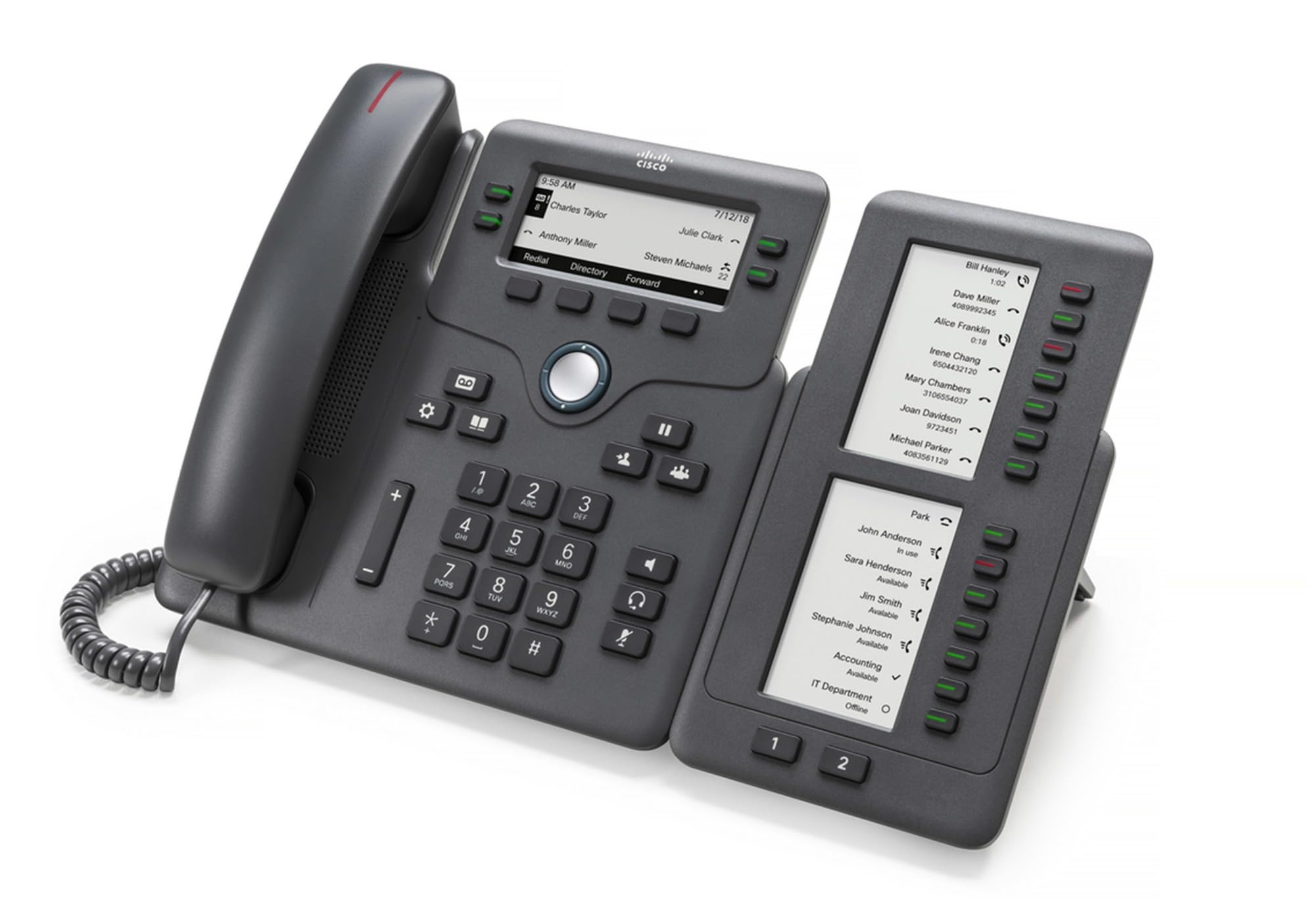
Figure 1: Cisco CP-68KEM-3PCC Expansion Module. This image shows the front view of the expansion module with its grayscale LCD screen and programmable keys.
The Cisco CP-68KEM-3PCC Expansion Module adds 14-line keys and 2-page keys, totaling 28 additional keys, with an easy-to-read grayscale LCD screen. It is ideal for monitoring and managing call status, directory numbers, and speed dial functions.
2. ماذا يوجد في الصندوق
قم بفك الصندوق بعناية وتأكد من وجود جميع العناصر:
- Cisco CP-68KEM-3PCC Phone Expansion Module
- Connecting Cable (typically included for linking to the phone)
- الوثائق (دليل المستخدم هذا، معلومات السلامة)
If any items are missing or damaged, please contact your vendor or Cisco support immediately.
3. تعليمات الإعداد
Follow these steps to connect your Cisco CP-68KEM-3PCC Expansion Module to your Cisco IP Phone 6851.
- Prepare the IP Phone: Ensure your Cisco IP Phone 6851 is powered off and disconnected from the network.
- Connect the Expansion Module: Locate the expansion port on the back or side of your Cisco IP Phone 6851. Connect the provided connecting cable from the expansion module to this port.
- تأمين الاتصال: تأكد من تثبيت الكابل بشكل آمن لمنع الانقطاع العرضي.
- تشغيل الطاقة: Reconnect your Cisco IP Phone 6851 to the network and power it on. The expansion module should be detected automatically.
- التحقق من الوظيفة: Once the phone has booted, check the expansion module's display and keys to ensure they are responsive.
For detailed visual instructions, refer to the official Cisco documentation or support webموقع.
4. Operating the Expansion Module
The expansion module provides additional keys for various functions, enhancing your call management capabilities.
4.1 مفاتيح قابلة للبرمجة
The 28 programmable keys (14 keys across 2 pages) can be configured for:
- Directory Numbers (DNs): Assign specific phone lines or extensions.
- اتصال سريع: استخدم الأرقام التي يتم الاتصال بها بشكل متكرر للوصول السريع.
- مفاتيح الميزات: Assign functions like call transfer, conference, or call park.
- Call Status Monitoring: Monitor the status of other lines (e.g., busy, ringing).
4.2 Page Navigation
Use the dedicated page keys (usually located near the display) to switch between the two pages of programmable keys. The grayscale LCD screen will update to show the labels for the currently active page.
4.3 التكوين
Configuration of the programmable keys is typically managed through your organization's phone system administrator or via the web interface of the Cisco IP Phone 6851. Consult your IT department for specific configuration instructions.
5. الصيانة
To ensure the longevity and optimal performance of your Cisco CP-68KEM-3PCC Expansion Module, follow these maintenance guidelines:
- تنظيف: Use a soft, dry, lint-free cloth to clean the exterior surfaces. For stubborn marks, slightly dampبللي قطعة القماش بالماء. تجنبي استخدام المواد الكيميائية القاسية أو المنظفات الكاشطة أو المذيبات، لأنها قد تتلف الطلاء والمكونات الإلكترونية.
- بيئة: Keep the module in a clean, dry environment, away from direct sunlight, excessive heat, and moisture.
- التعامل: Handle the module with care. Avoid dropping it or subjecting it to strong impacts.
- إدارة الكابلات: Ensure connecting cables are not kinked, pinched, or under strain.
There are no user-serviceable parts inside the expansion module. Do not attempt to open or repair the device yourself.
6. استكشاف الأخطاء وإصلاحها
If you encounter issues with your expansion module, try the following troubleshooting steps:
| مشكلة | السبب المحتمل | حل |
|---|---|---|
| Module not recognized by phone | Loose cable connection, phone not restarted, incompatible phone model. |
|
| المفاتيح لا تستجيب | Software glitch, configuration issue. |
|
| الشاشة فارغة أو تومض | مشكلة في الطاقة، عطل داخلي. |
|
If these steps do not resolve the issue, please contact Cisco technical support or your authorized reseller.
7. المواصفات
| ميزة | التفاصيل |
|---|---|
| رقم الموديل | CP-68KEM-3PCC |
| ماركة | سيسكو |
| الأجهزة المتوافقة | سيسكو IP الهاتف 6851 |
| لون | أسود |
| مادة | معدن |
| أبعاد العنصر (LxWxH) | 5.1 × 10.2 × 20.3 سم |
| مصدر الطاقة | Corded (powered via host IP Phone) |
| عدد المفاتيح | 28 (14 keys across 2 pages) |
| عرض | Grayscale LCD |
| رقم GTIN/الرمز العالمي للمنتج | 889728068383 |
8. معلومات الضمان
The Cisco CP-68KEM-3PCC Expansion Module comes with a ضمان المنتج لمدة 2 عامًا يسري هذا الضمان من تاريخ الشراء. ويغطي عيوب المواد والتصنيع في ظل الاستخدام العادي. ولا يغطي الأضرار الناجمة عن سوء الاستخدام أو الحوادث أو التعديلات غير المصرح بها أو الأسباب الخارجية.
For warranty claims or detailed terms and conditions, please refer to the official Cisco warranty policy available on their webالموقع أو اتصل بنقطة الشراء الخاصة بك.
9. الدعم
For technical assistance, product information, or to report issues, please contact Cisco support:
- دعم سيسكو Webموقع: قم بزيارة الموقع الرسمي دعم سيسكو webموقع for documentation, downloads, and contact options.
- الموزع المعتمد: Contact the reseller from whom you purchased the product.
When contacting support, please have your product model (CP-68KEM-3PCC) and serial number ready.