
1. المقدمة
شكرا لك على الشراءasing the DACOM GF7 TWS V4.2 Bluetooth Earbuds. This manual provides detailed instructions on how to set up, operate, and maintain your earbuds to ensure optimal performance and longevity. Please read this manual thoroughly before using the product and retain it for future reference.
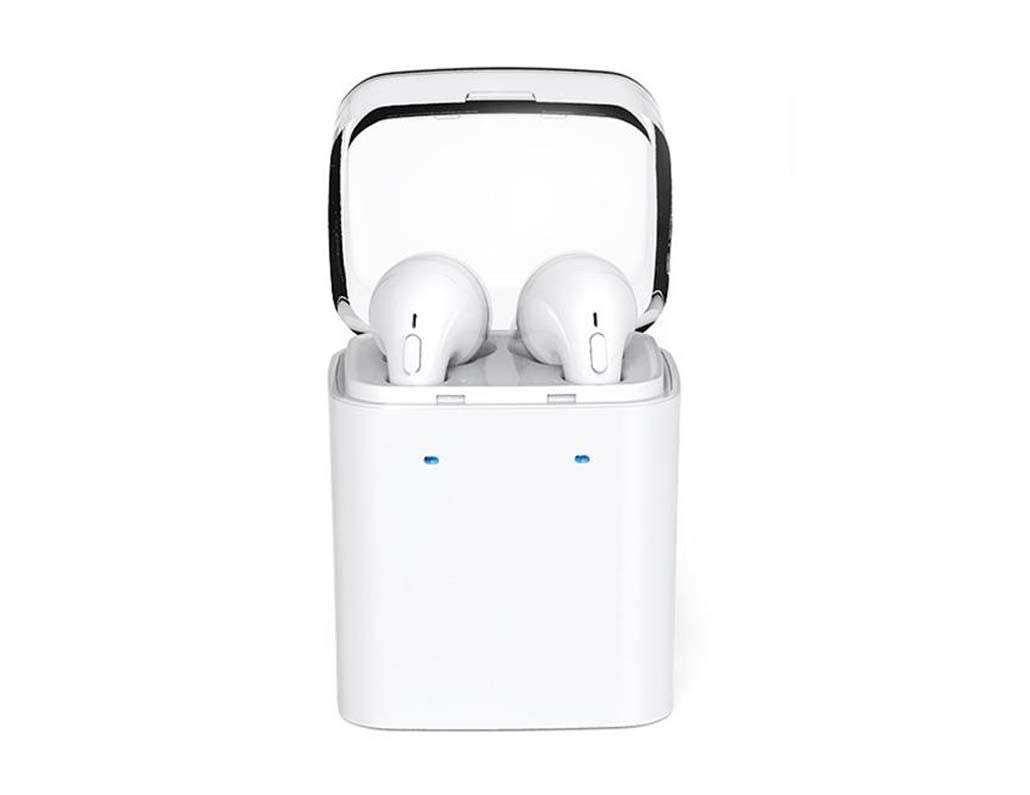
Image 1.1: DACOM GF7 TWS V4.2 Bluetooth Earbuds in their charging case.
2. محتويات العبوة
يرجى التحقق من محتويات العبوة عند فتحها. في حال وجود أي نقص أو تلف في المنتجات، يرجى الاتصال بالبائع.
- DACOM GF7 TWS V4.2 Bluetooth Earbuds (Left and Right)
- حافظة شحن محمولة
- كابل شحن USB
- وسائد الأذن (أحجام مختلفة)
- دليل المستخدم (هذا المستند)
3. انتهى المنتجview
Familiarize yourself with the components of your DACOM GF7 TWS V4.2 Earbuds and charging case.

Image 3.1: Detailed diagram showing the Multifunction Button (MFB), Indicator Light, Microphone (Mic), Air Gate, DC5V Charge Jack Cover, Headphone Charging Indicator Light, USB Charging Input Port, and the Charging Indicator Light of the bottom on the DACOM GF7 TWS V4.2 Earbuds and Charging Case.
- زر متعدد الوظائف (MFB): Used for power, playback, call management, and voice assistant activation.
- مؤشر الضوء: Displays pairing status, charging status, and power status.
- هيئة التصنيع العسكري: Built-in microphone for calls and voice commands.
- بوابة الهواء: Acoustic vent for sound performance.
- DC5V Charge Jack Cover: Protects the charging port on the earbuds.
- Headphone Charging Indicator Light: Shows charging status of individual earbuds within the case.
- USB Charging Input Port: For charging the portable charging case.
- Charging Indicator Light of the bottom: يعرض حالة شحن الجهاز.
4. الإعداد
4.1. شحن سماعات الأذن وعلبة الشحن
- شحن العلبة: Connect the USB charging cable to the USB Charging Input Port on the charging case and the other end to a 5V USB power adapter (not included). The Charging Indicator Light at the bottom of the case will illuminate to indicate charging. Once fully charged, the indicator light may change color or turn off.
- شحن سماعات الأذن: Place the earbuds into their respective slots in the charging case. Ensure the earbuds are properly seated. The Headphone Charging Indicator Light on the case will show the charging status of the earbuds. The earbuds' indicator lights will also show charging status (e.g., red while charging, off when fully charged).
- For first-time use, fully charge both the earbuds and the charging case.
4.2. اقتران بلوتوث
- تشغيل الطاقة: Take both earbuds out of the charging case. They will automatically power on and attempt to pair with each other. You will hear an audible prompt indicating they are connected to each other.
- وضع الإقتران: Once the earbuds are paired with each other, one earbud's indicator light will flash red and blue alternately, indicating it is in pairing mode and ready to connect to your device.
- الاتصال بالجهاز: On your smartphone or Bluetooth-enabled device, go to the Bluetooth settings and search for available devices. Select "DACOM GF7 TWS" (or similar name) from the list.
- اتصال ناجح: Once connected, the earbud's indicator light will stop flashing, and you will hear a confirmation sound.
- إعادة الاتصال التلقائي: بعد الاقتران الأولي، ستتصل سماعات الأذن تلقائيًا بآخر جهاز مقترن عند إخراجها من علبة الشحن، بشرط أن يكون البلوتوث مفعلًا على جهازك.
5. تعليمات التشغيل
The DACOM GF7 TWS V4.2 Earbuds feature a Multifunction Button (MFB) for various controls.
5.1. تشغيل/إيقاف التشغيل
- تشغيل الطاقة: Take the earbuds out of the charging case. They will power on automatically. Alternatively, press and hold the MFB on both earbuds for approximately 3 seconds until you hear a power-on prompt.
- إيقاف التشغيل: Place the earbuds back into the charging case. They will power off automatically. Alternatively, press and hold the MFB on both earbuds for approximately 5 seconds until you hear a power-off prompt.
5.2. تشغيل الموسيقى
- تشغيل/إيقاف مؤقت: اضغط مرة واحدة على زر الوظائف المتعددة (MFB) في أي من سماعتي الأذن.
- المسار التالي: Double press the MFB on the right earbud.
- المسار السابق: Double press the MFB on the left earbud.
5.3. إدارة المكالمات
- الرد/إنهاء المكالمة: اضغط مرة واحدة على زر الوظائف المتعددة (MFB) في أي من سماعتي الأذن.
- رفض المكالمة: Press and hold the MFB on either earbud for approximately 2 seconds.
5.4. مساعد صوتي
- تنشيط مساعد الصوت: Triple press the MFB on either earbud to activate your device's voice assistant (e.g., Siri, Google Assistant).
5.5. إلغاء الضوضاء
- The DACOM GF7 TWS V4.2 features active noise cancellation. Specific activation methods may vary. Refer to the product's quick start guide or manufacturer's website for precise instructions if not detailed here. Typically, a long press or specific tap sequence on an MFB or dedicated button activates/deactivates ANC.
6. الصيانة
تضمن الصيانة المناسبة طول عمر سماعات الأذن وأدائها.
- تنظيف: نظّف سماعات الأذن وعلبة الشحن بانتظام بقطعة قماش ناعمة وجافة وخالية من الوبر. تجنّب استخدام مواد كيميائية قاسية أو مواد كاشطة.
- نصائح الأذن: قم بإزالة أطراف الأذن وتنظيفها بشكل دوري باستخدام مزيل البقع.amp ثم اشطفها بقطعة قماش وصابون خفيف، ثم جففها جيداً قبل إعادة تثبيتها.
- تخزين: عندما لا تكون قيد الاستخدام، قم بتخزين سماعات الأذن في علبة الشحن الخاصة بها لحمايتها من الغبار والتلف.
- تجنب الرطوبة: Keep the earbuds and charging case away from water, excessive humidity, and extreme temperatures.
7. استكشاف الأخطاء وإصلاحها
إذا واجهت مشاكل مع سماعات الأذن الخاصة بك، فراجع المشاكل والحلول الشائعة التالية.
| مشكلة | حل |
|---|---|
| سماعات الأذن لا تتوافق مع بعضها البعض. |
|
| سماعات الأذن لا تتصل بالجهاز. |
|
| لا يوجد صوت من سماعات الأذن. |
|
| علبة الشحن أو سماعات الأذن لا تشحن. |
|
8. المواصفات
| العلامة التجارية | داكوم |
| اسم الموديل | GF7 TWS |
| رقم الموديل | 7 توز |
| لون | أبيض |
| عامل شكل سماعات الرأس | داخل الأذن |
| التحكم في الضوضاء | إلغاء الضوضاء النشط |
| تكنولوجيا الاتصال | لاسلكي (بلوتوث) |
| تكنولوجيا الاتصالات اللاسلكية | Bluetooth V4.2 (inferred from title) |
| المكونات المضمنة | وسائد الأذن |
| المميزات الخاصة | خاصية إلغاء الضوضاء، ميكروفون مرفق |
| طريقة التحكم | يلمس |
| الأجهزة المتوافقة | جميع الاجهزة |
| مادة | PU Metal Eraser (likely referring to ear tip material or casing finish) |
9. معلومات السلامة
Please read and follow these safety guidelines to prevent injury or damage to your device.
- لا تقم بتفكيك المنتج أو إصلاحه أو تعديله. قد يؤدي ذلك إلى نشوب حريق أو صدمة كهربائية أو تلف كامل للمنتج.
- Keep the product away from extreme temperatures (hot or cold), direct sunlight, and sources of heat.
- تجنب تعريض المنتج للماء أو السوائل الأخرى.
- لا تستخدم المنتج بمستوى صوت مرتفع لفترات طويلة لتجنب تلف السمع.
- استخدم فقط كابلات ومحولات الشحن المتوفرة أو الموصى بها.
- يُحفظ بعيدًا عن متناول الأطفال والحيوانات الأليفة. قد تُسبب الأجزاء الصغيرة خطر الاختناق.
- كن على دراية بالبيئة المحيطة بك عند استخدام سماعات الأذن، وخاصة في حركة المرور أو المواقف الخطيرة المحتملة الأخرى.
10. الضمان والدعم
DACOM products are designed and manufactured to the highest quality standards. For detailed warranty information, please refer to the warranty card included with your purchase or visit the official DACOM webموقع.
For technical support, troubleshooting assistance, or to inquire about replacement parts, please contact DACOM customer service through their official webالموقع أو معلومات الاتصال المقدمة في عبوة المنتج الخاص بك.
- الدعم عبر الإنترنت: Visit the official DACOM webالموقع الخاص بالأسئلة الشائعة ومقالات الدعم ونماذج الاتصال.
- دعم البريد الإلكتروني: Refer to your product packaging for customer service email addresses.