
1. المقدمة
This manual provides instructions for the Superior Electronics Universal Replacement Remote Control, model SUPTRB015. This remote is designed to be a direct replacement for original remote controls of LG, Samsung, and Sony televisions, including Smart TV models. It is ready to use without any programming.
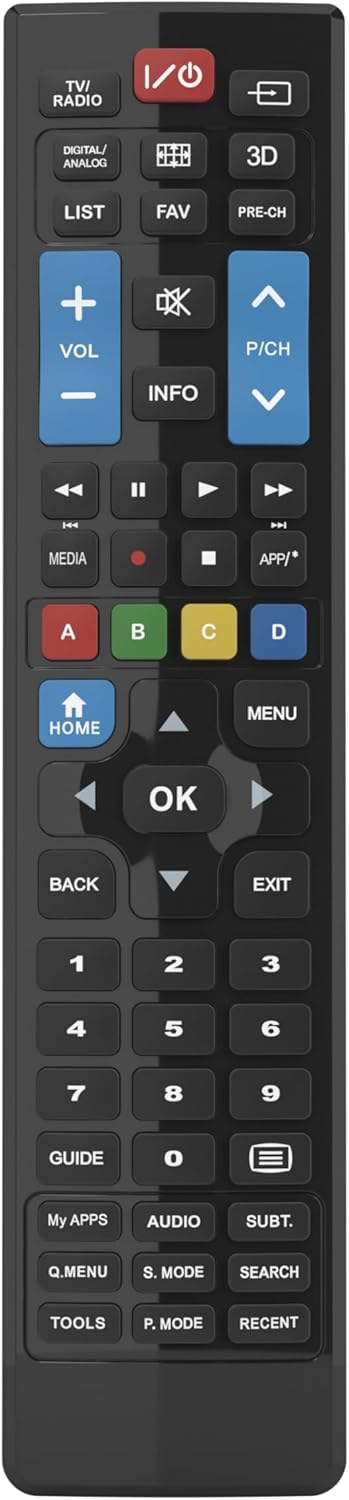
Figure 1: Superior Electronics Universal Remote Control (SUPTRB015)
2. الإعداد
2.1. تركيب البطارية
يتطلب جهاز التحكم عن بعد بطاريتين AAA (غير مرفقتين). اتبع الخطوات التالية لتثبيتهما:
- حدد موقع حجرة البطارية في الجزء الخلفي من جهاز التحكم عن بعد.
- اضغط لأسفل على المزلاج واسحب غطاء البطارية لإزالته.
- أدخل بطاريتين AAA، مع التأكد من تطابق الأطراف الموجبة (+) والسالبة (-) مع المخططات الموجودة داخل الحجرة.
- قم بتحريك غطاء البطارية مرة أخرى إلى مكانه حتى يستقر بشكل آمن.

Figure 2: Battery Compartment on the back of the remote.
2.2. Initial Use (No Programming Required)
This universal remote control is designed for immediate use with LG, Samsung, and Sony televisions. Once batteries are installed, it is ready to operate your TV without any additional programming or code setup.
3. تعليمات التشغيل
The remote control features an intuitive layout with dedicated buttons for common functions and Smart TV access. Refer to Figure 3 for a visual guide to the buttons.

الشكل 3: تخطيط زر التحكم عن بعد.
3.1. وظائف التلفزيون الأساسية
- زر الطاقة (ⓘ): يقوم بتشغيل أو إيقاف تشغيل التلفزيون.
- رفع/خفض مستوى الصوت (VOL +/-): يضبط مستوى الصوت.
- Channel Up/Down (P/CH +/-): تغيير القنوات التلفزيونية.
- زر كتم الصوت (🔇): يكتم أو يلغي كتم صوت التلفزيون.
- أزرار الأرقام (0-9): اختر قنوات التلفزيون مباشرة.
- زر الإدخال/المصدر (⎌): يحدد مصدر الإدخال (HDMI، AV، إلخ).
3.2. Navigation and Menu Functions
- لوحة الاتجاهات (الأسهم لأعلى، لأسفل، لليسار، لليمين): يتنقل بين القوائم والخيارات.
- زر موافقيؤكد الاختيارات.
- زر الصفحة الرئيسية: Accesses the TV's main home screen or Smart Hub.
- زر القائمة: يفتح القائمة الرئيسية للتلفزيون.
- زر الرجوع: يعود إلى الشاشة أو القائمة السابقة.
- زر الخروج: يخرج من القائمة أو التطبيق الحالي.
- زر المعلوماتيعرض معلومات حول البرنامج أو المدخلات الحالية.
3.3. Smart TV and Media Functions
- Dedicated Smart TV Buttons: Access popular streaming apps directly (e.g., Netflix, YouTube, Prime Video). These buttons are typically labeled or have recognizable logos.
- Media Control Buttons (Play, Pause, Stop, Rewind, Fast Forward): يتحكم في تشغيل الوسائط.
- أزرار ملونة (أحمر، أخضر، أصفر، أزرق): These buttons often have specific functions within Smart TV apps or teletext, as indicated on your TV screen.
4. الصيانة
4.1. تنظيف جهاز التحكم عن بعد
للحفاظ على مظهر ووظيفة جهاز التحكم عن بعد:
- امسح السطح بقطعة قماش ناعمة وجافة.
- بالنسبة للأوساخ العنيدة، قم بإزالة الأوساخ برفق.ampاغمر قطعة القماش بالماء أو بمنظف معتدل غير كاشط.
- Do not use harsh chemicals, solvents, or abrasive cleaning pads, as these can damage the remote's finish or internal components.
4.2. استبدال البطارية
استبدل البطاريات عندما يصبح استجابة جهاز التحكم عن بُعد بطيئة أو يتوقف عن العمل. استبدل البطاريتين معًا ببطاريات AAA جديدة. لا تخلط بين البطاريات القديمة والجديدة، أو بين أنواع مختلفة من البطاريات.
5. استكشاف الأخطاء وإصلاحها
إذا واجهت مشاكل مع جهاز التحكم عن بعد، فجرب الحلول التالية:
- جهاز التحكم عن بعد لا يستجيب:
- Check if the batteries are correctly inserted with the correct polarity (+/-).
- استبدل البطاريات بأخرى جديدة.
- تأكد من عدم وجود أي عوائق بين جهاز التحكم عن بعد وجهاز استقبال الأشعة تحت الحمراء الخاص بالتلفزيون.
- تأكد من أنك ضمن نطاق التشغيل الفعال (حتى 10 أمتار).
- بعض الأزرار لا تعمل:
- This remote is designed for LG, Samsung, and Sony TVs. Ensure your TV is one of these brands.
- Some advanced functions or very specific buttons might not be universally supported across all TV models, especially older ones.
- Clean the remote control, especially around the unresponsive buttons, to ensure no debris is preventing contact.
- Smart TV buttons not working:
- تأكد من أن جهاز التلفزيون الخاص بك هو تلفزيون ذكي ومتصل بالإنترنت.
- The dedicated Smart TV buttons (e.g., Netflix, YouTube) are compatible with most LG, Samsung, and Sony Smart TV models. If they don't work, you may need to access these apps through your TV's main Smart Hub/Home menu using the navigation buttons.
6. المواصفات
| ماركة | إلكترونيات فائقة |
| اسم الموديل | Superior Electronics Replacement LG/Samsung/Sony SUPTRB015 |
| ميزة خاصة | عالمي |
| لون | أسود |
| الحد الأقصى للأجهزة المدعومة | 3 (LG, Samsung, Sony) |
| الأجهزة المتوافقة | تلفزيون |
| تكنولوجيا الاتصال | الأشعة تحت الحمراء |
| نوع وحدة التحكم | التحكم بالأزرار |
| الحد الأقصى للمدى | 10 مترا |
| عدد البطاريات | 2 AAA (Required) |

Figure 4: Remote Control Dimensions (approx. 20 cm length, 4.5 cm width).
7. الضمان والدعم
Superior Electronics products are manufactured to high-quality standards. For information regarding warranty coverage, please refer to the documentation provided with your purchase or visit the official Superior Electronics website. For technical support or further assistance, please contact Superior Electronics customer service through their official channels.
يرجى الاحتفاظ بهذا الدليل للرجوع إليه في المستقبل.