
1. المقدمة
The BNT Dummy Fake Security Camera is designed to provide a realistic visual deterrent against potential intruders. Its appearance closely mimics that of a functional surveillance camera, aiming to reduce the likelihood of criminal activity by creating the impression of active monitoring. This manual provides essential information for the proper setup, operation, and maintenance of your dummy camera.

Image 1.1: Two BNT white dummy fake security cameras, showcasing their realistic design.
2. ماذا يوجد في الصندوق
Upon opening your package, you should find the following components:
- BNT Bullet Simulation Fake Camera (White) x 2
- مسامير للتثبيت
- دليل المستخدم (هذا المستند)
- Warning Security Alert Sticker Decal x 2

Image 2.1: Package contents showing two dummy cameras, warning stickers, and screws.
3. المميزات
- تصميم واقعي: Mimics the appearance of a real surveillance camera.
- ضوء وامض LED: Features a built-in red LED light that illuminates at night, simulating active recording.
- Photoelectric Sensor: Automatically activates the red LED light in low-light conditions.
- بناء متين: Made from Acrylonitrile Butadiene Styrene (ABS) for indoor and outdoor use.
- مقاومة للطقس: IP65 International Protection Rating ensures resistance to water.
- سهولة التركيب: No wiring required, mounts easily to ceilings or walls.
- زاوية قابلة للتعديل: Features 2-axis rotation for flexible positioning (360-degree rotation, 90-degree tilt).
- مصدر الطاقة: يعمل ببطاريتين AA (غير مرفقتين).
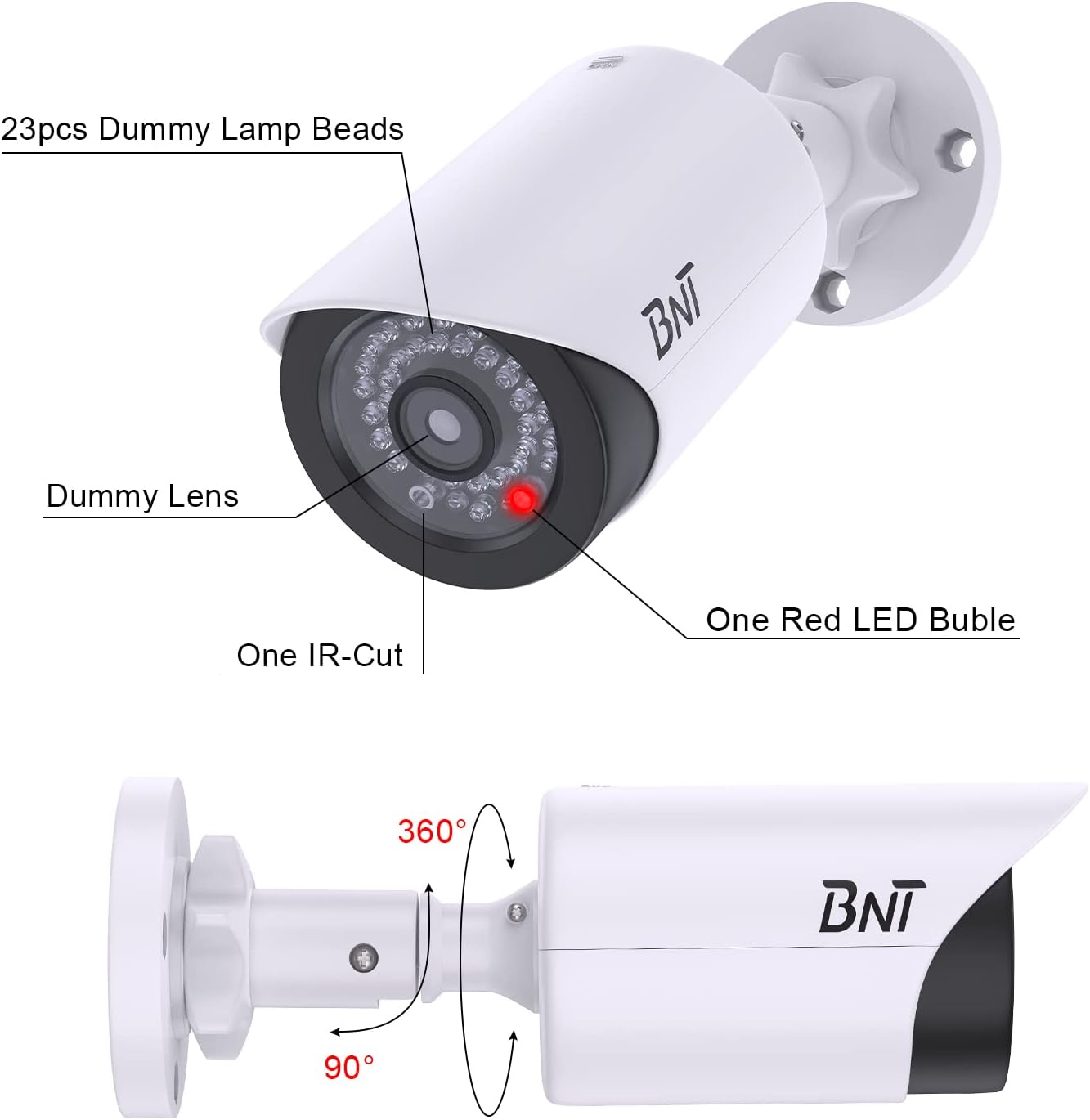
Image 3.1: Close-up of the dummy camera's front, showing the dummy lens, red LED, and rotation capabilities.
4. الإعداد والتثبيت
4.1. تركيب البطارية
- Locate the battery compartment on the camera. This is typically found by sliding open the back cover.
- Insert 2 AA batteries (not included) into the compartment, ensuring correct polarity (+/-).
- أغلق حجرة البطارية بشكل محكم.

Image 4.1: Illustration of battery insertion into the dummy camera.
4.2. تركيب الكاميرا
The camera can be easily installed on a ceiling or wall using the provided screws. No complex wiring is necessary.
- Choose a suitable location for installation, considering visibility and desired deterrent effect.
- Position the mounting base against the surface and mark the screw holes.
- Drill pilot holes if necessary, then secure the mounting base with the provided screws.
- قم بتثبيت الكاميرا على القاعدة المثبتة.
- Adjust the camera's angle using its 2-axis rotation feature to achieve the desired coverage.
Video: BNT Dummy Fake Security Camera Overview
الفيديو 4.2.1: يوفر هذا الفيديو نظرة عامةview of the BNT Dummy Fake Security Camera, highlighting its features and realistic appearance.
Video: Protecting Property with Fake Cameras
Video 4.2.2: This video demonstrates how fake cameras can be used to enhance property security and deter potential threats.
5. تعليمات التشغيل
The BNT Dummy Fake Security Camera is designed for simple, autonomous operation:
- Once batteries are installed, the built-in photoelectric sensor will detect ambient light levels.
- During daylight hours, the red LED light will remain off.
- As darkness falls, the photoelectric sensor will automatically activate the red LED light, causing it to illuminate. This simulates the operation of a real security camera's night vision or recording indicator.
- The camera provides 24/7 visual deterrence without any manual intervention after initial setup.

Image 5.1: The dummy camera's red LED light is active at night, providing a visual deterrent.
6. الصيانة
- استبدال البطارية: When the red LED light dims or stops illuminating, it is time to replace the batteries. Ensure to use high-quality AA batteries to prevent leakage and damage to the battery case.
- حماية البيئة: When replacing batteries, take care to avoid exposing the internal components to rain or moisture to maintain the lifespan of the battery case.
- تصرف: Please dispose of used batteries properly according to local regulations to protect the environment.
- تنظيف: Periodically wipe the camera's exterior with a soft, damp قطعة قماش لإزالة الغبار والحطام. تجنب استخدام المواد الكيميائية القاسية.
7. استكشاف الأخطاء وإصلاحها
7.1. LED Light Not Illuminating at Night
- التحقق من البطاريات: Ensure that 2 AA batteries are correctly installed and are not depleted. Replace if necessary.
- Test Photoelectric Sensor: In a dark environment, cover the LED light with your hand. If the red LED light turns on, the product is functioning correctly. If it does not, check battery installation again.
- العوامل البيئية: Ensure the camera is not installed in an area with ambient light at night (e.g., streetlights, porch lights) that might prevent the photoelectric sensor from detecting sufficient darkness to activate the LED.
8. المواصفات
| ميزة | التفاصيل |
|---|---|
| اسم الموديل | BNT Dummy (Model BNT-K8FaCam-2PW) |
| الاستخدام الداخلي والخارجي | داخلي، خارجي |
| مصدر الطاقة | يعمل بالبطارية (2 بطاريات AA، غير متضمنة) |
| مادة | أكريلونيتريل بوتادين ستايرين (ABS) |
| نوع التركيب | السقف والجدار |
| Viewزاوية جي | 120 درجة |
| تصنيف الحماية الدولية | IP65 (ماء) |
| أبعاد العنصر (الطول × العرض × الارتفاع) | 7.6 × 5.4 × 2.9 بوصة |
| وزن العنصر | 5.2 أونصة (148 جرامًا) |
| ميزة خاصة | Powered by 2 AA batteries (not included) |
9. الضمان والدعم
BNT provides reliable 24-month after-sales service for this product. If you have any questions, concerns, or require assistance with your BNT Dummy Fake Security Camera, please contact our dedicated customer service team. We are committed to ensuring your satisfaction.