
1. انتهى المنتجview
The Itek SIISBE 3.0 is a gaming middle tower PC case designed to combine high-level features with a modern aesthetic. It features a fully perforated front panel for optimal airflow and a tempered glass side panel with a convenient hinged closure, allowing for easy access and showcasing your internal components.
The case comes equipped with three 12 cm ARGB fans: two located at the front and one at the rear. These fans can be controlled via a dedicated button on the front panel or through your motherboard's ARGB software, providing customizable lighting effects and efficient cooling.
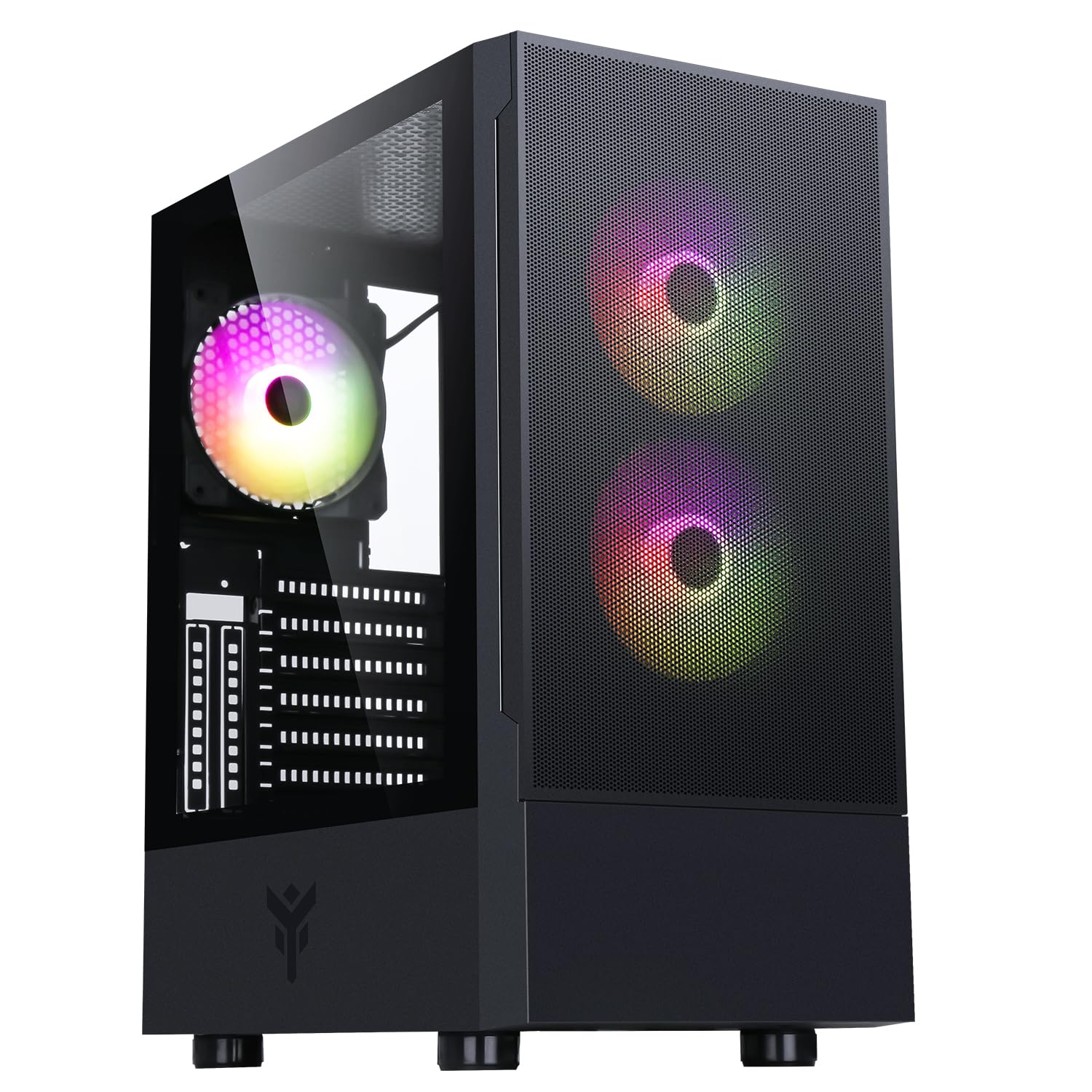
الشكل 1: الجانب الأمامي view of the Itek SIISBE 3.0 Gaming PC Case, showcasing the perforated front panel and tempered glass side panel.
The SIISBE 3.0 supports a wide range of hardware, including ATX, Micro-ATX, and Mini-ITX motherboards. It accommodates graphics cards up to 315 mm in length, CPU coolers up to 160 mm in height, and liquid cooling radiators up to 280 mm. The case also offers 28 mm of space for efficient cable management, ensuring a clean and organized build.
2. الإعداد والتثبيت
2.1 إعداد القضية
- قم بفتح العلبة وإزالة جميع مواد التغليف.
- Open the tempered glass side panel by gently pulling it open from the hinge.
- Locate the accessory box inside the case, which contains screws and other mounting hardware.
2.2 تركيب اللوحة الأم
- Install the necessary standoffs for your motherboard form factor (ATX, Micro-ATX, or Mini-ITX) onto the motherboard tray.
- قم بوضع اللوحة الأم بعناية على الحوامل، مع محاذاة فتحات البراغي.
- قم بتأمين اللوحة الأم باستخدام البراغي المتوفرة.

الشكل 2: داخلي view of the Itek SIISBE 3.0, highlighting the motherboard mounting area and cable routing options.
2.3 تركيب وحدة إمداد الطاقة (PSU)
- Mount the PSU in the dedicated bottom compartment of the case.
- قم بتأمين وحدة إمداد الطاقة باستخدام البراغي من الجزء الخلفي للعلبة.
2.4 تركيب محرك التخزين
- Install 2.5-inch SSDs or 3.5-inch HDDs into the designated internal bays. Refer to the case's internal layout for specific mounting points.
- Secure drives with the appropriate screws.

الشكل 3: الجزء الداخلي الخلفي view of the Itek SIISBE 3.0, showing the motherboard tray, SSD mounting points, and ampمساحة كافية لإدارة الكابلات.
2.5 تركيب بطاقة الرسومات وبطاقة التوسعة
- قم بإزالة أغطية فتحات التوسعة اللازمة من الجزء الخلفي للعلبة.
- أدخل بطاقة الرسومات أو بطاقات التوسعة الأخرى في فتحات PCIe الموجودة على اللوحة الأم.
- Secure the cards with screws. The case supports graphics cards up to 315 mm in length.
2.6 تركيب نظام التبريد
- The case includes three 12 cm ARGB fans (two front, one rear). Connect their power and ARGB cables to the motherboard or the integrated fan controller.
- For additional cooling, install extra fans or a liquid cooling radiator (up to 280 mm) in the designated mounting points.
- Install your CPU cooler. The case supports CPU coolers up to 160 mm in height.
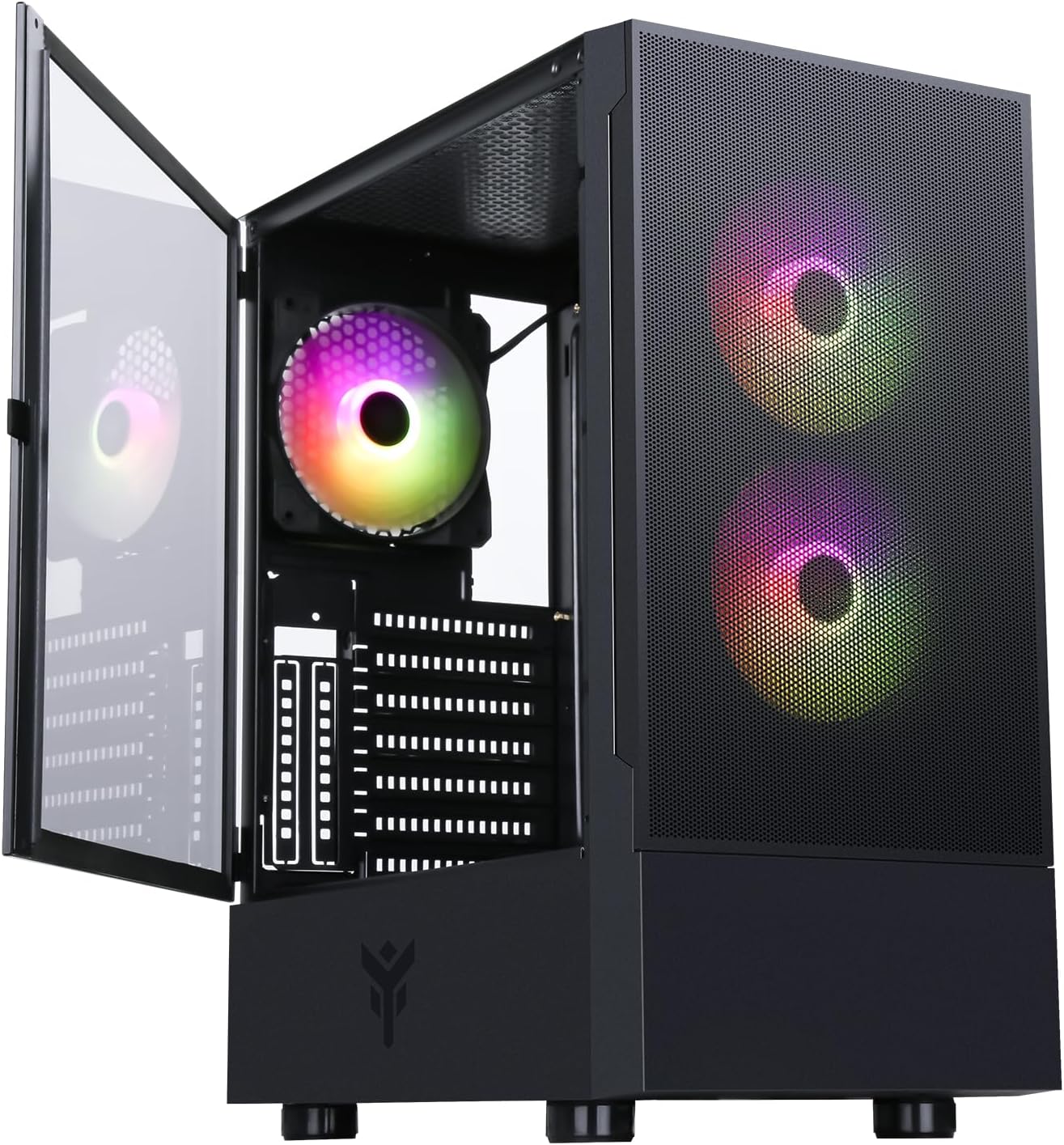
Figure 4: The Itek SIISBE 3.0 with its hinged tempered glass panel open, revealing the pre-installed ARGB fans and internal layout.
2.7 إدارة الكابلات
- Utilize the 28 mm cable management space behind the motherboard tray to route and organize all power and data cables.
- Use cable ties (not included) to secure cables and maintain optimal airflow.
3. تعليمات التشغيل
3.1 التشغيل
- Ensure all components are correctly installed and connected.
- قم بتوصيل كابل الطاقة بوحدة تزويد الطاقة (PSU) ومأخذ الحائط.
- Press the power button located on the top I/O panel of the case to start your system.
3.2 التحكم في مروحة ARGB
- The pre-installed ARGB fans can be controlled via the dedicated LED control button on the front panel. Press the button to cycle through various lighting modes and colors.
- Alternatively, if the fans are connected to an ARGB header on your motherboard, you can use the motherboard's proprietary software (e.g., ASUS Aura Sync, MSI Mystic Light, Gigabyte RGB Fusion) to synchronize and customize the lighting effects.
3.3 منافذ الإدخال/الإخراج الأمامية
- The front I/O panel includes USB 3.0 and USB 2.0 ports for connecting peripherals and external storage devices.
- Audio jacks are also available for headphones and microphones.
4. الصيانة
4.1 تنظيف فلتر الغبار
- The SIISBE 3.0 case is equipped with dust filters to prevent dust buildup inside. Regularly check and clean these filters.
- Gently remove the dust filters (typically located on the top, front, and/or bottom) and clean them with compressed air or by rinsing them with water. Ensure they are completely dry before re-installing.
4.2 التنظيف العام
- استخدمي قطعة قماش ناعمةamp cloth to wipe down the exterior surfaces of the case, including the tempered glass panel. Avoid abrasive cleaners.
- للتنظيف الداخلي، استخدم الهواء المضغوط لإزالة الغبار من المراوح والمشتتات الحرارية والمكونات الأخرى. تأكد من إيقاف تشغيل النظام وفصله عن الكهرباء قبل التنظيف.
5. استكشاف الأخطاء وإصلاحها
This section provides general troubleshooting tips for common issues. For more specific problems, consult the manuals for your individual PC components (motherboard, PSU, GPU, etc.) or contact Itek support.
5.1 النظام لا يعمل
- التحقق من توصيلات الطاقة: Ensure the PSU is properly connected to the wall outlet and the power switch on the PSU is in the 'ON' position. Verify all internal power cables (24-pin ATX, 8-pin CPU, PCIe, SATA) are securely connected to the motherboard and components.
- موصلات اللوحة الأمامية: Confirm that the front panel power switch cable is correctly connected to the motherboard's front panel header.
5.2 Fans Not Spinning / ARGB Not Working
- روابط المعجبين: Verify that the fan power cables are securely connected to the motherboard fan headers or the integrated fan controller.
- اتصالات ARGB: Ensure ARGB cables are correctly connected to the motherboard's ARGB header or the case's ARGB controller.
- Software/Button Control: If using the case's LED button, try pressing it to cycle modes. If using motherboard software, ensure it is installed and configured correctly.
5.3 مشاكل ارتفاع درجة الحرارة
- تدفق الهواء: Ensure fans are installed in the correct orientation for optimal airflow (front fans typically intake, rear/top fans exhaust).
- تراكم الغبار: قم بتنظيف فلاتر الغبار والمكونات الداخلية كما هو موضح في قسم الصيانة.
- إدارة الكابلات: تحسين مسارات الكابلات لتقليل العوائق التي تحول دون تدفق الهواء.
6. المواصفات
| ميزة | مواصفة |
|---|---|
| الشركة المصنعة | إيتيك |
| رقم موديل العنصر | ITGCASIB30 |
| ماركة | ايتيك |
| التوافق مع اللوحة الأم | ATX و Micro-ATX و Mini-ITX |
| نوع الحالة | البرج الأوسط |
| استخدامات المنتج الموصى بها | Gaming, Professional |
| لون | أسود |
| مادة | زجاج مقسّى |
| نوع تركيب مصدر الطاقة | التركيب السفلي |
| طريقة التبريد | هواء |
| اسم الموديل | Case SIISBE 3.0 |
| حجم المروحة | 120 مليمتر |
| Total Expansion Slots | 7 |
| Total USB 2.0 Ports | 2 |
| Total USB 3.0 Ports | 1 |
| إجمالي منافذ USB | 4 |
| مميزات المنتج | LED Control Button, Dust Filter, Integrated Fan |
| أقصى ارتفاع لمبرد وحدة المعالجة المركزية | 160 مليمتر |
| Number of Internal Bays | 7 |
| الأجهزة المتوافقة | ATX Motherboards, Full-size Graphics Cards, Standard Cooling Solutions |
| عدد المعجبين | 3 |
| لون فاتح | اللون الأحمر والأخضر والأزرق |
| أبعاد المنتج (العمق × العرض × الارتفاع) | 37.6D x 37.6W x 44.6H سنتيمترات |
7. معلومات الضمان
Specific warranty details for the Itek SIISBE 3.0 PC Case may vary by region and retailer. Please refer to the warranty card included with your product or visit the official Itek webالموقع للحصول على أدق وأحدث معلومات الضمان.
احتفظ بإثبات الشراء (الإيصال أو الفاتورة) لأنه سيكون مطلوبًا لأي مطالبات بالضمان.
8. دعم العملاء
For technical assistance, product inquiries, or support regarding your Itek SIISBE 3.0 PC Case, please contact Itek customer support through their official channels.
- رسمي Webموقع: Visit the Itek official webالموقع للحصول على موارد الدعم والأسئلة الشائعة ومعلومات الاتصال.
- دعم البريد الإلكتروني: Look for a support email address on the Itek webموقع.
- دعم الهاتف: Check the Itek webموقع إلكتروني لأرقام الدعم الهاتفي الإقليمية.
When contacting support, please have your product model (SIISBE 3.0) and item model number (ITGCASIB30) ready to help expedite the process.