
مقدمة
Thank you for choosing the SIMOLIO Kids Wireless Headphones Model JH-711. This manual provides essential information for the proper setup, operation, and maintenance of your headphones. Please read it carefully to ensure safe and optimal use.
مميزات المنتج
- 3-Level Volume Limiting: Protects children's hearing with switchable volume limits (75dB for toddlers, 85dB for kids, 94dB for adults). This feature is active in both wired and wireless modes.
- عزل الضوضاء: Over-ear design provides passive noise reduction, helping to block external sounds for improved listening focus.
- Wireless & Wired Modes: Offers Bluetooth connectivity for wireless use and includes a 3.5mm audio cable for wired connection when the battery is depleted or for non-Bluetooth devices.
- ميكروفون مدمج: Enables hands-free calling and voice chat.
- Audio Sharing Port: Allows another headphone to connect and share audio from the same device.
- Durable & Flexible Design: Constructed with memory stainless steel strips in the headband for impressive durability and flexibility, designed to withstand active use. Earmuffs feature an anti-shedding design.
- قابلة للطي وصغيرة الحجم: Easy to fold and store in the included EVA carrying case, ideal for travel and school.
- عمر بطارية طويل: ما يصل إلى 15 ساعة من اللعب بشحنة واحدة.

The headphones feature a 3-level volume limiter to protect hearing, adjustable for toddlers, kids, and adults.
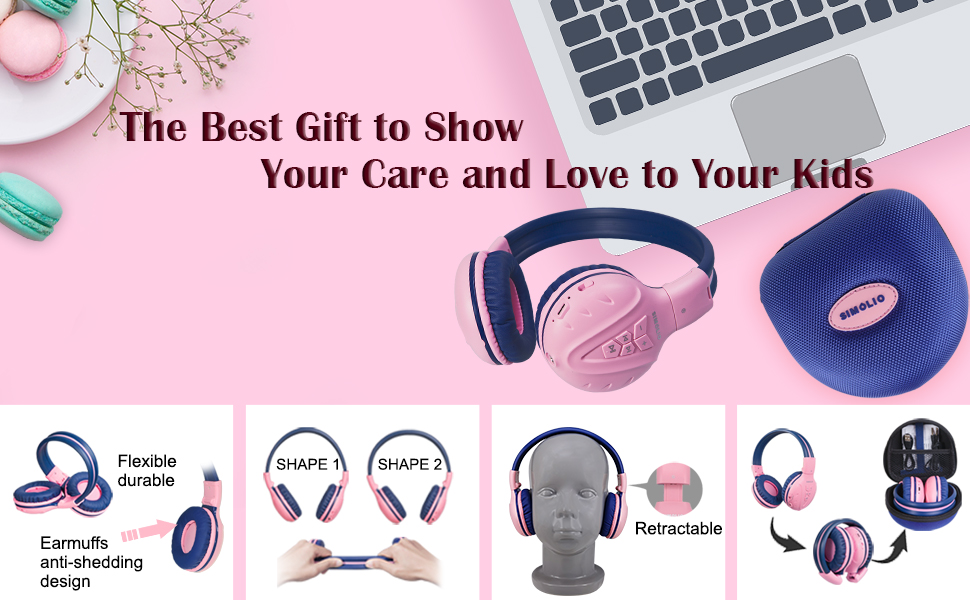
The flexible and durable design allows the headphones to withstand bending and twisting.
ماذا يوجد في الصندوق
تتضمن الحزمة العناصر التالية:
- SIMOLIO Kids Wireless Headphones JH-711
- كابل الشحن (USB)
- AUX Cable (3.5mm audio cable)
- دليل المستخدم
- Carrying EVA Case
يثبت
1. شحن سماعات الرأس
Before first use, fully charge the headphones. Connect the provided USB charging cable to the charging port on the headphones and to a USB power source (e.g., computer, wall adapter). The LED indicator will show charging status and turn off when fully charged.
2. اقتران بلوتوث
- تأكد من إيقاف تشغيل سماعات الرأس.
- Press and hold the Multi-Function Button (MFB) until the LED indicator flashes blue and red alternately, indicating pairing mode.
- على جهازك (الهاتف الذكي، الجهاز اللوحي، وما إلى ذلك)، قم بتمكين البلوتوث وابحث عن الأجهزة المتاحة.
- Select "SIMOLIO JH-711" from the list of devices.
- بمجرد الاتصال ، سيومض مؤشر LED باللون الأزرق ببطء.
3. الاتصال السلكي
To use the headphones in wired mode, connect one end of the 3.5mm AUX cable to the audio jack on the headphones and the other end to the audio output of your device. The headphones will automatically switch to wired mode, even if the battery is dead.

The headphones support both wireless Bluetooth mode and wired mode via the included AUX cable.
4. Volume Limiter Adjustment
Locate the 3-level volume limiter switch on the headphones. Adjust the switch to the desired maximum volume level:
- 75dB (S): Recommended for toddlers or very quiet environments.
- 85dB (M): Recommended for children in general listening environments.
- 94dB (L): Recommended for adults or noisy environments.

Adjust the physical switch to select the appropriate volume limit.
5. Using the Sharing Port
The headphones feature an additional sharing jack on the right side. To share audio, plug another headphone into this port. This allows two users to listen to the same audio source simultaneously.

Connect another headphone to the sharing port to share audio with a friend.
تعليمات التشغيل
1. تشغيل/إيقاف التشغيل
- تشغيل الطاقة: Press and hold the MFB for approximately 3 seconds until the LED indicator lights up.
- إيقاف التشغيل: Press and hold the MFB for approximately 3 seconds until the LED indicator turns off.
2. تشغيل الموسيقى
- تشغيل/إيقاف مؤقت: اضغط قصيرًا على MFB.
- المسار التالي: اضغط لفترة قصيرة على زر "+".
- المسار السابق: اضغط لفترة قصيرة على زر "-".
- رفع الصوت: اضغط لفترة طويلة على زر "+".
- اخفض الصوت: اضغط لفترة طويلة على زر "-".
3. إدارة المكالمات
When connected via Bluetooth:
- الرد/إنهاء المكالمة: اضغط قصيرًا على MFB.
- رفض المكالمة: اضغط لفترة طويلة على MFB.

يتيح الميكروفون المدمج إجراء المكالمات بدون استخدام اليدين.
صيانة
- نظّف سماعات الرأس بقطعة قماش ناعمة وجافة. لا تستخدم المنظفات الكاشطة أو المذيبات.
- تجنب تعريض سماعات الرأس لدرجات الحرارة العالية أو الرطوبة أو أشعة الشمس المباشرة.
- Store the headphones in the provided EVA carrying case when not in use to protect them from dust and damage.
- لا تحاول تفكيك سماعات الرأس أو تعديلها، لأن هذا من شأنه إبطال الضمان وقد يتسبب في حدوث أضرار.

The headphones fold compactly and fit into the included EVA case for easy storage and transport.
استكشاف الأخطاء وإصلاحها
| مشكلة | السبب المحتمل | حل |
|---|---|---|
| لا يتم تشغيل سماعات الرأس. | بطارية منخفضة. | اشحن سماعات الرأس بالكامل. |
| لا يمكن الاقتران عبر البلوتوث. | سماعات الرأس ليست في وضع الاقتران؛ البلوتوث في الجهاز مغلق؛ الجهاز بعيد جدًا عن الجهاز. | تأكد من أن سماعات الرأس في وضع الاقتران (يومض باللون الأحمر/الأزرق). شغّل البلوتوث في الجهاز. قرّب سماعات الرأس من الجهاز (في حدود 9 أمتار). |
| لا يوجد صوت في الوضع اللاسلكي. | مستوى الصوت منخفض جدًا؛ الجهاز غير متصل؛ تم اختيار مخرج صوت غير صحيح على الجهاز. | ارفع مستوى صوت سماعات الرأس والجهاز. أعد توصيل سماعات الرأس. تحقق من إعدادات الصوت في الجهاز. |
| لا يوجد صوت في الوضع السلكي. | AUX cable not fully inserted; cable damaged; device volume too low. | Ensure AUX cable is securely connected at both ends. Try a different AUX cable. Increase device volume. |
تحديد
| ميزة | التفاصيل |
|---|---|
| اسم الموديل | Kids Bluetooth Headphones JH-711 |
| تكنولوجيا الاتصال | لاسلكي (بلوتوث)، سلكي (مقبس 3.5 ملم) |
| نسخة البلوتوث | 4.0 |
| مدى البلوتوث | 9 مترا |
| التحكم في الضوضاء | عزل الصوت |
| حساسية | 94 ديسيبل (الحد الأقصى) |
| عمر البطارية | 15 ساعة |
| وقت الشحن | 3 ساعة |
| وزن العنصر | 187 جرام (6.6 أونصة) |
| أبعاد المنتج | 5.51 × 3.15 × 5.31 بوصة |
| مادة | Nylon, Stainless Steel (headband) |
| مادة حقيبة الحمل | إيفا |
| المميزات الخاصة | 3 Adjustable Volume Limited, Microphone, Durable, Flexible, Foldable, Wired & Wireless, Share Port, EVA Case |
فيديو المنتج الرسمي
يوفر هذا الفيديو عرضًا مرئيًاview of the SIMOLIO Bluetooth Headphones for Kids with Case JH-711, demonstrating its features and functionality.
الضمان والدعم
SIMOLIO products are designed for quality and reliability. For specific warranty information, please refer to the warranty card included with your product or visit the official SIMOLIO website. If you encounter any issues or require technical assistance, please contact SIMOLIO customer support through their official channels.