
1. المقدمة
Welcome to the user manual for your AAXA LED Pico Micro Video Projector. This compact and versatile projector is designed for personal media sharing, business presentations, and home cinema experiences. This manual provides detailed instructions on setting up, operating, maintaining, and troubleshooting your device to ensure optimal performance.
محتويات الحزمة
يرجى التأكد من وجود جميع العناصر في الحزمة الخاصة بك:
- جهاز عرض فيديو AAXA LED Pico Micro
- كابل يو اس بي
- كبل AV
- Mini Tripod (optional, may vary by package)
- Power Adapter (not explicitly listed but implied for charging)
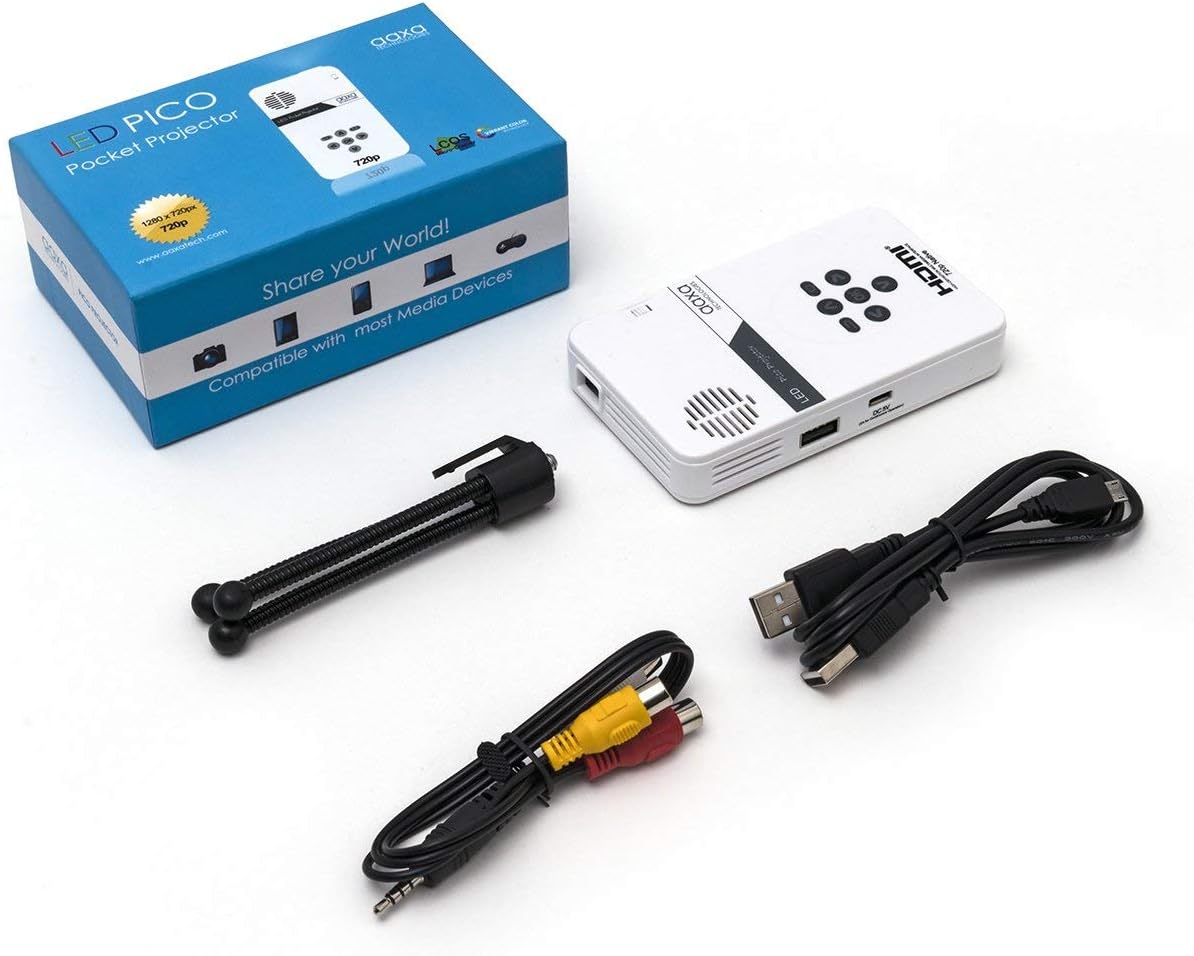
Figure 1: Package contents including the projector, cables, and tripod.
2. انتهى المنتجview
The AAXA LED Pico Micro Video Projector is a compact device featuring a user-friendly interface and multiple connectivity options. It is designed for portability and ease of use.
المميزات الرئيسية:
- Ultra Bright 25 Lumens LED light source with 15,000-hour lifespan.
- High Definition 720p (1280x720) native resolution, supporting up to 1080p input.
- Vibrant Color Technology for rich and accurate colors.
- Built-in 80-minute rechargeable Lithium-ion battery.
- Integrated media player and speakers.
- Compact and lightweight design (4.25 x 2.36 x 0.7 inches, 6.3 ounces).
الضوابط والمنافذ:
Familiarize yourself with the various controls and connection ports on your projector:

الشكل 2: الجزء العلوي view of the projector with navigation buttons (Up, Down, Left, Right, OK, Menu, Back) and speaker grille.
- أزرار التنقل: يتم استخدامه للتنقل بين القوائم وتحديد الخيارات.
- شبكة مكبر الصوت: For audio output from the built-in speakers.
- عجلة التركيز: Located on the side, used to adjust image clarity.

الشكل 3: الجبهة view of the projector showing the HDMI, AV, and 3.5mm audio out ports.
- مدخلات HDMI: Connect to laptops, gaming consoles, or other HDMI-enabled devices.
- مدخلات AV: For connecting older devices using the included AV cable.
- مخرج صوت 3.5 ملم: قم بتوصيل سماعات الرأس أو مكبرات الصوت الخارجية.

الشكل 4: الجانب view of the projector showing the USB port and DC 5V charging port.
- منفذ USB: لتوصيل محركات أقراص USB لتشغيل الوسائط.
- مدخلات DC 5V: مدخل الطاقة لشحن البطارية الداخلية.

الشكل 5: الجانب view of the projector showing the TF Card slot.
- Micro SD (TF Card) Slot: Insert a Micro SD card (up to 16GB) for media playback.
3. الإعداد
3.1 تشغيل/إيقاف التشغيل والشحن
- الشحن: Connect the supplied micro USB cable to the DC 5V input on the projector and a compatible USB power source. The LED indicator will show charging status.
- تشغيل الطاقة: Press and hold the power button (usually located near the focus wheel or on the top panel) until the projector powers on.
- إيقاف التشغيل: Press and hold the power button again until the projector shuts down.
3.2 وضع جهاز العرض
Place the projector on a stable, flat surface. For optimal image quality, project onto a smooth, light-colored wall or a dedicated projector screen. The distance from the surface will determine the image size.

Figure 6: The projector can be mounted on a tripod for stable positioning and angle adjustment.
3.3 ضبط التركيز
To achieve a clear image, rotate the focus wheel located on the side of the projector until the projected image appears sharp and in focus.
4. تعليمات التشغيل
4.1 توصيل الأجهزة
- HDMI: Connect an HDMI cable from your source device (laptop, game console, etc.) to the HDMI input port on the projector. Select HDMI as the input source in the projector's menu.
- من: Use the provided AV cable to connect to devices with composite video and audio outputs. Select AV as the input source.
- USB / Micro SD: Insert a USB flash drive into the USB port or a Micro SD card into the TF Card slot. The projector's media player interface will typically appear, allowing you to browse and play files.
4.2 تشغيل الوسائط
The built-in media player supports various video, music, and picture formats. Use the navigation buttons on the projector to browse files and select content for playback.
4.3 إخراج الصوت
The projector has built-in speakers. For private listening or enhanced audio, connect headphones or external speakers to the 3.5mm Audio Out port.
5. الصيانة
- تنظيف: Use a soft, dry cloth to clean the exterior of the projector. For the lens, use a lens cleaning cloth and specialized lens cleaning solution. Do not use abrasive cleaners.
- تخزين: عند عدم الاستخدام، قم بتخزين جهاز العرض في مكان بارد وجاف، بعيدًا عن أشعة الشمس المباشرة ودرجات الحرارة القصوى.
- العناية بالبطارية: To prolong battery life, avoid fully discharging the battery frequently. Charge the projector regularly, even if not in active use.
6. استكشاف الأخطاء وإصلاحها
| مشكلة | السبب المحتمل | حل |
|---|---|---|
| لم يتم عرض أي صورة | Projector not powered on; incorrect input source; loose cable connection. | Ensure projector is on and charged. Select correct input source (HDMI, AV, USB/SD). Check all cable connections. |
| الصورة ضبابية | Focus not adjusted; projector too close/far from surface. | Adjust the focus wheel until the image is clear. Adjust the distance of the projector from the projection surface. |
| لا يوجد صوت | Volume too low; external audio device connected; audio format not supported. | Increase volume. Disconnect external audio devices if using internal speakers. Ensure audio format is supported. |
| يتم إيقاف تشغيل جهاز العرض بشكل غير متوقع | انخفاض مستوى البطارية؛ ارتفاع درجة الحرارة. | Charge the battery. Ensure proper ventilation and clear any obstructions from vents. |
7. المواصفات
| ميزة | التفاصيل |
|---|---|
| ماركة | تقنيات AAXA |
| رقم الموديل | KP-101-01-cr |
| دقة العرض | 1280 x 720 (Native), Max 1080p Input |
| سطوع | 25 لومن |
| مصدر الضوء الحياة | 15,000 ساعة (LED) |
| تكنولوجيا الاتصال | HDMI, USB, Micro SD, 3.5mm Aux Out, Composite AV |
| عمر البطارية | Up to 80 minutes (Lithium-Ion) |
| أبعاد المنتج | 4.25 × 2.36 × 0.7 بوصة |
| وزن العنصر | 6.3 أونصات |
| الاستخدامات الموصى بها | الأعمال، التعليم، السينما المنزلية |
8. الضمان والدعم
This product is offered as an Amazon Renewed item, which means it has been professionally inspected and tested to work and look like new. Amazon Renewed products are eligible for replacement or refund under the Amazon Renewed Guarantee if you are not satisfied with your purchase.
For further assistance or technical support, please refer to the official AAXA Technologies webالموقع أو اتصل بخدمة العملاء الخاصة بهم مباشرة.