
1. المقدمة
This manual provides essential information for the proper setup, operation, and maintenance of your Eyeclops Digital Microscope & Camera. This device allows you to magnify objects up to 800 times, capture images, and record videos, making it suitable for exploring the microscopic world both indoors and outdoors.
ماذا يوجد في الصندوق:
- 1 EyeClops Digital Microscope & Camera with built-in color screen
- كبل USB 1
- 1 512MB MicroSD Card
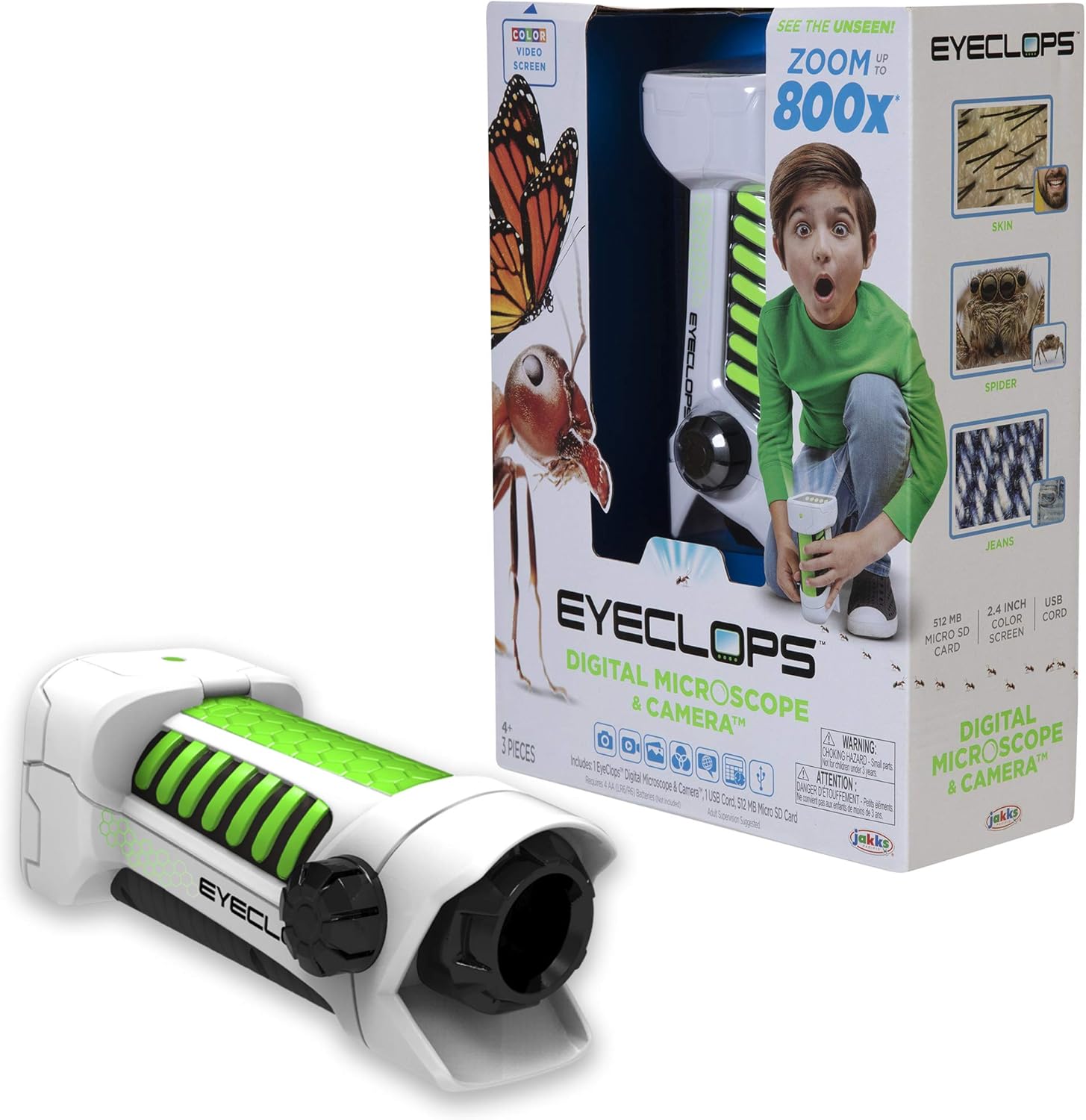
الصورة 1.1: The Eyeclops Digital Microscope & Camera with its retail packaging. This image displays the device alongside its box, highlighting its compact design and the included accessories like the MicroSD card and USB cable.
2. معلومات السلامة
يرجى قراءة وفهم احتياطات السلامة التالية قبل استخدام الجهاز:
- خطر الاختناق: This product contains small parts and is not suitable for children under 3 years of age. Adult supervision is recommended for all users, especially younger children.
- سلامة البطارية: Use only the specified battery type (4 AA batteries). Ensure correct polarity when inserting batteries. Do not mix old and new batteries, or different types of batteries. Remove batteries if the device will not be used for an extended period.
- الظروف البيئية: تجنب تعريض الجهاز لدرجات حرارة عالية، أو أشعة الشمس المباشرة، أو الرطوبة.
3. الإعداد
3.1 تركيب البطارية
- حدد مكان غطاء حجرة البطارية على الجهاز.
- Use a small screwdriver to open the battery compartment.
- Insert 4 AA batteries, ensuring the correct positive (+) and negative (-) polarity as indicated inside the compartment.
- استبدل غطاء حجرة البطارية وثبته بالمسمار.
3.2 إدخال بطاقة MicroSD
- حدد موقع فتحة بطاقة MicroSD على جانب الجهاز.
- Gently insert the included 512MB MicroSD card into the slot until it clicks into place. Ensure the card is oriented correctly.
- لإزالة البطاقة، ادفعها برفق إلى الداخل حتى تخرج.
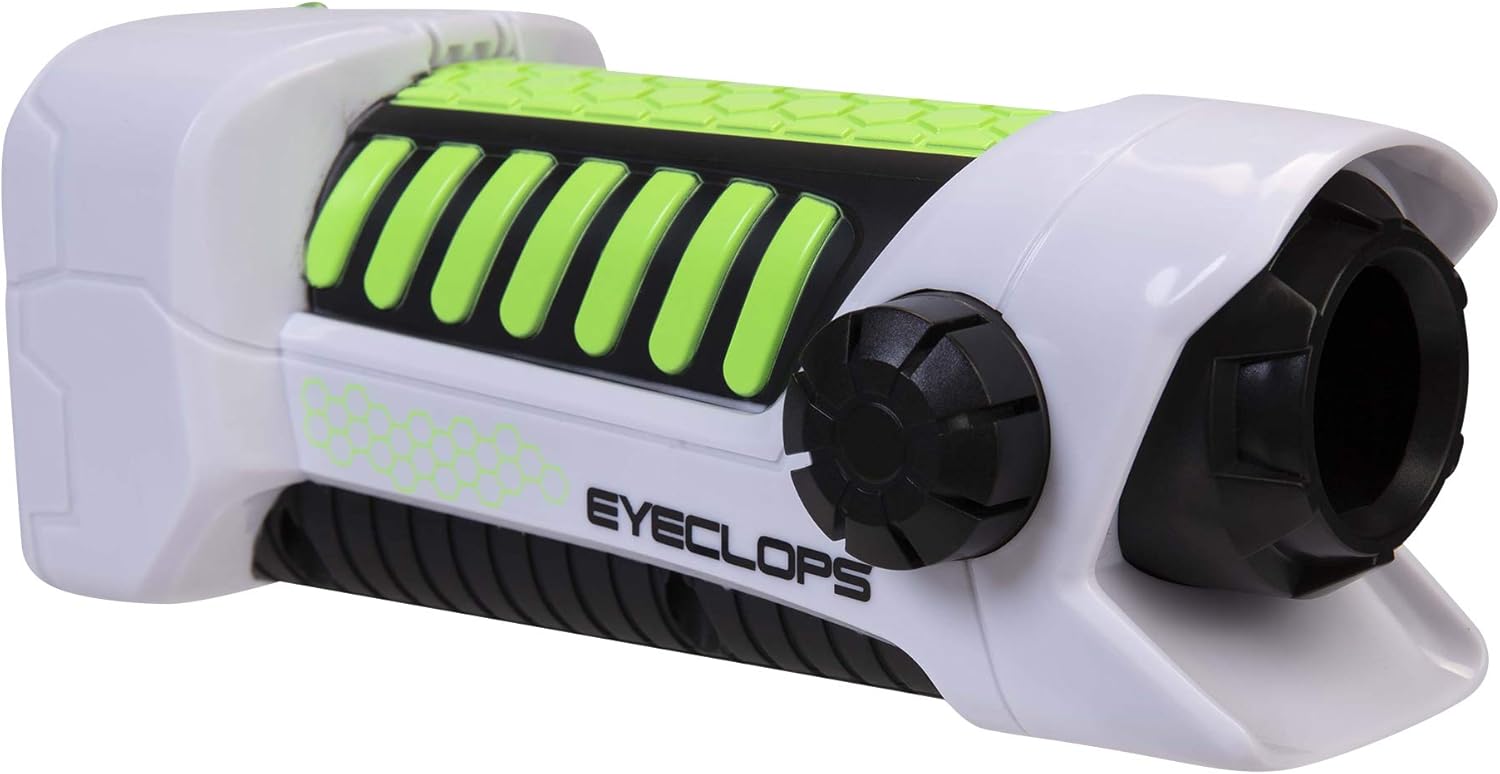
الصورة 3.1: جانب view of the Eyeclops Digital Microscope, illustrating the general shape and location of external features such as the focus knob and lens. This view helps in identifying the MicroSD card slot and battery compartment.
4. تعليمات التشغيل
4.1 تشغيل/إيقاف التشغيل
- To power on the device, press and hold the Power button (usually located near the screen or grip).
- لإيقاف التشغيل، اضغط مع الاستمرار على زر الطاقة مرة أخرى حتى تنطفئ الشاشة.
4.2 Focusing and Zoom
- Point the lens of the microscope at the object you wish to observe.
- ضبط مقبض التركيز (typically located on the side of the device) until the image on the 2.4-inch color screen appears clear.
- The device offers up to 800x magnification. The zoom level can be adjusted using dedicated zoom buttons (often marked with '+' and '-' symbols) or by moving the device closer to or further from the object.
4.3 Taking Pictures and Recording Video
- Once focused, press the زر الكاميرا (often indicated by a camera icon) to capture a still image.
- To record video, press the زر الفيديو (often indicated by a video camera icon). Press it again to stop recording.
- All captured images and videos are saved to the inserted MicroSD card.
4.4 Using as a Regular Camera
The Eyeclops Digital Microscope can also function as a regular camera. To use this feature, turn off the zoom function or adjust the focus for standard distance photography. This allows for capturing broader scenes or objects without extreme magnification.
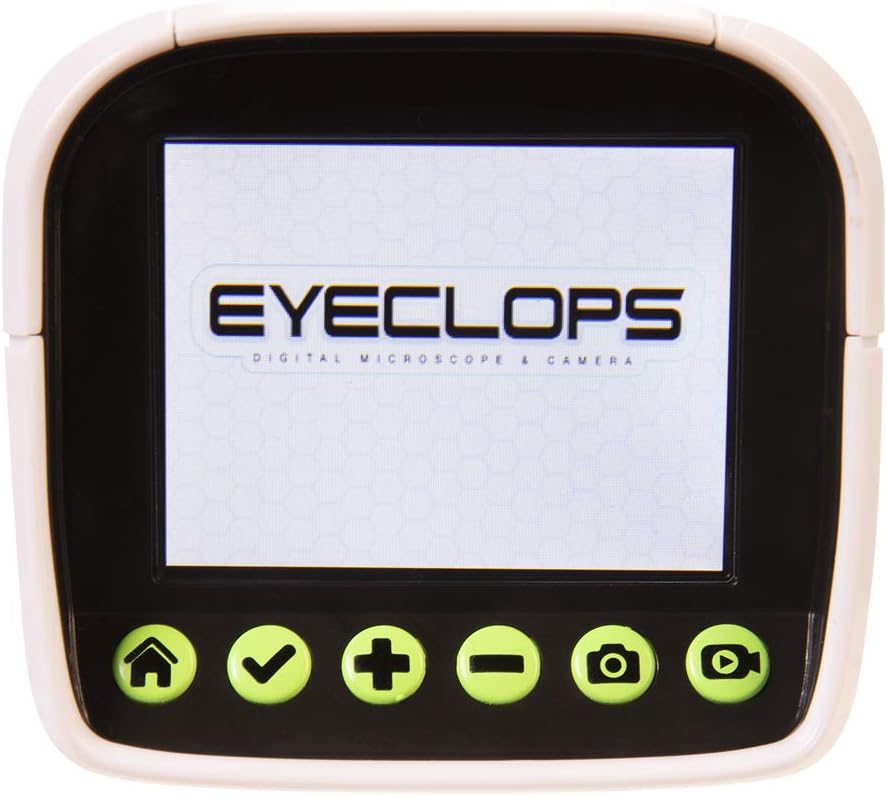
الصورة 4.1: تفصيلية view of the Eyeclops Digital Microscope's 2.4-inch color screen and its control buttons. The buttons typically include Home, Select/Confirm, Zoom In (+), Zoom Out (-), Camera, and Video functions.

الصورة 4.2: A child actively using the Eyeclops Digital Microscope to observe a small object, demonstrating the handheld operation and the visual engagement with the magnified view.
5. نقل البيانات
5.1 النقل Files عبر USB
- Connect the Eyeclops Digital Microscope to your Windows PC or Mac using the provided USB cable.
- يجب أن يظهر الجهاز كجهاز تخزين قابل للإزالة على جهاز الكمبيوتر الخاص بك.
- Navigate to the device's storage or the MicroSD card folder to access your pictures and videos.
- انسخ ملف files إلى جهاز الكمبيوتر الخاص بك.
5.2 النقل Files via MicroSD Card Reader
Alternatively, you can remove the MicroSD card from the microscope and insert it into a compatible card reader connected to your computer to transfer files.
6. الصيانة
- تنظيف: Use a soft, dry cloth to clean the exterior of the device. For the lens and screen, use a specialized lens cleaning cloth and solution to avoid scratches. Do not use abrasive cleaners or solvents.
- تخزين: Store the microscope in a cool, dry place away from direct sunlight and extreme temperatures. Remove batteries if storing for extended periods to prevent leakage.
- حماية العدسة: The lens is designed to be slightly inset to prevent accidental touching. Avoid poking or scratching the lens.
7. استكشاف الأخطاء وإصلاحها
- الجهاز لا يعمل:
- تأكد من إدخال البطاريات بشكل صحيح مع القطبية الصحيحة.
- استبدلها ببطاريات AA جديدة.
- Blurry images/difficulty focusing:
- Ensure you are adjusting the Focus Knob slowly and precisely.
- Maintain a steady hand or place the object on a stable surface to minimize movement during observation or capture.
- نظف العدسة إذا بدت ملطخة أو متسخة.
- لا يمكن النقل fileس للكمبيوتر:
- تأكد من توصيل كابل USB بشكل آمن بكل من المجهر والكمبيوتر.
- جرب منفذ USB مختلفًا على جهاز الكمبيوتر الخاص بك.
- Verify that the MicroSD card is properly inserted into the microscope.
- If issues persist, try using an external MicroSD card reader.
- خطأ في بطاقة MicroSD:
- تأكد من إدخال البطاقة بشكل صحيح.
- Try reformatting the card (this will erase all data, so back up first).
- If the problem continues, the card may be faulty and require replacement.
8. المواصفات
| ميزة | مواصفة |
|---|---|
| رقم الموديل | 652331 |
| الحد الأقصى للتكبير | 800x |
| شاشة مدمجة | شاشة ملونة مقاس 2.4 بوصة |
| تخزين | 512MB MicroSD Card (included) |
| الاتصال | USB |
| مصدر الطاقة | 4 بطاريات AA (غير مدرجة) |
| أبعاد المنتج | 9 × 3.5 × 11 بوصة (22.86 × 8.89 × 27.94 سم) |
| وزن العنصر | 14.8 أونصة (420 جرام) |
| العمر الموصى به | 6 - 9 سنة |
| الشركة المصنعة | جاكس باسيفيك المحدودة |
9. معلومات الضمان
For detailed warranty information, please refer to the documentation included with your product at the time of purchase or visit the official Eyeclops or Jakks Pacific Inc. webتغطي شروط الضمان عادةً عيوب التصنيع لفترة محددة من تاريخ الشراء.
10. الدعم
If you encounter issues not covered in this manual or require further assistance, please contact the manufacturer's customer support. Contact information can usually be found on the product packaging or the official Jakks Pacific Inc. webموقع.