
1. المقدمة
The Zerone Sport Action DV Camera is a compact and portable device designed for capturing high-definition video during various outdoor activities. Featuring 1080P and 720P recording options, a 120-degree wide-angle lens, and an IPX-4 waterproof aluminum alloy shell, this camera is built for durability and ease of use. It includes a built-in microphone for audio recording and provides vibration feedback for operational status.
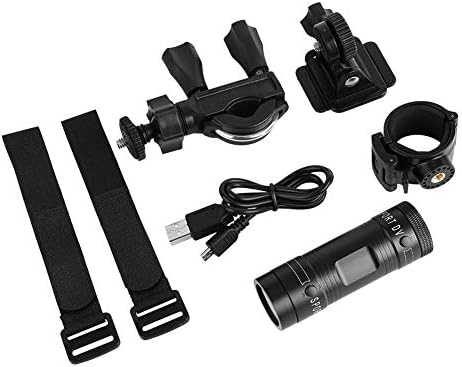
Image 1.1: The Zerone Sport Action DV Camera unit.
2. معلومات السلامة
- لا تعرض الكاميرا لدرجات حرارة قصوى أو لأشعة الشمس المباشرة لفترات طويلة.
- While the camera features an IPX-4 waterproof rating, it is designed to withstand splashes and light rain. Do not submerge or soak the camera in water.
- أبعد الجهاز عن المجالات المغناطيسية القوية.
- استخدم فقط كابل الشحن ومحول الطاقة المحددين لمنع حدوث تلف.
- لا تحاول تفكيك الكاميرا أو تعديلها، لأن ذلك سيؤدي إلى إبطال الضمان وقد يتسبب في تلفها.
- قم بتخزين الكاميرا في مكان جاف وبارد عندما لا تكون قيد الاستخدام.
3. محتويات العبوة
يرجى التحقق من الحزمة للتأكد من وجود جميع العناصر:
- Zerone Sport Action DV Camera Unit
- كابل شحن USB
- Mounting Accessories (e.g., bike mount, helmet mount, strap mounts)
- بطارية قابلة للشحن (قد تكون مثبتة مسبقاً)
- دليل المستخدم (هذا المستند)
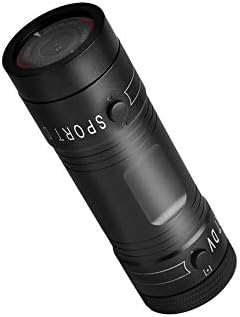
Image 3.1: Contents of the Zerone Sport Action DV Camera package, showing the camera, USB cable, and various mounting options.
4. الكاميرا انتهتview
تعرّف على مكونات الكاميرا وأدوات التحكم بها.
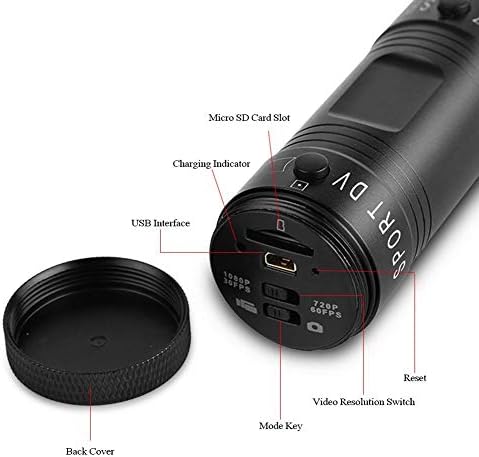
الصورة 4.1: تفصيلية view of the camera's rear end, highlighting the Micro SD card slot, USB interface, charging indicator, mode key, video resolution switch (1080P 30fps / 720P 60fps), and reset button.
- منفذ كارت الذاكرة الصغيرة: Insert your Micro SD card here. A card is required for operation.
- مؤشر الشحن: Displays charging status. A red light indicates charging; it turns off when fully charged.
- واجهة USB: للشحن والاتصال بالكمبيوتر.
- مفتاح الوضع: Used to switch between recording modes (e.g., video, photo).
- Video Resolution Switch: Selects between 1080P 30fps and 720P 60fps recording resolutions.
- زر إعادة الضبط: Used to reset the device if it becomes unresponsive.
- Power Button (Front): Located on the front side of the camera.
- Record/Stop Button (Back): Located on the back side of the camera.
5. الإعداد
5.1 شحن البطارية
- Connect the camera to a USB power source (e.g., computer, wall adapter) using the provided USB cable.
- ال ضوء احمر on the back of the camera will illuminate, indicating that it is charging.
- بمجرد شحنه بالكامل، سينطفئ الضوء الأحمر.
- Note: If the camera blinks red and blue when plugged in, it indicates that an SD card is not inserted. This is not a charging indicator.
5.2 إدخال بطاقة Micro SD
A Micro SD card (not included) is required for recording video and photos. The camera supports Micro SD cards up to a certain capacity (check product packaging for maximum supported size, typically 32GB or 64GB for similar devices).
- فك الغطاء الخلفي للكاميرا.
- Locate the Micro SD card slot (refer to Image 4.1).
- أدخل بطاقة Micro SD برفق في الفتحة حتى تُسمع صوت طقطقة. تأكد من وضع البطاقة بشكل صحيح.
- Replace the back cover, ensuring it is securely tightened to maintain water resistance.
5.3 تركيب الكاميرا
The camera comes with various mounting accessories for different applications.
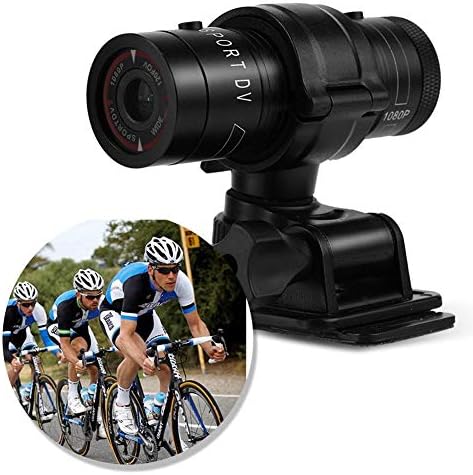
Image 5.1: The camera attached to a bicycle handlebar, demonstrating one of its mounting options.
- حامل الدراجة: استخدم clamp mount to attach the camera securely to bicycle handlebars or other tubular structures.
- جبل خوذة: Utilize the adhesive or strap mounts to fix the camera to a helmet.
- Strap Mounts: For attaching to various gear or body parts.
Ensure all mounts are securely fastened before engaging in activities to prevent the camera from falling.
6. تشغيل الكاميرا
6.1 تشغيل/إيقاف التشغيل
- للتشغيل ، اضغط مع الاستمرار على زر الطاقة (front switch) until the camera vibrates.
- لإيقاف التشغيل ، اضغط مع الاستمرار على زر الطاقة again until the camera vibrates once.
6.2 Selecting Video Resolution
Before recording, select your desired video resolution using the switch on the back of the camera (refer to Image 4.1).
- حرك المفتاح إلى "1080P 30fps" for Full HD video at 30 frames per second.
- حرك المفتاح إلى "720P 60fps" for HD video at 60 frames per second.
6.3 تسجيل الفيديو
- تأكد من تشغيل الكاميرا.
- اضغط على زر التسجيل / الإيقاف (back switch) to start recording. The camera will vibrate three times to indicate recording has started.
- لإيقاف التسجيل ، اضغط على زر التسجيل / الإيقاف again. The camera will vibrate once to indicate recording has stopped.
6.4 التوصيل بجهاز كمبيوتر
لنقل files or access recorded content:
- تأكد من إيقاف تشغيل الكاميرا.
- قم بتوصيل الكاميرا بجهاز الكمبيوتر الخاص بك باستخدام كابل USB المرفق.
- The camera will be recognized as a removable storage device.
- You can then access and transfer your video files.
7. الصيانة
- تنظيف: استخدم قطعة قماش ناعمة وجافة لتنظيف هيكل الكاميرا. أما بالنسبة للعدسة، فاستخدم قطعة قماش ومحلولًا خاصًا لتنظيف العدسات. تجنب المواد الكاشطة.
- تخزين: When not in use for extended periods, store the camera in a cool, dry place. Ensure the battery is partially charged (around 50%) to prolong its lifespan.
- مقاومة الماء: Regularly check that the back cover is securely tightened to maintain the IPX-4 water resistance. Avoid exposing the USB port or SD card slot to moisture when the cover is open.
- العناية بالبطارية: Avoid fully discharging the battery frequently. Recharge it when the low battery indicator appears.
8. استكشاف الأخطاء وإصلاحها
| مشكلة | السبب المحتمل | حل |
|---|---|---|
| الكاميرا لا تعمل. | نفدت طاقة البطارية. | شحن الكاميرا بالكامل. |
| Camera blinks red and blue, then turns off. | No Micro SD card inserted or card is faulty. | Insert a functional Micro SD card. Ensure it is properly seated. |
| لا يمكن تسجيل الفيديو. | لا توجد بطاقة ذاكرة مايكرو إس دي، أو البطاقة ممتلئة، أو خطأ في البطاقة. | Insert a Micro SD card, delete old fileأو قم بتهيئة البطاقة (سيؤدي ذلك إلى مسح جميع البيانات). |
| جودة الفيديو سيئة. | Lens is dirty; low light conditions; incorrect resolution setting. | Clean the lens. Ensure adequate lighting. Select 1080P resolution for higher detail. |
| الكاميرا لا تستجيب. | خلل في البرنامج. | Use a thin object (like a paperclip) to press the زر إعادة الضبط (refer to Image 4.1). |
9. المواصفات
| ميزة | التفاصيل |
|---|---|
| ماركة | زيرون |
| رقم الموديل | Zeronefg3h149y2s |
| دقة التقاط الفيديو | 1080 بكسل (30 إطارًا في الثانية) ، 720 بكسل (60 إطارًا في الثانية) |
| زاوية العدسة | 120-degree A+ grade wide-angle |
| تصنيف مقاومة الماء | IPX-4 (splash-proof) |
| مادة الغلاف | سبائك الألومنيوم |
| تقنية مستشعر الصور | سيموس |
| الفتحة القصوى | 1.8 مليمتر |
| نوع ذاكرة فلاش | Micro SD (card not included) |
| تنسيق التقاط الفيديو | أفي |
| تنسيق الصوت المدعوم | AAC, MP3, PCM, FLAC, or Dolby Digital/AC-3 |
| تكنولوجيا الاتصال | USB |
| وزن العنصر | 10.8 أونصة (حوالي 306 جرامًا) |
| أبعاد المنتج | 11.81 × 6.3 × 5.91 بوصة (حوالي 30 × 16 × 15 سم) |
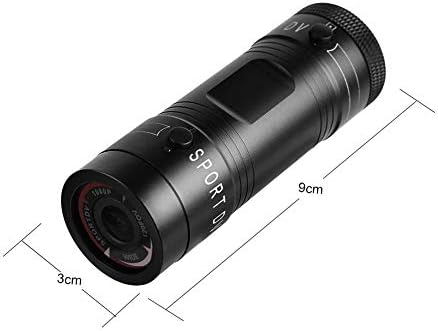
Image 9.1: Physical dimensions of the camera, showing a length of 9cm and a diameter of 3cm.
10. الضمان والدعم
للحصول على معلومات الضمان والدعم الفني، يُرجى مراجعة الوثائق المرفقة مع عملية الشراء أو التواصل مباشرةً مع البائع/الشركة المصنعة. احتفظ بإيصال الشراء لتقديم مطالبات الضمان.
Manufacturer: Zerone
For further assistance, you may visit the Zerone Store on Amazon: Zerone Store