
1. المقدمة
This manual provides essential information for the safe and efficient operation of your lightmaXX Nano Beam FX show effect light. Please read it thoroughly before use and retain it for future reference.
2. تعليمات السلامة
- اقرأ كافة التعليمات بعناية.
- احتفظ بهذا الدليل للرجوع إليه في المستقبل.
- لا تعرض الجهاز للمطر أو الرطوبة.
- تأكد من التهوية المناسبة.
- افصل الجهاز عن مصدر الطاقة قبل التنظيف أو الصيانة.
- Use only specified power supply.
- تجنب تعرض العين المباشر لمصدر الضوء.
- هذا الجهاز مخصص للإستخدام الداخلي فقط.
- Ensure the mounting bracket is securely fastened.
3. محتويات العبوة
Verify that all items are present and in good condition.
- lightmaXX Nano Beam FX Unit
- كابل الطاقة
- جهاز التحكم عن بعد
- دليل التعليمات (هذا المستند)

Image 1: lightmaXX Nano Beam FX unit, power cable, and remote control.
4. انتهى المنتجview
4.1 اللوحة الأمامية
The front panel features multiple lenses for projecting various light effects.
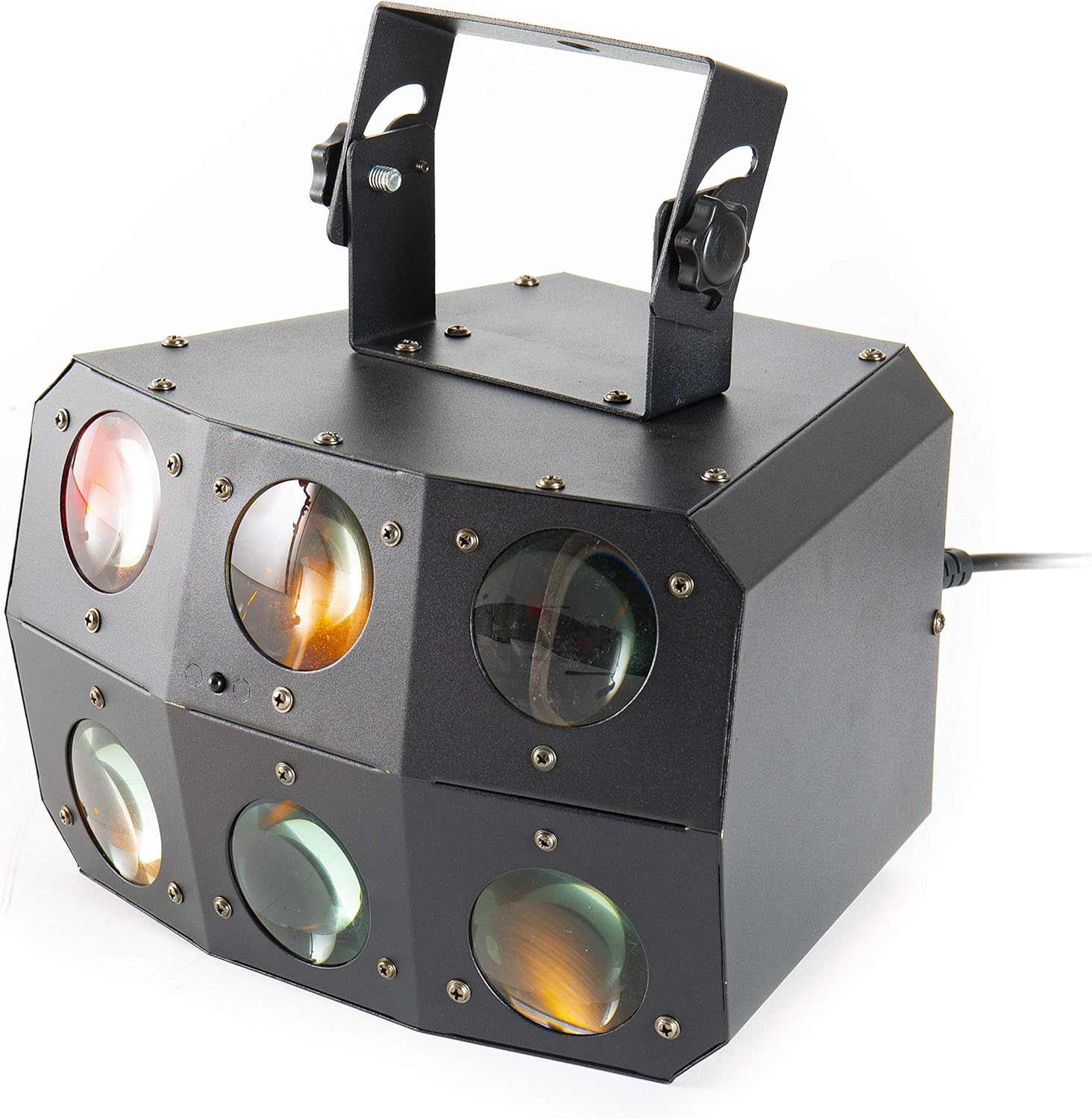
الصورة 2: عن قرب view of the front lenses.
4.2 اللوحة الخلفية والوصلات
The rear panel provides power input/output, DMX connections, and control interface.

Image 3: Rear panel with connections and control interface.
- السلطة في: قم بتوصيل كابل الطاقة المرفق هنا.
- خارج السلطة: For daisy-chaining power to other units.
- DMX في: Connect DMX controller or previous DMX device.
- DMX خارج: Connect to the next DMX device in the chain.
- ميك: Built-in microphone for sound-activated modes.
- العرض والأزرار: For menu navigation and settings (MENU, UP, DOWN, ENTER).
- SAFETY ROPE: Attachment point for a safety cable.
4.3 التحكم عن بعد
The included remote control allows for convenient operation of the unit's functions.
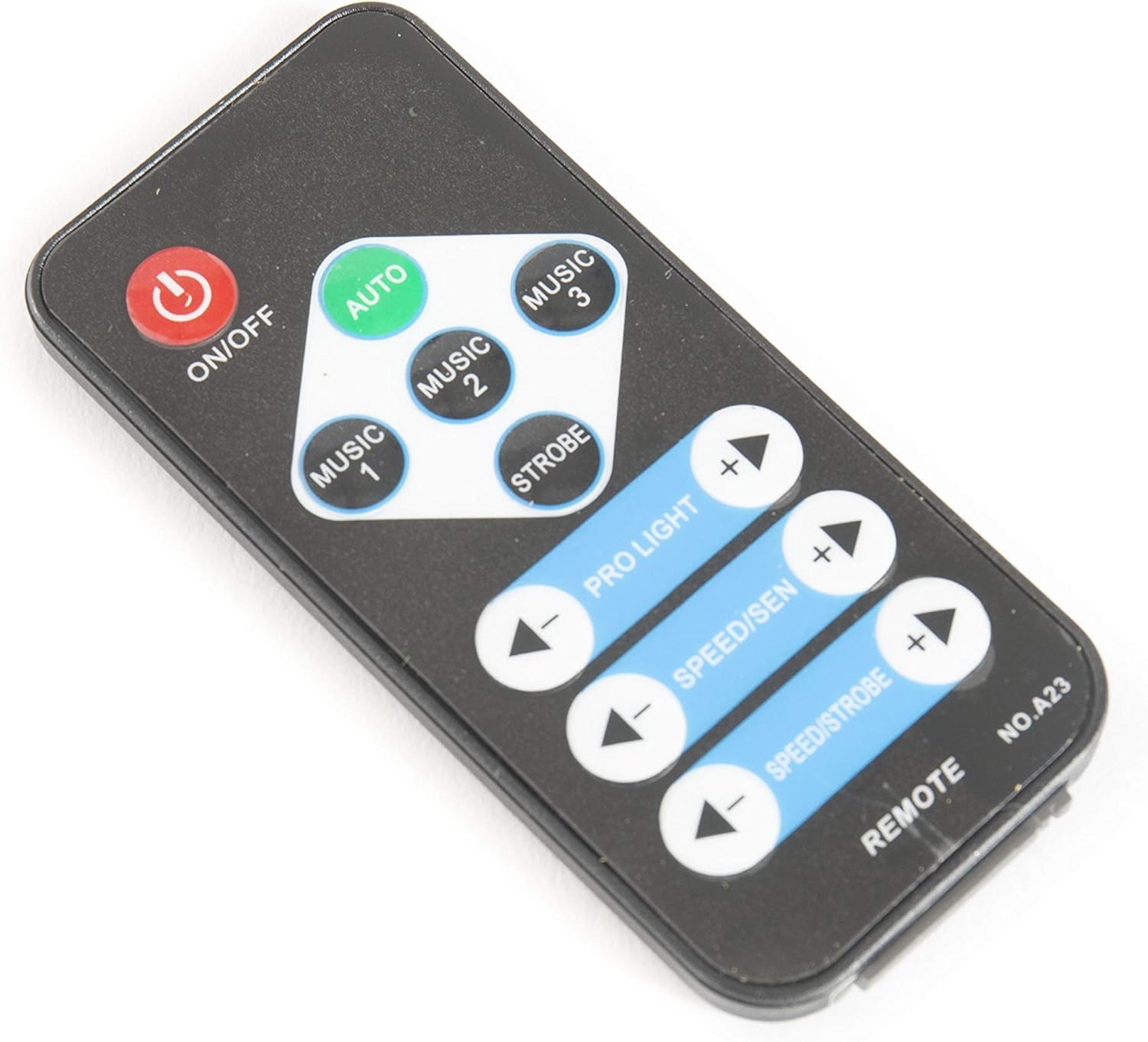
Image 4: Remote control for the Nano Beam FX.
- تشغيل/إيقاف: تشغيل أو إيقاف تشغيل الجهاز.
- تلقاءي: يقوم بتفعيل وضع البرنامج التلقائي.
- الموسيقى 1/2/3: Activates sound-activated modes with different sensitivities or patterns.
- ستروب: يُفعّل تأثير الوميض.
- PRO LIGHT: Adjusts light intensity or program selection.
- SPEED/SEN: Adjusts program speed or sound sensitivity.
5. الإعداد
5.1 فك التعبئة
Carefully remove the unit from its packaging. Inspect for any damage during transit. Retain packaging for future transport or storage.
5.2 التركيب
The Nano Beam FX unit is equipped with a mounting bracket for secure installation.

Image 5: Adjustable mounting bracket.
- Attach the unit securely to a truss, ceiling, or wall using appropriate clamps and hardware (not included).
- Always use a safety cable (not included) attached to the SAFETY ROPE point on the rear panel, ensuring it can hold the weight of the unit.
- Adjust the angle of the unit using the knobs on the mounting bracket.
5.3 توصيل الطاقة
Connect the supplied power cable to the POWER IN socket on the rear panel and then to a suitable power outlet.
5.4 وصلة DMX (اختياري)
For advanced control, connect the unit to a DMX controller.
- Connect a DMX cable from your DMX controller's output to the DMX IN socket of the Nano Beam FX.
- If connecting multiple DMX devices, connect from the DMX OUT of the first unit to the DMX IN of the next.
- Refer to the DMX channel chart (not provided in product data) for specific DMX control parameters.
6. التشغيل
6.1 تشغيل/إيقاف التشغيل
اضغط على تشغيل/إيقاف button on the remote control or ensure the unit is connected to power. The unit will power on automatically when connected to power.
أوضاع التشغيل 6.2
The Nano Beam FX offers several operating modes, selectable via the remote control or the rear panel display.
- نظام آلي: اضغط على آلي button on the remote. The unit will cycle through its pre-programmed light shows automatically.
- وضع الموسيقى: يضعط الموسيقى 1, الموسيقى 2، أو الموسيقى 3 on the remote. The unit will react to sound picked up by its internal microphone. Different music modes may offer varying sensitivities or patterns.
- وضع ستروب: اضغط على STROBE button on the remote to activate a flashing light effect.
- وضع DMX: If connected to a DMX controller, the unit will respond to DMX signals. Use the rear panel display to set the DMX address.

الصورة 6: مثالample of light effects (blue and red).

الصورة 7: مثالample of light effects (green and yellow).

الصورة 8: مثالample of light effects (orange and red).
6.3 Adjustments via Remote Control
- PRO LIGHT: استخدم + و - buttons to cycle through different light programs or adjust intensity in certain modes.
- SPEED/SEN: استخدم + و - buttons to adjust the speed of automatic programs or the sensitivity of sound-activated modes.
7. الصيانة
7.1 التنظيف
Disconnect the unit from power before cleaning. Use a soft, lint-free cloth to wipe the exterior. For lenses, use a specialized lens cleaner and cloth to avoid scratches. Do not use abrasive cleaners.
7.2 التخزين
When not in use, store the unit in its original packaging or a suitable case in a dry, dust-free environment.
8. استكشاف الأخطاء وإصلاحها
| مشكلة | السبب المحتمل | حل |
|---|---|---|
| الوحدة لا تعمل بالطاقة. | لا يوجد مصدر طاقة؛ كابل معيب. | تحقق من توصيل كابل الطاقة؛ جرب منفذًا كهربائيًا مختلفًا. |
| جهاز التحكم عن بعد لا يعمل. | بطارية فارغة؛ عائق؛ خارج النطاق. | Replace remote battery; ensure clear line of sight; move closer to unit. |
| No light effects. | Unit in DMX mode without DMX signal; program not selected. | Select AUTO or MUSIC mode; check DMX connection and settings. |
| Sound-activated mode not responding. | Microphone sensitivity too low; no sound input. | Increase sensitivity using remote; ensure sound source is close to the unit. |
9. المواصفات
| ميزة | التفاصيل |
|---|---|
| نموذج | Nano Beam FX |
| ماركة | لايت ماكس |
| أبعاد المنتج | 32 × 30 × 29 سم |
| وزن العنصر | 3.5 كجم |
| مصدر الطاقة | كهرباء سلكية |
| مصدر الضوء واتtage | 3 Watts (per light source) |
| عدد مصادر الضوء | 24 |
| مرجع الشركة المصنعة | LIG0015648-000 |
| ASIN | B07JM9XVT4 |
10. الضمان والدعم
للحصول على معلومات الضمان والدعم الفني، يرجى الرجوع إلى الموقع الرسمي للشركة المصنعة. webالموقع أو تواصل مع بائع التجزئة. احتفظ بإيصال الشراء لأي مطالبات بالضمان.