
AWEI T5
AWEI T5 True Wireless Earbuds User Manual
مقدمة
This manual provides detailed instructions for the AWEI T5 True Wireless Earbuds. Please read this guide carefully before using the product to ensure proper operation and to maximize your listening experience.
محتويات الحزمة
تأكد من وجود جميع العناصر المدرجة أدناه في الحزمة الخاصة بك:
- AWEI T5 True Wireless Earbuds (Left and Right)
- حافظة الشحن
- كابل شحن USB
- دليل المستخدم
- أحجام متعددة من أطراف الأذن

Image: AWEI T5 True Wireless Earbuds retail packaging, showing the brand logo and product model.
المنتج انتهىview
Familiarize yourself with the components of your AWEI T5 True Wireless Earbuds and charging case.

Image: The AWEI T5 True Wireless Earbuds inside their charging case, with an additional image showing an earbud being worn by a user.

الصورة: لقطة مقربة view of the AWEI T5 True Wireless Earbuds and their charging case resting on a laptop keyboard.
The earbuds are designed for a secure and comfortable fit, and the charging case provides both protection and power on the go.
يثبت
1. الشحن الأولي
قبل الاستخدام الأول، قم بشحن سماعات الأذن وعلبة الشحن بالكامل.
- ضع كلتا سمّاعات الأذن في علبة الشحن.
- قم بتوصيل كابل شحن USB بعلبة الشحن ومصدر الطاقة.
- The indicator lights on the case and earbuds will show charging status.
- بمجرد شحنه بالكامل، افصل الكابل.
2. الاقتران بجهاز
To connect your AWEI T5 earbuds to a Bluetooth-enabled device:
- تأكد من شحن وسادات الأذن.
- افتح علبة الشحن وأخرج سماعتي الأذن. سيدخلان تلقائيًا في وضع الاقتران.
- على جهازك (الهاتف الذكي، الجهاز اللوحي، وما إلى ذلك)، انتقل إلى إعدادات البلوتوث وقم بتمكين البلوتوث.
- بحث عن available devices and select "AWEI T5" from the list.
- بمجرد الاتصال، ستسمع نغمة تأكيد، وستتغير أضواء المؤشر الموجودة على سماعات الأذن.
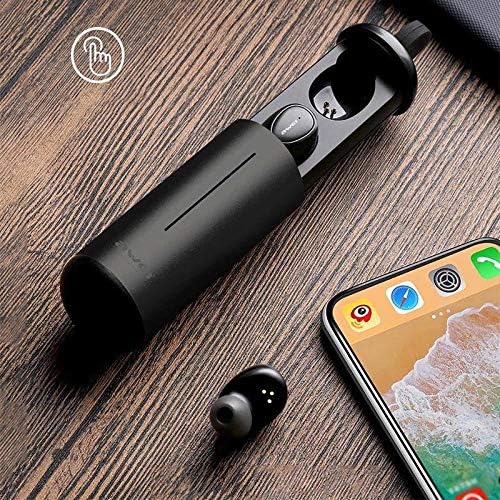
Image: AWEI T5 Earbuds in their charging case, positioned next to a smartphone, illustrating the pairing process.
تعليمات التشغيل
عناصر التحكم الأساسية
The AWEI T5 earbuds feature touch controls for various functions:
- تشغيل/إيقاف مؤقت: انقر مرة واحدة على أي من سماعتي الأذن.
- المسار التالي: انقر نقرًا مزدوجًا على سماعة الأذن اليمنى.
- المسار السابق: انقر نقرًا مزدوجًا على سماعة الأذن اليسرى.
- الرد/إنهاء المكالمة: انقر مرة واحدة على أي من سماعتي الأذن أثناء المكالمة الواردة.
- رفض المكالمة: اضغط مع الاستمرار على أي سماعة أذن لمدة ثانيتين أثناء المكالمة الواردة.
- تنشيط مساعد الصوت: انقر ثلاث مرات على أي من سماعتي الأذن.
وضع ياربود واحد
You can use either the left or right earbud independently:
- Remove one earbud from the charging case. It will automatically connect to the last paired device.
- The other earbud can remain in the case or be turned off.
وضع ياربود مزدوج
For a stereo audio experience, use both earbuds:
- Remove both earbuds from the charging case. They will automatically connect to each other and then to the last paired device.
الصيانة والعناية
To ensure the longevity and optimal performance of your AWEI T5 earbuds:
- تنظيف: نظّف سماعات الأذن وعلبة الشحن بانتظام بقطعة قماش ناعمة وجافة وخالية من الوبر. تجنّب استخدام مواد كيميائية قاسية أو مواد كاشطة.
- تخزين: عندما لا تكون قيد الاستخدام، قم بتخزين سماعات الأذن في علبة الشحن الخاصة بها لحمايتها من الغبار والتلف.
- العناية بالبطارية: Avoid fully discharging the battery frequently. Charge the earbuds and case regularly, even if not used for extended periods.
- مقاومة الماء: The earbuds are rated IPX4, meaning they are resistant to splashing water from any direction. Do not submerge them in water or expose them to heavy rain.

Image: AWEI T5 Earbuds with water droplets, indicating their IPX4 splash-resistant rating.
استكشاف الأخطاء وإصلاحها
If you encounter issues with your AWEI T5 earbuds, refer to the following common problems and solutions:
| مشكلة | حل |
|---|---|
| سماعات الأذن غير مقترنة بالجهاز. | Ensure earbuds are charged. Turn off and on Bluetooth on your device. Forget "AWEI T5" from your device's Bluetooth list and re-pair. |
| تعمل سماعة أذن واحدة فقط. | Place both earbuds back into the charging case, close the lid, then open and remove them together. Ensure both are charged. |
| لا يوجد صوت أو مستوى الصوت منخفض. | تحقق من مستوى الصوت في كل من جهازك وسماعات الأذن. تأكد من توصيل سماعات الأذن بشكل صحيح. |
| علبة الشحن لا تشحن. | Verify the USB cable is securely connected to both the case and the power source. Try a different cable or power adapter. |
تحديد
Technical details for the AWEI T5 True Wireless Earbuds:
| ميزة | التفاصيل |
|---|---|
| رقم الموديل | T5 |
| الاتصال | بلوتوث |
| عامل الشكل | داخل الأذن |
| مادة | بلاستيك |
| لون | أسود |
| الأبعاد (المنتج) | 4 × 10 × 16.5 سم |
| الوزن (المنتج) | 4.54 جرام |
| نوع البطارية | 1 Lithium Ion (per earbud, typically) |
| تصنيف مقاومة الماء | IPX4 (مقاوم للرذاذ) |
الضمان والدعم
للحصول على معلومات الضمان ودعم العملاء، يرجى الرجوع إلى الوثائق المرفقة مع عملية الشراء أو الاتصال بالبائع. احتفظ بإثبات الشراء لتقديم أي مطالبات ضمان.
Ask a question about this manual
Ask about setup, troubleshooting, compatibility, parts, safety, or missing instructions. Manuals+ will review the question and use this page’s manual context to help answer it.