
1. المقدمة
The FAAC 785506 Decoder SL is a high-quality electronic component designed for integration into FAAC automation systems. This device facilitates secure and reliable communication within your system, ensuring optimal performance and control. This manual provides essential information for the correct installation, operation, and maintenance of your Decoder SL.
Please read this manual carefully before proceeding with installation or operation to ensure safety and proper functionality.
2. معلومات السلامة
تعليمات السلامة الهامة:
- يجب أن يتم إجراء التركيب والصيانة بواسطة أفراد مؤهلين فقط.
- Disconnect power to the main system before performing any installation or maintenance procedures.
- تأكد من أن جميع التوصيلات الكهربائية تتوافق مع اللوائح والمعايير المحلية.
- Do not expose the device to moisture, extreme temperatures, or corrosive substances.
- احتفظ بمواد التغليف بعيدًا عن متناول الأطفال.
3. محتويات العبوة
Verify that all components are present and undamaged upon opening the package. The standard package for the FAAC 785506 Decoder SL typically includes:
- FAAC 785506 Decoder SL unit
- دليل التعليمات (هذا المستند)
- أجهزة التثبيت (إن وجدت)
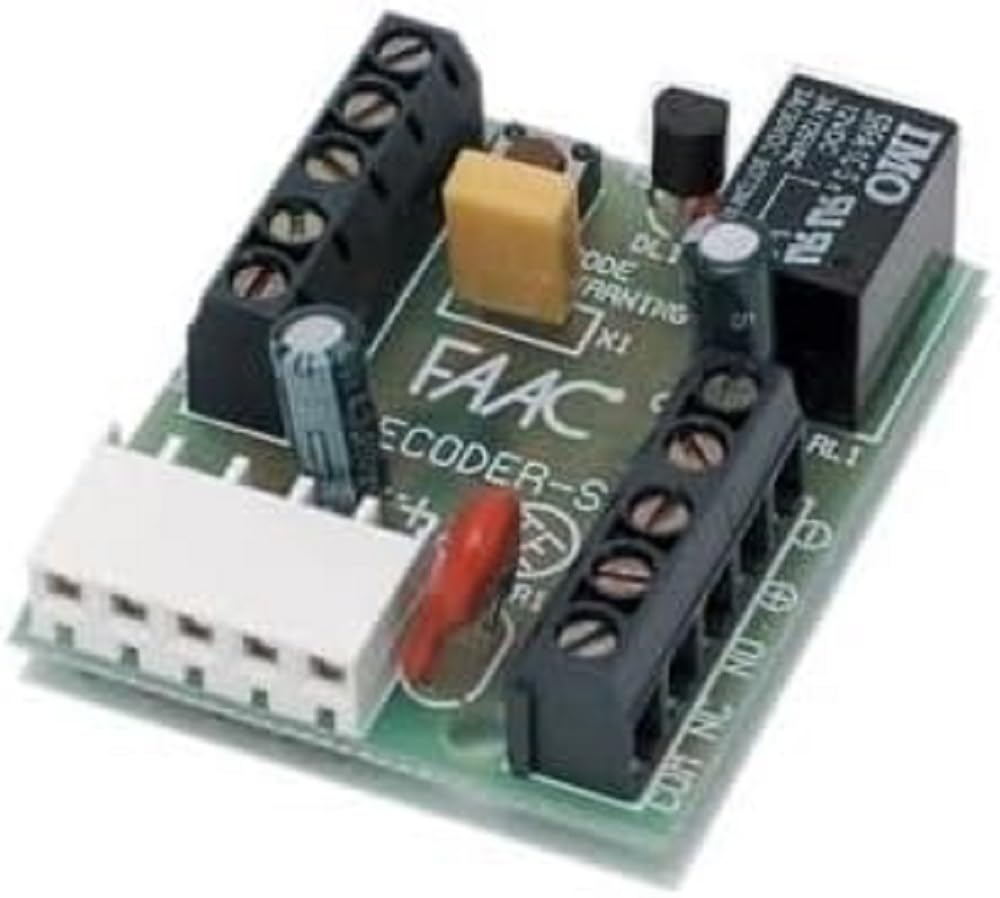
الشكل 1: The FAAC 785506 Decoder SL unit. This image displays the compact design of the decoder, typically featuring connection terminals and indicator lights.
4. الإعداد والتثبيت
The FAAC 785506 Decoder SL is designed for easy integration into existing FAAC control units. Follow these general steps for installation:
- انقطاع التيار الكهربائي: Ensure the main power supply to the automation system is completely disconnected before beginning installation.
- التركيب: Securely mount the Decoder SL in a suitable, protected location within the control unit enclosure, away from direct moisture or excessive heat. Use the provided mounting hardware.
- التوصيلات الكهربائية: Connect the Decoder SL to the control unit according to the wiring diagram provided with your specific FAAC control panel. Pay close attention to polarity and terminal designations. Typical connections include power supply, data lines, and output signals.
- تَحَقّق: Double-check all connections to ensure they are secure and correct.
- إعادة توصيل الطاقة: Once all connections are verified, restore power to the main system.
Refer to the specific wiring diagrams of your FAAC control unit for detailed connection instructions.
5. تعليمات التشغيل
Once installed and powered, the FAAC 785506 Decoder SL operates automatically as part of your FAAC automation system. Its primary function is to decode signals from connected devices, such as remote controls or keypads, and transmit them to the main control unit.
- أضواء المؤشر: Observe any indicator lights on the decoder. These typically provide status information, such as power on, signal reception, or error states. Consult your control unit's manual for specific indicator light meanings.
- تكامل النظام: The decoder works in conjunction with your FAAC control board. Any programming or configuration of remote controls or access devices will be performed through the main control unit, not directly on the decoder.
For specific operational details related to your overall FAAC system, refer to the instruction manual of your main control unit.
6. الصيانة
The FAAC 785506 Decoder SL is designed for minimal maintenance. However, periodic checks can help ensure its longevity and reliable operation:
- تنظيف: حافظ على الجهاز خالياً من الغبار والأوساخ. استخدم قطعة قماش ناعمة وجافة للتنظيف. لا تستخدم المنظفات السائلة أو المذيبات.
- فحص الاتصال: قم بفحص جميع توصيلات الأسلاك بشكل دوري للتأكد من أنها تبقى آمنة وخالية من التآكل.
- الظروف البيئية: Ensure the operating environment remains within the recommended temperature and humidity ranges.
No user-serviceable parts are inside the decoder. Do not attempt to open or repair the unit yourself.
7. استكشاف الأخطاء وإصلاحها
If you experience issues with your FAAC 785506 Decoder SL, consider the following common troubleshooting steps:
- لا يوجد طاقة:
- Check the main power supply to the control unit.
- Verify all power connections to the decoder are correct and secure.
- لا يوجد استقبال إشارة:
- Ensure the transmitting device (e.g., remote control) is functioning correctly and has fresh batteries.
- Check the wiring between the decoder and the control unit for any loose or incorrect connections.
- Verify that the transmitting device is within the operational range and not obstructed.
- عطل في النظام:
- If the entire automation system is not responding, consult the troubleshooting section of your main FAAC control unit manual.
- Ensure the decoder is correctly recognized by the main control unit (if applicable, check programming steps in the control unit manual).
If problems persist after attempting these steps, contact FAAC technical support or a qualified service technician.
8. المواصفات
| ميزة | التفاصيل |
|---|---|
| ماركة | FAAC |
| رقم الموديل | 785506 |
| ASIN | B07HYVG1WS |
| الشركة المصنعة | Faac Spa |
| بلد المنشأ | إيطاليا |
| توافر قطع الغيار | المعلومات غير متوفرة |
| تحديثات البرامج مضمونة حتى | المعلومات غير متوفرة |
9. الضمان والدعم
FAAC products are manufactured to high-quality standards. For information regarding warranty coverage, terms, and conditions, please refer to the warranty documentation provided with your complete FAAC automation system or visit the official FAAC webموقع.
For technical support, service, or inquiries about spare parts, please contact your authorized FAAC dealer or FAAC customer service. When contacting support, please have your product model number (785506) and any relevant system information ready.
الموارد المتاحة على الإنترنت: For additional information, product updates, and detailed technical documentation, please visit the official FAAC webموقع: www.faac.com