
1. المقدمة
Thank you for choosing the KAIDI KD-904 Bluetooth Earphones. These wireless in-ear headphones are designed for comfort and stability, making them ideal for sports and daily use. Featuring Bluetooth connectivity and a built-in microphone, they allow for hands-free calls and high-quality audio playback. This manual provides essential information for the proper setup, operation, and maintenance of your earphones.
2. محتويات العبوة
- KAIDI KD-904 Bluetooth Earphones
- كابل شحن USB
- دليل المستخدم
3. انتهى المنتجview
The KAIDI KD-904 earphones feature an ergonomic design with ear hooks for a secure fit, especially during physical activity. The earbuds are magnetic, allowing them to clip together for convenient storage around your neck when not in use. An inline control module provides easy access to power, volume, and call functions.

الصورة: عن قرب view of a single KAIDI KD-904 earphone, highlighting the in-ear bud and the flexible ear hook designed for stability.

الصورة: مفصلة view of the earbud housing with the 'KAIDI' brand logo, showing the design and finish of the earphone unit.
4. الإعداد
4.1 شحن سماعات الأذن
- Connect the micro USB end of the charging cable to the charging port on the inline control module of the earphones.
- قم بتوصيل طرف USB-A الخاص بكابل الشحن بمصدر طاقة USB (مثل منفذ USB في الكمبيوتر أو محول الحائط).
- The LED indicator on the control module will illuminate, typically red, during charging.
- Once fully charged (approximately 1-2 hours), the LED indicator will change color (e.g., blue) or turn off.
Note: Ensure the earphones are fully charged before first use for optimal battery life.
4.2 اقتران بلوتوث
- تشغيل الطاقة: Press and hold the multi-function button (usually the center button on the inline control) for approximately 3-5 seconds until the LED indicator flashes blue and red alternately. This indicates the earphones are in pairing mode.
- تفعيل البلوتوث: على هاتفك الذكي أو أي جهاز آخر يدعم تقنية Bluetooth، انتقل إلى إعدادات Bluetooth وتأكد من تشغيل Bluetooth.
- بحث عن الأجهزة: Your device will scan for available Bluetooth devices. Look for "KD-904" or a similar name in the list.
- يتصل: Select "KD-904" from the list to initiate the connection. Once successfully paired, the LED indicator on the earphones will typically flash blue slowly or turn solid blue, and you may hear an audible confirmation.
- إعادة الاتصال: After initial pairing, the earphones will automatically attempt to connect to the last paired device when powered on, provided the device's Bluetooth is active and within range.
5. تعليمات التشغيل
5.1 الوظائف الأساسية
- تشغيل الطاقة: اضغط مع الاستمرار على الزر متعدد الوظائف لمدة 3 ثوانٍ.
- إيقاف التشغيل: اضغط مع الاستمرار على الزر متعدد الوظائف لمدة 5 ثوانٍ.
- تشغيل/إيقاف مؤقت: اضغط قصيرًا على الزر متعدد الوظائف.
- رفع الصوت: اضغط لفترة قصيرة على زر "+".
- اخفض الصوت: اضغط لفترة قصيرة على الزر '-'.
- المسار التالي: اضغط لفترة طويلة على زر "+".
- المسار السابق: اضغط لفترة طويلة على الزر '-'.
5.2 إدارة المكالمات
- الرد على المكالمة: Short press the multi-function button when an incoming call rings.
- إنهاء المكالمة: Short press the multi-function button during a call.
- رفض المكالمة: Long press the multi-function button when an incoming call rings.
- إعادة الاتصال بالرقم الأخير: اضغط مرتين على زر الوظائف المتعددة.
6. الصيانة
- تنظيف: Use a soft, dry cloth to clean the earphones. Do not use abrasive cleaners or immerse in water.
- تخزين: Store the earphones in a cool, dry place away from direct sunlight and extreme temperatures. The magnetic earbuds help prevent tangling during storage.
- العناية بالبطارية: To prolong battery life, avoid completely discharging the earphones frequently. Charge them regularly, even if not in use for extended periods.
- تجنب الضرر: لا تسقط سماعات الأذن، ولا تفككها، ولا تعدلها. أبقِها بعيداً عن الأشياء الحادة.
7. استكشاف الأخطاء وإصلاحها
| مشكلة | السبب المحتمل | حل |
|---|---|---|
| لا يتم تشغيل سماعات الأذن. | بطارية منخفضة. | اشحن سماعات الأذن بالكامل. |
| لا يمكن الاقتران بالجهاز. | Earphones not in pairing mode; Bluetooth off on device; device out of range. | Ensure earphones are in pairing mode (flashing red/blue). Turn on Bluetooth on your device. Move device closer to earphones (within 10 meters). Try re-pairing. |
| لا يوجد صوت أو مستوى الصوت منخفض. | مستوى الصوت منخفض جدًا؛ غير متصل؛ تم اختيار مخرج صوت غير صحيح. | Increase volume on both earphones and connected device. Ensure earphones are successfully connected. Check audio output settings on your device. |
| الشحن لا يعمل. | كابل أو مصدر طاقة معيب. | Try a different USB charging cable and/or a different USB power source. |
8. المواصفات
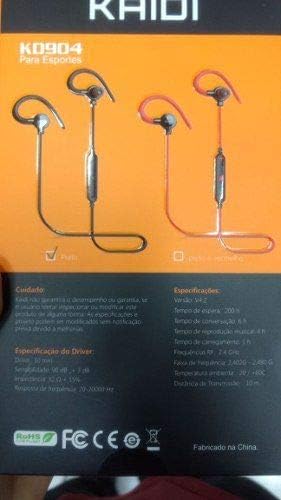
Image: Back of the KAIDI KD-904 product box, displaying detailed technical specifications and features in text.
- نموذج: كيه دي-904
- إصدار البلوتوث: رقم V4.2
- نطاق التشغيل: حتى 10 مترا (33 قدما)
- وقت تشغيل الموسيقى: حوالي 4 ساعات
- وقت الاستعداد: حوالي 200 ساعات
- وقت الشحن: حوالي 1-2 ساعة
- حجم السائق: 10 ملم
- حساسية السائق: 98 ديسيبل
- استجابة التردد: 20 هرتز - 20 كيلو هرتز
- الاتصال: بلوتوث لاسلكي
- وضع الأذن: In-ear (Intra-auricular)
- استخدامات محددة: Sports, Running
- الأجهزة المتوافقة: Android, Samsung, iPhone
9. الضمان والدعم
For warranty information or technical support, please refer to the purchase documentation or contact your retailer. Keep your proof of purchase for any warranty claims. KAIDI is committed to providing quality products and support.