
1. المقدمة
This manual provides detailed instructions for the proper installation, operation, and maintenance of your Roadstar RD8410N and RD8200N TV Tuner and TV Antenna. Please read this manual thoroughly before using the product to ensure safe and efficient operation. Keep this manual for future reference.
2. معلومات السلامة
- تأكد من حجم امدادات الطاقةtage يطابق المتطلبات المحددة على الجهاز.
- لا تعرض الجهاز للمطر أو الرطوبة أو درجات الحرارة العالية.
- تجنب وضع الجهاز بالقرب من مصادر الحرارة أو تحت أشعة الشمس المباشرة.
- لا تفتح الصندوقasing of the TV tuner; refer all servicing to qualified personnel.
- Keep the antenna away from high-voltage power lines and other electrical hazards.
- افصل محول الطاقة أثناء العواصف الرعدية أو عند عدم استخدامه لفترات طويلة.
3. محتويات العبوة
يرجى التحقق من محتويات العبوة عند فتحها. في حال وجود أي نقص أو تلف في المنتجات، يرجى الاتصال بالبائع.
- Roadstar TV Tuner (RD8410N or RD8200N)
- هوائي التلفزيون
- محول الطاقة
- جهاز تحكم عن بعد (إذا كان مرفقًا مع طرازك)
- دليل المستخدم (هذا المستند)
4. انتهى المنتجview
Familiarize yourself with the components of your Roadstar TV Tuner and Antenna.
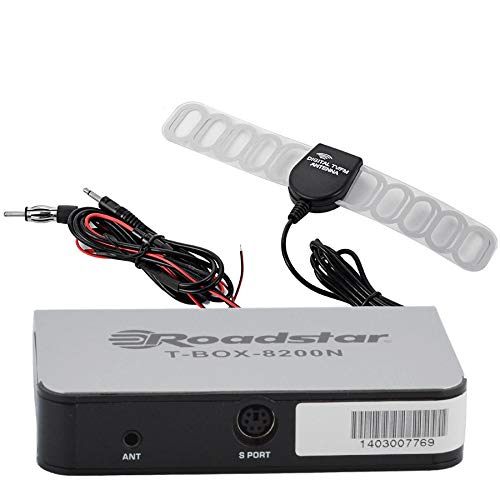
Figure 1: Roadstar T-BOX-8200N TV Tuner
This image displays the Roadstar T-BOX-8200N TV Tuner. It is a compact, silver-grey rectangular device with black side panels. The front face prominently features the "Roadstar" logo and the model name "T-BOX-8200N". On the right side, two ports are visible: one labeled "12V" for power input and another labeled "ANT" for antenna connection. This device is designed to receive and process television signals.
4.1. TV Tuner Ports and Indicators
- مدخلات ANT: Connects to the TV antenna for receiving broadcast signals.
- 12 فولت تيار مستمر الإدخال: يتصل بمحول الطاقة المقدم.
- (Other ports like HDMI Out, USB, AV Out may be present depending on specific model variant. Refer to your device for exact port configuration.)
4.2. TV Antenna
The included TV antenna is designed to capture terrestrial broadcast signals. Its performance may vary based on location, signal strength, and obstacles.
5. الإعداد
5.1. Connecting the TV Tuner
- ربط الهوائي: Plug the antenna cable into the "ANT" input port on the Roadstar TV Tuner.
- الاتصال بالتلفزيون: Use an appropriate cable (e.g., HDMI, AV) to connect the TV tuner's output port to an available input port on your television. Note the input port you use (e.g., HDMI 1, AV 2).
- توصيل الطاقة: Insert the small end of the power adapter into the "12V DC" input port on the TV tuner. Plug the other end of the power adapter into a standard electrical outlet.
5.2. Positioning the TV Antenna
- Place the antenna in a location with minimal obstructions, ideally near a window or high up.
- Experiment with different antenna positions to find the best signal reception.
- Avoid placing the antenna near large metal objects or other electronic devices that may cause interference.
6. تعليمات التشغيل
6.1. التشغيل الأولي ومسح القنوات
- Turn on your television and select the correct input source (e.g., HDMI 1, AV 2) that the TV tuner is connected to.
- The TV tuner should power on automatically or can be turned on using its power button or remote control.
- Follow the on-screen prompts for initial setup. This typically includes selecting your language and country.
- Initiate an "Auto Scan" or "Channel Search" from the TV tuner's menu. This process will scan for available digital television channels. This may take several minutes.
- Once the scan is complete, the tuner will save the found channels, and you should be able to view هم.
6.2. Basic TV Viewعمل
- Use the remote control's channel up/down buttons to navigate through channels.
- Use the volume buttons on your TV's remote control to adjust audio levels.
- Access the menu to adjust settings, view program guides (EPG), or manage channels.
7. الصيانة
7.1. التنظيف
- تأكد من فصل الجهاز عن الكهرباء قبل التنظيف.
- Wipe the exterior of the TV tuner and antenna with a soft, dry cloth.
- Do not use liquid cleaners, aerosols, or abrasive chemicals.
7.2. التخزين
- في حالة تخزين الجهاز لفترة طويلة، افصله عن مصدر الطاقة وخزنه في مكان بارد وجاف.
- يبقيه بعيدا عن أشعة الشمس المباشرة ودرجات الحرارة القصوى.
8. استكشاف الأخطاء وإصلاحها
| مشكلة | السبب المحتمل | حل |
|---|---|---|
| لا يوجد طاقة | محول الطاقة غير متصل أو المنفذ معيب. | Ensure power adapter is securely connected to the tuner and a working electrical outlet. |
| No signal / "No Channel" message | Antenna not connected, poor antenna position, or no channels scanned. |
|
| Poor picture quality / pixelation | Weak signal, interference, or antenna position. |
|
| لا يوجد صوت | TV volume muted or too low, incorrect audio settings. |
|
9. المواصفات
ملاحظة: المواصفات عرضة للتغيير دون إشعار.
- نموذج: Roadstar RD8410N, Roadstar RD8200N
- نوع المنتج: TV Tuner and Antenna Package
- نوع الموالف: Digital Terrestrial Television (DTT)
- حجم الإدخالtage: 12V DC (via included power adapter)
- نوع الهوائي: Passive or Active (depending on specific antenna model)
- الاتصال: ANT In, 12V DC In, (e.g., HDMI Out, USB, AV Out - specific to model)
- ASIN: B07GXJPR3R
- ماركة: رودستار
10. الضمان والدعم
للحصول على معلومات الضمان والدعم الفني، يرجى الرجوع إلى الوثائق المرفقة مع عملية الشراء أو الاتصال بالبائع. احتفظ بإثبات الشراء لتقديم مطالبات الضمان.