
BoxWave bw-1173-16092-8831
BoxWave SlimKeys Bluetooth Keyboard User Manual
Model: bw-1173-16092-8831
مقدمة
The BoxWave SlimKeys Bluetooth Keyboard is a portable, ultra-thin keyboard designed for seamless connectivity with your Bluetooth-enabled devices, including the Samsung Galaxy A6 (2018). Its chiclet-style keys provide a comfortable typing experience, making it ideal for productivity on the go. This manual provides detailed instructions for setting up, operating, maintaining, and troubleshooting your SlimKeys Bluetooth Keyboard.
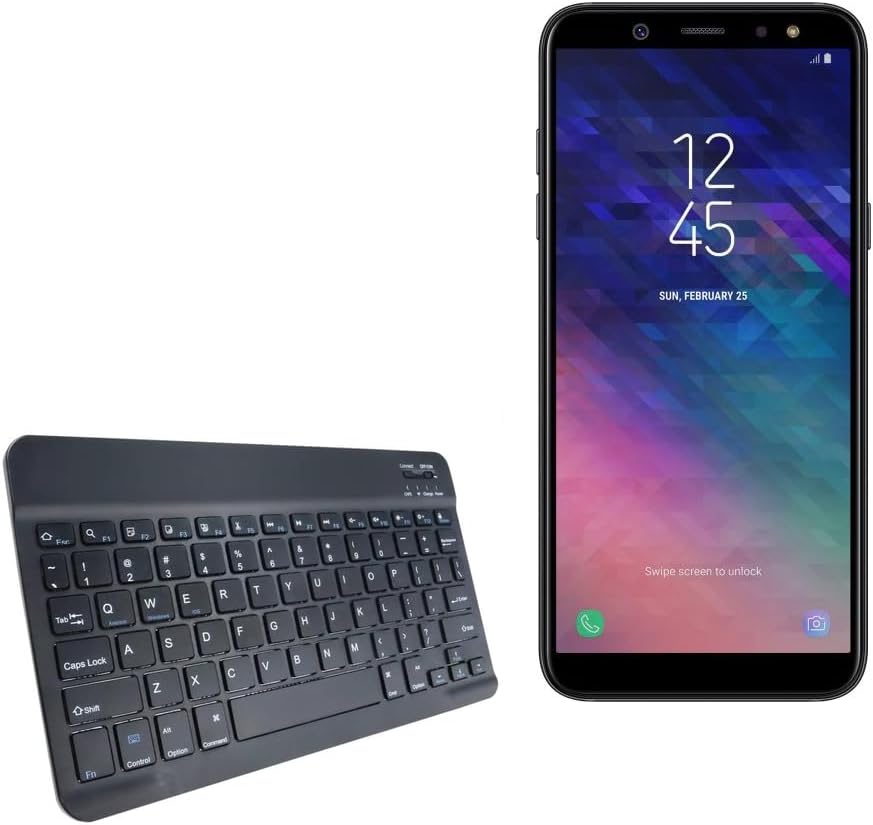
Image: The SlimKeys Bluetooth Keyboard shown alongside a compatible Samsung Galaxy A6 (2018) device, highlighting its compact size.
يثبت
شحن لوحة المفاتيح
Before initial use, ensure your SlimKeys Bluetooth Keyboard is fully charged. Use the included charging cable to connect the keyboard to a USB power source (e.g., computer USB port, USB wall adapter). The charging indicator light will illuminate during charging and turn off when fully charged.

الصورة: تفصيلية view of the keyboard's charging port, demonstrating how to connect the charging cable for its long-lasting battery.
بلوتوث الاقتران
- تشغيل الطاقة: Locate the ON/OFF switch on the keyboard (usually on the top right) and slide it to the 'ON' position. The power indicator light will briefly illuminate.
- الدخول في وضع الاقتران: Press the 'Connect' button (often located near the ON/OFF switch or as a dedicated key). The Bluetooth indicator light will start blinking, indicating the keyboard is in pairing mode.
- تمكين البلوتوث على جهازك: On your Samsung Galaxy A6 (2018) or other compatible device, go to 'Settings' > 'Connections' > 'Bluetooth' and turn Bluetooth ON.
- حدد لوحة المفاتيح: Your device will scan for available Bluetooth devices. Select 'BoxWave SlimKeys Keyboard' (or similar name) from the list.
- تأكيد الاقتران: Follow any on-screen prompts to complete the pairing process. You may be asked to enter a code displayed on your device using the keyboard and then press Enter. Once paired, the Bluetooth indicator light on the keyboard will stop blinking.
The keyboard supports Bluetooth 3.0 for quick and reliable pairing across Android, Windows, and iOS platforms.
تعليمات التشغيل
الاستخدام الأساسي
Once paired, the SlimKeys Bluetooth Keyboard functions like a standard keyboard. Simply open any application that requires text input (e.g., messaging app, word processor) and begin typing. The chiclet-style keys are designed for quiet and comfortable typing.

Image: A user's hands demonstrating comfortable and efficient typing on the SlimKeys keyboard.
مفاتيح الوظائف المتخصصة
The SlimKeys Bluetooth Keyboard includes specialized function keys (F1-F12) that provide quick access to common commands. These functions are typically accessed by pressing the Fn اضغط على المفتاح في نفس الوقت مع مفتاح الوظيفة المطلوبة.
| مجموعة المفاتيح | وظيفة |
|---|---|
| Fn + Esc (F1) | بيت |
| فن + F2 | بحث |
| فن + F3 | حدد الكل |
| فن + F4 | ينسخ |
| فن + F5 | يقطع |
| فن + F6 | تخطي للخلف |
| فن + F7 | تشغيل / إيقاف مؤقت |
| فن + F8 | تخطي للأمام |
| فن + F9 | خفض الصوت |
| فن + F10 | رفع الصوت |
| فن + F11 | خفض السطوع |
| فن + F12 | زيادة السطوع |
| الجبهة الوطنية + حذف | قفل |

Image: A visual guide to the specialized function keys available on the SlimKeys keyboard for quick access to various commands.
صيانة
تنظيف
لتنظيف لوحة المفاتيح، امسح السطح برفق بقطعة قماش ناعمة وخالية من الوبر. لإزالة الأوساخ أو الغبار العنيد، افركها قليلاًampen the cloth with water or a mild, non-abrasive cleaning solution. Avoid excessive moisture and do not spray cleaners directly onto the keyboard.
تخزين
When not in use, store the keyboard in a cool, dry place away from direct sunlight and extreme temperatures. Its ultra-thin design allows for easy storage in bags or cases, making it ideal for travel.

Image: The SlimKeys keyboard being stored in a bag, emphasizing its convenience for travel and compact design.
استكشاف الأخطاء وإصلاحها
- لوحة المفاتيح لا تتصل/لا تقترن:
- تأكد من شحن لوحة المفاتيح وتشغيلها.
- تأكد من تمكين البلوتوث على جهازك.
- Ensure the keyboard is in pairing mode (Bluetooth indicator blinking).
- قم بحذف الجهاز من إعدادات البلوتوث في هاتفك وحاول الاقتران مرة أخرى.
- أعد تشغيل كل من لوحة المفاتيح (إيقاف التشغيل/التشغيل) وجهازك.
- المفاتيح لا تستجيب:
- Check if the keyboard is still connected via Bluetooth.
- تأكد من أن لوحة المفاتيح بها شحنة كافية للبطارية.
- حاول إعادة إقران لوحة المفاتيح بجهازك.
- تأخر أو تأخير في الإدخال:
- Ensure there are no strong interferences (e.g., other Bluetooth devices, Wi-Fi routers) nearby.
- اقترب أكثر من جهازك.
- إعادة شحن لوحة المفاتيح.
تحديد
- رقم الموديل: بى دبليو-1173-16092-8831
- تقنية الاتصال: بلوتوث 3.0
- وصف لوحة المفاتيح: Wireless, Chiclet-Style Keys
- لون: أسود كالفحم
- وزن السلعة: 7.7 أونصات
- أبعاد الحزمة: 11.06 × 6.81 × 0.55 بوصة
- ميزة خاصة: Lightweight, Ultra-Thin Design (3/16 inch thick)
- البطاريات: 1 بطارية خاصة بالمنتج (مضمنة)
- الشركة المصنعة: بوكس ويف
- بلد المنشأ: الصين

Image: A diagram illustrating the precise dimensions of the SlimKeys keyboard, emphasizing its compact and lightweight form factor.
الضمان والدعم
For warranty information or technical support, please contact BoxWave Corporation directly. Refer to the product packaging or the official BoxWave webالموقع للحصول على تفاصيل الاتصال وشروط الضمان الحالية.
شركة بوكس ويف
Webموقع: www.boxwave.com
Ask a question about this manual
Ask about setup, troubleshooting, compatibility, parts, safety, or missing instructions. Manuals+ will review the question and use this page’s manual context to help answer it.