
1. المقدمة
شكرا لك على الشراءasing the GooDee Mini Projector GD-DE-9. This manual provides essential information for setting up, operating, and maintaining your projector. Please read it thoroughly before use to ensure optimal performance and safety.
The GooDee GD-DE-9 is a portable LED projector designed for home entertainment, gaming, and presentations. It features a native resolution of 800x480p, supports up to 1080p input, and offers multiple connectivity options including HDMI, VGA, USB, AV, and SD card. Its advanced cooling system ensures quiet operation, and the integrated 2W speaker provides clear audio.

الشكل 1.1: الجبهة view of the GooDee Mini Projector GD-DE-9.
2. معلومات السلامة
لتجنب الحريق أو الصدمة الكهربائية أو الإصابة، يرجى مراعاة احتياطات السلامة التالية:
- لا تفتح جهاز العرضasinز. إحالة جميع أعمال الصيانة إلى فنيي صيانة مؤهلين.
- لا تعرض جهاز العرض للمطر أو الرطوبة لتجنب نشوب حريق أو حدوث صدمة كهربائية.
- تأكد من التهوية الجيدة. لا تسد فتحات التهوية.
- استخدم فقط محول الطاقة المرفق مع جهاز العرض.
- تجنب النظر مباشرة إلى عدسة جهاز العرض عندما يكون lamp هو على.
- ضع جهاز العرض على سطح ثابت ومستوٍ.
- افصل جهاز العرض عن مأخذ الطاقة أثناء العواصف الرعدية أو عند عدم استخدامه لفترات طويلة.
3. محتويات العبوة
يرجى التأكد من أن جميع العناصر موجودة في طردك:
- GooDee Mini Projector GD-DE-9
- محول الطاقة
- جهاز التحكم عن بعد
- كابل HDMI
- كبل AV
- دليل المستخدم
4. انتهى المنتجview
4.1 مكونات جهاز العرض

الشكل 4.1: الجانب view مزودة بمنافذ إدخال/إخراج.
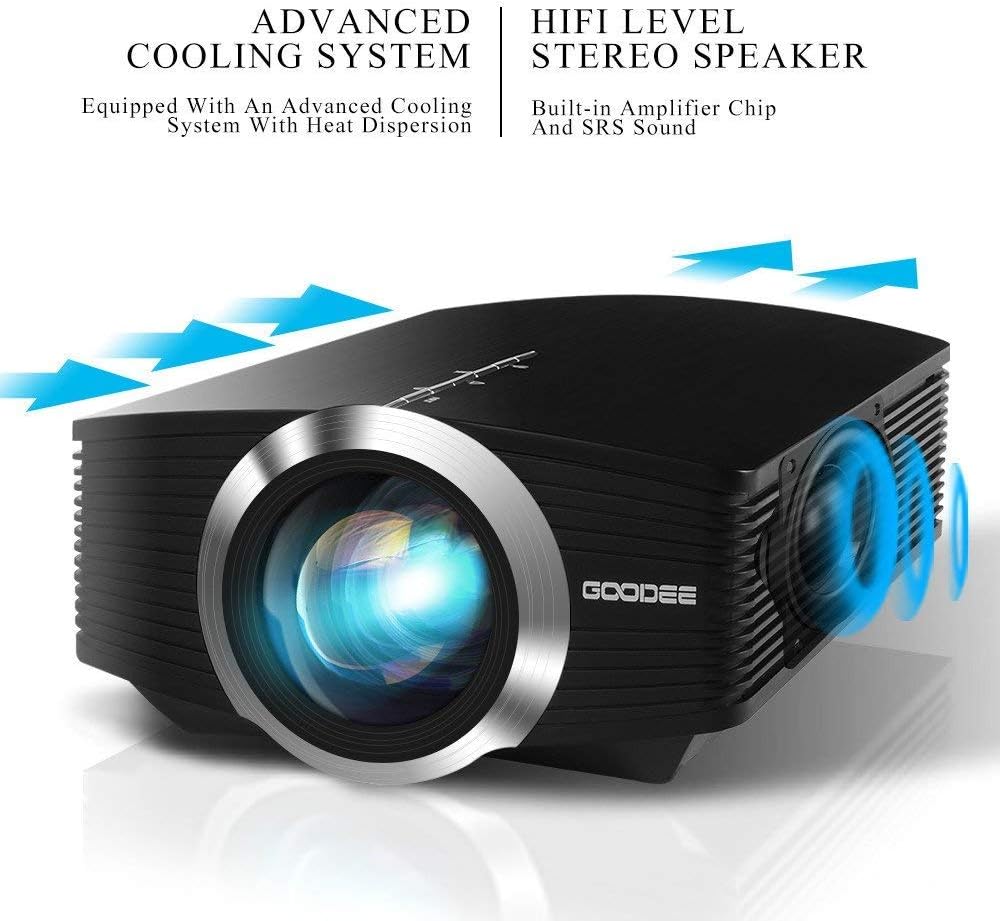
The projector features a direct light path optical technology for enhanced brightness and an advanced cooling system for quiet operation.

Figure 4.2: Advanced Cooling System and HIFI Stereo Speaker.
4.2 التحكم عن بعد
The remote control allows you to operate the projector from a distance. Insert two AAA batteries (not included) into the remote control before use.

الشكل 4.3: جهاز التحكم عن بعد.
5. الإعداد
5.1 الموضع ومسافة الإسقاط
The image size is adjusted by changing the projection distance. For optimal viewing, a projection distance between 1.5 to 4 meters is recommended, yielding screen sizes from 50 to 130 inches. The best projection size is typically 80-100 inches at a distance of 6.6-8 feet.

Figure 5.1: Projection Distance and Screen Size Chart.
الشكل 5.2: مثالample Projector Placement.
5.2 توصيل الطاقة
قم بتوصيل محول الطاقة بمنفذ إدخال الطاقة الخاص بجهاز العرض، ثم قم بتوصيل المحول بمأخذ الطاقة.
5.3 توصيل أجهزة الإدخال
The projector supports various input sources including HDMI, VGA, USB, AV, and SD card. It can connect to PCs, laptops, DVD players, PS3/4, Xbox ONE, and smartphones/tablets (via MHL cable and adapter, not included).

Figure 5.3: Multimedia Connection Diagram.
To connect a smartphone or tablet, ensure your device supports MHL functionality. You will need an MHL cable and a suitable adapter (not included).

Figure 5.4: Connecting Smartphones/Tablets.
5.4 Focus Adjustment and Keystone Correction
Adjust the focus ring on the projector lens until the image is clear. Use the keystone correction feature to adjust the image if it appears trapezoidal. The projector supports a ±15° keystone correction.
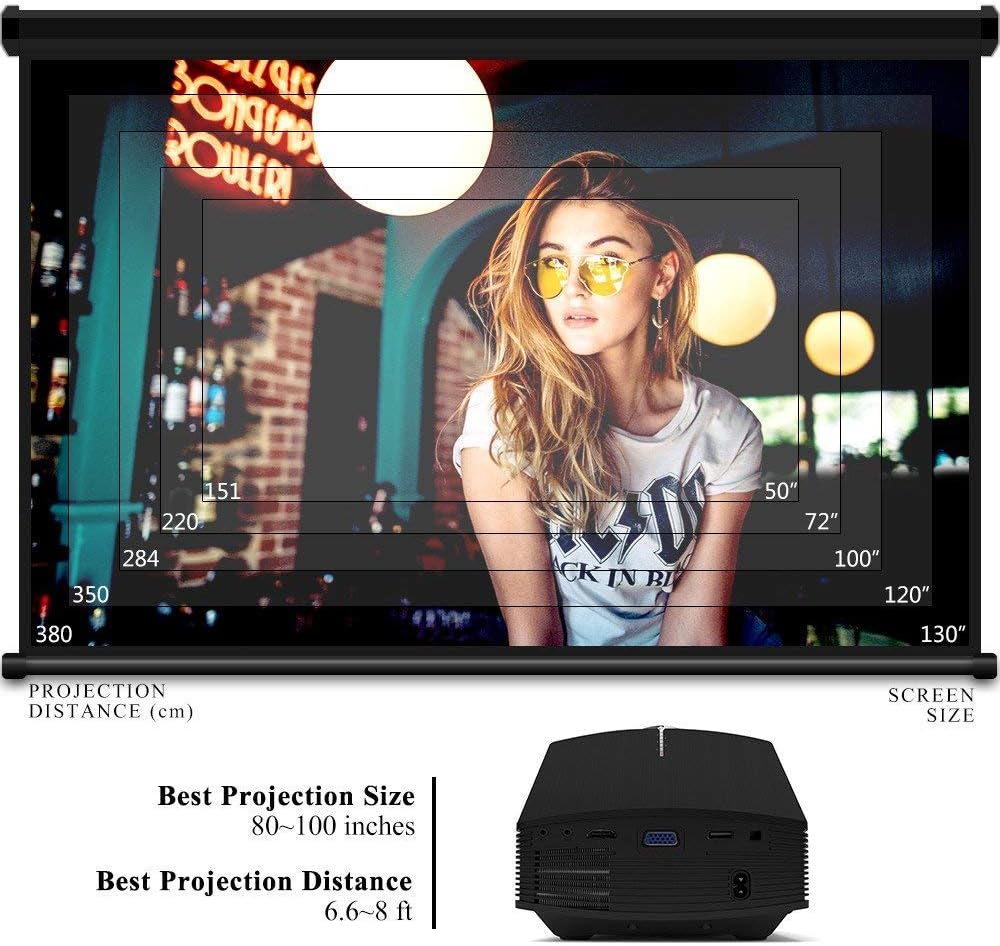
Figure 5.5: Focus and Keystone Adjustment.
6. تعليمات التشغيل
6.1 تشغيل/إيقاف التشغيل
اضغط على زر الطاقة الموجود على جهاز العرض أو جهاز التحكم عن بعد لتشغيل جهاز العرض أو إيقاف تشغيله.
6.2 اختيار المصدر
Press the 'Source' button on the projector or remote control to cycle through available input sources (HDMI, VGA, USB, AV, SD). Select the desired input source corresponding to your connected device.
6.3 تصفح القائمة
Use the arrow buttons on the projector or remote control to navigate through the on-screen menu. Press 'OK' or 'Enter' to confirm selections. Use the 'Menu' button to access settings and 'Exit' or 'Return' to go back.
6.4 إخراج الصوت
The projector has a built-in 2W speaker. For external audio, connect speakers or headphones to the 3.5mm audio output jack on the projector.
7. الصيانة
7.1 تنظيف العدسة
استخدم قطعة قماش ناعمة وخالية من الوبر أو ورق تنظيف العدسات لمسح عدسة جهاز العرض برفق. لا تستخدم المنظفات الكاشطة أو المذيبات.
7.2 تنظيف فتحات التهوية
Regularly clean the air vents to ensure proper airflow and prevent overheating. Use a soft brush or compressed air to remove dust accumulation.
7.3 التخزين
When not in use, store the projector in a cool, dry place, away from direct sunlight and extreme temperatures. Use the original packaging or a protective case to prevent dust and damage.
8. استكشاف الأخطاء وإصلاحها
| مشكلة | السبب المحتمل | حل |
|---|---|---|
| لا توجد صورة معروضة | Incorrect input source selected; Cable not connected properly; Device not powered on. | Select the correct input source; Check all cable connections; Ensure the source device is powered on. |
| الصورة ضبابية | لم يتم ضبط التركيز؛ جهاز العرض قريب جدًا/بعيد جدًا عن الشاشة. | اضبط حلقة التركيز؛ اضبط مسافة الإسقاط. |
| الصورة شبه منحرفة | جهاز العرض غير عمودي على الشاشة. | اضبط تصحيح الانحراف. |
| لا يوجد صوت | Volume too low; Muted; External audio device not connected/configured. | ارفع مستوى الصوت؛ قم بإلغاء كتم الصوت؛ تحقق من توصيلات وإعدادات الصوت الخارجية. |
| جهاز التحكم عن بعد لا يعمل | البطاريات منخفضة/نفدت؛ وجود عائق بين جهاز التحكم عن بعد وجهاز العرض؛ انسداد مستشعر جهاز التحكم عن بعد. | Replace batteries; Remove obstructions; Ensure remote sensor is clear. |
9. المواصفات
| ميزة | التفاصيل |
|---|---|
| ماركة | جودي |
| رقم الموديل | GD-DE-9 |
| نوع العرض | شاشة الكريستال السائل |
| الدقة الأصلية | 800 × 480 بكسل |
| الدقة المدعومة | حتى 1080 بكسل |
| سطوع | 3000 لومن (LED) |
| Lamp حياة | 30,000 ساعة |
| تكنولوجيا الاتصال | HDMI, USB, VGA, AV, SD Card |
| واجهة الأجهزة | HDMI، USB، VGA |
| رئيس المتكاملة | 2W Stereo Speaker |
| مسافة الإسقاط | 1.5 - 4 meters (6.6 - 8 feet recommended) |
| حجم الشاشة | 50 - 130 inches (80 - 100 inches recommended) |
| تصحيح الانحراف | ±15° يدوي |
| عامل الشكل | محمول |
| نوع التركيب | جبل منضدية |
| لون | أسود |
| أبعاد الحزمة | 33 × 21.6 × 11.8 سم |
| وزن العنصر | 1.48 كجم |
| الاستخدام الموصى به | Gaming, Home Theater |
| الأجهزة المتوافقة | Smartphone, PC, Laptop, DVD Player, PS3/4, Xbox ONE, Fire TV Stick |
10. الضمان والدعم
GooDee offers a 3-year warranty for this projector. If you encounter any issues or are not completely satisfied with your purchase, please contact GooDee customer support. A refund or replacement is available within the first 2 months of purchase. Customer satisfaction is our top priority.
For support, please refer to the contact information provided on the GooDee official webالموقع أو منصة الشراء الخاصة بك.