
1. المقدمة
This manual provides instructions for the proper setup, operation, and maintenance of your Acer B247Y 23.8-inch LED LCD Monitor. Please read this manual thoroughly before using your monitor to ensure optimal performance and to prevent damage.
The Acer B247Y is a 23.8-inch Full HD (1920 x 1080) monitor featuring an IPS panel for wide viewing angles, an anti-glare display, and a frameless design on three sides. It includes multiple connectivity options and an ergonomic stand for comfortable viewعمل.
2. محتويات العبوة
تأكد من وجود جميع العناصر في عبوتك. في حال وجود أي منها مفقود أو تالف، تواصل مع البائع.
- Acer B247Y 23.8-inch LED LCD Monitor
- حامل الشاشة (القاعدة والرقبة)
- Power Adapter (Internal) and Power Cable
- كابل فغا
- كابل DisplayPort 1.2
- كابل HDMI
- Audio-in Cable (if included)
- Audio-out Cable (if included)
- دليل المستخدم (هذا المستند)
3. الإعداد
3.1 تجميع حامل الشاشة
The monitor comes with a detachable foot stand. Follow these steps to assemble:
- قم بإزالة مكونات الشاشة والحامل من العبوة بعناية.
- ثبّت عنق الحامل بلوحة الشاشة. تأكد من تثبيته بإحكام.
- Attach the stand base to the stand neck. Tighten any screws if provided, usually located on the underside of the base.
- ضع الشاشة المجمعة على سطح ثابت ومستوٍ.
ملحوظة: The monitor also supports VESA mount (100 x 100 mm) for wall or arm mounting. Refer to your VESA mount kit instructions for installation.
3.2 توصيل الشاشة
قم بتوصيل الشاشة بجهاز الكمبيوتر الخاص بك أو بأجهزة أخرى باستخدام الكابلات المناسبة.
- اتصال الفيديو:
- Connect one end of the DisplayPort cable to the DisplayPort output on your computer and the other end to the DisplayPort input on the monitor.
- Alternatively, connect an HDMI cable from your computer's HDMI output to the monitor's HDMI input.
- For older systems, connect a VGA cable from your computer's VGA output to the monitor's VGA input.
- اتصال الصوت:
- If using VGA or DisplayPort without audio, connect an audio cable from your computer's audio output to the monitor's audio-in port for integrated speakers.
- To connect external speakers or headphones, use the monitor's audio-out port.
- توصيل الطاقة:
- قم بتوصيل كابل الطاقة بمدخل الطاقة الخاص بالشاشة، ثم قم بتوصيل الطرف الآخر بمأخذ كهربائي مؤرض.

Figure 3.2.1: Acer B247Y Monitor with Stand. This image illustrates the overall appearance of the monitor when fully assembled on its stand.
4. تعليمات التشغيل
4.1 تشغيل/إيقاف التشغيل
اضغط على زر التشغيل، الموجود عادةً في أسفل يمين الشاشة أو خلفها، لتشغيل الشاشة أو إيقاف تشغيلها. سيضيء مؤشر الطاقة عند تشغيل الشاشة.
4.2 Adjusting Monitor Settings (OSD)
The monitor features an On-Screen Display (OSD) menu for adjusting various settings. Use the control buttons (typically located near the power button) to navigate and select options within the OSD menu.
تتضمن إعدادات OSD الشائعة ما يلي:
- صورة: Brightness, Contrast, Color Temperature, Gamma, Acer eColor Management modes (e.g., Dark Room, Eco).
- صوتي: Volume control for integrated speakers or audio-out.
- مدخل: Select the active video input source (VGA, DisplayPort, HDMI).
- OSD: OSD timeout, language.
- إدارة: الرجوع الى ضبط المصنع.
4.3 التعديلات المريحة
The Acer B247Y monitor stand offers several ergonomic adjustments to optimize your viewالخبرة:
- الإمالة: Adjust the screen angle from -5 degrees to 25 degrees (forward/backward).
- قطب: Rotate the monitor horizontally up to +/- 45 degrees.
- ضبط الارتفاع: Adjust the screen height by up to 120mm.
- المحور: قم بتدوير الشاشة 90 درجة للوضع الرأسي viewعمل.
5. الصيانة
تضمن الصيانة المناسبة طول عمر الشاشة والأداء الأمثل لها.
- تنظيف الشاشة: امسح الشاشة برفق بقطعة قماش ناعمة وخالية من الوبر. لإزالة البقع الصعبة، استخدمampen the cloth with a small amount of water or a non-abrasive screen cleaner. Do not spray liquid directly onto the screen.
- تنظيف Casing: استخدم قطعة قماش ناعمة وجافة لتنظيف الشاشة.asinز. تجنب استخدام المنظفات القوية أو المنظفات الكاشطة.
- تهوية: تأكد من عدم سد فتحات التهوية الموجودة على الشاشة لمنع ارتفاع درجة الحرارة.
- إيقاف التشغيل: قم دائمًا بإيقاف تشغيل الشاشة وفصلها عن مأخذ الطاقة قبل التنظيف أو عند عدم استخدامها لفترات طويلة.
6. استكشاف الأخطاء وإصلاحها
إذا واجهت مشكلات مع شاشتك، فراجع خطوات استكشاف الأخطاء وإصلاحها الشائعة التالية:
- No Power / Monitor Does Not Turn On:
- تأكد من توصيل كابل الطاقة بشكل آمن بكل من الشاشة ومأخذ كهربائي يعمل.
- تأكد من أن منفذ الطاقة يعمل عن طريق توصيل جهاز آخر.
- اضغط على زر الطاقة بقوة.
- No Image / "No Signal" Message:
- Check that the video cable (DisplayPort, HDMI, or VGA) is securely connected to both the monitor and your computer.
- تأكد من أن جهاز الكمبيوتر الخاص بك قيد التشغيل وليس في وضع السكون.
- استخدم قائمة العرض على الشاشة (OSD) لتحديد مصدر الإدخال الصحيح يدويًا.
- جرب كابل فيديو أو منفذًا مختلفًا إن أمكن.
- Image is Distorted or Unclear:
- Ensure the display resolution on your computer is set to the monitor's native resolution (1920 x 1080).
- Adjust brightness, contrast, and other picture settings via the OSD menu.
- تحقق من وجود أي تلف مادي في الشاشة أو الكابلات.
- لا يوجد صوت من مكبرات الصوت:
- Increase the volume using the OSD menu or your computer's sound settings.
- Ensure the audio cable (if used) is properly connected.
- تأكد من تحديد جهاز إخراج الصوت الصحيح في إعدادات الصوت بجهاز الكمبيوتر الخاص بك.
7. المواصفات
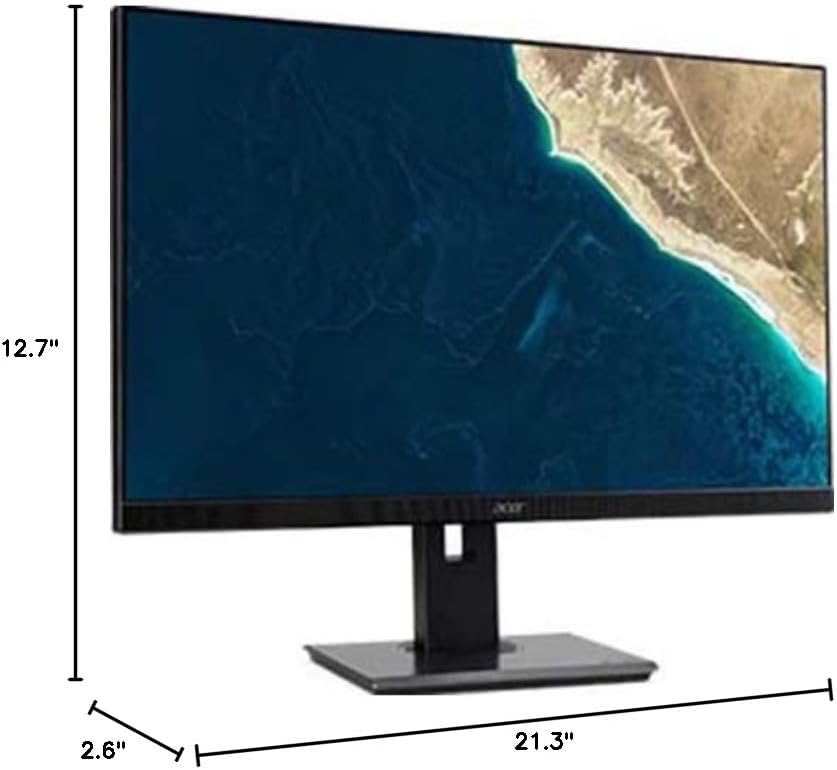
Figure 7.1.1: Acer B247Y Monitor Dimensions. This image shows the approximate height (12.7"), width (21.3"), and depth (2.6") of the monitor without the stand.
| ميزة | مواصفة |
|---|---|
| رقم الموديل | ب247ي |
| حجم الشاشة | 23.8 بوصة (60.5 سم) |
| نوع العرض | LED LCD, IPS Panel, Anti-glare (AG) |
| الدقة القصوى | 1920 × 1080 (دقة عالية كاملة) |
| نسبة العرض إلى الارتفاع | 16:9 |
| معدل التحديث | 75 هرتز |
| وقت الاستجابة | 4ms (gray-to-gray) |
| السطوع (نموذجي) | 250 شمعة/م² |
| نسبة التباين الأصلية | 1,000:1 |
| نسبة التباين الديناميكي | 100,000,000:1 |
| Viewزوايا جي (H / V) | 178 درجة / 178 درجة |
| الاتصال | VGA, DisplayPort 1.2, HDMI, Audio-in, Audio-out |
| مكبرات الصوت المتكاملة | 2 × 2.0 واط |
| تعديلات مريحة | Tilt (-5° to 25°), Swivel (+/- 45°), Height Adjustment (120mm), Pivot (90°) |
| VESA Mount Support | 100 × 100 ملم |
| الأبعاد مع الحامل (العرض × الارتفاع × العمق) | 21.3" x 14.9"~19.6" x 7.6" (54.0cm x 37.9cm~49.9cm x 19.3cm) |
| الوزن مع الحامل | 12.3 رطلاً (5.6 كجم) |
| محول الطاقة | داخلي |
| لون | أسود |
8. الضمان والدعم
Your Acer B247Y monitor comes with a Limited Three-Year Warranty. Please retain your proof of purchase for warranty claims.
For technical support, service, or warranty inquiries, please refer to the official Acer support website or contact their customer service department. Contact information can typically be found on the Acer webيمكنك الاطلاع على معلومات الموقع أو في بطاقة الضمان المرفقة مع المنتج.
قفل Kensington: The monitor supports a Kensington lock for security. Attach a compatible Kensington lock (sold separately) to the security slot on the monitor to deter theft.