
1. المقدمة
Thank you for choosing the Bagotte SH020 3MP 1296P FHD Wireless IP Camera. This manual provides detailed instructions for setting up, operating, and maintaining your camera to ensure optimal performance and security. Please read this manual carefully before use and keep it for future reference.
2. محتويات العبوة
تأكد من وجود جميع العناصر في العبوة:
- 1 x Bagotte SH020 IP Camera
- 1 × محول الطاقة
- 1 × كابل يو اس بي
- شنومكس x تصاعد قوس
- 2 × مسامير
- 1 × دليل المستخدم
3. انتهى المنتجview
The Bagotte SH020 is a 3MP 1296P Full HD wireless IP camera designed for indoor surveillance. It features pan and tilt functionality, infrared night vision, two-way audio, motion detection, and local storage via a MicroSD card.

الصورة 1: الجبهة view of the Bagotte SH020 3MP 1296P FHD Wireless IP Camera.

Image 2: Diagram illustrating the components of the Bagotte SH020 camera, including the IR sensor, lens, MicroSD card slot, antenna, network interface, power input, and reset button.
4. الإعداد
4.1. تشغيل
- قم بتوصيل كابل USB بمنفذ إدخال الطاقة الخاص بالكاميرا.
- قم بتوصيل محول الطاقة بمأخذ كهربائي قياسي.
- The camera will power on and initiate its startup sequence. Wait for the indicator light to flash, indicating it's ready for setup.
4.2. تثبيت التطبيق
Download the recommended mobile application (e.g., SriHome or MIPC, as mentioned in product reviews) from your device's app store (Google Play Store for Android or Apple App Store for iOS). بحث عن 'SriHome' or 'MIPC' and install the application.
4.3. الاتصال بشبكة Wi-Fi
- Open the installed application and create an account or log in.
- Follow the in-app instructions to add a new device. This usually involves scanning a QR code located on the camera or manually entering the device ID.
- Ensure your mobile device is connected to a 2.4GHz Wi-Fi network. The camera does not support 5GHz Wi-Fi.
- أدخل كلمة مرور شبكة الواي فاي الخاصة بك عندما يطلب منك التطبيق ذلك.
- The camera will attempt to connect to your Wi-Fi network. Once connected, the indicator light will typically turn solid blue or green, and the app will confirm successful pairing.
4.4. تركيب الكاميرا
The camera can be placed on a flat surface or mounted to a wall or ceiling using the provided bracket and screws.
- اختر موقعًا مناسبًا لتغطية مراقبة مثالية.
- Attach the mounting bracket to the desired surface using the screws.
- Securely attach the camera to the mounting bracket. Ensure it is firmly in place.
5. تشغيل الكاميرا
5.1. حي View والتحكم
Access the live video feed through the mobile application. You can remotely control the camera's pan (355°) and tilt (90°) movements to adjust the viewing angle. The app also supports 4x digital zoom.
Video 1: Seller's operation video demonstrating the camera's pan, tilt, auto-tracking, mobile phone view, two-way audio, MicroSD card slot, and infrared night vision features.
5.2. الصوت ثنائي الاتجاه
The camera features a built-in microphone and speaker, enabling two-way audio communication. Use the microphone icon in the app to speak through the camera and listen to audio from the camera's location.
5.3. الرؤية الليلية
Equipped with 10 IR LEDs, the camera provides clear infrared night vision up to 10 meters, ensuring surveillance even in complete darkness. The IR-Cut filter automatically switches between day and night modes.
5.4. كشف الحركة وأجهزة الإنذار
The camera supports motion detection with adjustable sensitivity. When motion is detected, the camera can trigger an alarm, send push notifications to your phone, and initiate recording. Advanced AI features include auto motion tracking and humanoid detection.
5.5. التسجيل والتخزين
The camera supports MicroSD cards up to 128GB for local storage of recordings. Recording modes include motion-activated, timed, and manual recording. You can playback recorded footage مباشرة من التطبيق.
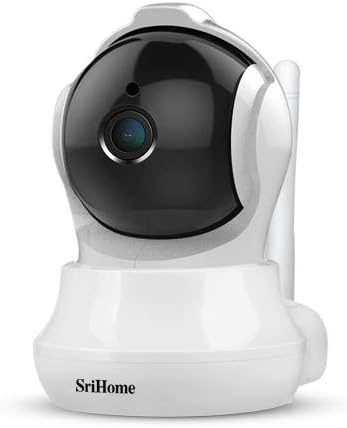
Image 3: The Bagotte SH020 camera positioned in a room, demonstrating its discreet design and wide viewزاوية جي.
6. الصيانة
- تنظيف: استخدم قطعة قماش ناعمة وجافة لتنظيف عدسة الكاميرا وجسمها. تجنب استخدام المواد الكيميائية القاسية أو المواد الكاشطة.
- تحديثات البرامج الثابتة: Regularly check the mobile application for available firmware updates to ensure your camera has the latest features and security enhancements.
- بطاقة MicroSD: If using a MicroSD card, periodically check its status and ensure sufficient storage space. Back up important recordings as needed.
7. استكشاف الأخطاء وإصلاحها
- الكاميرا غير متصلة بشبكة Wi-Fi: Ensure your Wi-Fi network is 2.4GHz. Verify the Wi-Fi password is correct. Move the camera closer to the router. Reset the camera using the reset button and try again.
- جودة الفيديو رديئة: Check your internet connection speed. Ensure the camera lens is clean. Adjust video resolution settings in the app.
- خاصية كشف الحركة لا تعمل: Verify motion detection is enabled in the app settings. Adjust sensitivity levels and detection zones.
- لا يوجد صوت: Check volume settings in the app. Ensure the microphone and speaker are not obstructed.
8. المواصفات
| ميزة | مواصفة |
|---|---|
| دقة الفيديو | 3MP, 1296P (2304*1296), H.264 |
| نطاق التحريك/الإمالة | المقلاة: 355 درجة، الإمالة: 90 درجة |
| عدسة | 3.6 ملم |
| نطاق الرؤية الليلية | Up to 10 meters (10 IR LEDs) |
| صوتي | صوت ثنائي الاتجاه (ميكروفون ومكبر صوت مدمجان) |
| تخزين | بطاقة MicroSD (تصل إلى 128 جيجابايت) |
| الاتصال اللاسلكي | واي فاي (2.4 جيجاهرتز فقط) |
| كشف الحركة | Yes, with AI Auto Motion Tracking and AI Humanoid Detection |
| مزود الطاقة | DC 5V، 1A |
| أبعاد | 7.3 × 7.6 × 10 سم |
| وزن | 380 جرام |
9. الضمان والدعم
For warranty information and technical support, please refer to the documentation included with your product or visit the official Bagotte webالموقع. احتفظ بإيصال الشراء الخاص بك كإثبات للشراء في حالة مطالبات الضمان.