
معلومات هامة حول السلامة
Read all instructions carefully before using this product. Keep this manual for future reference.
- تجنب تعريض سماعة الرأس لدرجات الحرارة أو الرطوبة الشديدة.
- لا تقم بتفكيك سماعة الرأس أو محاولة إصلاحها بنفسك.
- Clean the headset with a soft, dry cloth. Do not use liquid cleaners.
- قد يؤدي الاستماع المطول بمستويات صوت عالية إلى تلف السمع.
محتويات الحزمة
تأكد من وجود جميع العناصر في العبوة:
- NUBWO HW02 USB Computer Headset
- كابل يو اس بي
- دليل المستخدم (هذا المستند)
يثبت
توصيل جهاز كمبيوتر (USB)
- حدد موقع منفذ USB متاحًا على جهاز الكمبيوتر الخاص بك.
- Plug the USB connector of the NUBWO HW02 headset into the USB port.
- The operating system will typically install the necessary drivers automatically. This may take a few moments.
- Once installed, the headset should be recognized as an audio input and output device.
- You may need to select the "NUBWO HW02" headset as your default audio device in your computer's sound settings.
Connecting to a Device (3.5mm Jack)
The NUBWO HW02 headset features a 3.5mm jack for broader compatibility.
- Locate the 3.5mm audio jack on your device (e.g., gaming console controller, smartphone, tablet).
- Insert the 3.5mm connector from the headset into the device's audio jack.
- تأكد من أن الاتصال آمن.
- Adjust audio settings on your device as needed to select the headset for input and output.
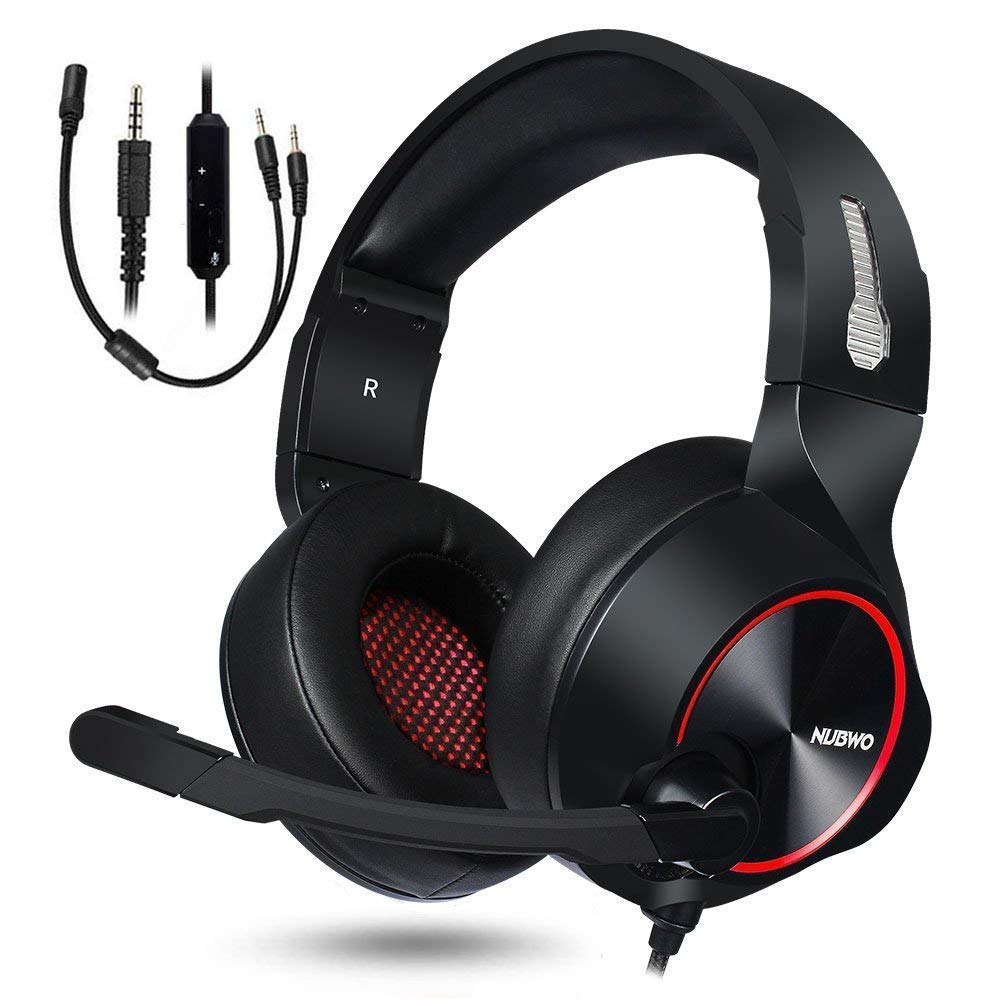
Image: NUBWO HW02 USB Computer Headset. This image displays the overall design of the headset, featuring orange accents on the earcups and headband, with a flexible microphone arm.
تعليمات التشغيل
ضبط سماعة الرأس
- تعديل عقال: Gently slide the earcups up or down along the headband to achieve a comfortable fit over your ears.
- تحديد موضع الميكروفون: Bend the flexible microphone arm to position the microphone approximately 1-2 inches from your mouth for optimal voice clarity.
التحكم في مستوى الصوت
The NUBWO HW02 headset features an in-line volume control.
- ارفع على الصوت: Roll the volume wheel upwards.
- تقليل الحجم: Roll the volume wheel downwards.
Microphone Mute Function
An in-line switch allows you to mute or unmute the microphone.
- كتم صوت الميكروفون: Slide the switch to the "Mute" position.
- إلغاء كتم صوت الميكروفون: Slide the switch to the "Unmute" position.
صيانة
- تنظيف: Use a soft, dry, lint-free cloth to wipe down the earcups and headband. Do not use abrasive cleaners, alcohol, or solvents.
- تخزين: When not in use, store the headset in a clean, dry place away from direct sunlight and extreme temperatures.
- العناية بالكابلات: تجنب الانحناءات الحادة أو السحب المفرط للكابل لمنع التلف.
استكشاف الأخطاء وإصلاحها
| مشكلة | السبب المحتمل | حل |
|---|---|---|
| لا يوجد صوت من سماعة الرأس | سماعة الرأس غير متصلة بشكل صحيح. الحجم منخفض جدًا. تم اختيار جهاز إخراج صوتي غير صحيح. | Ensure USB or 3.5mm jack is fully inserted. Increase volume using in-line control and computer/device settings. Select "NUBWO HW02" as the default playback device in your sound settings. |
| الميكروفون لا يعمل | تم كتم صوت الميكروفون. تم اختيار جهاز إدخال صوتي غير صحيح. وضع الميكروفون بشكل غير صحيح. | Check the in-line mute switch. Select "NUBWO HW02" as the default recording device in your sound settings. Adjust microphone position closer to your mouth. |
| جودة الصوت رديئة أو مشوهة | الحجم مرتفع للغاية. اتصال فضفاض. تدخل. | خفض حجم. Re-seat the USB or 3.5mm connection. حاول الاتصال بمنفذ USB أو جهاز آخر. |
تحديد
- نموذج: منزل رقم 02
- الاتصال: سلكي (USB، مقبس 3.5 ملم)
- وضع الأذن: فوق الأذن
- التحكم في الضوضاء: إلغاء الضوضاء النشط
- التوافق مع المنصة: وحدة تحكم الألعاب، الكمبيوتر الشخصي
- مادة: سيليكون
- وزن السلعة: 1.11 رطل
- أبعاد المنتج: 9 × 7 × 4 بوصة
الضمان والدعم
For warranty information or technical support, please refer to the NUBWO official webالموقع أو تواصل مع خدمة العملاء. احتفظ بإيصال الشراء كإثبات للشراء.
NUBWO Official Webموقع: Visit the NUBWO Store on Amazon