
1. المقدمة
This manual provides detailed instructions for the installation, operation, and maintenance of your Akozon Digital Programmable Timer. Please read this manual carefully before use to ensure proper function and safety.

Figure 1: Akozon Digital Programmable Timer 12V
2. انتهى المنتجview والميزات
The Akozon Digital Programmable Timer is a weekly programmable electronic timer designed for precise control of various electrical equipment. Its robust design and advanced features ensure reliable operation.
- التحكم التلقائي: Automatically turns electrical equipment on and off according to preset schedules.
- دقة عالية: Equipped with a high-precision chip for accurate timing.
- البرمجة الأسبوعية: Supports advanced programming for up to one week in advance.
- برامج متعددة: Features 16 ON/OFF settings (programs) for daily or weekly scheduling.
- الطاقة الاحتياطية: Integrated high-performance rechargeable battery maintains time display and stores data for over 12 months during power outagإِسْ
- بناء متين: Housing made of hard, durable plastic for extended lifespan.
- شاشة LCD: Clear LCD for easy viewing of time and program status.
- تركيب سكة DIN: Designed for convenient installation on a DIN rail.
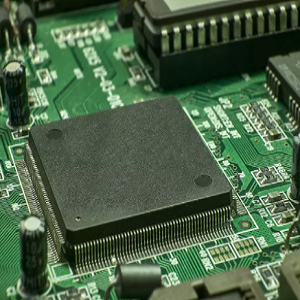
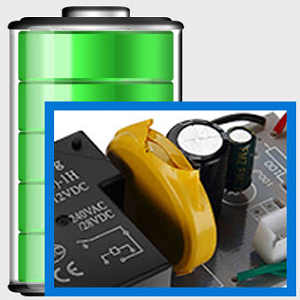
Figure 2: Internal components showing the high-precision chip and rechargeable backup battery.
3. المواصفات
| رقم الموديل | Akozonqegcgmk04u-01 |
| حجم الإدخالtage | 12V DC / AC |
| سعة الانتاج | 25(16) أمبير، 240 فولت تيار متردد |
| استهلاك الطاقة | <1 واط |
| مدى التوقيت | 1 دقيقة إلى 168 ساعات |
| البرامج | 16 ON/OFF settings (daily/weekly) |
| خطأ التوقيت | <±2 seconds/day |
| ذاكرة انقطاع الطاقة | >12 months (with internal rechargeable battery) |
| درجة حرارة التشغيل | -20 درجة مئوية إلى 55 درجة مئوية |
| طريقة التثبيت | دين السكك الحديدية |
| الأبعاد (تقريبًا) | 36 مم (عرض) × 86 مم (ارتفاع) × 65 مم (عمق) |
| الوزن (تقريبا) | 120 جرام |
| عرض | شاشة الكريستال السائل |

الشكل 3: أبعاد المنتج التفصيلية والمواصفات الرئيسية.
4. معلومات السلامة
- قم دائمًا بفصل الطاقة قبل التثبيت أو الصيانة.
- يجب أن يتم التركيب بواسطة كهربائي مؤهل لمنع حدوث صدمة كهربائية أو تلف للجهاز.
- تأكد من مستوى الصوت المدخلtage matches the timer's specifications (12V DC/AC). Connecting to incorrect voltagقد يؤدي ذلك إلى تلف الوحدة.
- Do not expose the device to excessive moisture or extreme temperatures outside the specified operating range.
- Do not disassemble the timer; refer servicing to qualified personnel.
5. الإعداد والتثبيت
5.1 DIN Rail Installation
The timer is designed for easy installation on a standard 35mm DIN rail. Simply clip the timer onto the rail in your distribution box.

الشكل 4: مثالample of the timer installed on a DIN rail within a distribution box.
5.2 تعليمات الأسلاك
Refer to the wiring diagram below for correct connection. Ensure all connections are secure and comply with local electrical codes.
- المحطتان 1 و 2: Power input (12V DC/AC).
- المحطات 3 و4 و5: Output contacts.
- 3: مغلق عادة (NC)
- 4: مشترك (COM)
- 5: مفتوح عادة (لا)

Figure 5: Detailed wiring diagram showing connections for power input and output contacts.

الشكل 6: مثالamples of wiring methods, including direct load connection and connection via a contactor.
6. تعليمات التشغيل
6.1 Initial Setup and Unlocking
- Upon first use, connect the timer to power (12V DC/AC).
- اضغط على إعادة ضبط button to clear all previous settings and initialize the timer.
- The timer display may be locked. To unlock, press the ج/ر button four times. The lock icon will disappear from the display. If no operation occurs for 15 seconds, the timer will automatically lock again.
6.2 ضبط الوقت واليوم الحاليين
After unlocking, set the current time and day:
- اضغط على P button (Program button) once.
- اضغط على D+ button to set the current day of the week (MO, TU, WE, TH, FR, SA, SU).
- اضغط على H+ زر لضبط الساعة الحالية.
- اضغط على M+ زر لضبط الدقيقة الحالية.
- اضغط على P button again to exit time setting mode.

الشكل 7: الصورة عن قرب view of the timer's control buttons.

Figure 8: Explanation of button functions and display elements, including day, hour, minute, and reset.
6.3 التحكم اليدوي
اضغط على دليل C/R button to cycle through manual control modes:
- على: المخرج يعمل باستمرار.
- تلقاءي: Timer operates according to programmed schedules.
- OFF: الإخراج متوقف باستمرار.
يختار آلي for the timer to follow your programmed settings.
7. برمجة جداول التشغيل/الإيقاف
The timer supports up to 16 ON/OFF programs. Follow these steps to set your desired schedules:
- اضغط على P اضغط على الزر للدخول إلى وضع البرمجة. ستظهر على الشاشة عبارة "1 تشغيل".
- يضعط D+ to select the day(s) for this program. You can choose a single day, weekdays, weekends, or all days.
- يضعط H+ لضبط ساعة التشغيل.
- يضعط M+ لضبط دقيقة التشغيل.
- يضعط P مرة أخرى. ستظهر على الشاشة عبارة "خصم 1".
- يضعط D+ to select the day(s) for this OFF program (usually the same as ON, but can be different).
- يضعط H+ to set the OFF hour.
- يضعط M+ to set the OFF minute.
- Repeat steps 1-8 for additional ON/OFF programs (up to 16). Press P to advance to the next program number.
- للخروج من وضع البرمجة ، اضغط على دليل C/R button. Ensure the timer is set to آلي الوضع المناسب لتنفيذ البرامج.
Note: If you need to cancel a program, press the ج/ر زر بينما viewing the specific ON or OFF program. This will clear the settings for that program.
8. التطبيقات
The Akozon Digital Programmable Timer is versatile and can be used in various applications, including:
- Controlling lamps and lighting systems (e.g., streetlights, garden lights, neon signs).
- Managing water heaters and preheaters.
- Automating agricultural facilities (e.g., irrigation systems).
- Controlling broadcasting equipment.
- Scheduling household appliances.
- Operating sprayers and bottling equipment.

الشكل 9: مثالamples of environments where the timer can be used, such as controlling outdoor lighting and industrial equipment.
9. الصيانة
- حافظ على نظافة المؤقت وخلوه من الغبار. استخدم قطعة قماش ناعمة وجافة للتنظيف.
- لا تستخدم المنظفات أو المذيبات الكاشطة.
- تأكد من التهوية المناسبة حول الجهاز لمنع ارتفاع درجة الحرارة.
- The internal battery is designed for long-term backup. If the timer consistently loses time or program settings after a power outage, the internal battery may need professional inspection.
10. استكشاف الأخطاء وإصلاحها
| مشكلة | السبب المحتمل | حل |
|---|---|---|
| العرض فارغ. | لا يوجد مصدر طاقة أو بطارية داخلية مستنفدة. | Check power connections. Allow time for the internal battery to charge (connect to power for several hours). |
| لا يستجيب المؤقت لضغطات الأزرار. | Timer is locked. | اضغط على ج/ر button four times to unlock. |
| البرامج لا يتم تنفيذها. | Timer is not in AUTO mode. Incorrect program settings. | يضعط دليل C/R حتى تظهر كلمة "تلقائي". إعادةview وضبط إعدادات البرنامج بشكل صحيح. |
| يتم فقدان الوقت أو الإعدادات بعد انقطاع التيار الكهربائيtage. | Internal backup battery is not charging or is depleted. | Ensure the timer is connected to power for sufficient time to charge the internal battery. If the issue persists, contact customer support. |
| Output is always ON or OFF, ignoring programs. | Timer is in manual ON or OFF mode. | يضعط دليل C/R حتى يتم عرض كلمة "AUTO". |
11. الضمان والدعم
Akozon products are manufactured to high-quality standards. For warranty information or technical support, please refer to the contact details provided with your purchase or visit the official Akozon webموقع.
يرجى الاحتفاظ بإثبات الشراء الخاص بك لمطالبات الضمان.