
1. المقدمة
This manual provides instructions for the setup, operation, and maintenance of the Avaya 1616 IP Telephone (Model 700450190). The Avaya 1616 is designed for users who require a robust and feature-rich communication device, supporting 16 line appearances and a high-quality speakerphone. This guide will help you maximize the functionality of your IP telephone.
2. الإعداد
Follow these steps to properly set up your Avaya 1616 IP Telephone.
2.1 فك العبوة وتحديد المكونات
Carefully remove all components from the packaging. Ensure all parts are present before proceeding with the setup.
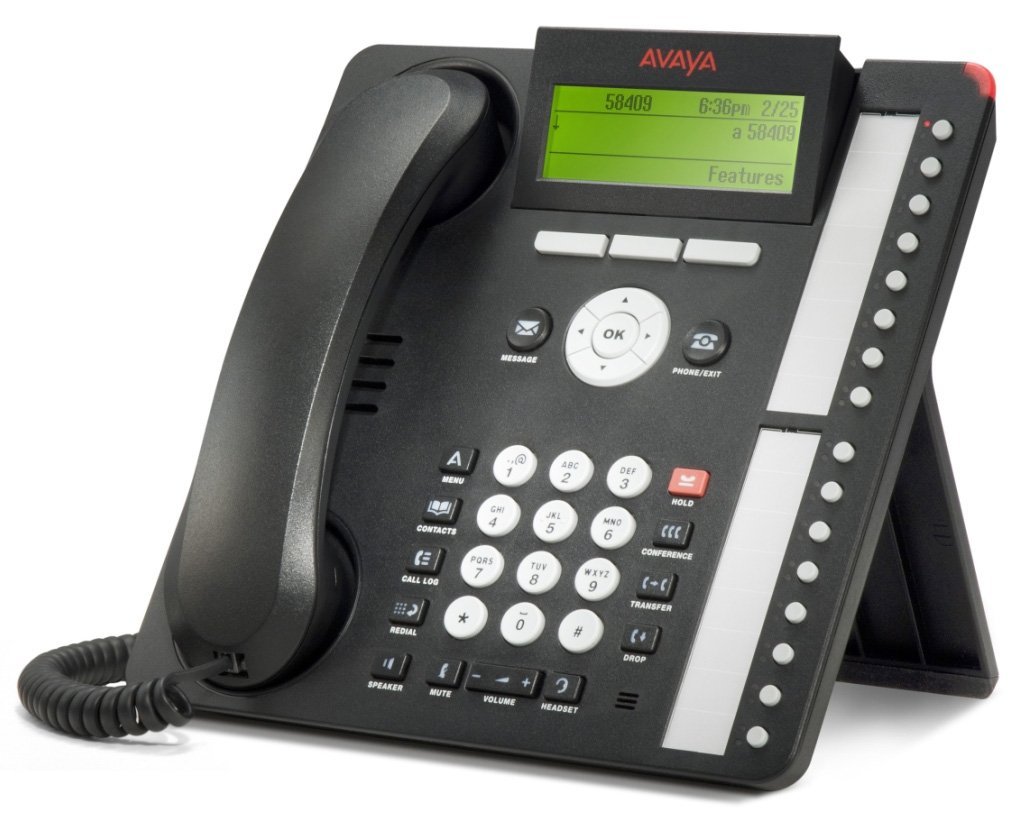
الشكل 1: Avaya 1616 IP Telephone components. This image displays the main telephone unit, the handset, the coiled handset cord, an Ethernet cable, and the desk stand. The main unit features a display screen, a numeric keypad, and various function buttons. The desk stand is designed to elevate the phone for easier viewجي والتشغيل.
- Telephone Base Unit: The main body of the phone with keypad, display, and function buttons.
- سماعة الهاتف: The receiver for voice communication.
- سلك سماعة الهاتف: Coiled cord connecting the handset to the base unit.
- كابل إيثرنت: لاتصال الشبكة.
- حامل المكتب: For positioning the phone on a desk.
- Power Adapter (Sold Separately): A 5V local power supply may be required if Power over Ethernet (PoE) is not available.
2.2 الاتصالات المادية
- قم بتثبيت حامل المكتب: Securely attach the desk stand to the bottom of the telephone base unit.
- توصيل سماعة الهاتف: Plug one end of the coiled handset cord into the handset and the other end into the designated handset port on the side or back of the telephone base unit.
- الاتصال بالشبكة: Insert one end of the Ethernet cable into the "LAN" port on the back of the telephone and the other end into a network switch or router. The phone supports dual Ethernet ports for connection of the phone and a collocated PC with VLAN separation.
- توصيل الطاقة:
- الطاقة عبر إيثرنت (PoE): If your network switch supports 802.3af PoE, the phone will receive power through the Ethernet cable. No separate power adapter is needed.
- Local Power Supply: If PoE is not available, connect a 5V local power supply (sold separately) to the power port on the back of the telephone and then to an electrical outlet.
Once connected, the phone will power on and begin its boot sequence. This may take a few moments.
3. تعليمات التشغيل
This section covers the basic operation of your Avaya 1616 IP Telephone.
3.1 الميزات الرئيسية
- 16 Line Appearances/Feature Keys: Programmable buttons with dual LEDs for line status and feature access.
- High-Quality 2-Way Speakerphone: للتواصل بدون استخدام اليدين.
- معرف المتصل: Displays incoming caller information.
- عملية متعددة الخطوط: Supports multiple active lines.
- إمكانية إجراء مكالمة جماعية: Basic conferencing features.
3.2 وظائف الاتصال الأساسية
- إجراء مكالمة:
- ارفع سماعة الهاتف أو اضغط على زر مكبر الصوت.
- اطلب الرقم المطلوب باستخدام لوحة المفاتيح.
- Press the "Call" or "Dial" softkey, or wait for automatic dialing.
- الرد على مكالمة:
- Lift the handset, or press the Speaker button, or press the flashing line appearance button.
- إنهاء المكالمة:
- Replace the handset, or press the Speaker button again if using speakerphone, or press the "End Call" softkey.
- وضع المكالمة قيد الانتظار:
- During an active call, press the "Hold" button. The line appearance LED will flash.
- To retrieve the call, press the flashing line appearance button.
- تحويل مكالمة:
- During an active call, press the "Transfer" button. The current call is put on hold.
- Dial the number of the party to whom you wish to transfer the call.
- Wait for the party to answer (consulted transfer) or press "Transfer" again to complete the transfer (blind transfer).
- بدء مكالمة مؤتمرية:
- During an active call, press the "Conference" button. The current call is put on hold.
- اطلب رقم الطرف الثالث.
- Once the third party answers, press the "Conference" button again to join all parties.
4. الصيانة
Proper maintenance ensures the longevity and optimal performance of your Avaya 1616 IP Telephone.
4.1 التنظيف
- استخدمي قطعة قماش ناعمة وخفيفةamp cloth to clean the exterior surfaces of the phone.
- Avoid using abrasive cleaners, solvents, or strong chemicals, as these can damage the finish and electronic components.
- Do not spray cleaning liquids directly onto the phone. Apply to the cloth first.
- Ensure the phone is disconnected from power before cleaning.
4.2 العناية العامة
- احتفظ بالهاتف بعيدًا عن الحرارة الزائدة وأشعة الشمس المباشرة والرطوبة.
- تجنب إسقاط الهاتف أو تعريضه لصدمات قوية.
- تأكد من عدم انضغاط الكابلات أو شدها.
5. استكشاف الأخطاء وإصلاحها
This section provides solutions to common issues you might encounter with your Avaya 1616 IP Telephone.
| مشكلة | السبب المحتمل | حل |
|---|---|---|
| الهاتف لا يعمل. | لا يوجد مصدر طاقة أو أن الاتصال معطل. |
|
| لا طنين. | Network connectivity issue or service problem. |
|
| لا يمكن إجراء أو استقبال المكالمات. | Network configuration, service issue, or phone registration problem. |
|
| جودة الصوت رديئة. | Network congestion, faulty cable, or handset issue. |
|
If the problem persists after attempting these solutions, please contact your IT department or Avaya support for further assistance.
6. المواصفات
Key technical specifications for the Avaya 1616 IP Telephone (700450190).
| ميزة | التفاصيل |
|---|---|
| رقم الموديل | 700450190 |
| Line Appearances | 16 with dual LEDs |
| مكبر الصوت | High-quality 2-way |
| خيارات التركيب | Desk or wall mountable (with optional adapter) |
| منافذ إيثرنت | Dual (for phone and collocated PC w/VLAN separation) |
| مصدر الطاقة | 802.3af Power over Ethernet (PoE) or optional 5V local power supply |
| نوع المسجل | لوحة مفاتيح واحدة |
| نوع نظام الرد | رقمي |
| الأجهزة المتوافقة | Computers, Telephone Networks, VoIP Services |
| إمكانية إجراء مكالمات مؤتمرية | أساسي |
| عملية متعددة الخطوط | تشغيل متعدد الخطوط |
| معرف المتصل | نعم |
| لون | أسود |
| أبعاد المنتج | 9.8 × 7.9 × 2.8 بوصات (تقريبًا) |
| أبعاد الحزمة | 16.8 × 10 × 3.3 بوصة |
| وزن | 2.9 Pounds (Package Weight) |
7. معلومات الضمان
This Avaya 1616 IP Telephone (700450190) is typically offered with a ضمان محدود لمدة 90 يومًا. This warranty covers defects in materials and workmanship under normal use. For specific terms and conditions, please refer to the warranty documentation provided at the time of purchase or contact your vendor.
Note: As a renewed product, warranty terms may vary from new products. Always confirm warranty details with your supplier.
8. الدعم
For technical assistance, further troubleshooting, or inquiries regarding your Avaya 1616 IP Telephone, please contact your system administrator or the vendor from whom you purchased the device. Avaya's official support channels can also provide resources and documentation for their products.
For general information about Avaya products, you may visit the official Avaya webموقع.