
1. المقدمة
Thank you for choosing the Zerone LP-838 Small Power Amplifier. This manual provides essential information for the safe and efficient operation of your device. Please read these instructions thoroughly before use and retain them for future reference.
2. انتهى المنتجview
2.1 الميزات الرئيسية
- تصميم مدمج وقابل للحمل.
- RCA and 3.5mm audio input compatibility.
- High-power audio amplifier chip for 2.1 channel output.
- Adjustable Treble, Bass, and Volume controls.
- Durable all-aluminum alloy shell for electromagnetic interference reduction.
2.2 تحديد المكون
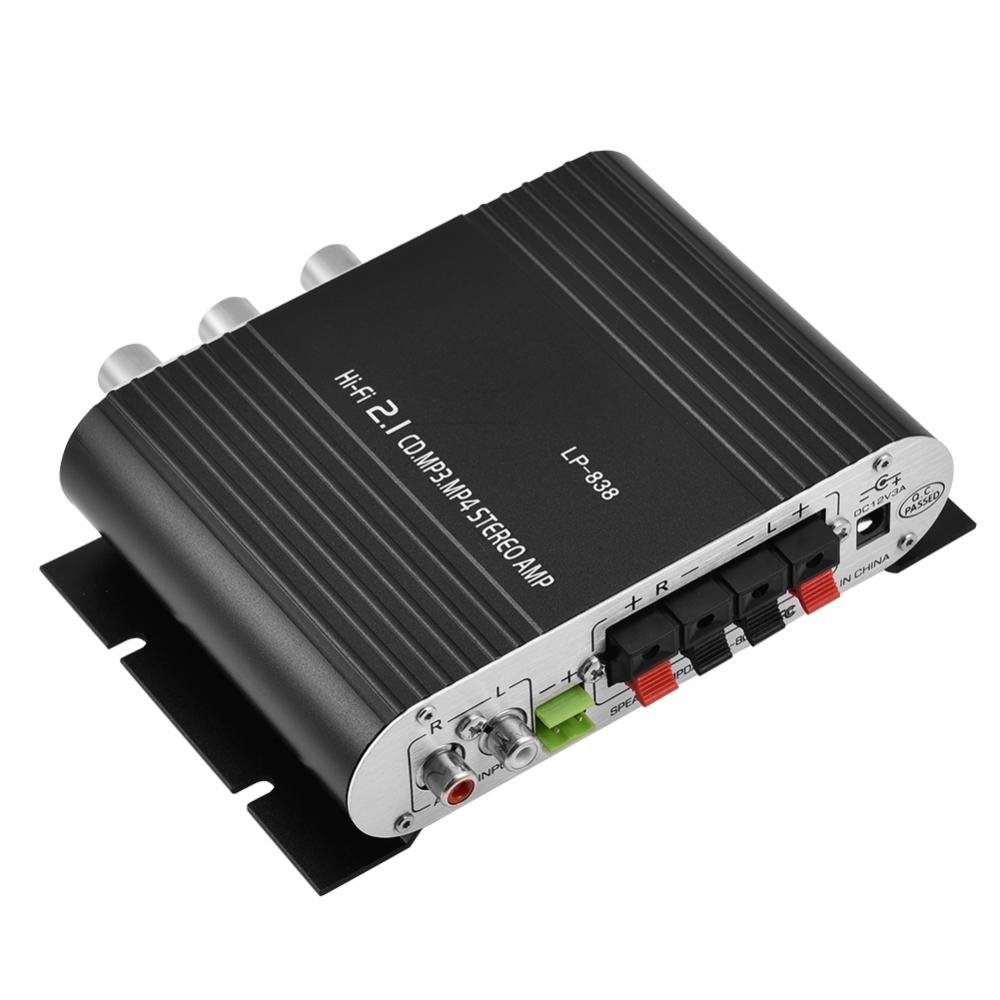
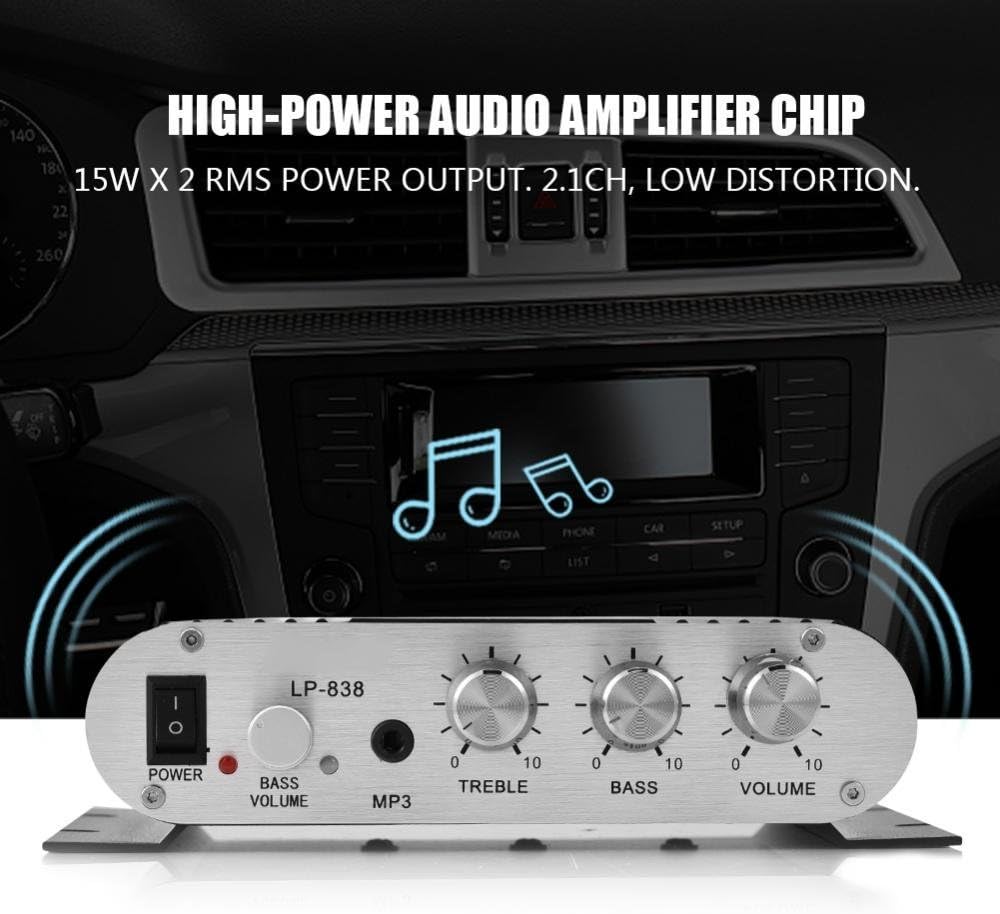
Figure 1: Front Panel Controls and Inputs
This image displays the front panel of the LP-838 amplifier. From left to right, it features a power switch, a bass volume knob, a 3.5mm MP3 input jack, and three rotary knobs for Treble, Bass, and Master Volume control. The unit also supports RCA audio input, as indicated by the text overlay.
الشكل 2: توصيلات اللوحة الخلفية
This image shows the rear panel of the LP-838 amplifier. On the left are the RCA audio input jacks (red for right, white for left). In the center are the spring-clip speaker terminals for connecting left and right speakers. On the right is the DC 12V/3A power input jack and a 'Q.C. PASSED' stamp, indicating quality control.
اللوحة الأمامية:
- مفتاح التشغيل: يبدل amplifier تشغيل / إيقاف.
- BASS VOLUME Knob: يضبط مستوى الصوت الجهير في مخرج الصوت.
- إدخال MP3: مقبس 3.5 ملم لتوصيل أجهزة الصوت المحمولة.
- مقبض ثلاثي: ضبط استجابة التردد العالي.
- مقبض الجهير: ضبط استجابة التردد المنخفض.
- مقبض الصوت: يتحكم في حجم الإخراج الكلي.
اللوحة الخلفية:
- AUDIO INPUT (RCA): Red and white RCA jacks for connecting audio sources (e.g., DVD players, computers).
- SPEAKER OUTPUTS (+R -R +L -L): Spring-clip terminals for connecting passive speakers. Ensure correct polarity (+ to + and - to -).
- مدخل تيار مستمر 12 فولت/3 أمبير: Power input jack for connecting the external power adapter (not included).
3. الإعداد
- ربط مكبرات الصوت: Connect your passive speakers to the SPEAKER OUTPUT terminals on the rear panel. Ensure the positive (+) terminal of the ampيتم توصيل مكبر الصوت بالطرف الموجب (+) للسماعة، والطرف السالب (-) لـ ampيتم توصيل مكبر الصوت بالطرف السالب (-) للسماعة. amplifier supports speakers with an impedance of 4-8 Ohms.
- توصيل مصدر الصوت:
- For RCA input: Connect your audio source (e.g., CD player, TV, computer) to the RCA AUDIO INPUT jacks on the rear panel using an RCA cable.
- For 3.5mm input: Connect your portable audio device (e.g., smartphone, MP3 player) to the MP3 input jack on the front panel using a 3.5mm audio cable.
- توصيل الطاقة: Connect a compatible DC 12V/3A power adapter (not included) to the DC 12V/3A input jack on the rear panel. Plug the power adapter into a wall outlet.
Important: Ensure all connections are secure before powering on the ampمكبر.
4. تعليمات التشغيل
- تشغيل الطاقة: Flip the POWER switch on the front panel to the 'ON' position. The power indicator light will illuminate.
- حدد الإدخال: ال amplifier automatically uses the active input. If both RCA and 3.5mm inputs are connected, the 3.5mm input may take precedence.
- ضبط مستوى الصوت: Start with the VOLUME knob set to a low level. Begin playing audio from your source, then slowly increase the VOLUME knob to your desired listening level.
- ضبط النغمة: Use the TREBLE and BASS knobs to fine-tune the high and low frequencies according to your preference. The BASS VOLUME knob provides additional control over the bass output.
- إيقاف التشغيل: When finished, turn the VOLUME knob down to its minimum setting, then flip the POWER switch to the 'OFF' position.
5. الصيانة
- تنظيف: استخدم قطعة قماش ناعمة وجافة لتنظيف الجزء الخارجي من الجهاز ampلا تستخدم المنظفات السائلة أو المذيبات.
- تهوية: تأكد من amplifier is placed in a well-ventilated area to prevent overheating. Do not block the ventilation slots.
- تخزين: When not in use for extended periods, disconnect the power adapter and store the ampيُحفظ في مكان بارد وجاف.
6. استكشاف الأخطاء وإصلاحها
| مشكلة | السبب المحتمل | حل |
|---|---|---|
| لا يوجد طاقة | محول الطاقة غير موصول أو به عطل؛ مفتاح الطاقة مطفأ. | Ensure power adapter is securely connected and functional. Flip power switch to ON. |
| لا يوجد مخرج صوت | Incorrect audio input connection; speaker wires loose or incorrect polarity; volume too low; audio source issue. | Check audio input cables and connections. Verify speaker wire connections and polarity. Increase volume. Test audio source with another device. |
| صوت مشوه | Volume too high; incorrect tone settings; faulty audio source or cable. | Reduce volume. Adjust Treble and Bass knobs. Test with a different audio source or cable. |
| طنين أو ضجيج | Ground loop issue; interference from other electronics; faulty cables. | تأكد من تأريض جميع المكونات بشكل صحيح. انقل amplifier away from other electronic devices. Try different audio cables. |
7. المواصفات
- ماركة: زيرون
- رقم الموديل: Zeroneq8ae3d902g-02 (LP-838)
- المجلدtage: 14.4 فولت (للتشغيل)
- عدد القنوات: 2
- معاوقة مكبر الصوت: 4-8 أوم
- نوع التركيب: التركيب السطحي
- وزن السلعة: 7.8 أونصات
- ASIN: B07DM4QJGX
- رمز المنتج العالمي: 763741184919
- تاريخ التوفر الأول: 4 يوليو 2019
8. معلومات الضمان
For specific warranty terms and conditions, please refer to the documentation provided at the time of purchase or contact your retailer. Warranty coverage typically includes defects in materials and workmanship under normal use.
9. الدعم
If you encounter issues that cannot be resolved using the troubleshooting guide, please contact the retailer or manufacturer for assistance. Provide your product model number (LP-838) and a detailed description of the problem when seeking support.