
باناسونيك AG-UX180PJ
دليل مستخدم كاميرا الفيديو الاحترافية المتميزة AG-UX180 من باناسونيك
الموديل: AG-UX180PJ
1. المقدمة
This manual provides detailed instructions for the safe and effective operation of your Panasonic AG-UX180 4K Premium Professional Camcorder. The AG-UX180 is designed for professional video production, offering DCI 4K recording at 24p, UHD 4K up to 60p, and FHD up to 120p. It features a 1-inch type sensor and an integrated 20x optical zoom lens, supporting MOV, MP4, and AVCHD formats. Please read this manual thoroughly before using the camcorder to ensure proper handling and to maximize its performance.
2. ماذا يوجد في الصندوق
تأكد من وجود جميع العناصر المذكورة أدناه في طردك. في حال وجود أي عناصر مفقودة أو تالفة، يرجى الاتصال بالبائع.

Image 2.1: The Panasonic AG-UX180 camcorder shown with its complete studio starter bundle, including various lenses, filters, lighting, and audio equipment.
العناصر المضمنة من قبل الشركة المصنعة:
- Panasonic AG-UX180 4K Premium Professional Camcorder
- 7.28V 43Wh Battery for DVX200 (5,900mAh)
- Battery Charger for AG-VBR & Other Batteries
- محول التيار المتردد
- مجموعة حامل الميكروفون
- كأس العين
- غطاء العدسة
- غطاء طرف الإدخال
- كابل التيار المتردد
Studio Starter Bundle Includes:
- 67mm Wide Angle Lens with Pouch and Lens Caps
- 67mm Telephoto HD Lens
- Professional 3 Piece Filter Kit, 67mm (UV, CPL, FLD)
- 67mm Close Up Filter Set, Diopters +1 +2 +4 +10
- Professional 160 LED Video Light Studio Series
- Dual-Channel VHF Wireless Handheld & Lavalier/Headset Microphone System
- حقيبة الحمل
- محلول تنظيف العدسات
- فرشاة النفخ
- قطعة قماش من الألياف الدقيقة
- ورق مناديل العدسات
- 5 قطع من أعواد القطن
- USB SDHC Card Reader
- محفظة بطاقة الذاكرة
- 32GB SDHC Class 10 UHS-1 600X Flash Memory Card
3. انتهى المنتجview
The Panasonic AG-UX180 is a high-performance professional camcorder designed for versatile shooting scenarios. It integrates advanced imaging technology with user-friendly controls.
المميزات الرئيسية:
- 1.0" Type CMOS Sensor: Captures high-quality images with excellent low-light performance.
- تسجيل بدقة 4K: Supports DCI 4K (4096x2160) at 24p and UHD 4K (3840x2160) at 60p/50p/30p/25p/24p.
- FHD Slow Motion: Records Full HD at 120 FPS for smooth slow-motion effects.
- عدسة تكبير بصري 20x: Integrated 8.8 to 176mm lens with Optical Image Stabilization (OIS) for stable, clear shots across various focal lengths.
- تصحيح الألوان على 16 محورًا: Provides precise color adjustment capabilities for professional grading.
- Manual Lens Control Rings: Three dedicated rings for focus, zoom, and iris control, offering tactile and precise adjustments.
- التصوير الليلي بالأشعة تحت الحمراء: Enables recording in extremely low-light conditions.
- UHD/FHD Dual Codec Recording: Allows simultaneous recording in different formats for efficient workflows.

الصورة 3.1: الجانب الأمامي view of the Panasonic AG-UX180 camcorder, highlighting the lens, lens hood, and integrated microphone.
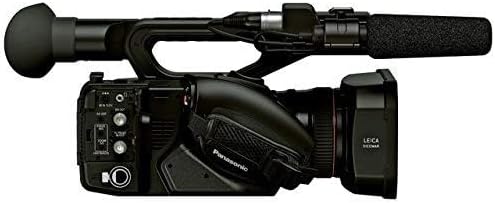
الصورة 3.2: الجانب view of the Panasonic AG-UX180 camcorder, illustrating the various input/output ports and control buttons for connectivity and operation.
4. الإعداد
4.1. شحن البطارية وتركيبها
- Connect the AC Adapter to the Battery Charger.
- Insert the 7.28V 43Wh Battery into the charger. The charging indicator will illuminate.
- Once charging is complete (indicator changes or turns off), remove the battery.
- Align the charged battery with the battery slot on the rear of the camcorder and slide it in until it clicks securely into place.
4.2. إدخال بطاقة الذاكرة
- Locate the memory card slot on the camcorder (typically on the side or rear).
- Insert the 32GB SDHC Class 10 UHS-1 600X Flash Memory Card with the label facing the correct direction until it clicks. Ensure the card is fully seated.
- Note: For 4K and Ultra HD recording, higher speed memory cards (e.g., UHS-I Speed Class 3 or faster) are recommended to ensure stable recording performance. The included 600X card may be suitable for some HD recording but might be too slow for continuous 4K recording.
4.3. تركيب الملحقات
- غطاء العدسة: Attach the lens hood to the front of the lens to prevent glare and protect the lens.
- Microphone Holder Kit: Secure the microphone holder to the designated mount on the camcorder's handle.
- External Lenses/Filters: Screw the 67mm Wide Angle Lens, Telephoto HD Lens, or various filters (UV, CPL, Close Up) onto the front of the camcorder's lens as needed.
- ضوء الفيديو LED: Mount the Professional 160 LED Video Light onto the camcorder's accessory shoe. Ensure it is securely fastened.
- Wireless Microphone System: Connect the receiver of the Dual-Channel VHF Wireless Microphone System to the camcorder's audio input ports.
5. تشغيل كاميرا الفيديو
5.1. تشغيل / إيقاف التشغيل
- To power on, slide the POWER switch to the ON position. The camcorder will boot up.
- لإيقاف التشغيل، حرك مفتاح الطاقة إلى وضع إيقاف التشغيل.
5.2. التسجيل الأساسي
- Select your desired recording mode (e.g., 4K, UHD, FHD) via the menu system.
- Adjust exposure, focus, and white balance as required using the manual controls or automatic settings.
- Press the REC START/STOP button to begin recording. The recording indicator will illuminate.
- Press the REC START/STOP button again to stop recording.
5.3. عملية التكبير
The camcorder features a 20x optical zoom lens. You can control the zoom using the zoom rocker on the handle or the dedicated zoom ring on the lens.
- زوم روكر: Push the rocker gently for slow zoom, or firmly for fast zoom.
- حلقة التكبير: Rotate the zoom ring on the lens for precise, manual zoom adjustments.
5.4. Manual Controls
Utilize the three manual lens control rings for precise adjustments:
- حلقة التركيز: Adjusts the focus manually.
- حلقة التكبير: يتحكم في التكبير البصري.
- Iris Ring: Adjusts the aperture (f-stop) to control exposure.
6. الميزات المتقدمة
6.1. 16-Axis Color Correction
The 16-axis color correction function allows for highly detailed and precise color adjustments. Access this feature through the camcorder's menu system under 'Picture Adjust' or 'Color Settings'. You can fine-tune specific color ranges without affecting others, providing extensive creative control over your footage's look.
6.2. FHD Slow Motion Recording
To capture smooth slow-motion footage, set the recording format to FHD and select the 120 FPS option in the menu. This will allow for playback at standard frame rates (e.g., 24p, 30p) resulting in a slow-motion effect.
6.3. IR Night Shooting
Activate the IR (Infrared) shooting mode from the camcorder's menu to record in environments with minimal or no visible light. The camcorder will utilize infrared light to capture images, typically in monochrome.
7. الصيانة
7.1. تنظيف كاميرا الفيديو
- جسم: استخدم قطعة قماش ناعمة وجافة لمسح جسم كاميرا الفيديو. لإزالة الأوساخ المستعصية، افركها برفق.ampen the cloth with water and then wipe dry. Avoid using harsh chemicals.
- عدسة: Use the Blower Brush to remove dust. For smudges, apply a small amount of Lens Cleaning Solution to the Microfiber Cloth or Lens Tissue Paper and gently wipe the lens in a circular motion from the center outwards.
- Viewfinder/LCD Screen: Use a clean, soft cloth or the Microfiber Cloth to gently wipe the screen.
7.2. التخزين
When not in use, store the camcorder in the provided Carrying Case in a cool, dry place away from direct sunlight and extreme temperatures. Remove the battery if storing for extended periods.
8. استكشاف الأخطاء وإصلاحها
يتناول هذا القسم المشكلات الشائعة التي قد تواجهها. إذا استمرت المشكلة، يُرجى الاتصال بخدمة دعم العملاء.
| مشكلة | السبب المحتمل | حل |
|---|---|---|
| كاميرا الفيديو لا تعمل. | البطارية غير مشحونة أو تم تركيبها بشكل غير صحيح. | Charge the battery fully and ensure it is correctly inserted. |
| توقف التسجيل بشكل غير متوقع. | Memory card is full or too slow for the selected recording format. | حذف غير ضروري files or use a higher-speed memory card, especially for 4K recording. |
| No audio from external microphone. | Microphone not connected properly or settings incorrect. | Check microphone connection, battery, and camcorder audio input settings. |
| الصورة غير واضحة. | لم يتم ضبط التركيز بشكل صحيح. | Adjust focus manually using the focus ring or enable autofocus. |
9. المواصفات
Technical specifications for the Panasonic AG-UX180 4K Premium Professional Camcorder.
| ميزة | مواصفة |
|---|---|
| ماركة | باناسونيك |
| رقم الموديل | AG-UX180PJ |
| وزن العنصر | 21.4 رطل |
| أبعاد المنتج | 13.6 × 6.8 × 7.7 بوصة |
| لون | أسود |
| تقنية مستشعر الصور | سيموس |
| دقة التقاط الفيديو | 4K, UHD, FHD (480p ft, 720p listed as minimums) |
| الطول البؤري الأقصى | 176 مليمتر |
| الفتحة القصوى | f/1.76 (implied from 176 f) |
| نوع ذاكرة فلاش | SD، SDHC |
| تنسيق التقاط الفيديو | MP4, MOV, AVCHD |
| تنسيق الصوت المدعوم | AAC، MP3 |
| حجم الشاشة | 5 بوصة |
| تكنولوجيا الاتصال | يو إس بي، لاسلكي |
10. الضمان والدعم
10.1. الضمان المحدود
The Panasonic AG-UX180 4K Premium Professional Camcorder comes with a Limited 1-Year Warranty from the date of purchase. This warranty covers manufacturing defects under normal use. Please retain your proof of purchase for warranty claims. For full terms and conditions, refer to the warranty card included with your product or visit the Panasonic support webموقع.
10.2. دعم العملاء
For technical assistance, troubleshooting beyond this manual, or service inquiries, please contact Panasonic customer support. Contact information can typically be found on the official Panasonic webيمكنك الاطلاع على المعلومات المتوفرة في الموقع أو في الوثائق المرفقة مع منتجك.
Ask a question about this manual
Ask about setup, troubleshooting, compatibility, parts, safety, or missing instructions. Manuals+ will review the question and use this page’s manual context to help answer it.