
1. المقدمة
شكرا لك على الشراءasing the CAIWEI A8AB-NEW Video Projector. This manual provides essential information for the safe and efficient operation of your device. Please read it thoroughly before use and retain it for future reference.
2. تعليمات السلامة
- لا تنظر مباشرة إلى عدسة جهاز العرض عندما يكون الضوءamp هو على.
- تأكد من التهوية المناسبة حول جهاز العرض لمنع ارتفاع درجة الحرارة.
- لا تعرض جهاز العرض للمطر أو الرطوبة.
- استخدم فقط محول الطاقة المرفق مع جهاز العرض.
- Keep the projector away from flammable materials.
- افصل جهاز العرض أثناء العواصف الرعدية أو عند عدم استخدامه لفترات طويلة.
- لا تحاول إصلاح جهاز العرض بنفسك. قم بإحالة جميع أعمال الصيانة إلى فنيين مؤهلين.
3. محتويات العبوة
يرجى التأكد من وجود جميع العناصر عند فتح العبوة:
- CAIWEI A8AB-NEW Video Projector
- كابل الطاقة
- جهاز التحكم عن بعد
- كابل HDMI
- كابل فغا
- كبل AV
- دليل المستخدم
4. انتهى المنتجview
تعرّف على مكونات جهاز العرض:
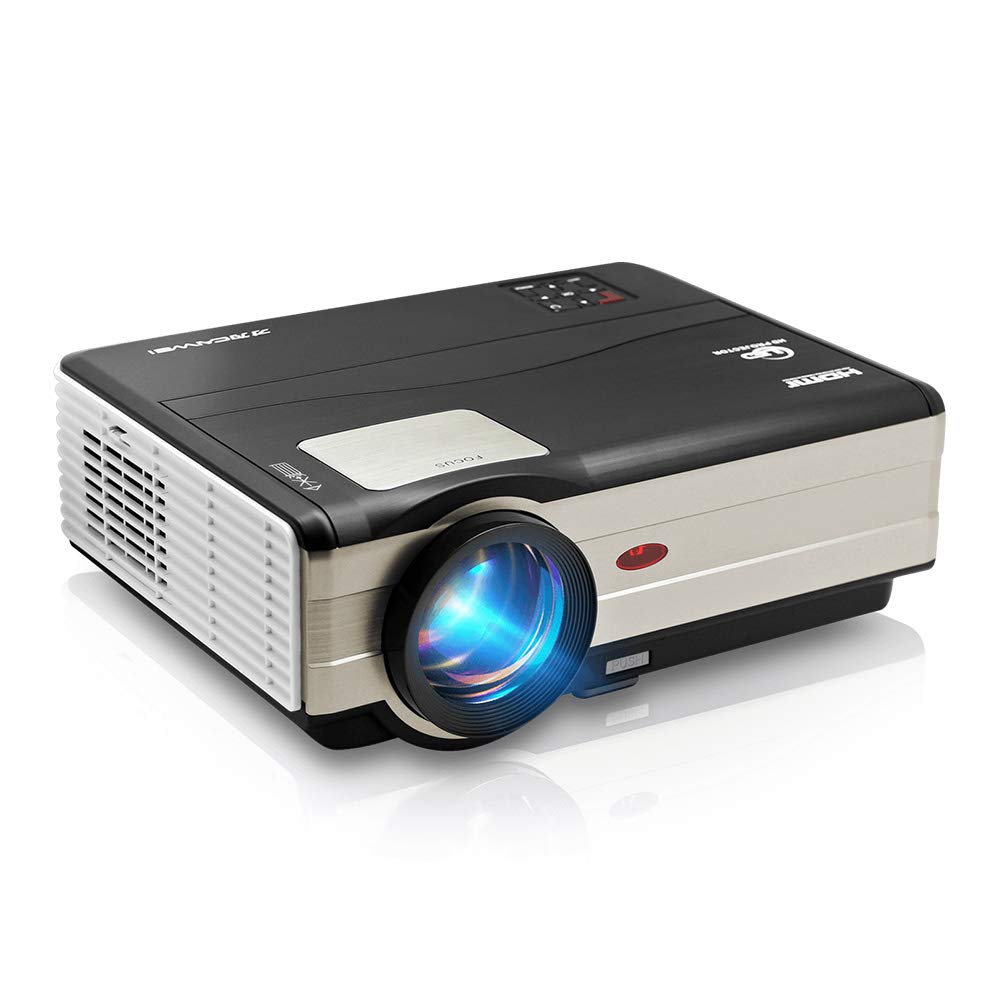
الشكل 1: أمام view of the CAIWEI A8AB-NEW Video Projector, showing the lens and ventilation.
اللوحة الأمامية
- عدسة الإسقاط: يُصدر الصورة.
- حلقة التركيز: يضبط وضوح الصورة.
- تصحيح الانحراف: يُصحح تشوه الصورة شبه المنحرفة.
اللوحة الخلفية
- منفذ الطاقة: يتصل بكابل الطاقة.
- منافذ HDMI (x2): Connects to HDMI-enabled devices (e.g., Blu-ray player, game console).
- منافذ USB (x2): Connects to USB storage devices or other USB peripherals.
- منفذ VGA: Connects to computers or laptops with VGA output.
- منفذ AV: Connects to older devices using composite video and stereo audio.
- مخرج الصوت (3.5 مم): يتصل بمكبرات صوت خارجية أو سماعات رأس.
5. الإعداد
5.1 التنسيب
Place the projector on a stable, flat surface or mount it to a ceiling. Ensure the projector is perpendicular to the projection screen or wall. The optimal projection distance varies, but generally, a larger distance yields a larger image.
5.2 توصيل الطاقة
- قم بتوصيل كابل الطاقة بمنفذ الطاقة الخاص بجهاز العرض.
- قم بتوصيل الطرف الآخر من كابل الطاقة بمأخذ الطاقة.
- سيضيء ضوء مؤشر الطاقة.
5.3 توصيل أجهزة الإدخال
يدعم جهاز العرض مصادر إدخال مختلفة:
- HDMI: Connect an HDMI cable from your device (e.g., laptop, game console, streaming stick) to one of the projector's HDMI ports.
- USB: Insert a USB flash drive into a USB port to play media fileس مباشرة.
- VGA: Connect a VGA cable from your computer to the projector's VGA port.
- من: Use the provided AV cable to connect to devices with composite video output.
- لاسلكي (واي فاي): For screen mirroring from smartphones or tablets, navigate to the 'Wireless Display' or 'Screen Mirroring' option in the projector's menu and follow the on-screen instructions. Ensure your device and the projector are on the same Wi-Fi network.
- بلوتوث: To connect external Bluetooth speakers, go to the Bluetooth settings in the projector's menu, enable Bluetooth, and pair with your desired audio device.
5.4 ضبط التركيز والانحراف
- قم بتشغيل جهاز العرض وعرض الصورة.
- تدوير حلقة التركيز on the lens until the image appears sharp and clear.
- If the image is trapezoidal (wider at the top or bottom), adjust the تصحيح الانحراف dial or setting until the image is rectangular.
6. تعليمات التشغيل
6.1 تشغيل/إيقاف التشغيل
- تشغيل الطاقة: اضغط على زر الطاقة الموجود بجهاز العرض أو جهاز التحكم عن بُعد.
- إيقاف التشغيل: اضغط على زر التشغيل مرة أخرى. أكد إيقاف التشغيل إذا طُلب منك ذلك.
6.2 تصفح القائمة
Use the navigation buttons (Up, Down, Left, Right, OK) on the projector or remote control to browse the on-screen menu. The 'Menu' button typically opens the main settings, and 'Exit' or 'Back' closes sub-menus.
6.3 اختيار مصدر الإدخال
Press the 'Source' or 'Input' button on the remote control or projector. A list of available input sources (HDMI1, HDMI2, USB1, USB2, VGA, AV, Wireless Display) will appear. Select the desired source using the navigation buttons and press 'OK'.
6.4 إعدادات الصوت
Access the audio settings through the main menu to adjust volume, select audio output (internal speaker, external via 3.5mm jack, or Bluetooth), and modify sound modes.
6.5 Wireless/Bluetooth Connection
Refer to section 5.3 for detailed instructions on connecting via Wi-Fi for screen mirroring or Bluetooth for audio output.
7. الصيانة
7.1 تنظيف العدسة
Use a soft, lint-free cloth specifically designed for optical lenses. Gently wipe the lens surface. Avoid using abrasive cleaners or excessive force, which can scratch the lens.
7.2 Cleaning the Air Filter/Vents
Regularly check the air intake and exhaust vents for dust accumulation. Use a soft brush or a can of compressed air to gently clean the vents. This helps maintain proper airflow and prevents overheating.
7.3 التخزين
When not in use, store the projector in a cool, dry, and dust-free environment. Use the original packaging or a protective case to prevent damage.
8. استكشاف الأخطاء وإصلاحها
| مشكلة | السبب المحتمل | حل |
|---|---|---|
| لا توجد صورة على الشاشة | Power not connected; Incorrect input source; Device not powered on. | Check power cable; Select correct input source; Ensure connected device is on. |
| الصورة ضبابية | لم يتم ضبط التركيز؛ جهاز العرض بعيد جدًا/قريب جدًا. | Adjust the focus ring; Reposition the projector. |
| الصورة شبه منحرفة | لم يتم ضبط مفتاح الزاوية. | اضبط تصحيح الانحراف. |
| لا يوجد صوت | Volume too low; Muted; Incorrect audio output; Cable issue. | Increase volume; Unmute; Check audio settings; Verify cable connections. |
| جهاز التحكم عن بعد لا يعمل | Batteries dead; Obstruction; Out of range. | Replace batteries; Remove obstructions; Ensure line of sight to IR receiver. |
| تحذير من ارتفاع درجة الحرارة | Blocked vents; Poor ventilation. | Clear vents; Ensure adequate space around projector. |
9. المواصفات
- نموذج: A8AB-NEW
- ماركة: كايوي
- دقة العرض: 1280 × 800
- تقنية الاتصال: Bluetooth, HDMI, USB, VGA, Wireless
- المميزات الخاصة: Built-In Wi-Fi, Portable, Wireless
- الاستخدامات الموصى بها: Gaming, Home Theater
- وزن السلعة: 6.1 رطل
- أبعاد المنتج: 11.2 × 14.7 × 5 بوصة
10. الضمان والدعم
CAIWEI products are designed for reliability and performance. For specific warranty details, please refer to the warranty card included with your purchase or contact CAIWEI customer support. If you encounter any issues not covered in this manual, please reach out to our support team for assistance.
دعم العملاء: يرجى زيارة موقع CAIWEI الرسمي website or contact your retailer for support information.