
1. المقدمة وما فوقview
The Dio DiOCAMRI01 is an advanced 360° HD WiFi camera designed for indoor surveillance, offering comprehensive monitoring while prioritizing user privacy. This camera features a motorized lens, 1080p resolution, and infrared night vision, ensuring clear visuals day and night. Its unique geo-fencing capability automatically activates a privacy mode when you are home, retracting the lens to ensure your personal space remains private. The camera also includes motion and noise detection, two-way audio communication, and local recording options via a Micro SD card.
This manual provides essential information for the proper installation, operation, and maintenance of your DiOCAMRI01 camera.
2. معلومات السلامة
- اقرأ كافة التعليمات بعناية قبل الاستخدام.
- استخدم فقط محول الطاقة المرفق مع الجهاز.
- لا تعرض الكاميرا للماء أو الرطوبة أو درجات الحرارة القصوى.
- تجنب وضع الكاميرا بالقرب من مصادر الحرارة أو في ضوء الشمس المباشر.
- لا تحاول تفكيك الكاميرا أو إصلاحها بنفسك. قم بإحالة جميع أعمال الصيانة إلى فنيين مؤهلين.
- Ensure the camera is securely mounted if using wall or ceiling installation.
3. محتويات العبوة
تأكد من وجود جميع المكونات في الحزمة الخاصة بك:
- DiOCAMRI01 HD WiFi Camera
- محول الطاقة
- Mounting Kit (screws, wall plugs, mounting bracket)
- دليل المستخدم (هذا المستند)
4. مواصفات المنتج
- المراقبة عن بعد: Day and night vision (infrared night vision up to 10m).
- Wide-Angle Motorized Lens: يوفر دورانًا أفقيًا بزاوية 360 درجة ودورانًا رأسيًا بزاوية 150 درجة لتغطية شاملة.
- حماية الخصوصية: Geo-fencing feature automatically puts the camera in standby mode and closes the lens when the owner is present. Manual standby mode is also available via the app.
- Motion and Noise Detection: Adjustable sensitivity with 3 levels. Sends direct notifications to your smartphone.
- صوت ثنائي الاتجاه: Built-in microphone and intercom function allow you to hear and speak through the camera.
- التسجيل المحلي: Supports Micro SD card (up to 128GB, not included) for manual or automatic recording upon detection. Remote viewing of recordings is available via the smartphone app.
- الإعداد السهل: Quick and intuitive installation via the DiO Cam+ mobile application.
- تركيب مرن: Designed for discreet integration, can be mounted on a wall, ceiling, or placed on a shelf.
5. الإعداد
5.1 الإعداد الأولي
- توصيل الطاقة: Connect the camera to a power outlet using the provided power adapter. The camera will power on.
- Download DiO Cam+ App: بحث عن "DiO Cam+" in your smartphone's app store (iOS or Android) and download the application.
- التسجيل/تسجيل الدخول: افتح التطبيق واتبع التعليمات التي تظهر على الشاشة لإنشاء حساب أو تسجيل الدخول إذا كان لديك حساب بالفعل.
- إضافة كاميرا: Within the DiO Cam+ app, select the option to add a new device. Follow the in-app wizard to connect your camera to your Wi-Fi network. This typically involves scanning a QR code on the camera or entering Wi-Fi credentials.
- الموقع: Position the camera in your desired location. It can be placed on a flat surface, or mounted on a wall or ceiling using the included mounting kit. Ensure the camera has a clear line of sight to the area you wish to monitor.
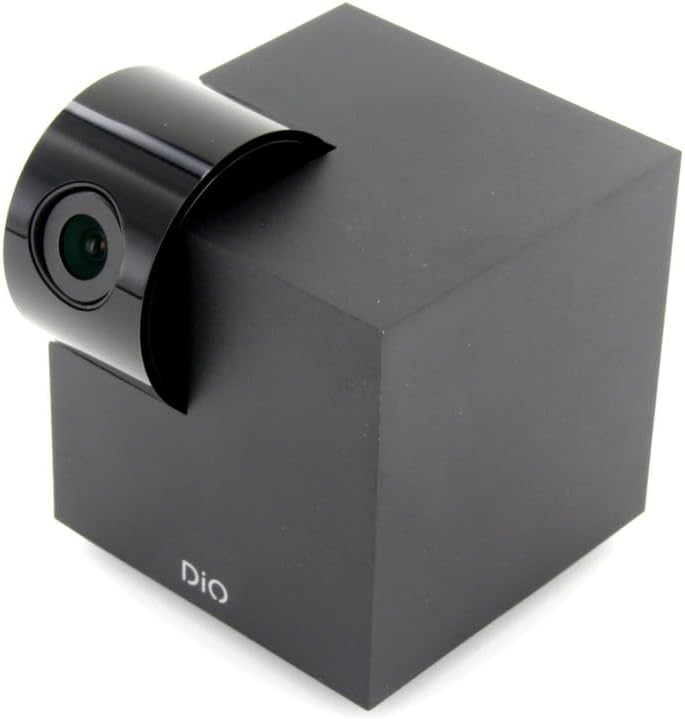
Figure 5.1: The DiOCAMRI01 camera in its standard upright position.

Figure 5.2: Camera placed on a shelf, demonstrating discreet integration.

Figure 5.3: Camera mounted on a ceiling for overhead surveillance.
5.2 تركيب بطاقة Micro SD (اختياري)
To enable local video recording, insert a Micro SD card (up to 128GB, not included) into the designated slot on the camera. Ensure the camera is powered off before inserting or removing the card.
5.3 مشاركة الوصول إلى الكاميرا
The DiO Cam+ app allows you to easily share access to your camera with family members or trusted friends. Navigate to the camera settings within the app and select the sharing option to invite others to view البث المباشر والتسجيلات.
6. تعليمات التشغيل
6.1 مباشر View وجهاز التحكم عن بعد
Once connected, open the DiO Cam+ app to access the live video feed from your camera. From the live view يمكنك من خلال الشاشة:
- يُعدِّل View زاوية: Use the on-screen controls to remotely rotate the camera lens up to 350° horizontally and 150° vertically to cover all corners of your room.
- صوت ثنائي الاتجاه: Tap the microphone icon to speak through the camera's speaker, and listen to audio from the camera's microphone.
- Take Snapshots/Record Video: Capture still images or start manual video recordings directly from the live view.

Figure 6.1: Camera interacting with the DiO Cam+ smartphone application.

الشكل 6.2: الجانب view of the camera, highlighting the rotating lens mechanism.
6.2 Privacy Features (Geo-Fencing and Manual Standby)
The DiOCAMRI01 camera offers advanced privacy protection:
- تحديد الموقع الجغرافي: Configure geo-fencing in the app to automatically switch the camera to privacy mode when your smartphone enters a predefined home zone. In privacy mode, the camera lens will retract, ensuring no recording or live viewجي يحدث.
- وضع الاستعداد اليدوي: You can manually activate or deactivate the camera's standby mode (privacy mode) at any time through the DiO Cam+ app.
- Scheduled Standby: Set a schedule within the app for the camera to automatically enter or exit standby mode at specific times.

Figure 6.3: Camera with lens retracted, indicating privacy mode.
6.3 Motion and Noise Detection
The camera can detect motion and noise within its field of view. When triggered, it will send a notification to your smartphone and can automatically begin recording to the Micro SD card.
- تعديل الحساسية: Adjust the detection sensitivity (3 levels) in the app settings to minimize false alarms.
- خيارات التسجيل: Configure recording duration (1, 3, or 5 minutes per clip) or continuous recording if a Micro SD card is installed.
7. الصيانة
- تنظيف: Use a soft, dry cloth to clean the camera body and lens. Do not use liquid cleaners or abrasive materials.
- تحديثات البرامج: Regularly check the DiO Cam+ app for firmware updates to ensure optimal performance and security. Follow the in-app instructions for any available updates.
- إدارة بطاقة Micro SD: إعادة بشكل دوريview and manage recordings on your Micro SD card. Format the card through the app if necessary to maintain performance.
8. استكشاف الأخطاء وإصلاحها
- الكاميرا غير متصل: Ensure the camera is powered on and connected to your Wi-Fi network. Check your Wi-Fi router and internet connection. Try restarting the camera and your router.
- لا يمكن الاتصال بالتطبيق: Verify your Wi-Fi password. Ensure your smartphone is connected to a 2.4GHz Wi-Fi network during initial setup, as the camera may not support 5GHz networks.
- جودة الفيديو رديئة: Check your internet connection speed. Ensure the camera lens is clean and free from obstructions. Adjust camera placement for optimal lighting.
- Motion/Noise Detection Not Working: Check the sensitivity settings in the app. Ensure the detection zones are correctly configured.
- لا يوجد تسجيل على بطاقة SD: Ensure the Micro SD card is correctly inserted and formatted. Check if the card is full. The camera supports up to 128GB.
- Privacy Mode Not Activating: Verify that geo-fencing is enabled and configured correctly in the app, and that your smartphone's location services are active.
9. المواصفات
| ميزة | مواصفة |
|---|---|
| رقم الموديل | DIOCAM-RI01 |
| نوع التركيب | حامل الحائط |
| دقة التقاط الفيديو | 1080 بكسل |
| لون | أبيض |
| عدد العناصر | 1 |
| المكونات المضمنة | DiOCAMRI01 WiFi HD 360° Rotating 1080P 2MP Camera with Geo-Fencing |
| تكنولوجيا الاتصالات اللاسلكية | واي فاي |
| عامل الشكل | Dome (Cube with rotating lens) |
| دقة الفيديو الفعالة | 1080 |
| Viewزاوية جي | 360 درجة (أفقي) |
| نطاق الرؤية الليلية | 10 مترا |
| مادة | معدن |
| المجلدtage | 5 فولت |
| واتtage | 5 واط |
| أبعاد العنصر (الطول × العرض × الارتفاع) | 9.4 × 4.9 × 31.9 سم |
| الشركة المصنعة | تشكون |
| المميزات الخاصة | Local Recording, Night Vision |
| البطاريات المتضمنة | لا |
| البطاريات المطلوبة | لا |
| الاستخدامات الموصى بها | Motion Detection, Night Vision |
| تكنولوجيا الاتصال | لاسلكي |
| الاستخدام الداخلي والخارجي | داخلي |
| الأجهزة المتوافقة | الهاتف الذكي |
| مصدر الطاقة | Battery Powered (Note: Product specs indicate 'No batteries required', implying external power) |
| بروتوكول الاتصال | واي فاي |
| نوع وحدة التحكم | أندرويد |
10. الضمان والدعم
For information regarding warranty coverage, technical support, or service, please refer to the official Dio webيمكنك زيارة الموقع الإلكتروني أو الاتصال بنقطة الشراء. احتفظ بإثبات الشراء لتقديم مطالبات الضمان.
الشركة المصنعة: تشكون