
مقدمة
The Nitecore NU30 is a high-performance, lightweight rechargeable headlamp designed for various outdoor activities. It features a powerful primary white LED, high CRI auxiliary white LEDs for close-range illumination, and a red auxiliary LED for preserving night vision. With its integrated USB-C charging and durable construction, the NU30 provides reliable lighting for your adventures.

الصورة: الجبهة view of the Nitecore NU30 headlamp مع عصابة رأس قابلة للتعديل.
محتويات الحزمة
يرجى التحقق من الحزمة للعناصر التالية:
- نايت كور NU30 هيدلamp
- كابل شحن USB-C إلى USB-C
- عصابة رأس
- ملصق نايت كور
المنتج انتهىview
The Nitecore NU30 features a dual-button interface for intuitive control over its various light sources and brightness levels. The headlamp unit is attached to an adjustable, elastic headband for comfortable wear.

Image: Diagram illustrating the location of the Power Button and Mode Button on the Nitecore NU30 headlamp.
عناصر التحكم:
- زر الطاقة: Controls power on/off and brightness levels for the primary white light.
- زر الوضع: Switches between different light sources (primary white, auxiliary white, auxiliary red) and special modes.
شحن الرأسamp
The NU30 headlamp is equipped with a built-in 1500mAh Li-ion battery and a USB-C charging port for convenient recharging. A power indicator will show the charging status.
- حدد موقع منفذ الشحن USB-C على جانب المصباح الأماميamp.
- Connect the included USB-C to USB-C charging cable to the headlamp and a USB power source (e.g., wall adapter, power bank, computer).
- The power indicator will illuminate during charging.
- Charging is complete when the indicator light changes or turns off (refer to the power indicator section for details). A full charge typically takes approximately 2 hours.

Image: The Nitecore NU30 headlamp being charged via its USB-C port.
تعليمات التشغيل
The NU30 offers multiple light sources and modes for various lighting needs.

Image: Diagram illustrating the three distinct light sources available on the Nitecore NU30 headlamp.
تشغيل/إيقاف التشغيل:
- لتشغيل: Press and hold the Power Button for 1 second. The headlamp will turn on in the previously used primary white light mode.
- لإيقاف التشغيل: عندما يكون الرأسamp is on, long press either the Power Button or the Mode Button until the light turns off.
Switching Light Sources:
عندما يكون الرأسamp is on, short press the Mode Button to cycle through the light sources in the following order:
Primary White Light → Auxiliary White Light → Auxiliary Red Light → Primary White Light...
Adjusting Brightness (Primary White Light):
When the Primary White Light is active, short press the Power Button to cycle through brightness levels:
Low → Mid → High → Low...
Auxiliary White Light Modes:
When the Auxiliary White Light is active, short press the Power Button to cycle through:
Ultralow → Flood → Ultralow...

Image: Visual comparison demonstrating the wide and even illumination of the TrueVision+ flood beam.
Auxiliary Red Light Modes:
When the Auxiliary Red Light is active, short press the Power Button to cycle through:
Low → High → Slow Flashing → Low...
Special Modes (SOS / Beacon):
عندما يكون الرأسamp is off, press and hold the Mode Button for 1 second to directly access SOS mode. While in SOS mode, short press the Power Button to switch to Beacon mode. Short press the Power Button again to return to SOS. Long press either button to turn off.
مؤشر الطاقة:
The power indicator light provides information on the remaining battery power. Refer to the product's specific indicator patterns for detailed battery status (e.g., flashes for remaining power, solid for charging, off for fully charged).
صيانة
Proper maintenance ensures the longevity and optimal performance of your Nitecore NU30 headlamp.
- تنظيف: امسح الرأسamp مع ناعمة، دamp قماش. تجنب استخدام المنظفات الكاشطة أو المذيبات.
- تخزين: قم بتخزين الرأسamp in a cool, dry place when not in use. Recharge the battery every 3 months to maintain battery health if stored for extended periods.
- مقاومة الماء: The NU30 is rated IP66, meaning it is protected against powerful water jets. Do not submerge the headlamp in water. Ensure the USB-C port cover is securely closed to maintain water resistance.
استكشاف الأخطاء وإصلاحها
If you encounter issues with your NU30 headlampجرب الحلول التالية:
- هيدلamp لا يتم تشغيله: Ensure the battery is charged. Connect the headlamp to a power source using the USB-C cable and check if the charging indicator activates.
- مخرجات الضوء خافتة: قد تكون البطارية ضعيفة. أعد شحنها.amp بالكامل.
- الشحن لا يعمل: Check the USB-C cable for damage and ensure the power source is functional. Try a different cable or power adapter.
- الأزرار لا تستجيب: تأكد من الرأسamp is not in a locked mode (if applicable, refer to specific product features for lock-out functions). If issues persist, contact customer support.
تحديد
Detailed technical specifications for the Nitecore NU30 headlamp:
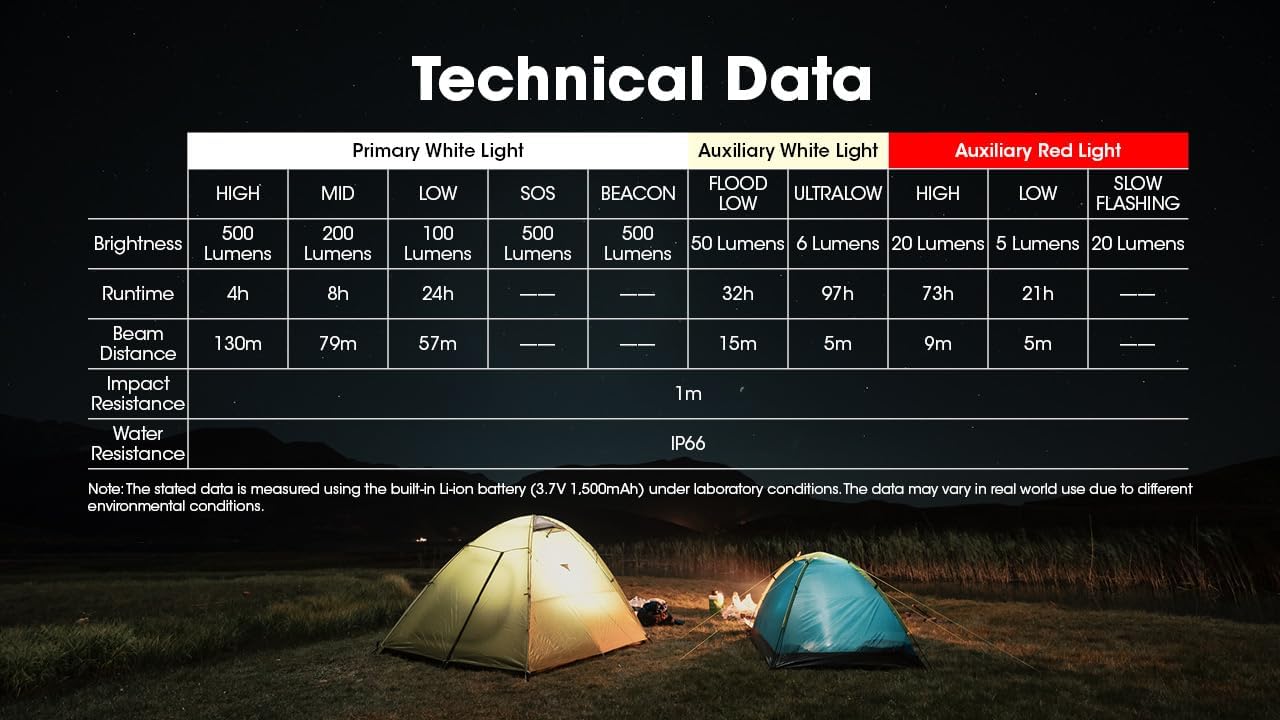
Image: Comprehensive table detailing the technical specifications of the Nitecore NU30 headlamp.
| ميزة | التفاصيل |
|---|---|
| الحد الأقصى للسطوع | 500 لومن |
| أقصى مسافة للشعاع | 130 متر (142 ياردة) |
| نوع البطارية | بطارية ليثيوم أيون مدمجة بسعة 1500 مللي أمبير في الساعة |
| منفذ الشحن | يو اس بي-سي |
| أقصى وقت تشغيل | Up to 97 hours (Ultralow Auxiliary White) |
| مقاومة التأثير | 1 متر |
| مقاومة الماء | IP66 |
| وزن | 90 جرام (3.17 أونصة) |
| مادة | Durable PC Material |
معلومات السلامة
Please read and follow these safety guidelines to prevent injury or damage to the headlamp:
- Do not shine the light directly into eyes, as this may cause temporary vision impairment.
- لا تقم بتفكيك أو تعديل headlamp, as this may void the warranty and cause damage.
- يحفظ بعيدًا عن متناول الأطفال.
- تجنب تعريض الرأسamp لدرجات الحرارة القصوى أو لأشعة الشمس المباشرة لفترات طويلة.
الضمان والدعم
Nitecore products are backed by a warranty. For detailed warranty terms and conditions, please refer to the official Nitecore website or the warranty card included with your product. If you require technical support or have questions about your NU30 headlamp, please contact Nitecore customer service or your authorized dealer.
For more information, visit the official Nitecore webموقع: www.nitecore.com