
مقدمة
This manual provides detailed instructions for the Sony BRAVIA KJ-43X8500F 43-inch 4K Android LCD TV. This high-quality television features a vibrant 4K display, a double-speed drive panel for smooth motion, and integrated Android TV functionality. It is also compatible with "Works with Alexa" for convenient voice control.
الميزات الرئيسية
- Android TV(TM) functionality: Easily search for TV broadcasts, recorded programs, and online video content by speaking into the remote control. Enjoy desired content effortlessly.
- يعمل مع Alexa: Link with Amazon Echo series for hands-free BRAVIA operation. Voice commands include "TV power on/off," "channel and input switching," and "playback/rewind/stop of recorded content."
- PS4 software "Kingdom Hearts III" certified image quality: High-definition processing ensures optimal image representation. Colors are faithfully reproduced (when game mode is set).
- Smooth motion display: Sports scenes and other fast-moving images are displayed smoothly. The TV predicts image movement and inserts new frames between existing ones, reducing afterimages by rendering 120 frames per second.
- 4K high-definition processor "HDR X1": Enhances the three major image quality elements: detail, color vibrancy, and contrast. Each high-quality function is precisely controlled.
- Supports 4K streaming services: Compatible with services like "Prime Video" and "Netflix," allowing you to enjoy desired content from a wide range of services.
- External HDD recording: Connect a separately sold USB hard disk (HDD) to BRAVIA to record programs while watching another, enabling "external HDD simultaneous recording."
- High-contrast 4K image quality: Enhances contrast for each subject in the image, enabling HDR-equivalent bright and dark rendering. All images, including terrestrial digital broadcasts, Blu-ray software, and online videos, are transformed into high-contrast, high-definition 4K quality.
- HDR (High Dynamic Range) signal compatible: Utilizes maximum image information closer to reality, reproducing brightness and vibrant colors that could not be expressed by previous TVs.
- "Voice Zoom" function: Adjusts the volume of voices without changing the overall sound volume.
يثبت
الإعداد الأولي
Follow these steps for the initial setup of your Sony BRAVIA KJ-43X8500F television.
- Unpack the TV and accessories carefully.
- Attach the stand securely to the television. Refer to the diagram below for proper attachment.
- قم بتوصيل سلك الطاقة بالتلفزيون ثم بمأخذ الطاقة.
- Connect your antenna or cable to the appropriate input on the TV.
- Connect any external devices (e.g., Blu-ray player, game console) to the HDMI ports.
- قم بتشغيل التلفزيون باستخدام جهاز التحكم عن بعد.
- Follow the on-screen instructions to complete the initial setup, including network connection and channel scanning.
تركيب حامل التلفاز
The TV stand provides stable support. Ensure it is correctly attached before placing the TV on a flat surface.
This image shows the rear of the television with the stand attached. Ensure all screws are tightened to prevent instability.
ربط الأجهزة الخارجية
Your BRAVIA TV offers multiple connectivity options.
- منافذ HDMI: 4 ports available for high-definition devices.
- منافذ USB: 3 ports for connecting USB storage devices.
- المدخل المركب: 1 port for older devices.
- شبكة محلية لاسلكية: IEEE802.11ac/a/b/g/n for network connectivity.

This image illustrates the various input and output ports located on the back of the television.
تعليمات التشغيل
استخدام جهاز التحكم عن بعد
The remote control provides access to all TV functions, including smart features and voice control.

This image displays the remote control, highlighting buttons for power, volume, channel, and direct access to streaming services like Netflix and YouTube.
التحكم الصوتي مع Alexa
Your BRAVIA TV supports "Works with Alexa" for convenient voice commands.
- "أليكسا، شغّلي التلفاز."
- "Alexa, switch to Channel 1."
- "Alexa, play [content name] on the TV."
- "Alexa, rewind/fast forward/stop the recording."

This image demonstrates how to use Alexa voice commands to control your television, such as turning it on or changing channels.
تكامل الوسائط
Streaming Services and Content
The Android TV platform provides access to a wide array of streaming services.
- أمازون برايم فيديو
- نيتفليكس
- يوتيوب
- هولو
- AbemaTV
- U-NEXT
- VideoMarket
- أفلام وتلفزيون Google Play
- سبوتيفاي
- Niconico
- دازن
- و الكثير غيرها.

This image illustrates the variety of streaming applications available on your BRAVIA TV, allowing you to enjoy movies, music, and games.
External HDD Recording
Connect a USB hard disk (sold separately) to enable recording of TV programs. You can record one program while watching another.
صيانة
Cleaning the TV Screen and Cabinet
- افصل دائمًا التلفاز عن الكهرباء قبل التنظيف.
- For the screen, gently wipe with a soft, dry, lint-free cloth. For stubborn marks, lightly dampبلّل قطعة القماش بالماء أو بمنظف شاشات لطيف وغير كاشط. لا ترش السائل مباشرة على الشاشة.
- For the cabinet, use a soft, dry cloth. Avoid using abrasive pads, harsh chemicals, or solvents as they can damage the finish.
الرعاية العامة
- تجنب وضع التلفاز في ضوء الشمس المباشر أو بالقرب من مصادر الحرارة.
- تأكد من وجود تهوية كافية حول التلفزيون لمنع ارتفاع درجة حرارته.
- Do not block the ventilation openings on the back or sides of the TV.
استكشاف الأخطاء وإصلاحها
لا يوجد طاقة
- Ensure the power cord is securely connected to both the TV and the power outlet.
- تأكد من أن منفذ الطاقة يعمل عن طريق توصيل جهاز آخر.
- اضغط على زر الطاقة الموجود على التلفزيون نفسه، وليس فقط على جهاز التحكم عن بعد، لاستبعاد مشاكل جهاز التحكم عن بعد.
لا يوجد صورة/صوت
- Verify that the correct input source is selected. Press the "Input" button on your remote.
- تحقق من جميع توصيلات الكابلات (HDMI، الهوائي) للتأكد من أنها آمنة.
- If using external devices, ensure they are powered on and functioning correctly.
- Adjust volume levels on both the TV and any connected audio systems.
جهاز التحكم عن بعد لا يعمل
- استبدال البطاريات في جهاز التحكم عن بعد.
- تأكد من عدم وجود أي عوائق بين جهاز التحكم عن بعد ومستشعر الأشعة تحت الحمراء الخاص بالتلفزيون.
- وجه جهاز التحكم عن بعد مباشرة نحو التلفزيون.
مشاكل اتصال الشبكة
- أعد تشغيل جهاز التوجيه والمودم.
- انتقل إلى إعدادات شبكة التلفزيون وحاول إعادة الاتصال بشبكة Wi-Fi الخاصة بك.
- Ensure your Wi-Fi password is entered correctly.
- If the issue persists, try connecting the TV directly to your router via an Ethernet cable.
تحديد
| حجم الشاشة | 43 بوصة |
| ماركة | سوني |
| تكنولوجيا العرض | شاشة الكريستال السائل |
| دقة | 4K |
| سمات | Android TV, Works with Alexa, Double Speed Drive, 4K HDR, External HDD Recording, Wi-Fi Wireless LAN |
| تكنولوجيا الاتصال | IEEE802.11ac/a/b/g/n |
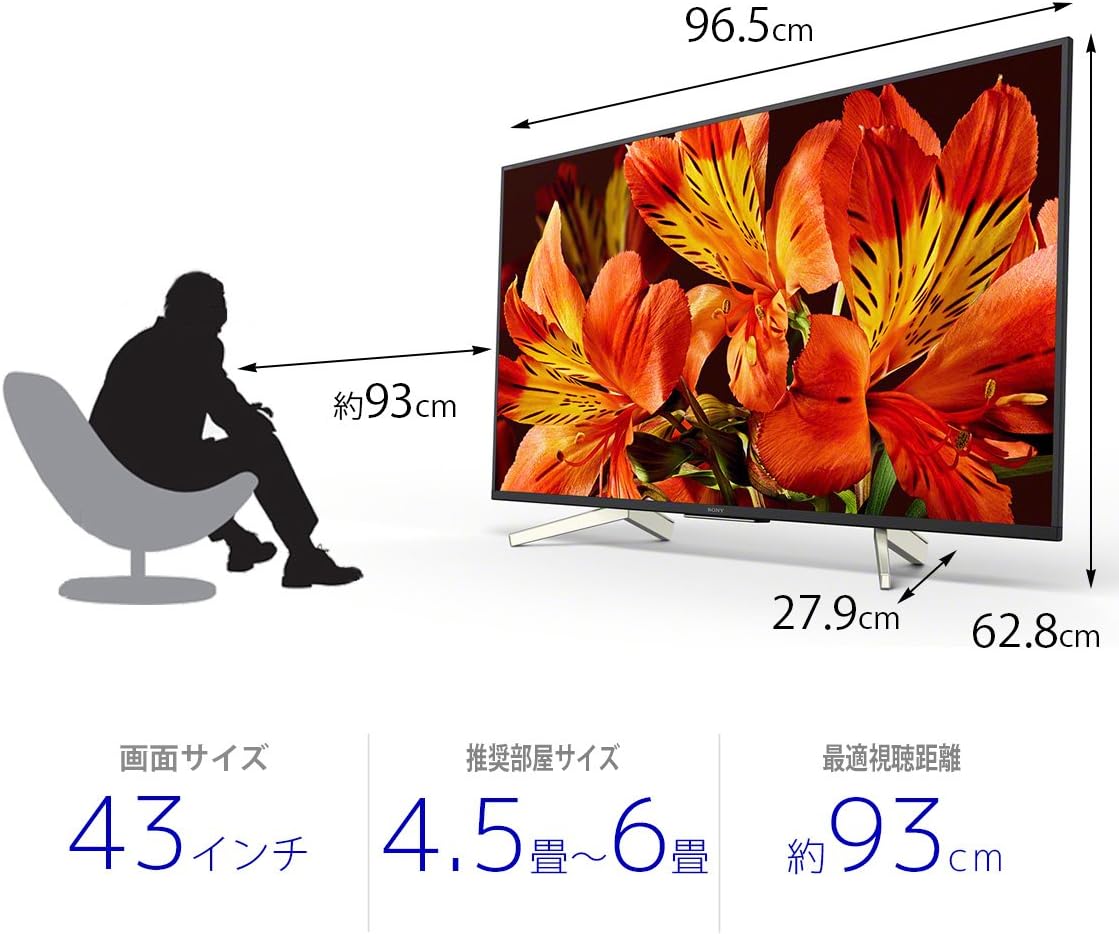
| أبعاد المنتج (العمق × العرض × الارتفاع) | 27.9 × 96.5 × 62.8 سم |
| خدمات الإنترنت المدعومة | Amazon Prime Video, Netflix |
| اسم الموديل | KJ-43X8500F |
| لون | أسود |
| وزن العنصر | 11.3 كيلوغرام |
| منافذ HDMI | 4 |
| واجهة الأجهزة | USB |
| Composite Input Count | 1 |
| USB Port Count | 3 |
| نوع التركيب | حامل الطاولة |
| نوع الموالف | البث الرقمي الأرضي، بكالوريوس في البث الرقمي، 110 درجة في علوم الحاسوب الرقمية |
| نظام التشغيل | أندرويد |
| طريقة التحكم | عن بعد، صوت |
الضمان والدعم
للحصول على معلومات تفصيلية عن الضمان، يرجى الرجوع إلى بطاقة الضمان المرفقة مع المنتج أو زيارة موقع دعم Sony الرسمي webموقع.
For technical assistance or customer support, please contact Sony customer service or visit their online support portal.