
1. المقدمة
Thank you for choosing the Symcode MJ-2090-CCD Embedded Mini Barcode Scanner. This device is designed for efficient and reliable barcode scanning, capable of reading barcodes from various surfaces, including mobile phone and computer screens. Its compact size and plug-and-play functionality make it ideal for integration into various systems such as kiosks, lockers, and point-of-sale equipment. This manual provides essential information for setting up, operating, and maintaining your barcode scanner.
2. انتهى المنتجview
2.1 الميزات الرئيسية
- Screen Scanning Capability: Reads barcodes directly from mobile phone and computer screens.
- التوصيل والتشغيل: Easy integration with end devices via USB, requiring no additional driver installation.
- Automatic Induction Trigger: Scans codes automatically without the need to press a trigger button.
- محاكاة لوحة المفاتيح: Functions as a keyboard device to input barcode characters directly.
- التوافق الواسع: Supports a broad range of 1D barcode types including Code128, EAN-13, EAN-8, Code39, UPC-A, UPC-E, Codabar, Interleaved 2 of 5, ISBN, Code 93, UCC/EAN-128, GS1 Databar, and more.
- المؤشرات المرئية والمسموعة: Features a siren and LED light for scan confirmation.
2.2 محتويات العبوة
عند تفريغ الأمتعة، يرجى التأكد من أن جميع العناصر موجودة وفي حالة جيدة:
- 1 x Symcode MJ-2090-CCD Barcode Scanner Unit
- 1 × كابل يو اس بي
- 1 × دليل المستخدم

Image: Package contents including the scanner unit, USB cable, and user guide.
3. الإعداد
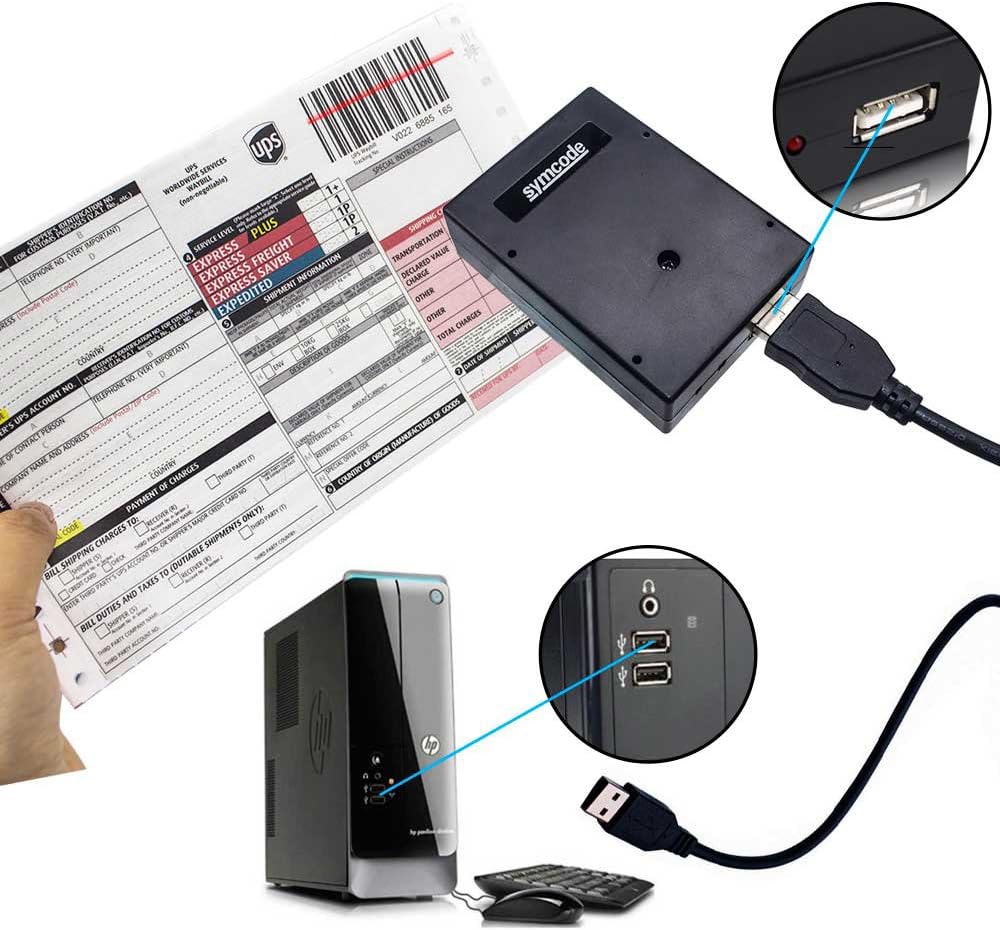
The Symcode MJ-2090-CCD barcode scanner is designed for simple plug-and-play operation. Follow these steps to set up your device:
- قم بتوصيل كبل USB: Insert the smaller end of the provided USB cable into the USB port on the barcode scanner.
- الاتصال بجهاز المضيف: Plug the standard USB-A end of the cable into an available USB port on your computer, kiosk, or other compatible host device.
- التعرف على النظام: Your operating system should automatically detect and install the necessary drivers. The scanner will be recognized as a standard keyboard input device.
- جاهز للاستخدام: Once the LED indicator on the scanner illuminates and/or a confirmation sound is heard, the scanner is ready to operate.

Image: The barcode scanner connected to a computer via its USB cable, demonstrating the plug-and-play setup.
4. تعليمات التشغيل
The MJ-2090-CCD scanner features an automatic induction trigger, simplifying the scanning process.
4.1 المسح الأساسي
- Ensure the scanner is properly connected to your host device and powered on.
- Position the barcode within the scanner's reading window. The scanner will automatically detect the barcode and emit a red light to scan it.
- Upon successful scan, the scanner will emit an audible beep and the LED indicator will flash, and the barcode data will be transmitted to your host device as if typed via a keyboard.
4.2 المسح الضوئي من الشاشات
This scanner is optimized to read barcodes displayed on digital screens, such as mobile phones and computer monitors. Simply present the screen with the barcode to the scanner's window.

Image: The barcode scanner actively scanning a barcode displayed on a mobile phone screen.
4.3 سيناريوهات التطبيق
The compact and embedded design of the MJ-2090-CCD makes it suitable for various applications:
- الأكشاك: For self-service checkouts, information terminals, or ticket vending.
- Lockers: For package retrieval or secure storage systems.
- Point-of-Sale (POS) Systems: Integrated into cash registers or payment terminals.
- التحكم في الوصول: For scanning ID badges or tickets.
الصورة: السابقamples of the embedded barcode scanner used in different environments, including self-service kiosks and automated locker systems.

Image: The scanner demonstrating its ability to automatically read different barcode formats such as Code 39, Code 93, and Code 128.
5. الصيانة
تضمن الصيانة المناسبة طول عمر وأداء مثالي لجهاز مسح الباركود الخاص بك.
- تنظيف نافذة المسح الضوئي: Regularly clean the scanner's optical window with a soft, lint-free cloth. For stubborn dirt, lightly dampen the cloth with water or a mild, non-abrasive cleaner. Avoid harsh chemicals or abrasive materials that could scratch the surface.
- النظافة العامة: امسح الجزء الخارجي من الماسح الضوئي بقطعة قماش ناعمة وجافة لإزالة الغبار والحطام.
- الظروف البيئية: Operate and store the scanner within the specified temperature and humidity ranges to prevent damage. Avoid exposure to extreme temperatures, direct sunlight, or high moisture.
- العناية بالكابلات: Handle the USB cable gently. Avoid bending, twisting, or pulling the cable excessively, which can damage the internal wires.
6. استكشاف الأخطاء وإصلاحها
If you encounter issues with your Symcode MJ-2090-CCD barcode scanner, refer to the following common problems and solutions:
| مشكلة | السبب المحتمل | حل |
|---|---|---|
| الماسح الضوئي لا يعمل أو لا يستجيب. | Loose USB connection; No power from USB port; Damaged cable. | Ensure USB cable is securely connected to both scanner and host device. Try a different USB port or host device. Inspect the cable for damage. |
| الماسح الضوئي لا يقرأ الباركود. | Barcode is damaged or poorly printed; Incorrect scanning angle/distance; Scanner window is dirty; Unsupported barcode type. | Ensure barcode is clear and undamaged. Adjust scanning angle and distance. Clean the scanner window. Verify the barcode type is supported (refer to specifications). |
| Barcode data is incorrect or incomplete. | Partial scan; Host device input error. | Ensure the entire barcode is within the scan area. Check if other applications are interfering with keyboard input on the host device. |
| Scanner reads too slowly or intermittently. | Environmental interference; Host device performance. | Minimize strong light sources or reflective surfaces near the scanner. Ensure the host device is not under heavy load. |
If the problem persists after attempting these solutions, please contact Symcode customer support for further assistance.
7. المواصفات
Below are the technical specifications for the Symcode MJ-2090-CCD Barcode Scanner:

Image: The Symcode MJ-2090-CCD barcode scanner with its physical dimensions (70mm/2.7in height, 20mm/2in width, 22mm/0.9in depth) clearly indicated.
| ميزة | التفاصيل |
|---|---|
| رقم الموديل | MJ-2090-CCD |
| الأبعاد (الطول × العرض × الارتفاع) | 70 مم × 20 مم × 22 مم (2.7 بوصة × 2 بوصة × 0.9 بوصة) |
| وزن | 110 جرام |
| مصدر الضوء | 650nm~670nm Visible Red Light Diode |
| سرعة المسح | 100 مسح/ثانية |
| Read Preciseness | 0.1 مم (4 مل) |
| تباين الطباعة | 30% الحد الأدنى |
| عمق المجال | 0~600mm (0.33mm, PCS 90%) |
| Scan Scope | 10 مم ~ 250 مم |
| مسافة القراءة | 2.5~600mm (100% UPC/EAN) |
| قدرات فك التشفير | EAN-8/13, UPC-A/E, Code 39/93/128, EAN-128, Codabar, Industrial 2 of 5, Interleave 2 of 5, Matrix 2 of 5, MSI, ISBN, GS1 Databar, etc. |
| معدل خطأ البت | 1 / 5 مليون |
| حاضِر | 85mA (working), 36mA (storage) |
| الواجهة | USB |
| درجة حرارة التشغيل | 0 درجة مئوية ~ 45 درجة مئوية |
| درجة حرارة التخزين | -20 درجة مئوية ~ 60 درجة مئوية |
| رطوبة | 5%~95% بدون تكاثف |
| مادة | ABS+PC |
| الأجهزة المتوافقة | Laptop (and other USB host devices) |
| مصدر الطاقة | Corded (USB) |
| حجم التشغيلtage | 3.7 فولت |
8. الضمان والدعم
Symcode products are manufactured to high-quality standards. For warranty information, technical support, or service inquiries, please refer to the contact information provided with your purchase or visit the official Symcode webيرجى الاحتفاظ بإثبات الشراء الخاص بك للمطالبة بالضمان.